
On this page
Start here
Quick answer
“Size issue” can mean that a Magic Chef washer-dryer does not fit the opening or that the laundry load is too large for the selected wash or dry program. Measure the opening at its narrowest points, the route and door swing, and the space needed for the water, drain, and power connections before moving or ordering the appliance. Then use the exact model manual for its dimensions and capacity. Magic Chef lists the current MCSCWD27S5 combo as 23.4 inches wide, 23.4 inches deep, and 33.5 inches high, but those figures are a model-specific example and must not be applied to another unit. If the cabinet fits but drying is poor, reduce the load to the model’s dry-capacity guidance rather than packing the wash load into the dry cycle.
Work through in order
Diagnostic checks
Use only checks that match the exact appliance or system and its official guide.
-
Check 1
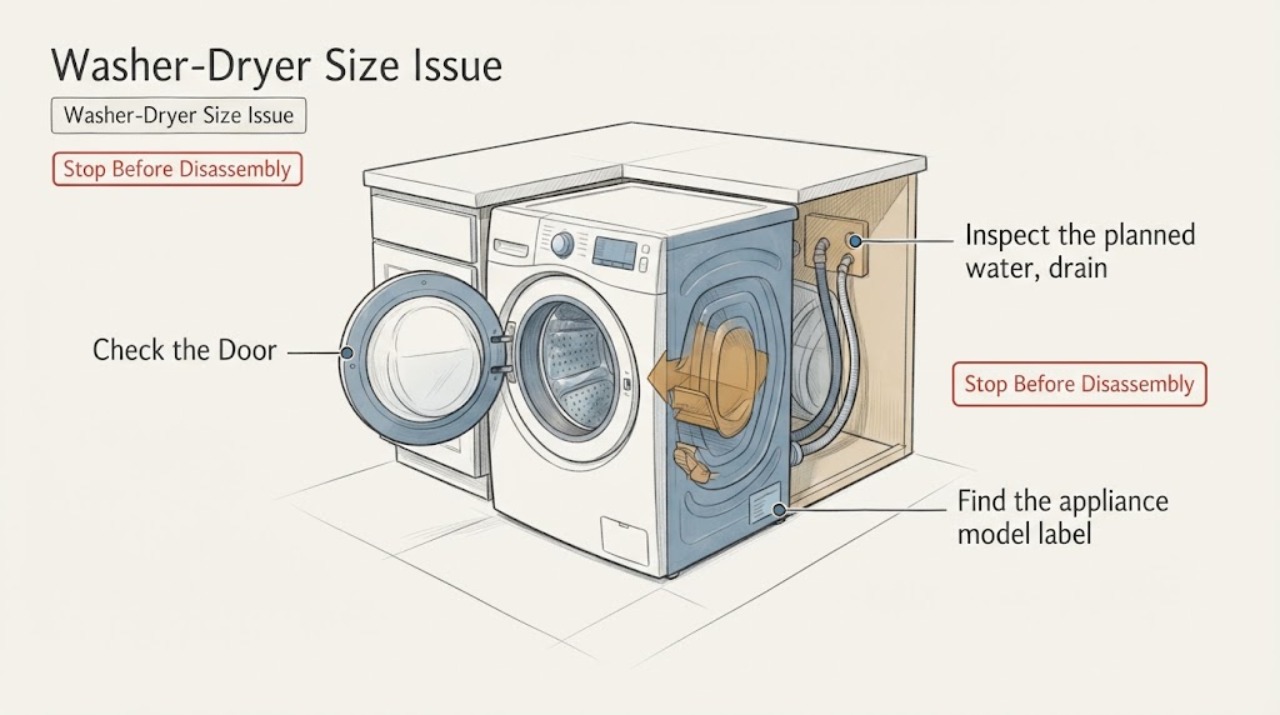
Measure the intended opening at its narrowest width, depth, and height, and measure the delivery path and loading-door swing from outside the appliance.
Expected result: The opening and route either have clear room around the cabinet and door, or one dimension, turn, threshold, or door swing is blocked.
Next step: If any dimension or door swing fails, do not force or order the unit for that space. Confirm the exact model data and have a qualified installer assess the opening.
Why this matters
Why: A blocked measurement is a physical-fit problem; it cannot be diagnosed by changing a wash or dry program. Clear dimensions keep the fit decision separate from drum capacity.
-
Check 2
Inspect the planned water, drain, and power routes without pulling panels or stretching connections.
Expected result: Connections can reach their service points with natural routing, or a hose/cord would be kinked, crushed, strained, wet, or inaccessible.
Next step: Keep the appliance out of service if a route is unsafe, and arrange qualified installation or service. Correct only an obvious external routing issue allowed by the exact manual.
Why this matters
Why: The cabinet may fit while the installation envelope still fails. A strained route can create leaks or electrical danger and is not a load-size issue.
-
Check 3
Find the appliance model label and retrieve that model’s instructions through the Magic Chef manuals portal before relying on any dimension or capacity number.
Expected result: The model is identified and its manual is available, or the label/manual does not match the appliance.
Next step: Use the matching manual for the installation envelope and load limits. If the model remains unknown, pause the move or purchase decision and contact Magic Chef service for identification help.
Why this matters
Why: Dimensions, clearances, programs, and load limits are model-specific. The MCSCWD27S5 dimensions are an example for that model and do not establish the dimensions of an unidentified combo.
-
Check 4
If the cabinet fits and the problem appears during drying, wait for the drum to stop and the door to unlock, then compare the load with the exact model’s dry-capacity guidance.
Expected result: The drum is tightly packed or the wash load is being dried as one full load, or the load is within the model guidance but remains wet.
Next step: Remove items only when safe, run a smaller compatible dry load, and supervise it. If a correctly sized load still fails, record the program and result and arrange service instead of repeatedly restarting a packed load.
Why this matters
Why: A full wash load may be too large for drying, and Magic Chef says dry time varies with the wash load. A correctly sized load shifts attention to the cycle, water, drain, or appliance fault rather than cabinet dimensions.
-
Check 5
With the unit stationary, check from outside that it sits securely and that opening the door does not contact surrounding surfaces.
Expected result: The cabinet is stable and the door opens freely, or it rocks, sits partly outside the support, or the door/controls contact nearby surfaces.
Next step: Do not operate an unstable or obstructed unit. Follow the exact manual for permitted positioning and arrange qualified installation if the issue cannot be corrected without moving or opening the appliance.
Why this matters
Why: An unstable or obstructed installation remains a physical-fit or installation problem even when the measured cabinet dimensions appear to fit.
Use your observations
Decision map
Find the observation that best matches what you see, then follow the next safe action.
-
PATH 01Next step
What you see
The measured opening, delivery route, or door swing is smaller than the exact model’s installation envelope.
Do this next
Do not force the cabinet or modify panels. Choose a confirmed-fitting location or have the space assessed by a qualified installer using the exact model instructions.
Why this path and its safety boundary
Why it matters: The appliance does not fit the planned location, regardless of whether its drum capacity would meet the laundry need.
-
PATH 02Next step
What you see
The cabinet fits, the connections route safely, and the issue appears only when a full wash load is dried.
Do this next
Use a smaller compatible dry load and the exact model program guidance. If the smaller load still does not dry or the cycle repeatedly fails, arrange appliance service.
Why this path and its safety boundary
Why it matters: Load size or the model’s separate drying limit is more likely than a cabinet-size problem. Magic Chef notes that drying time varies with the wash load.
-
PATH 03Next step
What you see
The model is unknown, or dimensions from a similar Magic Chef combo are the only available reference.
Do this next
Read the model label and retrieve the matching manual through Magic Chef, or contact the manufacturer’s service route before moving, ordering, or installing the unit.
Why this path and its safety boundary
Why it matters: The fit and capacity decision is unresolved; the MCSCWD27S5 figures cannot safely be generalized to another model.
-
PATH 04Next step
What you see
The unit cannot sit securely, the door is obstructed, a hose or cord is strained, or there is a leak, burning odor, damaged outlet, or repeated breaker trip.
Do this next
Stop using the appliance, isolate power or water only when safe, keep clear of wet electrical areas, and arrange qualified appliance or installation service.
Why this path and its safety boundary
Why it matters: This is an installation or immediate safety boundary, not a size-adjustment problem.
Helpful context
Understand the symptom
Separate physical fit from load size
Start by deciding which size problem you have. A physical-fit problem means the cabinet, door, delivery path, or connection space does not work. A load-size problem means the drum is packed, the dry load is too large, or the program takes much longer than expected. These lead to different next steps: measure the installation envelope for the first problem; reduce and redistribute the laundry for the second.
Measure the installation envelope before moving the unit
Measure the opening width, depth, and height at the tightest points, then check the route into the space and whether the loading door can open without striking a wall, cabinet, or another appliance. Include the space needed to route the water inlet, drain, and power connection without kinking, crushing, or stretching them. Do not force a cabinet into an opening or run the washer-dryer with a strained connection. Use the exact model instructions for any clearance or installation requirement that is not visible from the measurement.
Use the model number to confirm the dimensions
Magic Chef’s current MCSCWD27S5 product page gives a useful example: 23.4 inches wide, 23.4 inches deep, and 33.5 inches high for that named model. It is not a universal Magic Chef washer-dryer dimension. Find the model label on your appliance and use the Magic Chef manuals portal to retrieve the matching instructions before buying, relocating, or planning cabinetry. If the model is different or still uncertain, treat the example dimensions as unconfirmed.
Treat drying capacity as a separate limit
A combo can accept a wash load that is not an appropriate dry load. Magic Chef notes that dry time varies with the wash load and that its ventless drying process can take longer than a conventional vented dryer. If the cabinet fits but clothes are tightly packed or remain very wet, remove items only after the drum stops and the door unlocks, then run a smaller compatible dry load. Do not infer a capacity or dry-load ratio from a different model; follow the exact manual.
Stop when the measurements or connections do not work
A size mismatch is not solved by removing panels, forcing the door, compressing hoses, or operating the unit temporarily in an unsafe position. If the appliance cannot sit securely, the door cannot open, the water or drain route is strained, or the power connection is damaged or inaccessible, leave it out of service and arrange qualified installation or appliance service.
When checks do not resolve it
Need a professional?
Arrange qualified installation or appliance service when the exact model will not fit, the unit cannot sit securely, the door or connections are obstructed, or the problem persists with a correctly sized load. Stop immediately for a leak, smoke, burning odor, damaged cord or outlet, repeated breaker trips, or excessive heat.
Common questions
FAQ
What should I measure for a Magic Chef washer-dryer size issue?
Measure the opening width, depth, and height at the tightest points, the delivery route, the loading-door swing, and the water, drain, and power routing. Confirm any additional model-specific requirements in the exact manual.
What are the dimensions of the Magic Chef MCSCWD27S5?
Magic Chef lists the MCSCWD27S5 at 23.4 inches wide, 23.4 inches deep, and 33.5 inches high. Those dimensions apply to that named model only; identify your model before using them for a fit decision.
Does a full wash load also fit the dry cycle?
Not automatically. Drying time varies with the wash load, and a packed wash load may be too large for effective drying. Wait until the drum is stopped and the door unlocks, then use the exact model’s dry-capacity guidance and a smaller load when needed.
What if the machine fits but the hoses or door do not?
Do not force the unit, stretch a hose or cord, or operate it with an obstructed door. Leave it out of service and use the exact manual or Magic Chef service route to resolve the installation.
Read the exact guide
Official sources
- ManualsMC Appliance / Magic Chef · Official manual lookup page used to direct the reader to the Product Type and Model selectors for the exact appliance. It does not establish dimensions or clearances for an unidentified model.
- 2.7 cu. ft. All-in-One Ventless Washer and Dryer Combo in SilverMagic Chef · Official product information for the named MCSCWD27S5 model; used for its model-specific dimensions, 2.7 cu. ft. capacity, ventless design, and drying-time caveat. It is not a universal dimension or capacity reference for every Magic Chef combo.
- Request ServiceMC Appliance / Magic Chef · Official service request route used for unresolved fit, installation, and appliance faults after safe external checks.
Community feedback
Share a repair observation
Share a plain-text repair observation. Accepted observations are published automatically; this page may take a moment to update.