
On this page
Start here
Quick answer
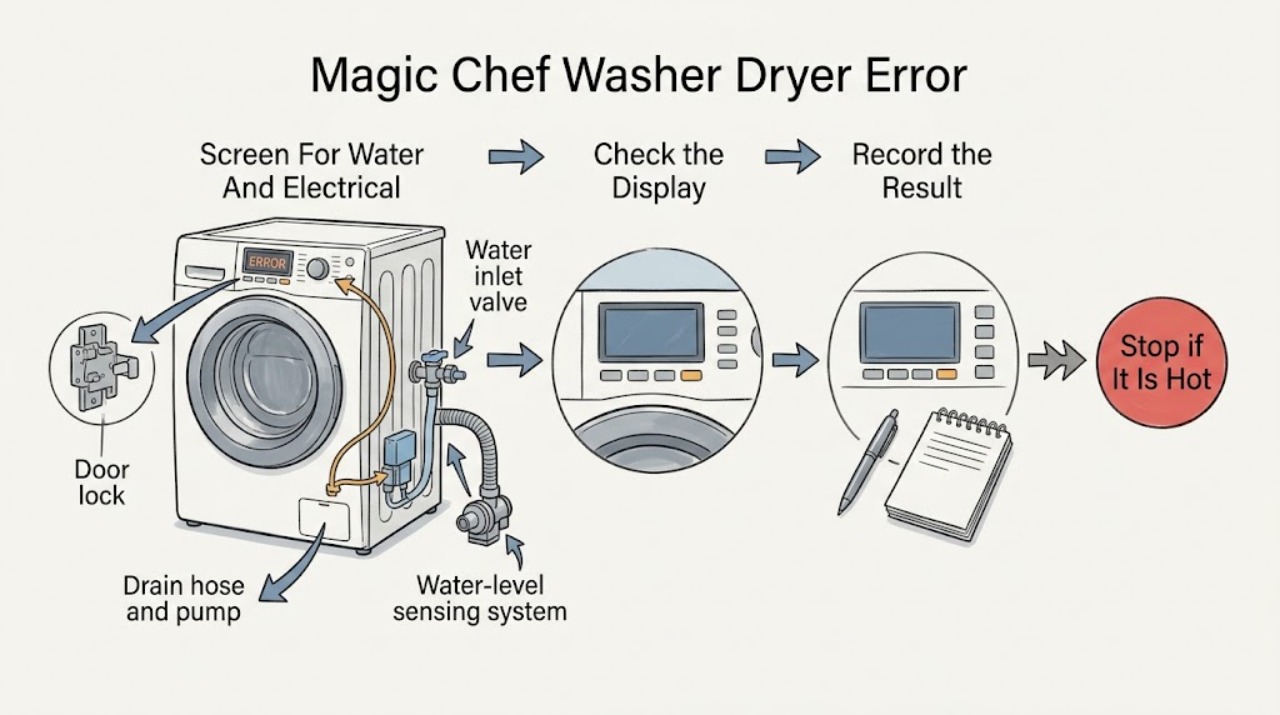
Start by taking a photo of the complete code and noting whether the drum contains water, the door is locked, the washer is filling or draining, or the drying function has stopped. The Magic Chef 24-inch combo service documentation groups common codes by the failed operation: E10 points to slow or insufficient filling, E11 to water remaining when the unit is idle, E12 to an excessive water level, E20 or E21 to a drain or pump problem, E30 or E31 to a door-lock problem, E33 to water-level sensing, E34-E36 to water temperature or wash-heater sensing, E37, E38, or E3A to drying temperature, airflow, or heater behavior, and E40, E50-series, E64, E70, E80, or E81 to control, inverter, or communication faults. Check only the faucet, accessible hose routing, visible door seal, and the user-accessible filter or lint areas described in your model manual. Stop for leaking water, overflow, smoke, burning odor, damaged power parts, a hot connection, or repeated electrical trips. Do not open the cabinet or attempt live electrical, heater, inverter, door-lock, or control-board tests; if the code returns after the manual's safe restart or the external check, arrange qualified service with the model, exact code, and what the machine was doing.
Before you begin
Safety first
- A user may record the code, inspect visible hoses and the door area, follow model-specific accessible filter or lint instructions, and perform one documented safe restart. Internal valves, pumps, locks, sensors, heaters, controls, inverter parts, and live electrical work require qualified service.
Work through in order
Diagnostic checks
Use only checks that match the exact appliance or system and its official guide.
-
Check 1
Press the control to stop the cycle if it responds, then look from a dry position for active overflow, a floor leak, smoke, a burning odor, sparking, a damaged cord or plug, a hot connection, or a breaker that opens again; do not reach into moving, hot, or flooded areas.
Expected result: Record whether water is still entering, whether the drum contains water, whether the door remains locked, whether the display stays on, and whether any electrical or heat warning continues after the control is stopped.
Next step: Close the water supply if it can be reached safely, keep the appliance off, and arrange qualified appliance or electrical help. Continue only when the unit is cool, dry, stable, and free of stop signs.
Stop if: Stop immediately for uncontrolled water, smoke, burning odor, sparking, damaged power parts, a hot connection, or repeated electrical protection trips.
Why this matters
Why: Overflow, a leak near electrical parts, smoke, burning odor, sparking, or repeated protection trips is a safety event, not a normal code-clearing step. A locked door may be a consequence of water level or an active cycle rather than proof that the lock itself failed.
-
Check 2
With the machine safe and stationary, photograph the complete display and write down the model, cycle, approximate stage, whether it was filling, washing, spinning, draining, or drying, and whether the door was locked.
Expected result: Compare the characters carefully, including any second character or prefix, and note whether the code clears after the display is turned off or returns when the same operation is selected.
Next step: Use the matching code branch below and verify the interpretation against the manual for the exact model. If the display is ambiguous, preserve the photo and use service rather than guessing.
Stop if: Do not enter a hidden service test, disassemble the console, or repeatedly run a cycle merely to reproduce an unclear code.
Why this matters
Why: The documented code families have different decision paths: filling, draining, door locking, water sensing, wash heating, drying, and control or inverter faults should not be diagnosed as one generic error.
-
Check 3
For E10, E11, E12, or E33, check from outside that the water tap is open, the accessible inlet hose is not kinked, the hose screens are not visibly restricted, the drain hose is routed as the manual specifies, and the drum is not already overfilled; do not remove panels or pressure-sensor tubing.
Expected result: For a fill code, note whether water enters slowly or not at all. For E11, note water left at standby or cycle end. For E12, note a rising level or overflow. For E33, note whether the machine fills or stops without a credible level response.
Next step: Correct only a clearly closed faucet or accessible hose restriction, then follow the exact model's safe restart instruction once. If the code returns, water level is abnormal, or overflow is possible, keep the water supply closed when safe and arrange service.
Stop if: Stop for overflow, a leak, water near electrical parts, or a machine that keeps filling after the cycle is stopped.
Why this matters
Why: The official service documentation associates these families with water pressure or inlet flow, retained or excessive water, and the water-level sensing path. A clear faucet and unrestricted visible hose do not prove that an inlet valve or sensor is good.
-
Check 4
For E20 or E21, keep the unit off, check whether the accessible drain hose is kinked or blocked at its visible route, and use the model manual to identify whether the pump filter is user-accessible before opening any filter cap; protect the floor from residual water.
Expected result: Note whether water drains at all, whether the hose is pinched behind the machine, whether the accessible filter area contains an obvious foreign item, and whether the code appears only when pumping begins.
Next step: Remove only an obvious external hose restriction or clean a user-accessible filter exactly as the model manual describes, then perform one safe restart. If water remains, the pump is noisy or silent, or the code returns, arrange qualified service.
Stop if: Do not reach into the pump, remove internal hoses, tip a water-filled machine, or continue a cycle with a leak or standing water near electrical parts.
Why this matters
Why: The service documentation links these codes to pump signaling or a water level that does not change while the pump runs. A clear hose does not rule out a blocked or failed pump, wiring, or control path.
-
Check 5
For E30 or E31, wait until the drum has stopped and the water level is safe, then inspect the visible door seal and latch area for trapped clothing or debris and close the door normally without slamming it; do not force the door or bypass its lock.
Expected result: Note whether the door closes flush, whether the code appears during locking or unlocking, whether water remains in the drum, and whether the display responds after the door is closed.
Next step: Follow the exact model's normal stop and emergency-release instructions only if needed and safe. If the code returns with an unobstructed door, keep the appliance out of service and arrange qualified diagnosis.
Stop if: Do not pry the door, insert tools into the latch, reach through a locked door, or remove the front panel.
Why this matters
Why: The service documentation associates E30 with repeated failure to lock and E31 with repeated failure to unlock, while a door that cannot open may also be held by water level or a running cycle. An unobstructed door that still fails points to the lock, wiring, or control path.
-
Check 6
For E34-E36, E37, E38, E3A, E40, E50-series, E64, E70, E80, E81, or an unlisted EXX-style code, stop the cycle and perform no more than the model manual's single safe restart after the appliance is cool, empty of abnormal water, and free of visible hazards.
Expected result: Record whether the code concerns wash heating, drying airflow or temperature, a blocked button, memory, inverter behavior, or communication; note whether the machine stops immediately or only when that function starts.
Next step: Keep the unit off and arrange qualified service if the code returns, the dryer does not operate, the heater path is implicated, the controls remain blocked, or an inverter/control code appears. Provide the display photo and cycle context.
Stop if: Do not reset repeatedly, open the cabinet, test a heater or inverter live, bypass a sensor or thermal device, or operate after smoke, burning odor, overheating, or a protection trip.
Why this matters
Why: The service documentation associates these families with temperature sensors or heaters, drying airflow and heater components, a stuck button, memory, inverter load or temperature, and display/control communication. These are not confirmed by a visual check and can involve concealed electrical parts.
Use your observations
Decision map
Find the observation that best matches what you see, then follow the next safe action.
-
PATH 01Safety boundary
What you see
There is overflow, an active leak near electrical parts, smoke, a burning odor, sparking, a damaged power connection, overheating, or repeated protection trips.
Do this next
Stop the cycle, close the water supply if safe, keep the appliance off, and arrange qualified appliance or electrical service.
Why this path and its safety boundary
Safety stop: Do not touch wet electrical areas, repeatedly reset protection, or run another test cycle.
-
PATH 02Safety boundary
What you see
The code appears while filling, water remains at standby or end of cycle, the level rises abnormally, or the machine cannot sense its level.
Do this next
Check only the faucet, visible inlet hose, visible drain routing, and model-approved external filter access; then follow one documented restart.
Why this path and its safety boundary
Safety stop: A returning code, abnormal level, or overflow needs service; do not access the valve or sensor internally.
-
PATH 03Safety boundary
What you see
E20 or E21 appears, water remains, or the pump cannot lower the water level.
Do this next
Check visible drain routing and the user-accessible filter only as described in the exact manual, protecting the floor from residual water.
Why this path and its safety boundary
Safety stop: Do not disassemble the pump or continue with standing water, a leak, or an electrical hazard.
-
PATH 04Safety boundary
What you see
E30 or E31 appears during locking or unlocking.
Do this next
Wait for the drum and water level to be safe, clear only visible door-area obstruction, and close the door normally.
Why this path and its safety boundary
Safety stop: Do not force the door or bypass the lock; a returning code needs qualified diagnosis.
-
PATH 05Safety boundary
What you see
An E34-E38 or E3A code appears during wash heating or drying.
Do this next
Stop, let the unit cool, check only user-accessible lint or airflow areas named by the manual, and use one documented restart if safe.
Why this path and its safety boundary
Safety stop: A returning code, overheating, burning odor, or no drying requires service; do not test heater or temperature wiring.
-
PATH 06Safety boundary
What you see
E40, E50-series, E64, E70, E80, E81, or another unlisted code appears, or the panel is blocked or unresponsive.
Do this next
Preserve the exact display and cycle context, perform at most one model-directed safe restart, and arrange qualified service if it returns.
Why this path and its safety boundary
Safety stop: Do not enter service mode, open the console, bypass a button or sensor, or test live control or inverter circuits.
Helpful context
Understand the symptom
An error code is a starting point, not a part diagnosis
A Magic Chef washer-dryer combo can show a code when a cycle cannot fill, drain, lock the door, sense water level, heat wash water, dry, or communicate between controls. The same-looking symptom can have a simple external cause, such as a closed faucet or kinked drain hose, or an internal cause that is not a user repair. Record the exact characters before switching the unit off, and use the manual for the exact model rather than guessing from a similar washer.
Match the code to what the appliance was doing
For the MCSCWD27W5 service documentation, E10 is associated with filling, E11 and E12 with water-level conditions, E20 and E21 with pumping or draining, and E30 and E31 with door locking or unlocking. E33 concerns the water-level signal. E34-E36 concern wash-water temperature sensing or heating, while E37, E38, and E3A concern the drying temperature path or heater. E40, E50-series, E64, E70, E80, and E81 stop or inhibit operation for memory, inverter, button, or control communication conditions. These labels are model-family evidence, not a substitute for the manual supplied with the installed unit.
Safe external checks are enough for the first pass
Before service, check the water tap, accessible inlet and drain hose routing, obvious door obstructions, the visible display and buttons, and the user-accessible filter or lint areas specified by the manual. Unplugging or resetting is not a cure for a persistent code, and repeatedly restarting a machine that is overflowing, leaking, overheating, or tripping protection can increase risk. Do not remove covers or use a meter on energized parts.
What to provide to service
Give the technician the full model and serial information, a photo or transcription of the code, the cycle and stage when it appeared, whether there was water in the drum, whether the door locked, whether the fault was during wash or dry, any leak or unusual sound, and which safe external checks changed the result. Keep the unit off if a safety stop condition is present.
Only after diagnosis
Potential parts
- water inlet valve or inlet screens
Consider only when the faucet and visible hose path are correct but a fill code returns or the valve does not admit water as commanded.
Confirm the exact model before any part decision; inlet components require qualified diagnosis. - drain pump or drain hose assembly
Consider only when the visible hose path and user-accessible filter are clear but water does not drain or the code returns.
Residual water and concealed pump wiring require safe service procedures and model confirmation. - door lock assembly
Consider only when the door is unobstructed and correctly closed but E30 or E31 returns.
Do not bypass the lock; verify the model and wiring during qualified diagnosis. - water-level sensor or pressure circuit
Consider only when water behavior and visible plumbing do not explain a recurring level or sensing code.
The sensor, air path, wiring, and control are concealed and model-specific. - wash heater, drying heater, or temperature sensor
Consider only when a documented heater or drying code returns after safe cooling and external airflow checks.
Heater and sensor work involves electrical and thermal hazards; use qualified service. - main control or inverter module
Consider only when a control, communication, memory, or inverter code persists after the model-directed safe restart.
Confirm the exact control revision and do not infer a module fault from an ambiguous display.
When checks do not resolve it
Need a professional?
Arrange qualified Magic Chef appliance service for a returning or unlisted code, overflow, a persistent leak, a door that will not safely lock or unlock, no-drain behavior, wash-heater or drying failure, control or inverter codes, smoke, burning odor, sparking, overheating, damaged power parts, or repeated protection trips.
Safety scope: A user may record the code, inspect visible hoses and the door area, follow model-specific accessible filter or lint instructions, and perform one documented safe restart. Internal valves, pumps, locks, sensors, heaters, controls, inverter parts, and live electrical work require qualified service.
Have this ready
- Provide the exact model and serial information, complete display code, cycle and stage, water level, door state, wash versus dry function, visible hose and filter observations, any leak or unusual sound, the restart performed, and clear photographs taken from a safe position.
Common questions
FAQ
What should I do first when my Magic Chef washer dryer shows an error code?
Stop safely, photograph the complete code, and record the cycle stage, water level, and door state. Match the code to the exact model manual; do not assume that every code means the same part.
What does E10 mean on a Magic Chef washer dryer?
In the MCSCWD27W5 service documentation, E10 is associated with a filling or water-level problem. Check the faucet and visible inlet hose path, then use the model's safe restart instruction once. A returning code needs service.
Why is my Magic Chef washer dryer showing E20 or E21?
These codes are associated with pumping or draining behavior in the service documentation. Check visible drain-hose routing and any user-accessible filter exactly as the model manual directs. Do not disassemble the pump, and arrange service if water remains or the code returns.
Why will the door not open when an error is displayed?
The machine may keep the door locked while water remains or a cycle is active, and E30 or E31 can indicate a lock or unlock fault. Wait for the drum to stop, never force the door, and use the model's safe emergency-release instructions only when appropriate.
Can I clear a Magic Chef washer dryer error by unplugging it?
A single model-directed restart may clear a transient condition, but it does not diagnose a recurring code. Do not repeatedly reset a machine that leaks, overfills, smells hot, sparks, or trips electrical protection; keep it off and arrange qualified service.
Read the exact guide
Official sources
- Manual DownloadsMagic Chef · Use the model lookup to retrieve the installed washer-dryer owner's manual and confirm which checks and emergency procedures are user-accessible.
- 2.7 cu. ft. 120-Volt Gold All in One Ventless Electric Washer Dryer ComboMagic Chef · The product page identifies the combo's electronic controls, LED display, child lock, and ventless washer-dryer design; model-specific error meanings still come from the installed unit manual.
- Service Center PortalMagic Chef · Use the official support route when an error persists or the required diagnosis involves concealed electrical, water, lock, heater, or control parts.
- Magic Chef MCSCWD27W5 washer-dryer combo service manualMC Appliance Corporation / Magic Chef support · The PDF is the official service manual hosted on the MC Appliance support domain for the MCSCWD27W5 combo family; exact codes and user controls can vary by model.
Community feedback
Share a repair observation
Share a plain-text repair observation. Accepted observations are published automatically; this page may take a moment to update.