
On this page
Start here
Quick answer
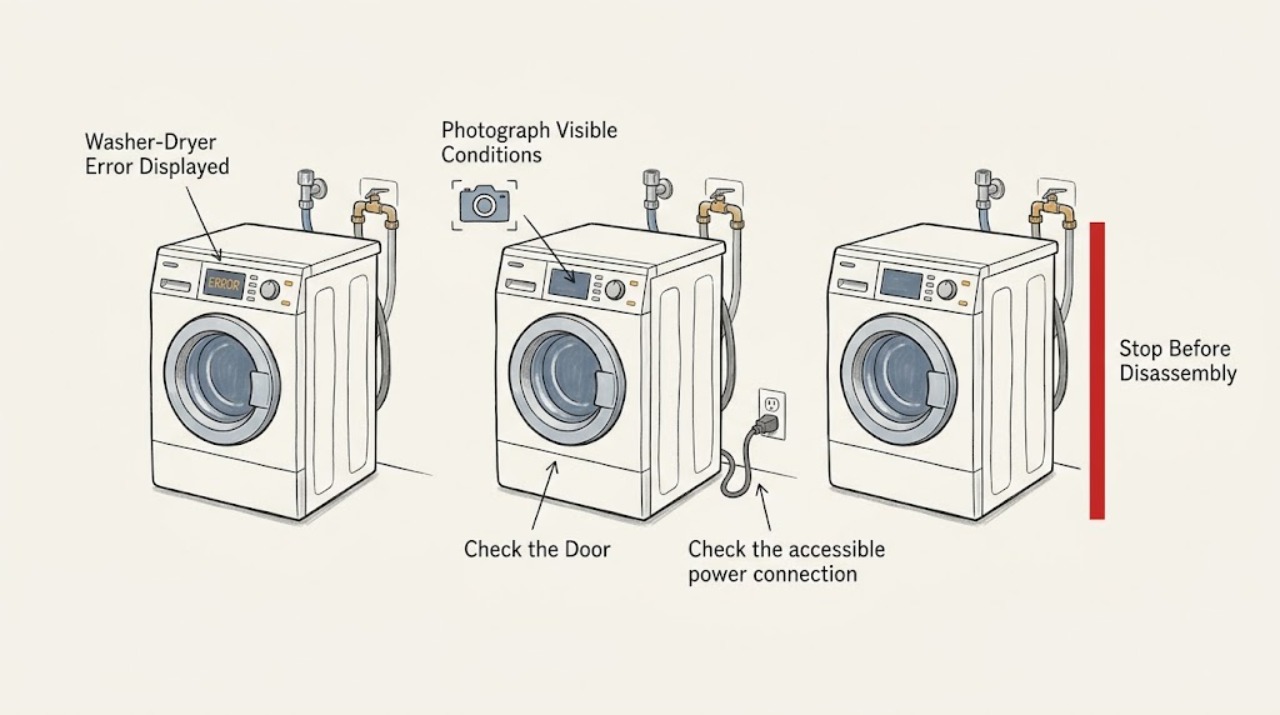
Record the exact code, words, icon, beeps, and whether the washer or dryer side is affected before changing anything. On Frigidaire Laundry Centers, some messages are normal prompts: Close Washer Lid, Close Dryer Door, Balance Load, and Clean Lint can describe an action or routine maintenance rather than a failed control. If the unit stops with three long beeps, Frigidaire treats that as an error and says to check installation. Also verify power, closed lid or door, Start/Pause selection, and the washer water supply; if the message returns after the model-specific checks, stop using the affected side and arrange appliance repair.
Work through in order
Diagnostic checks
Use only checks that match the exact appliance or system and its official guide.
-
Check 1
Write down the complete display text or code, count and type of beeps, flashing lights, and whether the washer side, dryer side, or both are affected; photograph the panel if useful.
Expected result: The display shows a named prompt, a repeatable code or symbol, or only blinking lights and beeps without a code.
Next step: Keep the model number with the record and consult the exact Owner's manual before attempting a code-clearing sequence. Continue with the matching washer or dryer checks below.
Stop if: Stop if the display is accompanied by smoke, burning smell, sparking, water near electrical parts, or an energized control that will not stop.
Why this matters
Why: The message may be a normal operating prompt, a side-specific condition, or an error that requires model-specific interpretation. Frigidaire's display and cycle guidance applies to Laundry Centers as a product family, not every identical control layout.
-
Check 2
Compare the message with the normal Laundry Center prompts: Close Washer Lid, Close Dryer Door, Balance Load, and Clean Lint.
Expected result: The matching lid or door is open, the washer load is unbalanced, or Clean Lint is displayed after a drying cycle; or none of those conditions fits.
Next step: Close the correct lid or door, redistribute a washer load when indicated, or clean the dryer lint filter after the cycle. If the message does not match the symptom or remains with the condition corrected, use the exact model manual and continue diagnosis.
Stop if: Do not bypass a lid or door interlock, run the dryer without its lint filter, or force a latch closed.
Why this matters
Why: Frigidaire identifies these as routine prompts or user actions. Clean Lint may continue blinking on some models after cleaning and does not by itself prove a control failure.
-
Check 3
Check the accessible power connection and the labeled circuit, then verify that the washer water-supply faucets are open and that the combination unit is stable and level.
Expected result: The cord is loose, the circuit has tripped, the water faucets are closed, or the unit is level and supplied but the error persists.
Next step: Correct only an accessible loose connection, closed faucet, or leveling issue as permitted by the manual, then make one start attempt. If the circuit trips again or the message returns, arrange service.
Stop if: Stop for a hot outlet, scorched cord, exposed wiring, water leaking toward electrical parts, or repeated breaker trips.
Why this matters
Why: Frigidaire lists power, water supply, and leveling among the basic Laundry Center start checks. A supply problem can look like a control or cycle error, while correct supplies move the issue toward the displayed message itself.
-
Check 4
With the washer lid and dryer door fully closed, select the intended cycle and press the correct START/PAUSE control once; do not assume a selector change alone starts the cycle.
Expected result: The message clears and the selected side begins, the panel beeps and still shows an open-lid or open-door prompt, or the cycle remains idle.
Next step: If the cycle begins, observe it normally. If the prompt remains or the control will not accept START/PAUSE, stop trying to defeat the interlock and arrange appliance repair.
Stop if: Do not hold the interlock closed by hand, bypass it, or reach into a moving drum or tub.
Why this matters
Why: Frigidaire states that the lid or door must be closed and that START/PAUSE must be pressed after selections. A persistent prompt with a physically closed lid or door points toward an interlock, control, or alignment issue.
-
Check 5
If the washer appears to stop immediately after starting, wait through the initial load-sensing period and observe whether the tub later fills; if it pauses between wash and spin, leave the controls undisturbed briefly.
Expected result: The washer begins filling after sensing, pauses normally between stages, or remains stopped with a code or repeated alert.
Next step: Treat a normal sensing or stage pause as expected. If the display repeats the error or the cycle does not resume, record the stage and arrange service or follow the exact manual's code guidance.
Stop if: Do not open a locked lid, force the tub, or repeatedly cancel and restart a cycle to make it advance.
Why this matters
Why: Frigidaire says many Laundry Centers spend the first two minutes sensing the load and may pause between Wash and Spin. A repeated coded stop is different from that normal sequence.
-
Check 6
If the unit stops with three long beeps, keep the code and event record, then compare the installation with the model's Installation Guide rather than repeatedly restarting it.
Expected result: The installation appears correct and the error does not return, or the same three-beep stop recurs during a cycle.
Next step: For a recurrence, arrange appliance service and provide the complete display, affected side, cycle stage, and installation history.
Stop if: Stop using the unit if the stop is paired with leaks, abnormal electrical noise, smoke, heat, or a circuit trip.
Why this matters
Why: Frigidaire identifies three long beeps after a cycle stop as an error and directs owners to check installation. A recurrence after the checklist needs support or service, not a guessed part replacement.
-
Check 7
If the error appears on the dryer side with poor heating or drying, identify the fuel type and check only the external conditions Frigidaire lists: gas supply valve and air supply for gas models, or the intended electrical circuit and ventilation for electric models; keep the lint filter installed and clear.
Expected result: The dryer is gas or electric, the relevant supply and ventilation are normal, and the error or poor drying remains.
Next step: Correct only an accessible supply or lint condition allowed by the manual, then make one supervised cycle. If the display or drying fault returns, stop using the dryer side and arrange service.
Stop if: Do not work on gas piping, exposed electrical conductors, restricted exhaust ducts inside walls, or internal heating components.
Why this matters
Why: Frigidaire separates gas supply and air requirements from electric-circuit requirements and warns against using a dryer with a blocked, damaged, or missing lint filter. Correct external conditions move the issue toward model-specific service.
-
Check 8
Prepare a service record containing the model number, exact display, beeps, affected washer or dryer side, cycle and stage, supply checks, lid or door result, and whether the message returns after one normal start attempt.
Expected result: The message is repeatable with the same side or stage, or it has disappeared but the event can be described accurately.
Next step: Give the record and any photo to an authorized appliance technician. Do not order a part from the display text alone.
Stop if: Stop all further testing if a safety symptom appears or if the unit cannot be shut down normally.
Why this matters
Why: A repeatable code and operating context allow model-specific diagnosis; a one-time prompt may have been a normal user-action alert or transient installation condition.
Use your observations
Decision map
Find the observation that best matches what you see, then follow the next safe action.
-
PATH 01Next step
What you see
The display says Close Washer Lid or Close Dryer Door and the corresponding lid or door is open.
Do this next
Remove any obstruction, close the correct lid or door fully, and press START/PAUSE once.
Why this path and its safety boundary
Why it matters: Frigidaire treats the message as a start interlock prompt.
-
PATH 02Next step
What you see
Close Lid or Close Door remains after the lid or door is aligned and closed.
Do this next
Do not bypass the interlock; arrange appliance service.
Why this path and its safety boundary
Why it matters: The interlock, alignment, or control may need diagnosis.
-
PATH 03Next step
What you see
Balance Load is displayed during washer operation.
Do this next
Pause safely, redistribute the load, close the lid, and resume according to the manual.
Why this path and its safety boundary
Why it matters: Frigidaire associates this prompt with an unbalanced wash load.
-
PATH 04Next step
What you see
Clean Lint is displayed after drying and there is no other fault symptom.
Do this next
Clean the lint filter after the cycle and keep it installed for the next run.
Why this path and its safety boundary
Why it matters: This can be a routine filter reminder; on some models it may continue blinking after cleaning.
-
PATH 05Next step
What you see
The washer appears inactive during the first part of a cycle or between Wash and Spin.
Do this next
Wait for the sensing or pause stage to complete; escalate only if a repeated error appears or the cycle remains stopped.
Why this path and its safety boundary
Why it matters: Load sensing or a normal stage pause may be occurring.
-
PATH 06Next step
What you see
The display is accompanied by three long beeps and the Laundry Center stops.
Do this next
Check the model Installation Guide once; if the installation is correct or the stop recurs, arrange service.
Why this path and its safety boundary
Why it matters: Frigidaire identifies this as an error during the cycle.
-
PATH 07Next step
What you see
The dryer side shows a fault with poor heating or drying.
Do this next
Check only the external conditions for the model type, keep the lint filter in place, and arrange service if the error or symptom remains.
Why this path and its safety boundary
Why it matters: Fuel supply, circuit, ventilation, lint filtration, or an internal dryer fault may be involved.
-
PATH 08Next step
What you see
Power, supply, lid or door, cycle selection, and normal-pause checks are correct but the error returns.
Do this next
Stop using the affected side and provide the exact code, model, and event record to appliance repair.
Why this path and its safety boundary
Why it matters: The remaining condition is not explained by the documented user prompts.
-
PATH 09Next step
What you see
Smoke, burning smell, sparking, a leak near electrical parts, exposed wiring, uncontrolled motion, or a repeated circuit trip is present.
Do this next
Keep clear, stop use, isolate accessible power only when safe, and arrange qualified appliance or electrical service.
Why this path and its safety boundary
Why it matters: This is an immediate stop-use condition rather than a display interpretation problem.
Helpful context
Understand the symptom
A displayed message is not always a fault
Frigidaire Laundry Centers use the display and beeps to request actions as well as to report problems. A lid or door prompt, a balance warning, or a Clean Lint reminder can be resolved by the corresponding user action. The exact model and the side of the combination unit matter, so preserve the message before clearing it.
Keep the washer and dryer paths separate
A washer may spend the first part of a cycle sensing the load and may pause between stages, while the dryer has separate door, lint, ventilation, and heating conditions. Do not diagnose a dryer display from a washer message or assume that a normal sensing pause is a failed motor.
Only after diagnosis
Potential parts
- lid lock or dryer door interlock
Consider this category only when the correct lid or door remains closed but the same open-lid or open-door prompt persists after alignment and model-specific checks.
Interlocks differ between Laundry Center models; confirm the complete model and manufacturer fit information before selection. - control interface or control board
Consider this category only when power, supply, lid or door, cycle selection, and installation checks pass but a repeatable display error remains and a technician confirms a control fault.
Control assemblies must be matched to the exact model and revision by a qualified technician. - washer water inlet or drain component
Consider this category only when the washer-specific error is repeatable and a technician isolates a fill or drain component after the faucets, hoses, and installation checks are verified.
Do not infer a valve or pump fit from a display message alone; verify the exact model and diagnosis. - dryer heating or airflow component
Consider this category only when the dryer-side error persists after the applicable supply, ventilation, and lint-filter checks and a qualified technician isolates an internal heating or airflow fault.
Gas and electric dryer systems use different components; confirm the exact model, fuel type, and manufacturer fit information.
When checks do not resolve it
Need a professional?
Arrange appliance repair when a non-routine code returns, three long beeps recur, a closed lid or door is still reported open, the washer does not progress beyond normal sensing, the dryer remains unable to heat or dry after external checks, or the installation checklist does not resolve the event. Stop immediately for smoke, burning smell, sparking, exposed wiring, water near electrical parts, uncontrolled movement, or repeated circuit trips.
Common questions
FAQ
Are blinking lights or beeps always an error on a Frigidaire Laundry Center?
No. Frigidaire lists normal prompts including Close Washer Lid, Close Dryer Door, Balance Load, and Clean Lint. Match the prompt to the physical condition before treating it as a failed control.
Why does my washer seem to stop right after I press Start?
Frigidaire says many Laundry Centers spend the first two minutes sensing the load and may pause between Wash and Spin. If a repeatable error or three long beeps appears, record it and follow the service branch instead.
What do three long beeps mean?
Frigidaire identifies three long beeps with a cycle stop as an error and recommends checking the Installation Guide. If the installation is correct or the condition recurs, arrange service.
What should I check if the error is on the dryer side?
Check the applicable external conditions: gas supply valve and air supply for gas models, or the intended electrical circuit for electric models. Also verify ventilation and a clean, installed lint filter. Persistent errors need service.
Can I order a part from the displayed code?
Not safely without the exact model and diagnosis. The same display area can report a normal prompt, an interlock condition, an installation issue, or a component fault. Give the code and event record to a qualified technician first.
Read the exact guide
Official sources
- What should I do if my Frigidaire Laundry Center is not properly heating or drying?Frigidaire · Gas or electric dryer supply, ventilation, lint-filter, exhaust, load, and drying boundaries.
- Why did my Laundry Center stop during a cycle and give three long beeps?Frigidaire · Three-long-beep cycle-stop error and installation-check escalation.
- What should I do if my Frigidaire Laundry Center is not starting?Frigidaire · Power, dedicated circuit, water supply, leveling, lid or door, START/PAUSE, load sensing, and normal pause checks.
- Laundry Centers - How do I use my display or select cycles on my Frigidaire Laundry Center?Frigidaire · Washer and dryer cycle selection, START/PAUSE behavior, door or lid closure, and model-manual boundary.
- Why does my Frigidaire Laundry Center beep or have blinking lights?Frigidaire · Normal washer and dryer prompts, beeps, blinking lights, lid or door messages, balance prompt, and lint reminder.
- How To Use Your Laundry Center DisplayFrigidaire · Laundry Center display identity and model-specific manual boundary.
Community feedback
Share a repair observation
Share a plain-text repair observation. Accepted observations are published automatically; this page may take a moment to update.