
On this page
Start here
Quick answer
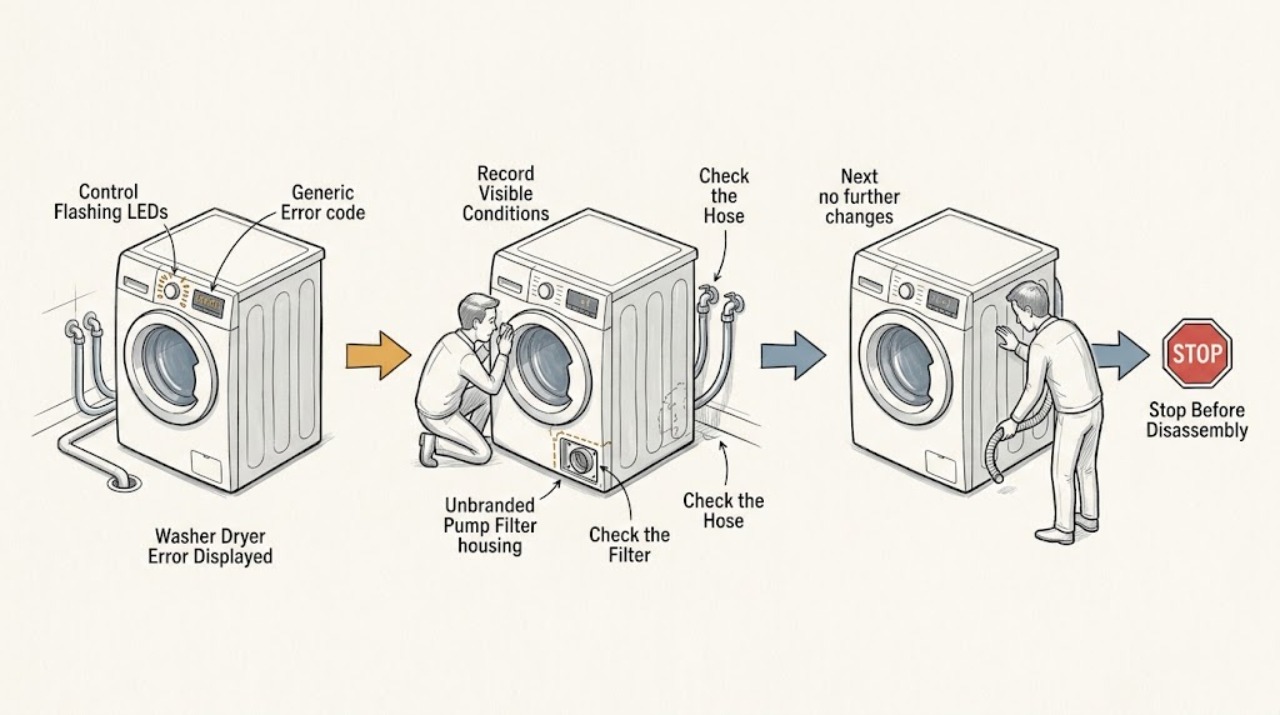
Record the exact code or LED-flash pattern and stop the Hoover washer dryer before examining it. Hoover uses different codes across models, but its advice commonly maps E02/E2 to a fill or water-supply problem, E03/E3 to a drain problem, E04/E4 to excess foam or water, E08 to an overloaded drum, E15 to a power reset, and E20 to a possible blocked drain pump. Check only the matching external cause: water tap and inlet hose, drain hose and filter, detergent amount, or load size. Disconnect power before examination, never force a locked door or open the cabinet, and if an unfamiliar code returns after the model-specific reset or a fault involves water, wiring, a damaged door, or an internal part, keep the machine out of service and arrange authorized service.
Work through in order
Diagnostic checks
Use only checks that match the exact appliance or system and its official guide.
-
Check 1
Pause or stop the programme and record the exact display, including the letter, leading zero, and any flashing-light sequence. Note whether the machine was filling, washing, draining, spinning, or drying, and whether water remains in the drum, the door is locked, or an unusual smell or sound is present.
Expected result: The code matches a known Hoover family such as E02/E2, E03/E3, E04/E4, E08, E15, E20, or a door-related code; or it is unfamiliar, incomplete, or recurring with a safety symptom.
Next step: If there is a leak, burning smell, smoke, damaged cord, or water near electrics, stop and arrange qualified help. Otherwise use the matching external check below and keep the exact code for service if it remains.
Why this matters
Why: Hoover documents code meanings by model and identifies water fill, drain, foam, overload, pump, and door conditions separately. An unfamiliar or recurring code cannot safely be decoded by guessing from a different model.
-
Check 2
For E02/E2 or a fill-related code, check from outside that the water tap is open and the inlet hose is not kinked, trapped, or crushed. Check that the hose connection and inlet filter show no obvious blockage or leak; do not force a seized tap or remove a pressurized hose while water is flowing.
Expected result: The tap is closed, water pressure is low, the hose is bent or trapped, the inlet filter is blocked, or the accessible supply looks normal.
Next step: Correct only a visibly closed tap or kinked hose when safe, then retry the model's fill operation once. If the code returns, the hose leaks, or the tap is seized, close the supply and arrange qualified service or plumbing help.
Why this matters
Why: Hoover defines E02/E2 as the machine being unable to fill and points to the water supply, low pressure, a twisted hose, or a blocked filter. A normal accessible supply with a recurring fill code can indicate an inlet valve, sensor, or control fault.
-
Check 3
For E03/E3 or E20, and for a machine that stops full of water, disconnect power and check the accessible drain hose, pump filter, and household waste connection according to the model manual. Place towels and a container before filter work, wait for water to cool, and reinstall the filter securely; never open the filter while the appliance is running.
Expected result: The drain hose is kinked or blocked, the filter contains debris, the sink connection is obstructed, the filter is clean and sealed, or water cannot be safely contained.
Next step: Clear only accessible debris after power and water-safety steps and secure the filter. If water is hot, the filter or housing is damaged, the code returns, or the blockage is internal, keep the washer dryer off and arrange service.
Why this matters
Why: Hoover maps E03/E3 to failure to drain and E20 to a possible blocked drain pump. Its guidance also warns that a loose filter can cause leaks or malfunction and that persistent failure after clearing the external path needs service.
-
Check 4
For E04/E4, E08, or a spin-related warning, check the load and detergent without opening the cabinet. Reduce an overfilled drum, untangle and redistribute laundry only when the door is unlocked, and use the amount and type of detergent specified for the appliance.
Expected result: The drum is overfilled or unbalanced, excess foam or water is visible, the door cannot safely unlock, or the load and detergent are normal.
Next step: After reducing or redistributing the load, make one supervised retry only if there is no leak or other hazard. If the code returns, the door remains locked, or water is left in the drum, stop and arrange service.
Why this matters
Why: Hoover identifies E04/E4 with excess foam or water and E08 with an overloaded drum; its manuals explain that imbalance can reduce or abort spinning to protect the machine. A normal load with a recurring code points to a sensor, lock, pump, or control issue.
-
Check 5
For E15 or another code not explained by the exact model guide, switch off and disconnect the washer dryer for the period specified by Hoover's model instructions, then reconnect and start one appropriate programme only if there is no safety symptom. Do not repeat resets to suppress a returning code.
Expected result: The code clears and the programme runs normally, or the same code returns, a different code appears, the machine trips power, leaks, or stops again.
Next step: If the code returns or any unsafe symptom appears, keep the appliance disconnected and provide the exact code, model, cycle phase, and checks to authorized service. Do not open panels or bypass the fault.
Why this matters
Why: Hoover lists unplugging for a few minutes for E15 on some models and says any other code that returns after a reset needs an Authorized Customer Service Centre. A reset cannot repair an inlet, drain, door, motor, wiring, or control fault.
Use your observations
Decision map
Find the observation that best matches what you see, then follow the next safe action.
-
PATH 01Safety boundary
What you see
The display is accompanied by a leak, smoke, burning smell, damaged cord, water near electrics, severe noise, or an unsafe locked-door situation.
Do this next
Stop immediately, keep clear, and disconnect power only if the plug and area are dry and safe. Close the water tap if it can be reached safely, do not force the door or open panels, and arrange qualified help.
Why this path and its safety boundary
Safety stop: Record the exact code and continue with only the matching model-specific external check.
-
PATH 02Safety boundary
What you see
The code maps to an accessible fill, drain, foam, load, or door condition and that condition is found.
Do this next
Correct only the safe external cause described by the model guide, then make one supervised retry; stop if the code or symptom returns.
Why this path and its safety boundary
Safety stop: Treat the code as unresolved and do not guess at a component or borrow a code meaning from another Hoover model.
-
PATH 03Safety boundary
What you see
A model-appropriate reset clears the error and the next programme runs without leaks, power faults, or abnormal symptoms.
Do this next
Monitor the next use and retain the recorded code; arrange service if it appears again.
Why this path and its safety boundary
Safety stop: Leave the washer dryer out of service and provide the exact code, model, cycle phase, and observations to authorized repair.
Helpful context
Understand the symptom
An error display is a symptom, not a universal diagnosis. Hoover's Advice Centre is model-specific, and the same family of codes can be shown on a display or represented by flashing LEDs on another model. Photograph the display or count the flashes before resetting anything, then use the code's meaning and the cycle phase to choose one check.
Keep the safety boundary clear. Hoover says to disconnect the appliance from mains power before examining it. Do not bypass a door lock, reach into a moving drum, remove cabinet panels, or keep restarting a machine that is leaking, tripping power, overheating, or showing a code that returns.
When checks do not resolve it
Need a professional?
Stop for a recurring or unfamiliar code, leak, power trip, abnormal noise, water that will not drain, an unsafe locked door, or any internal repair requirement.
Have this ready
- Provide the full model or product code, exact display or LED pattern, cycle phase, water level, load and detergent observations, hose and filter findings, and what happened after one model-approved reset.
Common questions
FAQ
What does an E02 or E2 code mean on a Hoover washer dryer?
Hoover generally uses E02/E2 for a water-fill problem. Check that the water tap is on and the inlet hose is not kinked or trapped; if the code returns or the tap or hose is damaged, arrange qualified help.
What should I do for E03, E3, or E20 on a Hoover washer dryer?
These codes commonly point to draining or the drain pump. Disconnect power, contain any water, check the accessible drain hose and filter using the model manual, and reinstall the filter securely. A recurring code needs service.
Can I reset a Hoover washer dryer error code?
Only use the reset described for the exact model and make one retry when there is no safety symptom. If the code returns, the manual and Hoover Advice Centre direct you to authorized service rather than repeated resets or internal repairs.
Read the exact guide
Official sources
- Error message E02Hoover Advice Centre · Official Hoover support article for E02/E2; confirm the code and exact instructions against the appliance model.
- Hoover Washing machine DHL 1482D3 Instruction Manual - Product Code 31007904Hoover · Official Hoover instruction manual for a particular washer model; use the exact manual for the assigned product code.
- Error message E03Hoover Advice Centre · Official Hoover support article for E03/E3; drain access and code behavior vary by model.
- Nextra HNWL7166 - Washer Dryer Help and Advice from HooverHoover · Official Hoover Advice Centre page for a washer-dryer model; code meanings and menu behavior vary by product code.
Community feedback
Share a repair observation
Share a plain-text repair observation. Accepted observations are published automatically; this page may take a moment to update.