
On this page
Start here
Quick answer
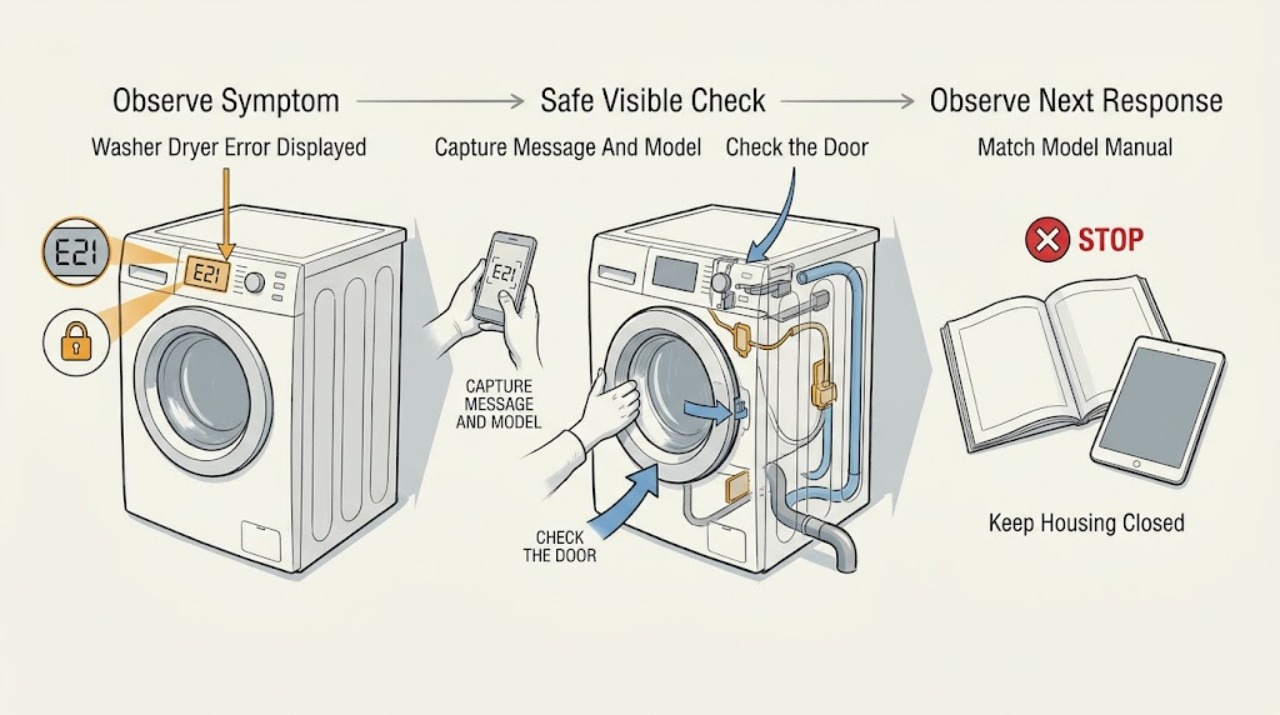
Do not diagnose a GE washer-dryer from the word “error” or from a code list for another model. Photograph or copy the exact display, note whether the message is on the washer or dryer side, and record the model and serial information. GE says washer messages can be normal status states such as sensing, pause, balancing, or a locked lid, while its combination-appliance error guidance is model-specific. Use the exact Owner's Manual for the displayed message, then perform only the documented external remedy, such as reopening and closing a lid or door, checking visible water supply or drain conditions, or waiting through a model-defined lockout. Stop for smoke, burning odor, hot or damaged wiring, a water overflow, gas odor, or a cycle that cannot be stopped. If the code returns or the appliance remains unusable, arrange qualified service rather than opening the cabinet.
Work through in order
Diagnostic checks
Use only checks that match the exact appliance or system and its official guide.
-
Check 1
When it is safe to approach, photograph the full display and write the exact letters, numbers, symbols, and flashing lights before pressing buttons. Record whether the message is on the washer or dryer section and find the model and serial information without removing a panel.
Expected result: The display shows a stable fault code; a status word scrolls; a lock, pause, or sensing indicator is shown; or the message is unclear or disappears.
Next step: Keep the photo and use the model number to open the exact GE support and Owner's Manual pages. If the unit cannot be stopped or has a safety symptom, skip code interpretation and use the stop branch.
Stop if: The display or controls are wet, cracked, unusually hot, activating by themselves, or the appliance cannot be stopped normally.
Why this matters
Why: GE distinguishes normal washer status messages from errors and warns that messages vary by model. A partial or guessed code can lead to the wrong remedy, while the appliance side and model determine which manual applies.
-
Check 2
Use the exact GE model number to open its support page and Owner's Manual, then compare the full message with that model's error and status sections. Do not substitute a code table from a similar-looking GE washer, dryer, or Combo.
Expected result: The manual identifies a normal status, a door or lid condition, a water or drain condition, a lockout, or a fault that requires service; or the message is not listed.
Next step: Follow only the manual's external remedy when no hazard is present. If the message is unlisted, returns, or disables operation, keep the appliance out of service and arrange qualified diagnosis.
Stop if: The procedure asks you to open the cabinet, bypass a lock, test live wiring, or dismantle a water, drain, or heating component.
Why this matters
Why: A listed status may have a limited user remedy, while an unlisted or service-directed message cannot be safely translated into a universal part or reset. GE's support library is organized by product and model family for this reason.
-
Check 3
If the model manual or display identifies a door, lid, or control-lock state, inspect only that the door or lid is fully closed and free of an obvious item in the seal or opening. Use the documented unlock or close-and-restart sequence; never force the lock or reach into a moving drum.
Expected result: The door or lid is visibly open or obstructed; a lock indicator remains after the cycle should be complete; the manual describes a temporary lockout; or the closure and lock state appear normal.
Next step: Remove only an obvious, accessible obstruction and close the door or lid once as the manual directs. If the lock remains, the cycle will not release, or the message returns, stop and arrange service.
Stop if: The latch, hinge, gasket, glass, or lid is damaged, the lock is hot or jammed, or opening it would require defeating the interlock.
Why this matters
Why: GE's washer and Combo guidance uses door or lid state and control lockouts to explain why a cycle may pause or refuse to start. A normal closure with a persistent message shifts attention to the model's next branch rather than to forcing the interlock.
-
Check 4
Only when the model-specific message points to water entry or draining, check the visible supply valves and hoses for an obvious closed valve, kink, leak, or disconnected connection. Observe whether the tub has standing water and whether the accessible drain hose is kinked; do not open the pump housing unless the exact manual provides a safe user procedure.
Expected result: The supply valve is closed, a hose is kinked or leaking, water is not entering, the tub remains full, the model reports a drain or pump-filter restriction, or the visible path appears normal.
Next step: Correct only an obvious valve or hose position described by the manual and clean an accessible filter only as instructed. Stop for a leak, overflow, standing water that will not drain, or a returning message and arrange service.
Stop if: Water is near an electrical connection, the appliance is overflowing, a hose or filter cannot be accessed without dismantling, or the drain pump would need live testing.
Why this matters
Why: GE's model-specific Combo and washer guidance links selected messages to water supply, drain restrictions, a pump filter, or a hose condition. A visible path that looks normal does not prove that an internal valve, pump, sensor, or control is good.
-
Check 5
If the exact manual or GE support page specifies a waiting period or one-time control reset, follow that instruction without trying to bypass the lockout by repeatedly unplugging the appliance. Keep the door or lid closed during a model-defined lock period and do not reset a unit with smoke, water, odor, or an electrical fault.
Expected result: The message clears after the documented wait or reset; the controls remain locked; the same message returns; or power restoration causes a trip or abnormal behavior.
Next step: If the message clears and the appliance behaves normally, run only the model-recommended supervised check. If the controls remain locked, the message returns, or power behaves abnormally, leave the appliance off and arrange service.
Stop if: A reset would require opening a connection, the breaker trips, the appliance smells hot or burnt, or the cycle starts without accepting normal stop commands.
Why this matters
Why: GE documents model-specific lockout periods and notes that unplugging can restart the timer on some Combo and washer models. A reset can clear a temporary state but cannot establish that a persistent fault is repaired.
-
Check 6
Compare the display with the model manual's normal-status descriptions: sensing, pause, balancing, spin-stop, cooling, or a flashing lock light. Observe whether the cycle resumes after the documented wait or user action; do not interrupt a moving drum or open a locked door or lid.
Expected result: The message matches a normal sensing, balancing, pause, spin-stop, or lock state and clears; it remains indefinitely; the load is unusually wet; or the dryer side fails to complete its cycle.
Next step: Allow only the manual's normal wait or restart action once. If the appliance remains paused, fails to drain or spin, or the dryer cannot proceed, record the behavior and arrange service.
Stop if: The drum or basket behaves violently, the door or lid will not safely release, water remains at a hazardous level, or there is abnormal heat, noise, odor, or electrical behavior.
Why this matters
Why: GE says several washer display words and lights describe the current phase rather than a component failure. A persistent state, unusually wet load, or a washer-dryer that cannot transition between washing and drying needs model-specific diagnosis.
-
Check 7
Arrange qualified appliance service when the code is unlisted, returns after the exact documented remedy, appears in multiple cycles, prevents safe door or lid release, or is accompanied by a leak, abnormal motor or heater behavior, smoke, odor, or electrical trip. Provide the display photo and complete sequence of events.
Expected result: The fault is intermittent, repeatable, limited to the washer or dryer section, present after installation or repair, or associated with a safety symptom.
Next step: Keep the washer-dryer out of service until diagnosed. Provide the model, exact code, appliance section, cycle, water and drain observations, door or lid state, and any prior repair information; do not open the cabinet or order a component from the code alone.
Stop if: Diagnosis would require removing panels, bypassing a door or lid lock, opening live electrical or gas sections, or testing a heater, motor, pump, or valve while energized.
Why this matters
Why: The remaining possibilities include a sensor, valve, pump, interlock, heater, control, or wiring fault, but the display alone does not identify a safe replacement part. GE directs unresolved washer and dryer problems to model-specific support and service.
Use your observations
Decision map
Find the observation that best matches what you see, then follow the next safe action.
-
PATH 01Next step
What you see
Smoke, burning odor, hot or damaged cord or outlet, water near an electrical area, gas odor, uncontrolled motion or heat, or a repeated electrical trip is present.
Do this next
Stop the cycle if possible, keep clear of the appliance, follow local gas or electrical emergency guidance when applicable, and arrange qualified help. Do not restart it to identify the code.
Why this path and its safety boundary
Why it matters: The display is secondary to an immediate appliance, water, gas, or electrical safety concern.
-
PATH 02Next step
What you see
The display matches a documented sensing, pause, balancing, spin-stop, cooling, or lock state and clears after the model's normal wait or action.
Do this next
Resume only as the manual directs and monitor one cycle. Escalate if the state repeats indefinitely, leaves the load unusually wet, or prevents a normal transition.
Why this path and its safety boundary
Why it matters: The message describes an operating state rather than a confirmed failure.
-
PATH 03Next step
What you see
The model-specific message identifies an open door or lid, a locked interlock, or an obstruction at the closure.
Do this next
Close the door or lid and remove only an obvious accessible obstruction as the manual describes. Do not force or bypass the lock; use service if the message remains.
Why this path and its safety boundary
Why it matters: The appliance may be preventing movement or water entry until the closure is safely recognized.
-
PATH 04Next step
What you see
The exact message points to water supply, a pump filter, drain restriction, or standing water.
Do this next
Follow the exact manual's external water or drain check once. Stop for a leak, overflow, or inaccessible component and arrange service.
Why this path and its safety boundary
Why it matters: A visible valve, hose, drain, or accessible filter condition may be blocking the cycle, but an internal pump or valve fault remains possible.
-
PATH 05Next step
What you see
The model defines a temporary lockout or a documented one-time power reset, and there is no safety hazard.
Do this next
Wait or reset exactly as documented. If the code returns, the controls remain locked, or power behaves abnormally, leave the appliance off and arrange service.
Why this path and its safety boundary
Why it matters: The control may be protecting the cycle or clearing a transient state; unplugging may restart a model-defined wait period.
-
PATH 06Next step
What you see
The code is not in the exact model manual, returns after the documented remedy, or prevents normal operation.
Do this next
Keep the appliance out of service, provide the model and display evidence to GE support or a qualified technician, and do not open the cabinet.
Why this path and its safety boundary
Why it matters: The error cannot be translated safely into a universal GE washer-dryer repair or part.
Helpful context
Understand the symptom
Start with the exact display and appliance type
A GE washer-dryer may show a countdown, a status word, a lock indicator, a flashing light, or a fault message. Some messages describe a normal pause, sensing, balancing, or cooling state; others point to a door, water, drain, or control condition. GE's public help pages are split by model family, so a code from a Profile Combo or a top-load washer must not be applied to an unrelated washer-dryer. The model and the exact characters on screen are the first diagnostic facts.
Keep checks outside the cabinet
Do not remove panels, bypass a lid or door lock, probe wiring, reach into the pump or heater, or pull a stacked or integrated unit out to access connections. Stop the cycle if possible and leave the appliance off for smoke, a burning smell, a hot cord or outlet, water escaping, gas odor, or uncontrolled motion or heat. Use only a visible water valve, accessible lint or pump-filter procedure, or control reset that the exact manual documents.
What to record before clearing the message
Save a photo of the display, write down the full message and any flashing lights, identify whether the washer or dryer was running, note the load and cycle, and record whether the door or lid was locked, water entered, the drum drained, and the dryer heated. Include the model and serial information. If the message disappears after a reset, the saved photo still gives the technician evidence of the original state.
Safety boundary
Stop conditions
- Smoke, burning odor, gas odor, or scorching
- Water overflow, a leak near an electrical area, or standing water that will not drain
- A hot, damaged, or discolored cord, outlet, or connection
- Repeated breaker operation or an appliance that cannot be stopped normally
- The door or lid lock is jammed, damaged, or would need to be bypassed
- The exact error returns after the documented user remedy or remains unlisted
- Diagnosis would require opening panels, testing live parts, or replacing a component without model-specific testing
Only after diagnosis
Potential parts
- washer-dryer control or display assembly
Consider this only after the exact model code and qualified testing identify a control or display fault; an error display alone does not establish this part.
Confirm the exact model and manufacturer fit information before selecting or installing any component. - door or lid lock assembly
Consider this only when the model-specific diagnosis confirms that the closure and wiring are correct but the interlock does not report the required state.
Do not bypass the interlock or infer fit from a similar GE model. - drain pump or water inlet component
Consider this only after a water or drain message persists and qualified testing identifies the failed valve, pump, or related circuit.
Verify model, connection type, and manufacturer fit information before any replacement.
When checks do not resolve it
Need a professional?
Arrange service for a returning code, an appliance that will not start, drain, spin, wash, or dry, a door or lid that will not release, a leak or overflow, repeated lockout, abnormal noise or heat, or any need to open the cabinet.
Have this ready
- Provide the model and serial information, display photo, complete code, washer or dryer section, cycle and load, door or lid state, water and drain observations, reset or wait result, and any odor, smoke, leak, heat, or electrical symptoms.
Common questions
FAQ
Why is my GE washer-dryer showing an error?
The display may be reporting a model-specific fault, but it can also show a normal state such as sensing, pause, balancing, or a door/lid lock. Save the exact message and model number, then use the matching Owner's Manual before trying a remedy.
Can I use a GE washer error-code list for my washer-dryer?
Not safely. GE states that messages vary by model, and its Combo page applies only to a named Profile UltraFast model family. Use the exact model manual and do not infer a pump, valve, lock, sensor, or control failure from a code alone.
Should I unplug my GE washer-dryer to clear an error?
Only use a reset that the exact model documentation specifies and only when there is no water, heat, odor, gas, or electrical hazard. GE notes that unplugging can restart a model-defined lockout on some washer and Combo messages. If the code returns or the controls remain locked, arrange service.
What information should I give GE support for a washer-dryer error?
Provide the model and serial information, a photo and full text of the display, which section was running, the cycle and load, door or lid state, water and drain observations, the result of any documented wait or reset, and any leak, odor, smoke, heat, or electrical symptom.
Read the exact guide
Official sources
- Top Load Washer - Display and Status / Feature LightsGE Appliances · Supports distinguishing normal status messages and feature lights from a fault and treating washer messages as model-family specific.
- Support for GE Washers and DryersGE Appliances · Supports using GE's washer/dryer support and model-specific troubleshooting path when an error cannot be resolved safely.
- Washer - Consumer Help IndicatorGE Appliances · Supports using only model-relevant remedies for washer messages, waiting through documented lockouts, checking water or drain conditions, and escalating persistent problems.
- GE Profile™ UltraFast Combo Washer/Dryer - Fault & Error Codes and Status MessagesGE Appliances · Provides examples of model-specific door, water, drain-pump, lint-filter, and lockout behavior; it is not a universal code chart for every GE washer-dryer.
- GE Appliances Service and Support by Product LineGE Appliances · Supports routing an unspecified error through the model-specific support and manual system instead of using a generic code list.
- GE Profile™ UltraFast Combo Washer/Dryer - Display Not RespondingGE Appliances · Supports the limited statement that a particular GE Combo model documents control lock behavior and a 30-second reset; the reset is not generalized to all GE washer-dryer models.
Community feedback
Share a repair observation
Share a plain-text repair observation. Accepted observations are published automatically; this page may take a moment to update.