
On this page
Start here
Quick answer
Maytag has a dryer-specific Product Help page for F9 E2. It allows one controlled check: turn the dryer circuit breaker(s) off for 5 minutes, restore power, run a Timed Dry cycle, and watch for the code for 5 minutes. This page does not identify a replacement part or establish that the code has the same meaning on a washer, a Whirlpool appliance, or every Maytag platform. First confirm the complete display, the dryer model and region, and any safety symptom. Stop for smoke, burning or melting odor, arcing, unusual heat, damaged wiring, or repeated breaker trips. If F9E2 returns after the one documented sequence, leave the dryer off and arrange qualified Maytag service.
Before you begin
Safety first
- Internal electrical, heating, motor, control, and protective-device diagnosis requires a qualified appliance technician.
Work through in order
Diagnostic checks
Use only checks that match the exact appliance or system and its official guide.
-
Check 1
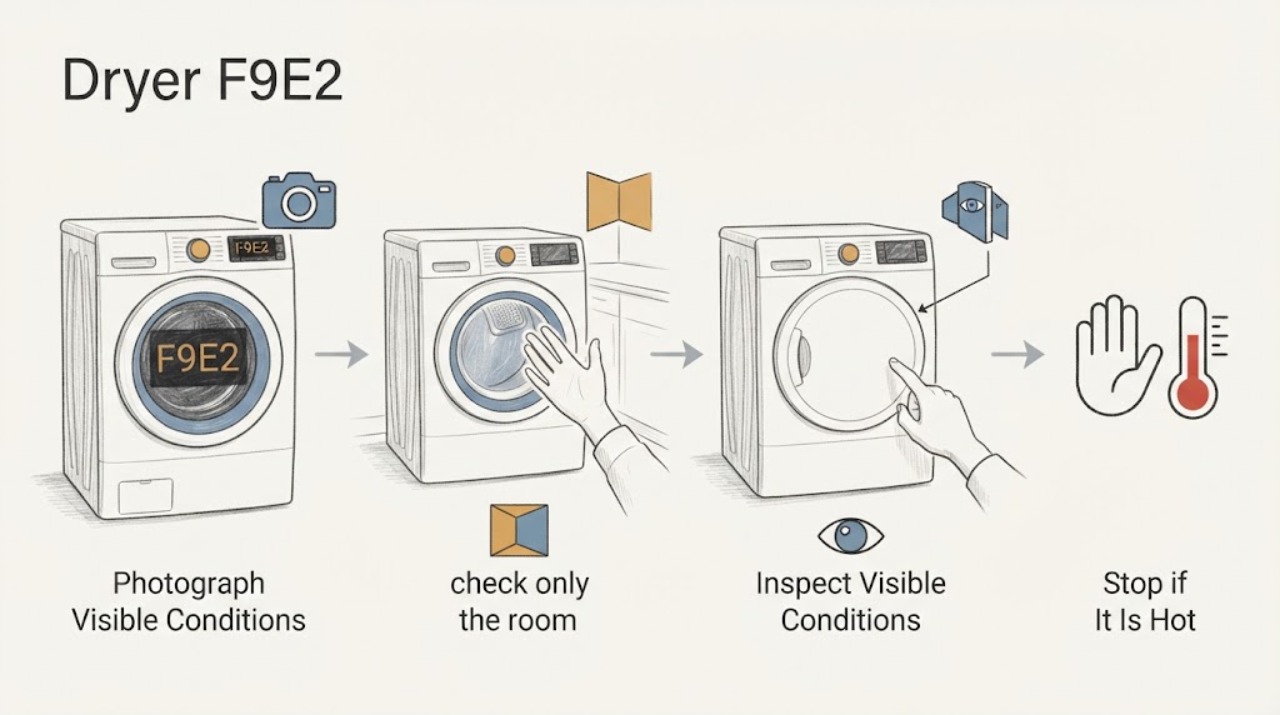
From a stable position, photograph and transcribe every display character exactly, including whether it reads F9E2, F9 E2, or alternates between F9 and E2. Record the dryer model number, serial-label region, gas or electric type, cycle, and whether the drum, controls, and heat responded.
Expected result: The display is an exact F9E2/F9 E2 dryer message, has extra characters, or cannot be matched; the dryer stopped, continued tumbling, or became unusually hot.
Next step: Keep the dryer off for smoke, odor, arcing, unusual heat, visible damage, or breaker activity. Otherwise keep the complete identity record with the service request and continue only to the documented sequence.
Stop if: Do not borrow an F9E2 meaning from a washer, dishwasher, Whirlpool product, or an unidentified service manual.
Why this matters
Why: The Maytag page is dryer-specific, while Maytag warns that code guidance is tied to the applicable dryer and owner manual. A partial or differently formatted display cannot support a reliable cross-platform interpretation.
-
Check 2
Before restoring power, check only the room and dryer exterior for a burning or melting smell, smoke, arcing, a hot or damaged cord, exposed wiring, obstruction around the dryer, or a breaker that trips again. Do not remove the cabinet or terminal cover.
Expected result: A safety or electrical symptom is present, or the exterior is cool and intact with no repeated breaker activity.
Next step: For any safety symptom, leave power off and arrange qualified appliance or electrical service. Only if no hazard is present may you consider Maytag's one documented reset.
Stop if: Do not restore power repeatedly, run the dryer through smoke or odor, or inspect energized wiring.
Why this matters
Why: A safety symptom takes priority over interpreting or clearing F9E2. An intact exterior does not prove the internal control, motor, heater, or protective circuit is healthy.
-
Check 3
If there is no safety symptom, switch the dryer circuit breaker(s) off for 5 minutes, restore them once, select a Timed Dry cycle, and observe the display for 5 minutes as Maytag's F9 E2 dryer page directs. Do not add an undocumented service-mode test.
Expected result: The display clears and remains clear during the 5-minute observation, F9E2 returns, another code appears, or the breaker trips.
Next step: Stop the cycle and arrange qualified Maytag service if F9E2 or another code returns, the breaker trips, or operation is abnormal. Do not repeat the reset sequence.
Stop if: Do not extend the test, switch to repeated heated cycles, bypass the breaker, or open the dryer to investigate.
Why this matters
Why: A one-time clear shows only that the displayed state did not immediately recur; it does not identify or rule out a component. A returning code or trip is an unresolved service condition.
-
Check 4
If the code remains clear, end the check and compare the result with the exact model's owner documentation. Record whether the dryer completed the short Timed Dry observation, whether it heated and tumbled normally, and whether any odor, noise, or display change occurred.
Expected result: The dryer remains normal and code-free, or the code/abnormal behavior returns later in the same or another cycle.
Next step: Use the dryer only if the exact manual permits and no abnormal symptom remains; arrange service at the first recurrence or operating change.
Stop if: Do not choose or install a part from F9E2 alone.
Why this matters
Why: A normal short observation does not establish a permanent repair. Recurrence supports Maytag's generic F# E# service path rather than a guessed airflow, motor, heater, sensor, or control part.
-
Check 5
Prepare the service handoff with the model and region, full code formatting, date and cycle, whether the dryer is gas or electric, the breaker/reset result, the 5-minute Timed Dry observation, and any safety or performance symptom.
Expected result: The model/region is still unknown, the code is intermittent, or the code is recurring after the documented check.
Next step: Leave the dryer off if the code recurs or any safety symptom remains, and provide the recorded evidence to qualified Maytag service.
Stop if: Do not enter a hidden diagnostic mode, perform live electrical diagnosis, or replace a board, motor, heater, or sensor based only on F9E2.
Why this matters
Why: Maytag directs owners to model-specific literature for other questions, and its generic dryer guide sends unresolved F# E# displays to service. Without identity, a technician must establish the platform before interpreting the code or parts.
Use your observations
Decision map
Find the observation that best matches what you see, then follow the next safe action.
-
PATH 01Next step
What you see
The display is exactly F9E2/F9 E2 on a Maytag dryer, no safety symptom is present, and the code stays clear through the one Maytag 5-minute reset and Timed Dry observation.
Do this next
Record the result, follow the exact model manual, and arrange service if the code or abnormal operation returns.
Why this path and its safety boundary
Why it matters: The immediate display state did not recur, but the reset does not prove that the dryer is permanently repaired or identify a component.
-
PATH 02Next step
What you see
F9E2 returns during or after the documented reset, another F# E# code appears, the breaker trips, or the dryer behaves abnormally.
Do this next
Leave the dryer off and arrange qualified Maytag appliance service with the full display, model, region, and reset result.
Why this path and its safety boundary
Why it matters: Maytag's generic dryer guidance treats an alternating F# E# display as a problem requiring service; the exact cause remains model-specific.
-
PATH 03Next step
What you see
The display is partial or differs from F9E2, or the dryer model/region cannot be established.
Do this next
Stop code-specific testing, locate the rating label and exact owner manual, or ask qualified Maytag service to identify the platform before interpreting the message.
Why this path and its safety boundary
Why it matters: The official F9 E2 dryer page cannot safely be assumed to match an unidentified platform or a different code format.
-
PATH 04Safety boundary
What you see
Smoke, burning or melting odor, arcing, exposed wiring, unusual heat, a hot or damaged cord, or repeated breaker trips accompanies F9E2.
Do this next
Stop using the dryer, keep clear of hot or energized areas, and obtain qualified appliance or electrical help as appropriate.
Why this path and its safety boundary
Why it matters: The safety or electrical event takes priority over code recovery.
Safety stop: Do not operate, repeatedly restore power, open the cabinet, or investigate an odor with a flame.
When checks do not resolve it
Need a professional?
Provide the model and region, complete display, gas/electric type, cycle stage, safety symptoms, and the result of the single 5-minute breaker reset and Timed Dry observation.
Safety scope: Internal electrical, heating, motor, control, and protective-device diagnosis requires a qualified appliance technician.
Common questions
FAQ
Does Maytag F9E2 prove that a particular dryer part has failed?
No. Maytag's dryer-specific page provides a one-time reset and observation procedure but does not identify a replacement part. A recurring code needs model-specific professional diagnosis.
Can a washer or Whirlpool F9E2 guide be used for this Maytag dryer?
Not safely. The opened Maytag page is explicitly for a dryer, and Maytag's general guidance directs owners to the applicable owner manual. Confirm the dryer model and region before applying any other code interpretation.
Read the exact guide
Official sources
- F9 E2 - Error Code - DryerMaytag Product Help · Maytag dryer-specific F9 E2 / F9E2 Product Help guidance with United States and Canada support routes
- Error Codes in DryersMaytag Product Help · Maytag dryer error-code overview for applicable Maytag dryer platforms
- Service & Support Owners Center | MaytagMaytag · Maytag model-specific manuals, troubleshooting, and model-number support for dryers
Community feedback
Share a repair observation
Share a plain-text repair observation. Accepted observations are published automatically; this page may take a moment to update.