
On this page
Start here
Quick answer
On the Sharp tumble-dryer manuals opened for the KD-NCB9S7PW9-EN and KD-NCB7S7PW9-BX models, E06 is listed in the automatic fault-warning table with the same instruction: contact an authorized service agent. It is not mapped to a user-cleanable filter, condenser, water tank, or a named replacement part. Confirm the complete model and the exact E06 display or flashing-light pattern, stop the dryer for smoke, burning smell, abnormal heat, sparks, water near power, or a damaged cord, and do not open the cabinet or keep restarting it. If the model-specific manual confirms E06, preserve the code and arrange authorized service.
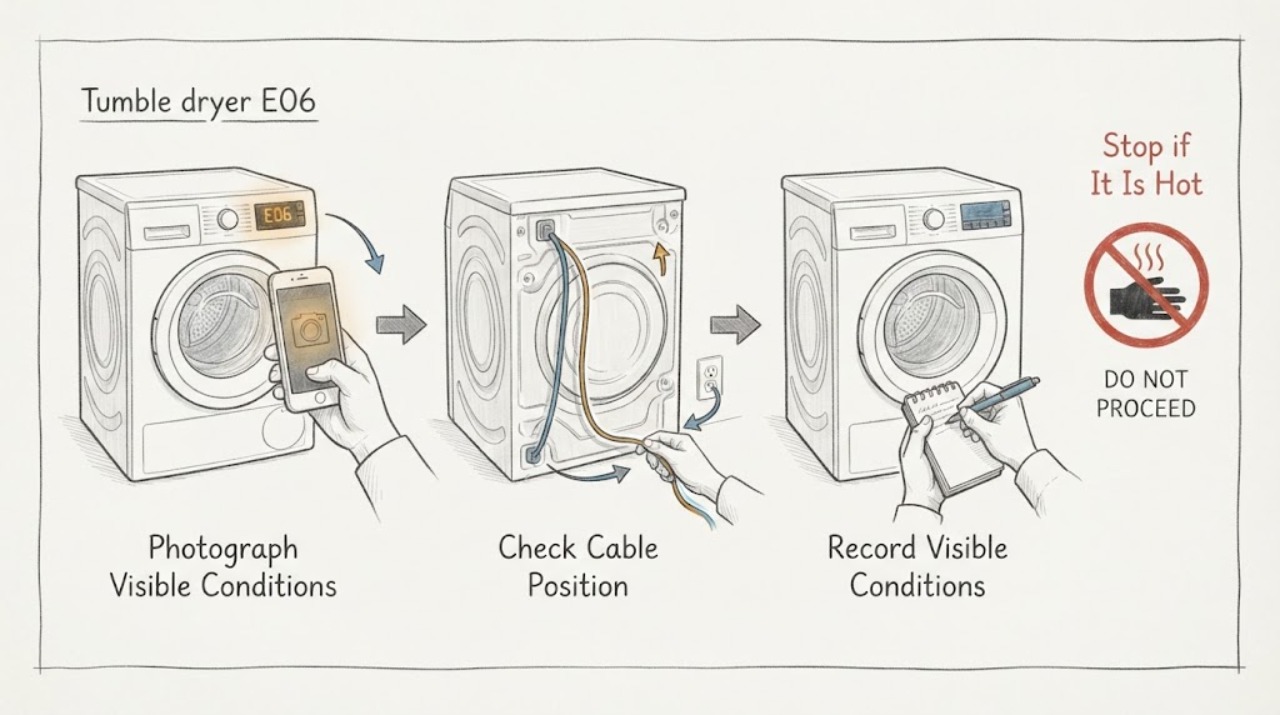
Work through in order
Diagnostic checks
Use only checks that match the exact appliance or system and its official guide.
-
Check 1
From outside the dryer, photograph the complete display or the full combination of flashing operation lights. Record E06 exactly, the selected programme, when it appeared, and the full model and product-label information; do not remove a panel to find the label.
Expected result: The appliance is one of the model families covered by the opened manuals and the indication is clearly E06; the model is different or unknown; or the display is actually a water-tank, filter, condenser, voltage, or other warning.
Next step: If the exact manual confirms E06, continue to the safety check and service decision. If the model or display format does not match, stop code interpretation and obtain the matching Sharp manual or model-specific support.
Stop if: Do not use another Sharp model's code table, translate E06 into a filter or heater fault, or order a part from the letters alone.
Why this matters
Why: E06 is directly supported only for the model-specific Sharp manuals cited here, where it is an automatic fault warning sent to authorized service. Similar-looking codes and icons have separate instructions and must not be merged into E06.
-
Check 2
Before touching the plug or attempting any restart, check from a dry, safe position for smoke, a burning or plastic smell, scorching, abnormal cabinet or cord heat, sparks, water near the socket or cord, a damaged plug or cable, or a breaker that trips again.
Expected result: The dryer is cool and dry with no visible electrical or fire warning; or one of the hazard signs is present.
Next step: If there is no hazard, leave the dryer stopped while arranging the model-specific service described by the manual. If a hazard is present, stop use, isolate power only when dry and safe, keep clear, and obtain qualified or emergency help.
Stop if: Do not run a confirmation cycle, repeatedly reset a breaker, touch wet electrical parts, move the dryer to reach a connection, or continue using it with smoke, sparks, scorching, abnormal heat, or a damaged cord.
Why this matters
Why: A normal exterior allows you to preserve the code and arrange service without adding a hazard. A fire, heat, water, or electrical symptom overrides code interpretation and makes a restart unsafe.
-
Check 3
Compare the recorded indication with the exact model manual's automatic fault-warning table. For an exact E06 match, do not dismantle the dryer, test live heating or motor circuits, bypass a thermal or door protection, wash a part as a presumed E06 fix, or perform a guessed reset.
Expected result: The matching manual lists E06 and says to contact an authorized service agent; the manual lists a different code; or the manual is unavailable or cannot be matched to the model.
Next step: For a confirmed E06, keep the dryer out of service and arrange authorized service with the model, code photograph, programme, and timing. For any mismatch, use the exact manual or model-specific support before doing anything beyond safe external observation.
Stop if: Do not open the cabinet, remove the heater, probe, motor, pump, condenser, or control board, or continue operating to see whether E06 worsens.
Why this matters
Why: For the two Sharp dryer manuals opened here, E06 has a direct professional-service instruction and no user diagnostic branch. A different or unmatched code has different meaning and cannot be safely inferred from E06.
-
Check 4
Prepare the service record without disassembling the appliance: provide the full model, serial or product-label details if available, the exact E06 indication, flashing-light sequence, programme and load, whether the drum or heat started, and any smoke, smell, heat, water, or power event.
Expected result: The code is persistent, recurs after a power event, prevents a programme from starting, or is accompanied by abnormal heat, noise, odor, water, or electrical behavior.
Next step: Keep the dryer out of use until the E06 cause is assessed. If a hazard is present, use the safety escalation immediately rather than waiting for a normal service visit.
Stop if: Do not supply guessed component numbers, continue normal loads, or make live measurements to improve the service record.
Why this matters
Why: These details help the authorized service provider distinguish the model-specific fault from a separate warning or safety event; they do not identify a user-replaceable part.
Use your observations
Decision map
Find the observation that best matches what you see, then follow the next safe action.
-
PATH 01Next step
What you see
The exact Sharp manual for the identified dryer lists E06 in its automatic fault-warning table.
Do this next
Leave the dryer stopped and arrange authorized service with the exact model and code details. Do not assign a component or reset from another model.
Why this path and its safety boundary
Why it matters: For the two opened Sharp dryer models, E06 is a service-directed fault indication rather than a user-cleanable filter, condenser, or water-tank prompt.
-
PATH 02Next step
What you see
The display is actually a water-tank, filter, condenser, voltage, door, or other warning, or the model does not match the cited manuals.
Do this next
Use the exact model manual and full flashing-light pattern. Do not use the E06 service wording to diagnose or clean a different warning.
Why this path and its safety boundary
Why it matters: The user may be looking at a different model-specific indication; those warnings can have separate external checks and should not be relabeled E06.
-
PATH 03Next step
What you see
E06 is accompanied by smoke, burning or plastic smell, scorching, sparks, abnormal heat, water near electrical parts, a damaged cord, or repeated electrical trips.
Do this next
Stop immediately, keep clear, isolate power only if it is dry and safe to do so, and obtain qualified or emergency assistance. Do not restart to test E06.
Why this path and its safety boundary
Why it matters: This is an immediate fire, thermal, water, or electrical safety concern; code interpretation is secondary.
-
PATH 04Next step
What you see
E06 returns, prevents the programme from starting, or remains after the appliance has been left stopped while the model and code are documented.
Do this next
Keep the dryer out of service and provide the code photograph and model details to an authorized service agent. Do not open the cabinet or select a part by code alone.
Why this path and its safety boundary
Why it matters: The service-directed fault remains unresolved. Repeated attempts cannot distinguish the internal fault safely and may add heat or electrical risk.
Helpful context
Understand the symptom
Why the exact model still matters
Sharp's opened manuals are model-specific and use a combination of flashing operation lights for fault detection. The E06 entry is verified for the listed European models, not automatically for every Sharp dryer or every market. Keep the full model label and the complete display pattern with the code before applying this guidance.
E06 is a service boundary in these manuals
The manuals do not tell the user to clear E06 by washing a filter, emptying the tank, cleaning the condenser, or replacing a part. Those checks belong to separate filter, condenser, water-tank, or voltage indications. Do not turn a different warning into an E06 diagnosis.
When checks do not resolve it
Need a professional?
Give the provider the full model and product-label details, the exact E06 display or flashing-light sequence, programme and load, time of occurrence, whether the dryer tumbled or heated, and any odor, heat, water, or electrical symptom. Do not open the cabinet or guess at a replacement part.
Common questions
FAQ
What does E06 mean on a Sharp tumble dryer?
In the opened Sharp KD-NCB9S7PW9-EN and KD-NCB7S7PW9-BX manuals, E06 appears in the automatic fault-warning table and the instruction is to contact an authorized service agent. The manuals do not identify a user-replaceable component for E06.
Can I clear Sharp dryer E06 by cleaning the filter or condenser?
Not based on these manuals. Filter, condenser, and water-tank prompts have their own entries and external checks; E06 is listed separately with a service instruction. Confirm the exact model before acting on any different icon or code.
Should I keep using the dryer while E06 is displayed?
No. Leave it stopped while arranging model-specific authorized service, and stop immediately for smoke, burning smell, sparks, abnormal heat, water near electrical parts, a damaged cord, or repeated trips. Do not open the cabinet or run repeated test cycles.
Read the exact guide
Official sources
- Sharp KD-NCB7S7PW9-BX Tumble Dryer User ManualSharp Home Appliances · Opened Sharp Home Appliances manual for the European KD-NCB7S7PW9-BX tumble dryer; its automatic fault-warning table lists E06 and directs the user to an authorized service agent.
- Sharp KD-NCB9S7PW9-EN Tumble Dryer User ManualSharp Home Appliances · Opened Sharp Home Appliances manual for the European KD-NCB9S7PW9-EN tumble dryer; its automatic fault-warning table lists E06 and directs the user to an authorized service agent.
Community feedback
Share a repair observation
Share a plain-text repair observation. Accepted observations are published automatically; this page may take a moment to update.