
On this page
Start here
Quick answer
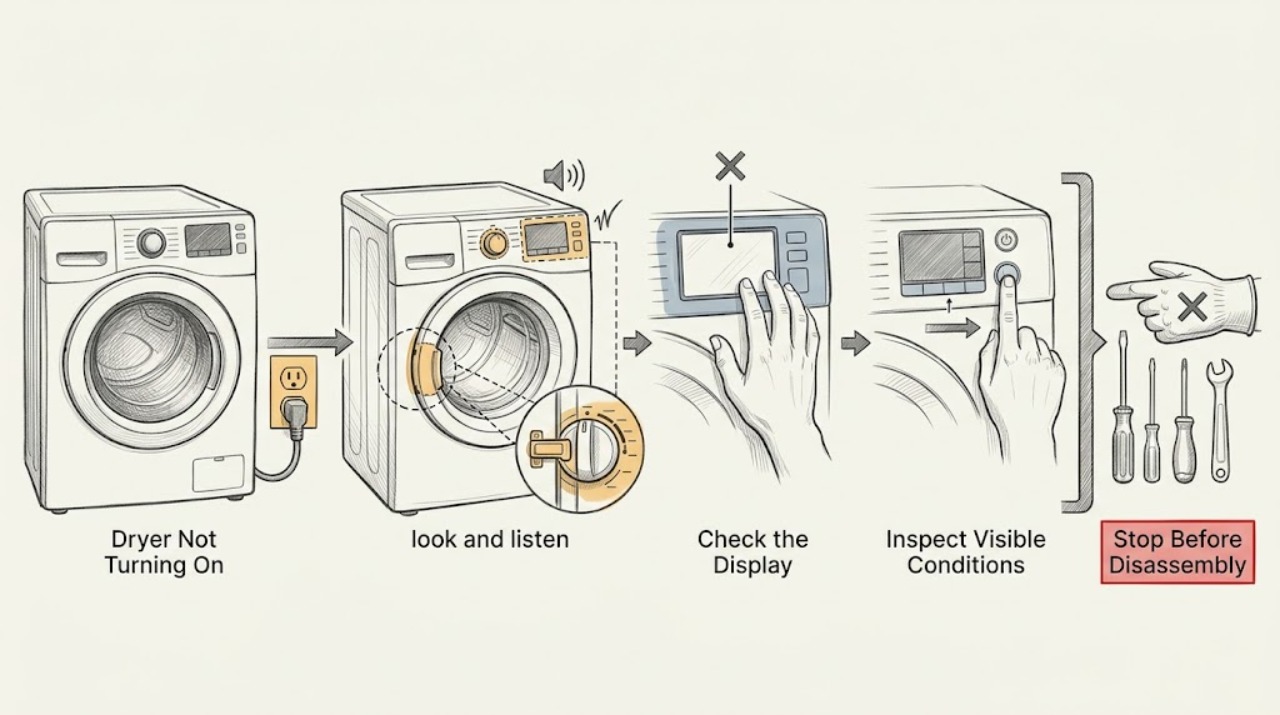
Do not keep trying a Maytag dryer that has a burning smell, smoke, sparks, a hot or damaged power cord, gas odor, unusual heat, or a breaker that trips again. From a dry, safe position, check whether the outlet and controls have power, confirm the correct supply for the dryer type, and inspect that the door is fully latched with no clothing caught in it. Select a valid dry cycle and press or hold Start as your model requires; dry hands and the touch panel if moisture is preventing input. Check the Controls Locked indicator and any displayed code, including a power-failure indication, against the exact model manual. If the dryer remains dead after one safe breaker or control reset, or if any electrical or gas hazard is present, stop and arrange qualified service or an electrician.
Work through in order
Diagnostic checks
Use only checks that match the exact appliance or system and its official guide.
-
Check 1
Before touching controls, look and listen from a safe, dry position. Check for a burning smell, smoke, sparks, a hot or damaged cord or receptacle, gas odor, unusual heat, water near electrical parts, or a breaker that trips again. If any is present, stop using the dryer and do not retry it.
Expected result: There is an immediate heat, fire, gas, water, or electrical warning; or the dryer is cool, dry, and shows no hazard.
Next step: For smoke or fire, leave the area and use appropriate emergency help. For gas odor, avoid flames and electrical switches, leave from a safe route, and contact the appropriate gas emergency service from outside. Otherwise continue with the power-state check.
Why this matters
Why: These symptoms can indicate a fire, shock, or gas risk and are not ordinary no-start symptoms. With no hazard, external power and control checks can proceed.
-
Check 2
Check the symptom at the controls and, if fitted, the drum light: is the panel completely dark, or does it light but ignore input? With dry hands, make sure the plug is fully seated and inspect only the visible cord and receptacle for looseness or damage. Do not open the terminal area or test live wiring.
Expected result: The display and light are dark, the visible cord or receptacle is damaged, or the controls light normally.
Next step: If the cord or receptacle is damaged, stop and arrange an electrician or qualified appliance service. If the unit is dark and safe to approach, identify whether it is electric or gas and continue to the matching breaker check; if it is lit, continue to the controls and door checks.
Why this matters
Why: A dark unit is consistent with a supply, fuse, breaker, or connection problem rather than a Start-button problem. Visible damage makes continued use unsafe. A lit panel means the dryer has at least some control power and the no-start checks are more relevant.
-
Check 3
At the household electrical panel, look for a tripped breaker or blown fuse serving the dryer. An electric Maytag dryer may use two breakers or fuses, while a gas dryer uses one. Reset a breaker only once if the panel is dry and there is no smell, heat, sparking, or damage; do not replace a fuse with an incorrect type.
Expected result: A breaker or fuse is clearly tripped, the reset holds, and the dryer returns; or the breaker trips again or no supply fault is visible.
Next step: If the breaker holds, try the dryer's normal Power and Start controls once. If it trips again, leave it off and arrange an electrician or qualified service. If no household fault is found, do not remove panels; continue with start, door, and control-state checks.
Why this matters
Why: A single interruption can remove power and a two-sided electric supply can leave an electric dryer unable to operate correctly. A repeat trip signals an unresolved electrical fault, not a reason to keep resetting it.
-
Check 4
Choose the cycle specified by the model instructions, close the door firmly, and make sure no garment is caught between the door and latch. With a dry fingertip, press or hold Start for the model's required gesture; if the panel is a touch surface, wipe away moisture from the panel and your hands first.
Expected result: The dryer starts, the door does not latch, clothing blocks the latch, the panel remains unresponsive, or Start produces a code or no response.
Next step: If the door or clothing prevents latching, correct only the visible obstruction and close it normally. If the panel remains unresponsive, check Controls Locked; if a code appears, record it exactly and use the model manual rather than guessing.
Why this matters
Why: Maytag identifies an incompletely latched door, an invalid cycle, a Start gesture that was too brief, and moisture on electronic controls as distinct no-start causes. A code or continued silence after these checks needs model-specific interpretation.
-
Check 5
Look for the Controls Locked or child-lock indicator and check whether a power-failure code is shown. Use the exact Maytag manual for the control-lock release and code meaning. For a power-failure indication, follow the model's normal Power or Start recovery sequence once; do not hold random keys or repeatedly cycle the breaker.
Expected result: Controls Locked is active, a power-failure code is present, or neither state is shown and the dryer still will not start.
Next step: Clear only the identified lock or code using the exact model instructions, then try one normal start. If no state is present or the code returns, stop repeated resets and prepare the model and code information for qualified service.
Why this matters
Why: Controls Locked intentionally prevents a cycle from starting. Maytag documents a power-failure code as an interrupted cycle that can require a normal restart or clear action. If neither state explains the symptom, a door switch, control, motor, or supply fault may require service diagnosis.
-
Check 6
After the external checks, make one controlled restart only if the dryer is cool, dry, undamaged, and free of odor or electrical symptoms: switch it off normally, leave the breaker in its safe state, restore power according to the model instructions, and try one valid cycle. Do not run it with a damaged cord, bypassed door switch, open panel, or recurring trip.
Expected result: The dryer starts and remains stable, or it stays dead, stops immediately, smells hot, sparks, or trips the breaker again.
Next step: If it fails or shows any hazard, stop and arrange qualified Maytag appliance service; use an electrician when the household supply, receptacle, cord, or breaker is implicated. Provide the model, dryer type, display code, breaker behavior, and checks already completed.
Why this matters
Why: A successful one-time restart can clear a transient control state. A repeated failure or new hazard points to a persistent supply, door, control, motor, or safety problem that cannot be confirmed safely from outside.
Use your observations
Decision map
Find the observation that best matches what you see, then follow the next safe action.
-
PATH 01Next step
What you see
The display and drum light are dark, but there is no smell, heat, smoke, water, or visible damage.
Do this next
Identify electric versus gas, check the appropriate household breaker or fuse once, and stop if it trips again.
-
PATH 02Next step
What you see
The panel is lit but Start does nothing.
Do this next
Use a valid dry cycle, close the door firmly, press or hold Start as the exact model requires, and dry the touch panel and hands if needed.
-
PATH 03Next step
What you see
A garment or object is visibly preventing the door from latching.
Do this next
Remove only the loose visible obstruction and close the door normally. If the latch or door is damaged, stop and arrange service; do not defeat the door switch.
-
PATH 04Next step
What you see
Controls Locked is displayed.
Do this next
Use the exact Maytag manual to clear the lock, then try one normal start. If it will not clear, stop repeated key presses and arrange service.
-
PATH 05Next step
What you see
A power-failure code is displayed after an outage or interruption.
Do this next
Record the code and follow Maytag's normal Power or Start recovery sequence for the model. If the code returns or the breaker trips, stop and arrange service.
-
PATH 06Next step
What you see
There is smoke, a spark, burning smell, gas odor, unusual heat, a damaged cord, water near electrics, or a repeat breaker trip.
Do this next
Stop immediately. Do not run the dryer or operate questionable switches; leave fire or gas danger and use appropriate emergency help, then arrange qualified electrical, gas, or appliance service as applicable.
Helpful context
Understand the symptom
First separate no power from no start
A blank display or drum light points toward the household supply or the dryer's connection. A lit display that ignores Start points more toward the selected cycle, the door latch, the Controls Locked state, a wet touch panel, or a fault reported by the display. Electric and gas Maytag dryers do not have identical supply requirements, so identify the type from the model documentation before checking the supply.
The checks below are external and model-aware. Do not remove covers, probe live terminals, defeat the door switch, or bypass a thermal or control safety. A reset is a diagnostic step, not permission to keep operating a dryer that shows heat, smoke, gas, or electrical damage.
When checks do not resolve it
Need a professional?
Call a qualified appliance technician if the dryer remains dead or will not start after the external power, door, cycle, Controls Locked, and one safe restart checks., Use an electrician when the receptacle, cord, household supply, fuse, or breaker is implicated, especially if a breaker trips again., Stop immediately for smoke, fire, sparks, burning smell, gas odor, unusual heat, damaged wiring, water near electrical parts, or a repeat trip; use appropriate emergency help for immediate danger.
Common questions
FAQ
Why is my Maytag dryer completely dead?
Start with the visible power state, plug and receptacle, and the household fuse or breaker. Electric dryers may use two breakers or fuses, while gas dryers use one. A repeat trip or damaged cord needs qualified electrical or appliance help.
Why does my Maytag dryer have power but not start?
Check that the correct cycle is selected, the door is fully latched, clothing is not caught in the latch, Start receives the required press or hold, and the Controls Locked state is off. Dry a damp touch panel and hands before trying again.
Can a locked control panel stop a Maytag dryer from starting?
Yes. Controls Locked is designed to prevent operation on models that provide that feature. Use the exact model manual to clear it; do not bypass the control or repeatedly reset the breaker.
What should I do if my Maytag dryer shows a power-failure code?
Record the code and follow the model-specific Power or Start recovery sequence in the Maytag instructions. If it returns, the dryer stays off, or the breaker trips again, stop and arrange service.
Should I keep resetting the dryer breaker?
No. A single reset is reasonable only when the panel and dryer are dry, cool, and free of odor, sparks, and damage. A repeat trip indicates an unresolved electrical fault and needs an electrician or qualified service.
When is a no-start dryer unsafe to test?
Do not retry it with smoke, sparks, burning smell, gas odor, unusual heat, a damaged cord, water near electrical parts, or a breaker that trips again. Leave immediate fire or gas danger and use appropriate emergency help.
Read the exact guide
Official sources
- No Power - Electric DryerMaytag Product Help · Maytag electric dryers; installation and supply details must be checked for the exact model
- Dryer Not Starting or No OperationMaytag Product Help · Maytag residential dryers; exact controls and cycle names vary by model
- PF - Error Code - DryerMaytag Product Help · Maytag dryer models that display the PF power-failure code; verify the exact model manual
- No Power - Gas DryerMaytag Product Help · Maytag gas dryers; exact installation and model instructions apply
Community feedback
Share a repair observation
Share a plain-text repair observation. Accepted observations are published automatically; this page may take a moment to update.