
On this page
Start here
Quick answer
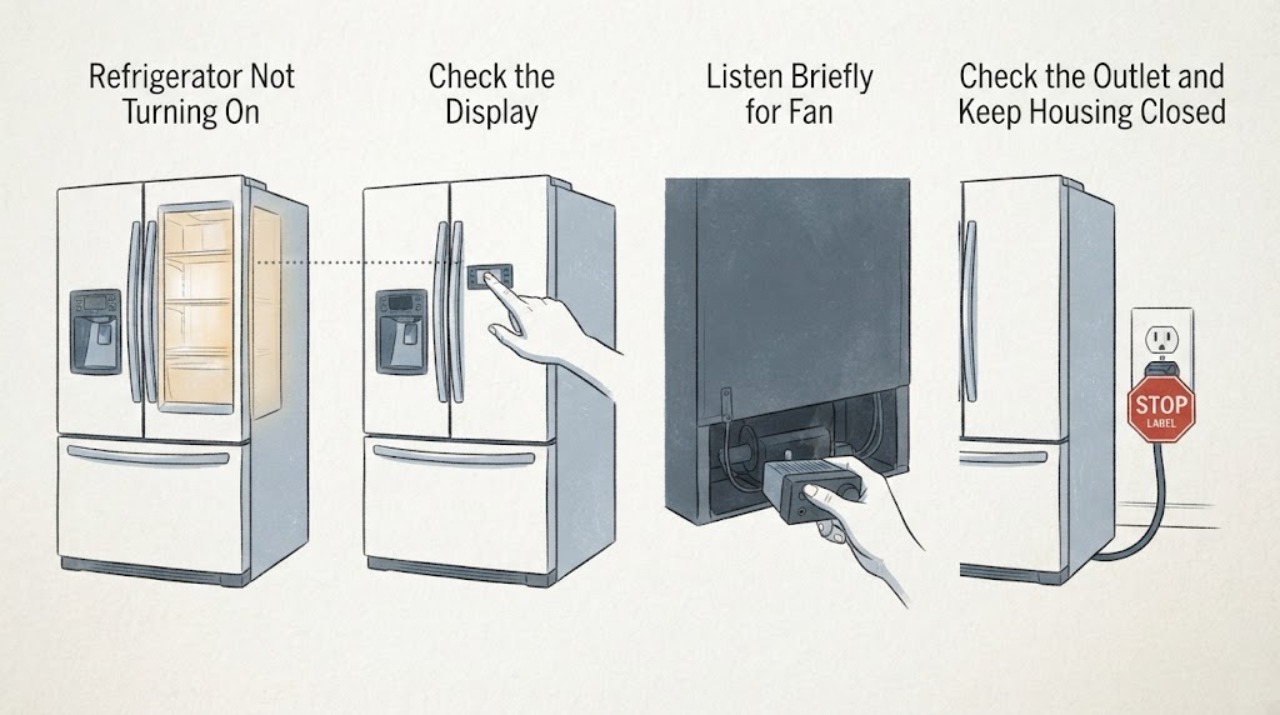
“Not turning on” first requires a power classification. Wake the display, check the interior light and cooling sound, then check the plug, outlet, and breaker from a dry safe position. A dark display with a working light is not the same as a completely dark refrigerator. If a live outlet still produces no response, arrange Monogram service.
Before you begin
Safety first
- Do not bypass breakers, use adapters, remove covers, or probe the appliance's power circuitry.
Work through in order
Diagnostic checks
Use only checks that match the exact appliance or system and its official guide.
-
Check 1
Open and close the door, then press one normal control to wake the display without changing the setpoint.
Expected result: The display wakes, remains dark while the interior light works, or remains dark with no light.
Next step: Record the state and continue to the outlet check without removing trim.
Why this matters
Why: A waking display suggests sleep behavior; light with no display indicates a panel/control symptom; no light and no display makes incoming power more likely.
-
Check 2
With the doors closed, listen briefly for fan or compressor operation and check whether food temperatures are normal or rising.
Expected result: The refrigerator is cooling, operating sounds are present, or it is silent and warming.
Next step: If warm and silent, proceed only with external supply checks and plan service if power is available.
Why this matters
Why: Cooling or sound proves the appliance has power even if the panel is dark; silence with warming supports a true start/power symptom.
-
Check 3
Inspect the plug and outlet for visible damage or heat and test the outlet with a safe known-working device; check the breaker label once if it has tripped.
Expected result: The outlet is dead, the supply is damaged, the breaker trips again, or the outlet works.
Next step: Use an electrician for supply faults and Monogram service for a nonresponsive appliance at a live outlet.
Why this matters
Why: Dead or damaged household supply needs electrical attention; a repeated trip must not be defeated; a live outlet with a dark appliance points inside the refrigerator.
-
Check 4
Confirm the door closes and the cord is not under tension or pinched, then record the model number and any recent move, cleaning, or outage.
Expected result: The cord or door condition is abnormal, or the installation looks normal but the symptom persists.
Next step: Correct only a plainly accessible obstruction and request service for an unresolved no-power symptom.
Why this matters
Why: A disturbed connection or door condition can create an apparent shutdown; persistent failure after external checks is not identified by guessing at a part.
Use your observations
Decision map
Find the observation that best matches what you see, then follow the next safe action.
-
PATH 01Next step
What you see
The display is dark but the light or cooling works
Do this next
Use the model manual for panel behavior and arrange service if the controls remain unresponsive.
Why this path and its safety boundary
Why it matters: The refrigerator is powered; a display, control, or sleep-state issue is more likely.
-
PATH 02Next step
What you see
The display and interior light are both dark and the outlet is dead
Do this next
Have the outlet or breaker system checked by a qualified person; do not modify the appliance cord.
Why this path and its safety boundary
Why it matters: The household supply is the first fault boundary.
-
PATH 03Next step
What you see
The outlet is live but the refrigerator is dark and warming
Do this next
Keep the unit closed to protect food and arrange Monogram service.
Why this path and its safety boundary
Why it matters: An appliance-side power or control fault remains likely.
Helpful context
Understand the symptom
Use the light to separate display sleep from no power
The panel can be dark while the cabinet still has power. Checking the interior light and temperature before touching the breaker prevents treating a normal display state as an appliance power failure.
When checks do not resolve it
Need a professional?
Call for service when a live outlet supplies no refrigerator response, a breaker trips again, the appliance is dark and warming, or the display remains unresponsive while the unit has power.
Safety scope: Do not bypass breakers, use adapters, remove covers, or probe the appliance's power circuitry.
Have this ready
- Provide the model number, display/light state, temperature, outlet test, breaker history, and recent outage or move.
Common questions
FAQ
How can I tell whether a dark display means the refrigerator is off?
Check the interior light, cooling temperature, and operating sound. If any remain normal, the panel may be asleep or have a control issue rather than a total power loss.
What should I do if the breaker trips again?
Stop resetting it and arrange qualified electrical or appliance service. Repeated trips should not be bypassed.
Read the exact guide
Official sources
- Refrigerator - Not Cooling EnoughGE Appliances · Refrigerators with comparable controls and cooling layout
- Refrigerator - Door Will Not CloseGE Appliances · Refrigerator and freezer doors
- Refrigerator - Unusual NoisesGE Appliances · Refrigerators with compressor and fan systems
- Monogram Site MapMonogram · Monogram appliances; exact manual and feature set are model-specific
- Refrigerator - Electrical Requirements and Breaker SizeGE Appliances · Refrigerators and compact refrigeration appliances
- GE Appliance - Resetting Your Circuit BreakerGE Appliances · Household appliance circuits
Community feedback
Share a repair observation
Share a plain-text repair observation. Accepted observations are published automatically; this page may take a moment to update.