
On this page
Start here
Quick answer
On the Sharp R-25JT heavy-duty commercial microwave, the opened Sharp operation manual identifies EE 0 as a fan lock error and says to call for service. Treat a flashing EE 0 as a service condition, not as permission to open the cabinet or keep cooking. From a safe external position, record the exact model and display, disconnect power if there is a hazard, and check only for obvious blockage around the rear air intake/ventilation openings and for a damaged cord, plug, door, or cabinet. Do not insert tools, bypass the door interlock, remove the fan cover, measure live voltage, or run repeated heating tests. A qualified commercial-microwave technician must diagnose the fan-lock circuit, airflow, and any high-voltage or RF-related cause.
Before you begin
Safety first
- Do not remove the cabinet, access the high-voltage capacitor or magnetron, touch RF/waveguide parts, bypass door interlocks, spin or wire the fan, alter the voltage selector, probe live circuits, or run repeated heating tests. Commercial microwave service requires qualified personnel and model-specific procedures.
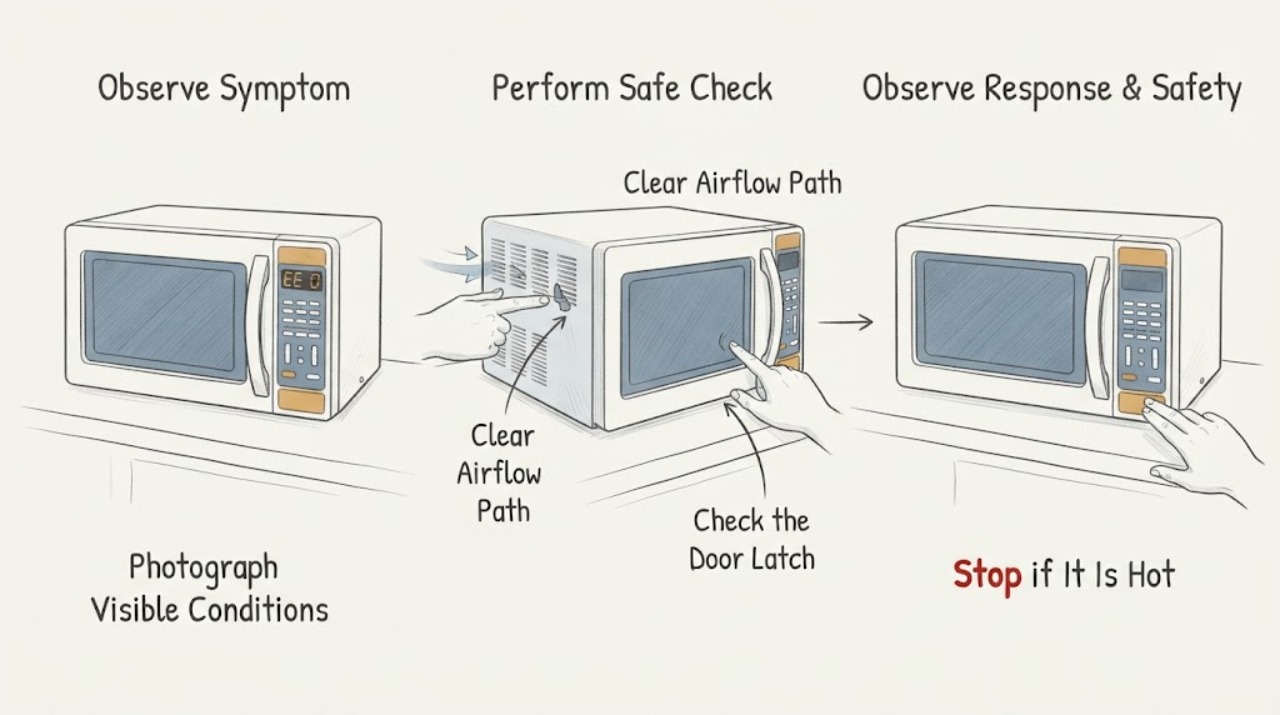
Work through in order
Diagnostic checks
Use only checks that match the exact appliance or system and its official guide.
-
Check 1
From outside the appliance, photograph the rating label and display. Record the exact model as R-25JT, whether the display reads EE 0 with a space or EE0, whether it is flashing, when it appeared, whether the oven was idle or operating, and whether any other indicator is present.
Expected result: EE 0 repeats or flashes, the display is different from EE 0, or the model/suffix cannot be confirmed.
Next step: Keep the record and provide it to Sharp-authorized or qualified commercial-microwave service. If the model is not truly R-25JT, stop using this code interpretation until the exact manual is identified.
Stop if: Do not enter a hidden diagnostic mode, clear the code repeatedly, or substitute a different Sharp model's code table.
Why this matters
Why: Sharp's manual defines EE 0 for the R-25JT platform as fan lock error and says a flashing EE indication requires a servicer. A different display or uncertain model cannot be safely mapped to this code.
-
Check 2
With the oven powered off and unplugged or isolated by a qualified person, inspect only the outside rear and side areas for cardboard, grease buildup, stored items, wall contact, or other obvious blockage at the air-intake and ventilation openings. Do not remove the filter, cover, or cabinet panel unless the exact manual explicitly identifies it as an owner-cleanable part.
Expected result: An obvious external obstruction is present, the oven is tightly against a wall or heat source, or the openings look clear.
Next step: Remove only loose objects that are safely reachable without tools and restore the manual's clearance. If EE 0 remains or the opening is not safely accessible, leave the oven out of service and arrange commercial service.
Stop if: Do not reach into openings, spin a fan by hand, insert a brush or probe, spray cleaner into vents, or remove a grille or fan cover.
Why this matters
Why: The manual requires rear ventilation clearance for cooling and airflow, while EE 0 itself remains a fan-lock service code. Clearing an external obstruction can remove a contributing condition but cannot certify the fan, lock feedback, wiring, or controller.
-
Check 3
Inspect the appliance from a dry standing position for a damaged cord or plug, scorch marks, melted plastic, hot wiring, unusual heat, smoke, burning odor, sparking, damaged door latches, or a cabinet that was dropped or struck. Do not open the door repeatedly to reproduce the error and do not touch a hot cabinet.
Expected result: Any electrical, thermal, smoke, fire, door, or impact damage is visible, or the cabinet and cord appear intact.
Next step: If any hazard is present, keep people clear, isolate power only from a safe accessible point, and obtain qualified commercial appliance/electrical help. If there is no visible hazard, keep the oven disconnected until the EE 0 service path is resolved.
Stop if: Do not tape a damaged cord, bypass a latch, operate with smoke/odor/sparking, or attempt a cabinet repair.
Why this matters
Why: Sharp instructs operators not to use the oven if it is damaged, not working properly, or dropped, and says it should be serviced only by qualified personnel. A hazard overrides any attempt to interpret EE 0 as a simple airflow obstruction.
-
Check 4
Check the installation context without moving the oven: confirm it is on the intended dedicated grounded supply and that the rear ventilation area is not obstructed by another appliance, wall, steam source, or stacked unit. Do not alter the voltage selector or wiring yourself.
Expected result: The supply/installation label is unknown, the oven is on an incompatible-looking receptacle or shared extension, or the commercial installation matches the manual's general arrangement.
Next step: Have a qualified electrician or commercial appliance technician verify the supply and installation if anything is uncertain. Do not attempt the manual's voltage-selection procedure as a user repair for EE 0.
Stop if: Do not use an adapter or extension to force compatibility, open the receptacle box, change wiring, or measure line voltage yourself.
Why this matters
Why: Sharp specifies a dedicated grounded supply for this commercial family and identifies the R-25JT as a 208/230 V, 20 A appliance. Incorrect supply or installation may create a separate electrical or thermal fault; it does not prove the fan-lock cause.
-
Check 5
Create a service handoff record instead of running a confirmation cook: include the model/serial, display photo, whether EE 0 flashed, time since startup, recent relocation or cleaning, ambient heat/steam exposure, visible vent condition, supply information, and any food that was in the cavity. Keep the oven out of service while the code is present.
Expected result: The code clears without operation, returns immediately, appears only after several minutes, or is accompanied by a fan/noise/heat change.
Next step: Give the record to Sharp-authorized or qualified commercial-microwave service and ask them to verify the fan-lock circuit, airflow, thermal protection, interlocks, and microwave-generation safety before returning the oven to use.
Stop if: Do not run a water-cup test, heat an empty cavity, repeatedly press Stop/Clear, or reopen the cabinet to watch the fan.
Why this matters
Why: The timing and external conditions can help the technician distinguish a fan-lock indication from an airflow, temperature, control, or service-history issue, but no timing pattern authorizes a user to expose the high-voltage or RF system.
Use your observations
Decision map
Find the observation that best matches what you see, then follow the next safe action.
-
PATH 01Next step
What you see
The model is confirmed as R-25JT and EE 0 is flashing or returns after power is restored, even though the visible rear openings are clear.
Do this next
Leave the commercial microwave out of service and call Sharp-authorized or qualified commercial-microwave service. Do not perform a heating test or open the cabinet.
Why this path and its safety boundary
Why it matters: This is the exact manual's fan-lock service path. A clear opening does not rule out a locked fan, feedback, wiring, thermal, or control fault.
-
PATH 02Next step
What you see
A loose external object or installation obstruction is found, EE 0 does not return while the oven remains unpowered, and there is no damage or heat hazard.
Do this next
Remove only the loose obstruction, restore the documented clearance, and have a qualified provider confirm safe operation before the oven is put back into commercial use.
Why this path and its safety boundary
Why it matters: The obstruction may have contributed to airflow, but Sharp still defines EE 0 as a fan-lock error and does not certify operation merely because the outside was cleared.
-
PATH 03Next step
What you see
The display is not exactly EE 0, the model is R-25JTF or another Sharp platform, or the code is being inferred from a label/photo rather than read from the display.
Do this next
Stop and obtain the rating label, exact display transcription, and matching operation manual before any interpretation; use qualified service if the unit is already showing a fault.
Why this path and its safety boundary
Why it matters: The R-25JT EE 0 interpretation cannot be transferred to an unconfirmed model or display. Similar EE codes can represent different voltage, thermistor, temperature, or circuit conditions.
-
PATH 04Next step
What you see
There is smoke, fire, burning odor, sparking, hot wiring, damaged cord/plug/door, repeated electrical protection, or any need to remove the cabinet.
Do this next
Stop use, keep clear, isolate power only if safe, call emergency help for an active fire or immediate danger, and arrange qualified commercial-microwave/electrical service.
Why this path and its safety boundary
Why it matters: The case is an immediate electrical, fire, RF, or mechanical safety boundary. EE 0 does not make continued operation or user diagnosis acceptable.
Helpful context
Understand the symptom
EE 0 is not a generic Sharp home-microwave message. The opened R-25JT operation manual covers the R-25JT commercial platform and names EE 0 as a fan lock error, with the required action to call for service. The code does not tell an operator which fan, sensor, connector, or control is defective, and the manual does not authorize cabinet access for an owner.
Because the R-25JT is a heavy-duty commercial oven using a 208/230 V, 20 A supply, a code that involves fan operation can overlap with cooling, temperature, control, and microwave-generation safety. The useful decision is therefore to document the code and inspect only visible airflow and damage, then hand the unit to a qualified commercial-microwave service provider.
When checks do not resolve it
Need a professional?
Arrange service whenever EE 0 flashes or returns, the external ventilation check does not resolve the code, the model/display is uncertain, or there is any smoke, burning odor, sparking, abnormal heat, damaged cord/plug/door, repeated trip, or cabinet-access requirement.
Safety scope: Do not remove the cabinet, access the high-voltage capacitor or magnetron, touch RF/waveguide parts, bypass door interlocks, spin or wire the fan, alter the voltage selector, probe live circuits, or run repeated heating tests. Commercial microwave service requires qualified personnel and model-specific procedures.
Have this ready
- Provide the exact R-25JT model and serial, display photographs, whether EE 0 was flashing, the time and operating state when it appeared, recent moves or cleaning, external vent/clearance observations, supply and receptacle information, and every hazard or unusual sound/heat observation.
Common questions
FAQ
What does EE 0 mean on a Sharp R-25JT?
Sharp's R-25JT operation manual identifies EE 0 as a fan lock error and directs the operator to call for service. It does not identify a user-replaceable fan or authorize cabinet access.
Can I clear EE 0 and keep using the commercial microwave?
Do not repeatedly clear or test it. The manual's action for EE 0 is service, and any flashing EE indication is a reason to call a servicer.
Can I remove the fan cover or test the fan by hand?
No. Keep the cabinet closed, do not insert tools or reach through ventilation openings, and have a qualified commercial-microwave technician inspect the fan-lock system.
Is the R-25JT a household countertop microwave?
No. Sharp's documentation identifies it within a heavy-duty commercial microwave family with a 208/230 V, 20 A electrical requirement. Use commercial service procedures and personnel.
Read the exact guide
Official sources
- Commercial Appliances - Heavy-Duty Microwave OvensSharp Electronics Corporation · Official Sharp commercial brochure opened to confirm the heavy-duty commercial context and electrical specification; it is not used to expand EE 0 into a component diagnosis.
- R-22GV | R-22GT | R-23GT | R-24GT | R-25JT Operation ManualSharp Electronics Corporation · Exact Sharp commercial operation manual opened for the R-25JT model, EE 0 meaning, service instruction, commercial supply, ventilation, and safety boundaries.
Community feedback
Share a repair observation
Share a plain-text repair observation. Accepted observations are published automatically; this page may take a moment to update.