
On this page
Start here
Quick answer
If your Sharp microwave is not working, first separate a blank display from a control-panel, door, or heating symptom. Check that the power cord is securely connected and that the household fuse or breaker has not tripped, then clear the program, set a cooking time, and close the door firmly. Sharp's user manual says the oven will not start until the door is completely closed or the program is reset; Sharp's general FAQ also recommends unplugging the microwave for 30 seconds before reconnecting it. If the display stays blank, a breaker trips again, the oven runs but does not heat, or there is sparking, smoke, burning odor, or door damage, stop using it and arrange Sharp-authorized service. Do not open the cabinet or tamper with the door interlocks.
Before you begin
Safety first
- Do not open the microwave cabinet, touch internal wiring or high-voltage parts, bypass or tamper with door interlocks, or attempt an internal fuse, magnetron, or door-switch repair. Stop immediately for smoke, burning odor, sparks that are not explained by removable metal or foil, abnormal heat, a damaged cord, a damaged door, damaged seals, or a repeatedly tripping breaker.
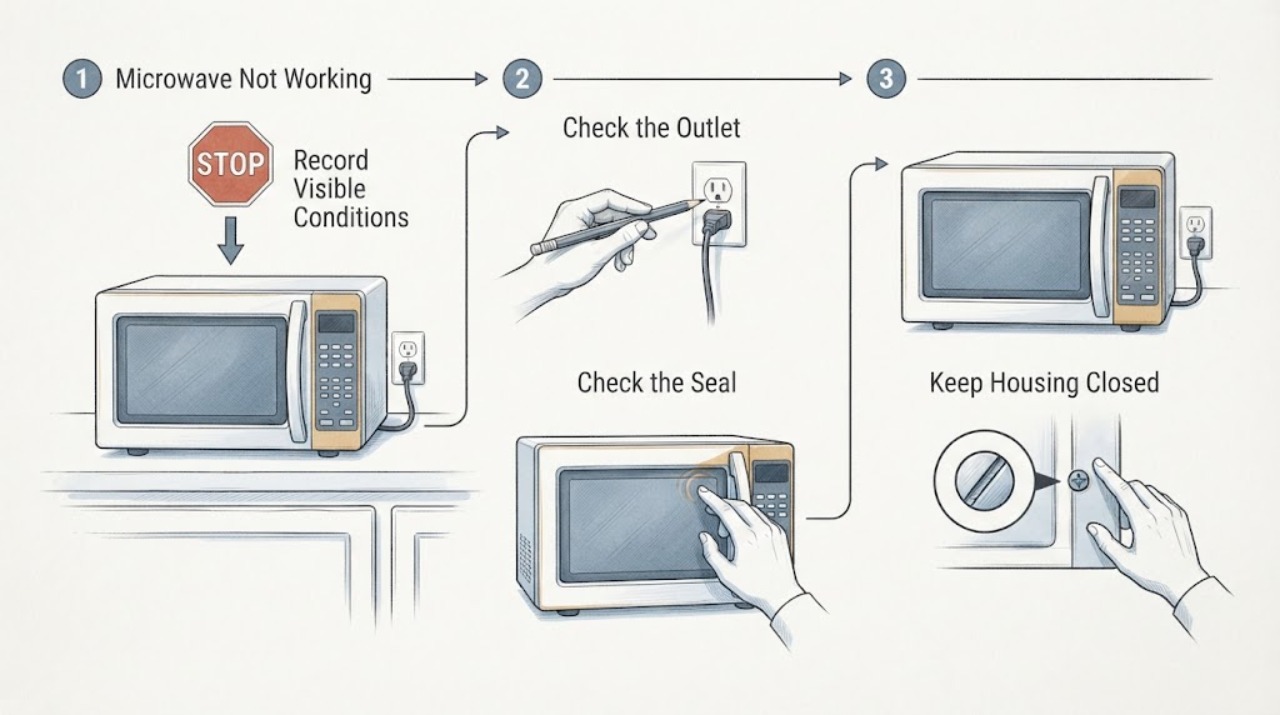
Work through in order
Diagnostic checks
Use only checks that match the exact appliance or system and its official guide.
-
Check 1
Identify the symptom before changing anything. Note whether the display is blank, the display and keypad work but Start does nothing, the oven sounds like it is running without heating, or the oven stopped with sparks, smoke, or an unusual odor. Record the model number from the label inside the door frame or on the back so the exact manual can be used.
Expected result: The display is blank; the display works but the cycle will not start; the cycle starts but food does not heat; or there is a safety symptom such as sparking, smoke, burning odor, or visible door damage.
Next step: Follow the matching power, control, or safety check below and keep the model number for the model-specific manual or service request.
Why this matters
Why: A blank display first points to the incoming power path or an internal power fault. A Start failure with a live display makes the door, program, lock, or controls more relevant. A running but cold oven may need service for an internal heating or door-switch fault. Sparks, smoke, odor, or damaged door parts move the problem to the safety stop boundary.
-
Check 2
Without opening the microwave, inspect the plug and cord from a safe, dry position and confirm the plug is seated securely in its intended outlet. Check the household fuse or circuit breaker for that circuit. Do not keep resetting a breaker that trips again, and do not use a damaged cord or plug.
Expected result: The plug was loose, the display returns after the connection or breaker is restored, the breaker trips again, or the display remains blank with the household supply apparently available.
Next step: If the breaker trips again, the cord or plug is damaged, or the display stays blank, stop using the microwave and arrange qualified electrical or Sharp service. If power is restored, continue with the control and door checks rather than opening the cabinet.
Why this matters
Why: A loose connection or tripped household protection can remove power from the microwave. A breaker that trips again or a persistently blank display leaves an electrical or internal appliance fault possible; the user-level check does not identify which internal part failed.
-
Check 3
For a microwave with a live display, press STOP/CLEAR to remove a held program, set a valid cooking time using the exact model's controls, and close the door firmly. With the unit disconnected only if cleaning an obstruction, inspect the accessible area between the front frame and the door seal for food residue or an object that prevents full closure. Do not force, bend, or disassemble the door.
Expected result: The oven starts after the program is cleared and the door is closed; the door does not latch or sits crooked; an obstruction is present; or the display shows a lock or other model-specific indicator.
Next step: Remove only accessible residue or an obstruction, close the door normally, and try one ordinary cycle with food inside. If the door, hinges, hooks, seals, or lock remain abnormal, stop and request service rather than defeating an interlock.
Why this matters
Why: A retained program, missing cooking time, incomplete closure, or an obstruction can prevent a cycle from starting. A door that will not close or a lock indicator that is not covered by the general check requires the exact model instructions; it does not prove that an internal switch is safe to replace.
-
Check 4
If the controls are unresponsive but the cord, household supply, and door appear normal, unplug the microwave for 30 seconds and reconnect it from a safe, dry position, following the exact model manual if it specifies a different reset. Observe the display before trying one normal cycle with food inside; never run the oven empty as a test.
Expected result: The display and controls return after the 30-second reset, the same fault returns immediately, or the display remains blank.
Next step: Use the microwave only if it completes a normal supervised cycle without abnormal heat, odor, or noise. If the fault returns or the display remains blank, stop repeated resets and contact Sharp support with the exact model and observed symptom.
Why this matters
Why: A successful reset is consistent with a temporary control or power state, but it does not prove that an internal fault is repaired. A repeated failure or blank display after reconnection needs model-specific service diagnosis.
-
Check 5
If the oven starts but does not heat, or if it sparks, stop the cycle and disconnect power only from a safe location. After it is cool and disconnected, record whether metal cookware, foil, a damaged waveguide cover, or door and seal damage was visible without removing parts. Do not run another cycle to confirm a heating failure and do not open the cabinet.
Expected result: The oven has no heat despite normal operation sounds, sparks occurred, metal or foil touched the cavity, the waveguide cover appears damaged, or the door, hinges, hooks, or seals are damaged.
Next step: Leave the microwave out of service and arrange Sharp-certified or otherwise qualified appliance service. Provide the model, whether the display and fan worked, whether heat was absent or sparking occurred, and what was observed after power was disconnected.
Why this matters
Why: Sharp identifies a possible blown fuse, magnetron, or door-switch issue when an over-the-range microwave is not heating, and its manual separately directs users to check metal or foil for cavity sparking. These observations do not identify a replaceable part and damaged door or internal cover parts create a safety boundary.
Use your observations
Decision map
Find the observation that best matches what you see, then follow the next safe action.
-
PATH 01Next step
What you see
The display remains blank after the plug is secure, the household fuse or breaker is checked, and one 30-second unplug reset is completed.
Do this next
Stop using the microwave and request qualified Sharp service. Do not remove the cabinet or measure exposed circuits.
Why this path and its safety boundary
Why it matters: The user-level power checks did not restore the control display, so an internal power or control fault remains possible; the symptom does not identify an internal fuse or other part.
-
PATH 02Next step
What you see
The display works, but Start does nothing until the program is cleared or the door is closed firmly; there is no visible door damage.
Do this next
Clear the program, set the time, remove only accessible residue, and try one normal cycle. If the door does not latch or the same failure returns, use the exact model manual and arrange service.
Why this path and its safety boundary
Why it matters: A held program, missing cooking time, incomplete closure, or an accessible obstruction is more likely than a proven internal component failure.
-
PATH 03Next step
What you see
The oven starts and sounds normal, but food stays cold after the power, program, and door checks.
Do this next
Stop further testing and arrange Sharp-certified service. Do not order or replace a magnetron, fuse, or door switch from the symptom alone.
Why this path and its safety boundary
Why it matters: Sharp's FAQ lists an internal fuse, magnetron, or door-switch issue as possible causes for a no-heating symptom; user checks cannot distinguish these safely.
-
PATH 04Next step
What you see
Sparking, smoke, burning odor, abnormal heat, damaged cord, damaged door or seal, or a breaker that trips again is present.
Do this next
Stop the cycle, disconnect power only if it can be done safely, keep the microwave out of service, and contact qualified appliance service. Never bypass an interlock or continue testing.
Why this path and its safety boundary
Why it matters: This is a safety stop condition and may involve fire, electrical, microwave-emission, or internal component risk.
-
PATH 05Next step
What you see
The display returns after the reset and the microwave completes one ordinary supervised cycle with food inside without abnormal heat, odor, noise, or sparking.
Do this next
Continue to use the exact model instructions and stop if the symptom returns. Record the model and timing of any repeat failure for Sharp support.
Why this path and its safety boundary
Why it matters: A temporary power or control state may have cleared, but a repeat failure would still need model-specific diagnosis.
Helpful context
Understand the symptom
Not working can mean different things: the display is completely blank, the display works but Start does nothing, the oven runs without heating, or the oven stops with sparks or an odor. These patterns point to different checks. Sharp sells countertop, over-the-counter, over-the-range, drawer, and other microwave designs, so use the manual for the exact model for any lock, keypad, installation, or error-code procedure.
Keep the work at the user level. A microwave contains hazardous high-voltage parts even after it is unplugged. Never remove the cabinet, bypass a door interlock, test exposed wiring, or replace an internal fuse yourself. Sharp's manual says adjustment and repair should be done only by a competent service technician.
When checks do not resolve it
Need a professional?
Arrange Sharp-authorized or qualified appliance service when the display stays blank after the safe power checks, the Start failure persists with a correctly closed door, the oven runs without heating, an error or lock state remains unexplained by the exact model manual, or any safety symptom appears.
Safety scope: Do not open the microwave cabinet, touch internal wiring or high-voltage parts, bypass or tamper with door interlocks, or attempt an internal fuse, magnetron, or door-switch repair. Stop immediately for smoke, burning odor, sparks that are not explained by removable metal or foil, abnormal heat, a damaged cord, a damaged door, damaged seals, or a repeatedly tripping breaker.
Have this ready
- Provide the exact model number and region, installation type if known, whether the display and interior light work, what happens when Start is pressed, whether the fan or turntable runs, any error or lock indicator, the result of the power and door checks, and whether sparks, odor, smoke, or abnormal heat occurred.
Common questions
FAQ
Why is my Sharp microwave completely blank?
Start by checking that the power cord is securely connected and that the household fuse or breaker has not tripped. Sharp's general FAQ suggests unplugging the microwave for 30 seconds and reconnecting it. If the display stays blank or the breaker trips again, stop using the unit and arrange qualified service; a blank display does not identify a user-replaceable part.
Why does my Sharp microwave have power but not start?
Clear any held program, set a cooking time, and close the door firmly. Sharp's manual says the oven will not start until the door is completely closed or the program is reset, and it recommends checking the area between the door and seal for an obstruction. If the door will not latch or the same problem returns, use the exact model manual and request service.
Can I reset a Sharp microwave that is not working?
Sharp's general microwave FAQ recommends unplugging the unit for 30 seconds and plugging it back in. Follow the exact model manual if it specifies another reset, and never use an empty cavity as a test. A reset that does not restore normal operation is a service result, not permission to open the cabinet.
What should I do if the Sharp microwave runs but does not heat?
Stop further testing and unplug the unit from a safe location. Sharp's FAQ lists an internal fuse, magnetron, or door-switch issue as possible causes and directs owners to a Sharp-certified technician. Do not remove the cabinet or order one of those parts from the symptom alone.
Read the exact guide
Official sources
- Microwave FAQs | SHARP Microwave Frequently Asked QuestionsSharp Home Electronics Company of America · Sharp microwave FAQ guidance across over-the-range, over-the-counter, and countertop categories
- SHARP Microwave Oven Operation ManualSharp Electronics Corporation · Sharp SMC1139FS user-level no-work checklist, door-start behavior, reset and microwave safety boundaries
- Sharp Consumer Product SupportSharp Consumer · Sharp microwave product support and model-specific manuals
- Contact Us | Sharp Product SupportSharp Electronics Corporation · Sharp product technical support and authorized service routing
Community feedback
Share a repair observation
Share a plain-text repair observation. Accepted observations are published automatically; this page may take a moment to update.