
On this page
Start here
Quick answer
First identify which function failed. If the display and cavity light are both off, check the breaker and the dedicated non-GFCI circuit only from a safe, dry position; Frigidaire says a recent surge or outage can trip the breaker, while an unresolved supply problem may require an electrician. If the display works but Start does nothing, confirm the door is fully closed and the exact model's normal controls or lock state are satisfied; never bypass the door interlock. If the oven runs but food stays cold, stop using it for heating and arrange service rather than opening the high-voltage section. If the turntable does not move, unplug first and reseat only the removable tray and support as the cleaning guide permits; a persistent motion fault needs service. An over-the-range vent fan may have model-specific automatic or manual behavior, so do not treat fan operation alone as proof that microwave heating works. For sparks, stop immediately, unplug or isolate power safely, remove only loose food residue after the unit is cool, and do not run another test until a technician evaluates it. The waveguide cover, capacitor, magnetron, inverter, wiring, and internal fuses are not DIY repair points.
Before you begin
Safety first
- This article covers safe supply observation, normal controls and door closure, model-authorized function selection, unplugged cleaning, and removable tray/support seating. Qualified microwave service or an electrician must handle the cabinet, interlock, high-voltage system, internal fuses, motors, fan wiring, controls, and live diagnosis.
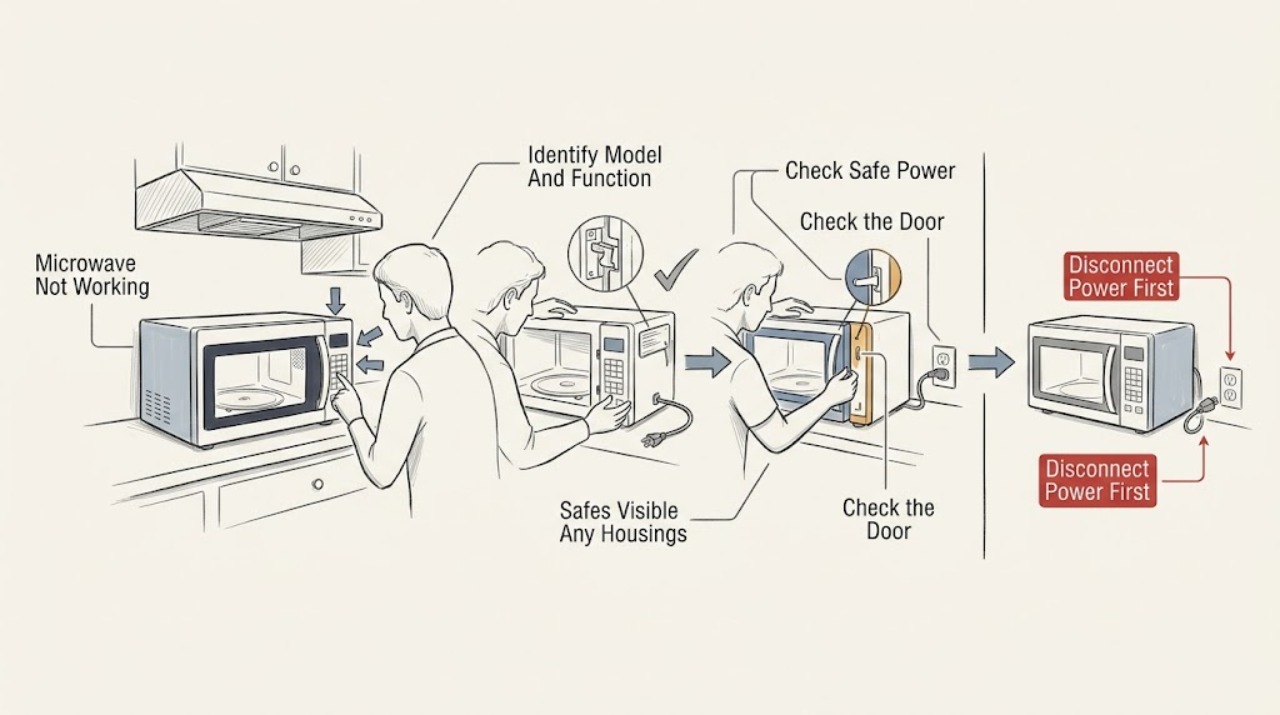
Work through in order
Diagnostic checks
Use only checks that match the exact appliance or system and its official guide.
-
Check 1
Read the exact model and serial label and define the failure by function: no display/light, display on but no start, cycle runs without heating, turntable does not rotate, over-the-range fan does not behave as expected, or sparks/smokes. Note whether the microwave is countertop, built-in, over-the-range, or a combination model. Do not use another model's button sequence or internal parts list.
Expected result: The panel is dark, the controls respond but the cycle will not begin, the timer runs with cold food, the tray or fan is stationary, or there is visible arcing/smoke.
Next step: Use the matching branch and the exact owner's manual. Stop immediately for sparks, smoke, burning odor, abnormal heat, or electrical damage.
Stop if: Do not open the cabinet or use a tool to defeat a door switch or expose internal components.
Why this matters
Why: The symptom determines whether to check supply, normal start conditions, heating, a removable tray, a model-specific fan function, or immediate safety escalation. A fan or light can work while the heating system has failed, and a display can work without proving that the high-voltage system is safe.
-
Check 2
For a dark panel or no apparent operation, check from a safe, dry position whether the display or cavity light works, whether the plug is seated if it is safely reachable, and whether a recent outage or surge opened the breaker. Follow the home's normal breaker procedure once. Frigidaire advises a dedicated non-GFCI circuit for its microwaves; do not add an extension cord, adapter, or another appliance to the circuit while diagnosing.
Expected result: The display/light is dead, the breaker is open, the circuit is GFCI-protected or overloaded, the microwave recovers after one safe breaker reset, or power appears normal but the panel remains dead.
Next step: If the breaker resets and stays on with normal operation, monitor without repeated cycling. If it trips again, the cord/outlet is hot or damaged, or the unit remains dead, leave it disconnected and call an electrician or qualified microwave service.
Stop if: Do not remove the plug end, open the junction area, replace an internal fuse, or test voltage at the appliance.
Why this matters
Why: A dark display/light is consistent with a supply or internal power path, and Frigidaire notes that surges can trip the breaker or affect electronic controls. A recurring trip or confirmed safe supply with no display needs qualified diagnosis, not a fuse replacement by the owner.
-
Check 3
If the display is lit but Start does nothing, close the door normally and check for a visible dish or rack obstruction. Confirm the exact model's normal clock, timer, control-lock, demo, or start sequence from its manual, then select a short ordinary cycle and press Start once. Never hold or defeat the door latch or operate with the door open.
Expected result: The door does not close flush, a lock/demo/timer state is shown, the control accepts a command but will not start, or the cycle begins normally.
Next step: Clear only a visible obstruction and restore only the exact documented normal control state. If Start remains ineffective, stop and arrange service.
Stop if: Do not bypass the latch, tape the door closed, enter an undocumented service mode, or repeatedly press Start while the door is misaligned.
Why this matters
Why: A door or documented control state can prevent a microwave from starting without a failed heating component. If the controls respond but no cycle begins after a normal door and model-authorized control check, the keypad, interlock, or control path needs service; it is not safe to bridge the interlock.
-
Check 4
If the timer, light, and possibly fan run but food stays cold, stop treating the microwave as operational. Confirm only that the selected function is a microwave-cooking function rather than a model-specific convection, grill, timer, or demonstration mode. Do not perform a heating test with the enclosure open or attempt to inspect the magnetron, high-voltage capacitor, inverter, transformer, fuse, or waveguide path.
Expected result: The cycle runs with no heat, the model is in a non-microwave or demo function, the result is normal for the selected mode, or the same microwave-cooking function repeatedly leaves food cold.
Next step: Use only the exact model's documented cooking function once if there is no hazard. If it still does not heat, unplug/isolate it and arrange qualified microwave service; do not keep operating it as a heater.
Stop if: Do not open the cabinet, test high-voltage parts, replace an internal fuse, or attempt a magnetron/inverter/capacitor repair.
Why this matters
Why: A running display, light, turntable, or fan does not prove that microwave energy is being generated. A wrong function can explain no heating; persistent cold food in a proper cooking function points to an internal high-voltage or control fault that cannot be diagnosed safely by a user.
-
Check 5
For a stationary turntable, unplug first and let the cavity cool. Remove only the glass tray and its support if your model has those removable parts, clean away food residue, and reseat them exactly as the manual shows. For an over-the-range fan, identify it as a separate ventilation function and use only the model's normal fan control and manual. Do not remove a fan cover or motor.
Expected result: The tray/support was dirty or mis-seated, the tray is stationary while the microwave otherwise heats, the fan runs automatically or by its normal control, or the tray/fan remains inoperative after the safe external check.
Next step: Reseat only the removable tray/support and use the normal fan control. If the motion problem persists, stop using the affected function and arrange service; do not test the motor live.
Stop if: Do not run with a cracked/missing tray, reach into a moving mechanism, remove the waveguide or fan cover, or use a tool to turn a shaft.
Why this matters
Why: Frigidaire says the turntable and support can be removed for cleaning, so a simple seating or residue issue is possible. A persistent turntable or fan failure after that check may involve a motor, coupling, control, or model-specific ventilation path; it does not indicate that the microwave heating system is safe or functional.
-
Check 6
If you see sparks, arcing, smoke, or a flash, stop the cycle immediately and disconnect power only from a safe position. After the unit is cool and isolated, record where the event occurred and whether there was a metal rack, foil, damaged tray, heavy food residue, or a damaged interior/waveguide-cover area. Clean only loose food splatter with a soft damp cloth as Frigidaire directs; never remove the waveguide cover or restart to “see if it happens again.”
Expected result: Sparking stops when the cycle stops, the waveguide cover or cavity is visibly damaged, a metal object or residue was present, or the source cannot be safely identified.
Next step: Leave the microwave disconnected and arrange qualified service for any spark, smoke, damage, or repeat event. Provide the exact model, location, selected function, and photos taken only after isolation and cooling.
Stop if: Do not restart, remove the waveguide cover, open the cabinet, or inspect high-voltage components.
Why this matters
Why: A visible object or residue may explain an isolated event, but repeated or unexplained arcing can damage the cavity or reflect a component fault. The waveguide cover is not a user-removal point, and a stopped spark is not proof that the microwave is safe to operate.
-
Check 7
For any unresolved failure, create a service record with the model/serial, installation type, display/light state, door/start result, selected function, whether the timer ran, heating result, turntable/fan result, error or flashing pattern, breaker history, and any spark, odor, smoke, heat, cord, or water event. Do not order an internal part from the symptom alone.
Expected result: The issue resolved after a safe external correction, or it recurs with normal power and controls or requires the enclosure to be opened.
Next step: Use the microwave only when its normal function is restored and no hazard occurred. Otherwise leave it disconnected and give the service record to Frigidaire or a qualified microwave technician; use an electrician for the house circuit.
Stop if: Stop for any unresolved spark, smoke, burning odor, abnormal heat, damaged cord/outlet, water near electrical parts, or repeated breaker trip.
Why this matters
Why: A repeatable correction supports a normal setup, removable tray, or control-state issue. Recurrence or any need to open the enclosure means the remaining fault could be an interlock, control, motor, high-voltage, or wiring problem that needs a qualified diagnosis.
Use your observations
Decision map
Find the observation that best matches what you see, then follow the next safe action.
-
PATH 01Safety boundary
What you see
The display and cavity light are both off.
Do this next
Check the breaker once from a safe dry position and confirm the circuit is not GFCI-protected or overloaded. Leave the unit disconnected for a repeat trip, damaged cord/outlet, or persistent dead display.
Why this path and its safety boundary
Why it matters: Frigidaire's no-power guidance points to the breaker, recent outage/surge, and circuit arrangement before an appliance-internal diagnosis. A recurring trip or safe supply with a dead panel requires qualified help.
Safety stop: Do not open the cabinet or replace an internal fuse.
-
PATH 02Safety boundary
What you see
The display is lit but a normal microwave cycle will not begin.
Do this next
Close the door normally, clear only visible obstructions, check the exact manual's normal state, and press Start once. Arrange service if it still will not run.
Why this path and its safety boundary
Why it matters: Door closure/latch, a model-specific lock/demo/timer state, or the normal Start sequence is more likely than a no-heat diagnosis. A persistent failure after the external check may involve the keypad, interlock, or control.
Safety stop: Do not bypass the latch or run with the door open.
-
PATH 03Safety boundary
What you see
The timer, light, or fan runs, but food remains cold in a microwave-cooking function.
Do this next
Stop using the heating function and arrange qualified microwave service. Do not open the cabinet or test the capacitor, magnetron, inverter, transformer, or fuse.
Why this path and its safety boundary
Why it matters: The display and motion functions do not prove that microwave energy is present. After excluding an exact-model non-microwave/demo mode, persistent cold food points to a concealed high-voltage or control fault.
Safety stop: Do not perform energized heating tests or continue operating it as though it were heating.
-
PATH 04Safety boundary
What you see
The turntable or an over-the-range ventilation fan does not move as expected.
Do this next
Unplug and reseat only the removable tray/support; use only the exact model's fan control. Arrange service for a persistent problem, and do not assume fan operation means heating works.
Why this path and its safety boundary
Why it matters: A removable tray/support may be dirty or mis-seated, while an over-the-range fan can have model-specific manual or automatic behavior. Persistent motion failure may involve a motor, coupling, control, or ventilation path and does not select a safe part.
Safety stop: Do not remove fan covers, reach into moving parts, or turn a motor shaft with a tool.
-
PATH 05Safety boundary
What you see
The microwave sparks, arcs, smokes, smells burnt, overheats, or shows cavity/waveguide-cover damage.
Do this next
Stop immediately, isolate power safely, and arrange qualified microwave service. After cooling, record the location without removing the waveguide cover or restarting the unit.
Why this path and its safety boundary
Why it matters: This is a stop-use condition. Residue or an unsuitable object can be a visible contributor, but repeated or unexplained arcing can involve the cavity or high-voltage system.
Safety stop: Do not restart, open the cabinet, remove the waveguide cover, or probe any component.
Helpful context
Understand the symptom
A microwave can look alive and still have a different failure
“Not working” is not one diagnosis. A dark display is a power path; a lit display that will not run is usually a normal control or door-start path; a running timer with cold food is a heating path; a nonmoving tray is a motion path; and an over-the-range fan may be a separate ventilation function. Start with the last function that definitely worked and the exact model, because Frigidaire's microwave types and controls are not interchangeable.
High-voltage boundary
Unplug the microwave or switch off its circuit before cleaning or any manufacturer-authorized external maintenance. Never remove the outer cabinet, waveguide cover, control panel, rear cover, or internal shield to inspect a fuse, capacitor, magnetron, inverter, transformer, motor, or wiring. Do not bypass the door interlock, run the oven with the door open, test energized terminals, or keep resetting a breaker. If there is arcing, smoke, a burning smell, abnormal heat, a damaged cord, water near the appliance, or a repeated trip, stop using it and arrange qualified microwave service; use an electrician for a supply-side hazard.
Safety boundary
Stop conditions
- Stop immediately for sparks, arcing, smoke, burning odor, abnormal heat, a damaged cord/outlet, water near electrical parts, or a repeated breaker trip.
- Do not remove the microwave cabinet, waveguide cover, control panel, rear cover, or internal shield, and do not replace an internal fuse.
- Do not bypass the door interlock, run with the door open, perform live electrical tests, or inspect the capacitor, magnetron, inverter, transformer, heater, or wiring.
- Unplug before cleaning; remove only the turntable and support when the model has those removable parts and the cleaning guide permits it.
- Do not order a magnetron, capacitor, inverter, fuse, interlock, motor, fan, control, or other internal part without the exact model and qualified diagnosis.
When checks do not resolve it
Need a professional?
Safety scope: This article covers safe supply observation, normal controls and door closure, model-authorized function selection, unplugged cleaning, and removable tray/support seating. Qualified microwave service or an electrician must handle the cabinet, interlock, high-voltage system, internal fuses, motors, fan wiring, controls, and live diagnosis.
Common questions
FAQ
Why is my Frigidaire microwave completely dead?
Check whether the display and cavity light are both off, then from a safe dry position check the breaker and the microwave's circuit after any outage or surge. Frigidaire recommends a dedicated non-GFCI circuit. If the breaker trips again or the unit stays dead with a safe supply, leave it disconnected and call an electrician or qualified microwave service.
My Frigidaire microwave has power but will not start. What should I check?
Close the door normally, clear only visible obstructions, and check the exact owner's manual for a control lock, timer, demo state, or Start sequence. Never bypass the door interlock. If the display responds but the cycle still will not begin, arrange service for the keypad, interlock, or control path.
Why does my Frigidaire microwave run but not heat?
First confirm that the selected function is a microwave-cooking function rather than a timer, demo, convection, or grill mode where applicable. A running timer, light, turntable, or fan does not prove the high-voltage heating system works. If proper microwave cooking remains cold, stop using it and arrange qualified service; do not open the cabinet.
What can I do if the microwave turntable is not moving?
Unplug the unit and let it cool. If your model has a removable glass tray and support, remove them for cleaning and reseat them as the manual shows. A persistent motion problem may involve a motor, coupling, or control. Do not reach into the mechanism, turn a shaft with a tool, or open the base.
Is it normal for my Frigidaire over-the-range microwave fan to run?
Over-the-range ventilation is separate from microwave heating, and Frigidaire documents model-dependent manual and automatic fan behavior in its fan guidance. Use the exact model control and manual. If the fan behavior is accompanied by smoke, burning odor, abnormal heat, or electrical symptoms, stop using the appliance and arrange service.
What should I do if my Frigidaire microwave sparks?
Stop the cycle immediately and isolate power safely. After the cavity is cool, record the spark location and any loose residue or unsuitable object, but do not remove the waveguide cover or restart the microwave to test it. Any repeat, unexplained spark, smoke, burning odor, or visible damage requires qualified microwave service.
Can I replace the microwave fuse or magnetron myself?
No. The fuse, capacitor, magnetron, inverter, transformer, interlock, and internal wiring are inside the microwave's high-voltage/electrical system. Frigidaire's public cleaning guidance requires unplugging and specifically says never to remove the waveguide cover; internal diagnosis and repair should be handled by qualified service.
Read the exact guide
Official sources
- Microwaves - Do I need a special plate to cook popcorn in my microwave?Frigidaire Owner Support · Official microwave guidance; turntable material and accessories vary by model.
- Microwaves - How do I change the surface light in my microwave?Frigidaire Owner Support · Official surface-light guidance for applicable microwaves; it is used here only for the requirement to isolate power before authorized maintenance.
- Microwaves - No PowerFrigidaire Owner Support · Official Frigidaire support article marked as applying to microwaves; circuit and installation details must still match the actual model and home wiring.
- Microwaves | Frigidaire Owner Center SupportFrigidaire Owner Support · Official microwave support landing page; it shows microwave-specific resources but does not replace the exact model's owner's manual.
- How do I clean my microwave?Frigidaire Owner Support · Official cleaning guidance for microwaves; it does not authorize cabinet opening or heating-system repair.
Community feedback
Share a repair observation
Share a plain-text repair observation. Accepted observations are published automatically; this page may take a moment to update.