
On this page
Start here
Quick answer
Check household power, the door closure, the control lock, and the selected cooking function before assuming an internal failure. If the oven has power but does not heat a cup of water, stop using it and arrange service; do not remove the microwave cabinet.
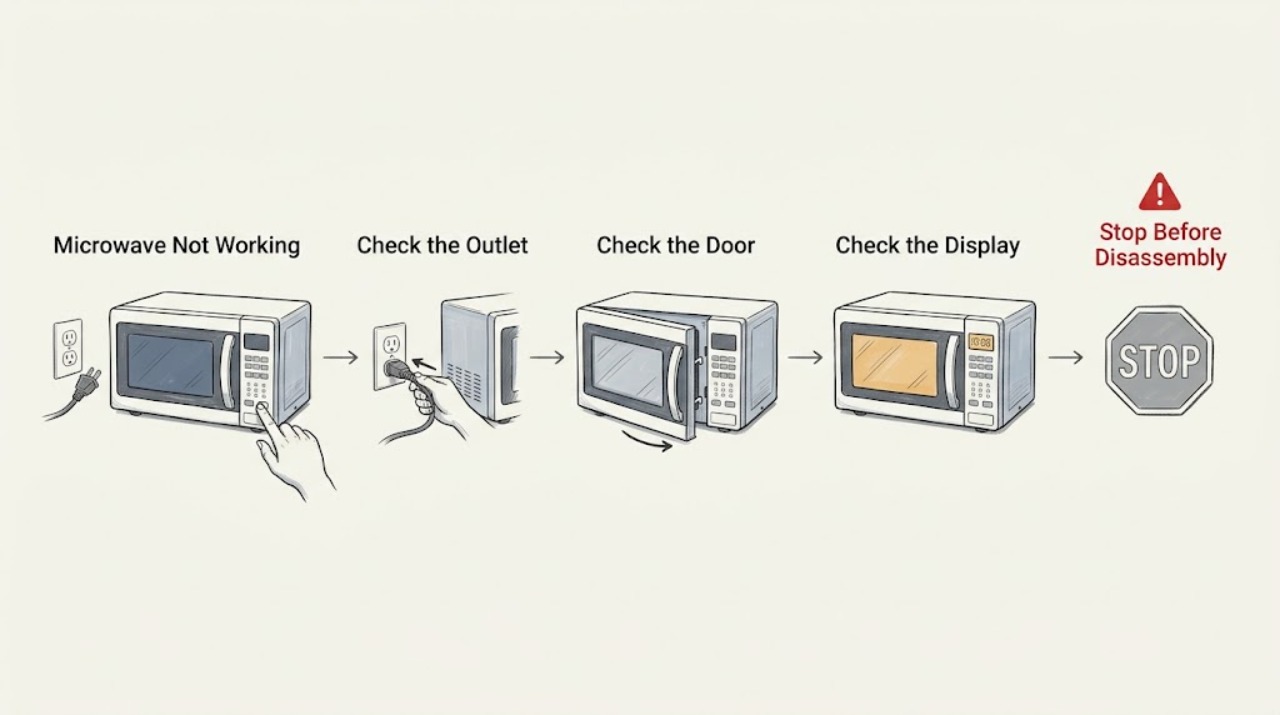
Work through in order
Diagnostic checks
Use only checks that match the exact appliance or system and its official guide.
-
Check 1
Check that the microwave is plugged into its grounded outlet and that the household breaker or fuse has not opened.
Expected result: the display returns or remains dead
Next step: If the breaker trips again, stop and have the circuit checked by a qualified electrician.
Why this matters
Why: A dead display keeps the power supply or control system in question; a live display means continue with operating checks.
-
Check 2
Remove anything obstructing the door and close it firmly, then check whether a door message disappears.
Expected result: the message clears or the oven still will not start
Next step: Do not defeat or bypass the door interlock; request service if clean closure does not restore operation.
Why this matters
Why: A clear message supports a closure issue; a persistent message can indicate an interlock or door-alignment fault.
-
Check 3
Cancel any timer or control-lock setting and select a normal microwave cooking cycle according to the model controls.
Expected result: the cycle starts or only the timer counts down
Next step: If the controls remain unresponsive after the model-specific unlock procedure, arrange service.
Why this matters
Why: A timer or lock can prevent a cooking cycle even though the display works; a countdown without heating needs a heat test.
-
Check 4
Place one cup of cold water in a microwave-safe container and run the manual's two-minute, full-power test.
Expected result: the water heats or stays cold
Next step: Do not repeat tests with an empty cavity and do not remove the cabinet or test high-voltage parts.
Why this matters
Why: Heating confirms the basic cooking function; cold water with a running countdown indicates a fault requiring service.
Use your observations
Decision map
Find the observation that best matches what you see, then follow the next safe action.
-
PATH 01Next step
What you see
The display is dead or the breaker opens again
Do this next
Stop and use a qualified electrician or appliance technician.
-
PATH 02Next step
What you see
The display works and the door closes, but water remains cold
Do this next
Stop operating the microwave and request service.
Helpful context
Understand the symptom
Start with the symptom
Separate no display, no start, and no heat. A timer countdown alone does not prove microwave energy is being produced, and a door-related message should be treated as a closure or interlock symptom.
Only after diagnosis
Potential parts
- door gasket or latch components
Only consider a model-matched door component if inspection shows physical damage and the door does not close correctly.
Microwave door and interlock parts require exact model verification and professional installation when the interlock is involved.
When checks do not resolve it
Need a professional?
Stop immediately for a burning smell, smoke, repeated arcing, damaged cord or door, a breaker that trips again, or a microwave that runs without heating. Never remove the cabinet; call a qualified technician.
Common questions
FAQ
Why does my KitchenAid microwave count down but not heat?
Confirm the timer is not being used instead of a cooking cycle, then perform the manual's water test. If the water stays cold, discontinue use and request service.
Can I repair a microwave door interlock myself?
No. The interlock is a safety system. Inspect only for obvious obstruction or damage and arrange qualified service for a persistent closure or door message.
Read the exact guide
Official sources
- TROUBLESHOOTINGKitchenAid Brand Home Appliances · KitchenAid microwave operating and troubleshooting guidance
Community feedback
Share a repair observation
Share a plain-text repair observation. Accepted observations are published automatically; this page may take a moment to update.