
On this page
Start here
Quick answer
When a GE microwave is not working, first separate a dead display from a lit display that will not start, a unit that shuts down, and a unit that runs without heating. Check the dedicated breaker or fuse and the outlet, then confirm the cord is fully inserted in a grounded three-prong outlet. If the panel is lit, cancel any unfinished or delayed program, set the clock if needed, enter a cooking time, press Start, and close the door firmly without forcing it. GE says a power interruption or overheating shutdown may recover after about 30 minutes, but blocked ventilation can cause a shutdown. If the oven runs but does not heat, or if there is smoke, burning odor, arcing, a damaged door or cord, repeated breaker trips, or water near electrical parts, stop using it. Never open a microwave, bypass door interlocks, or perform live or post-unplug high-voltage tests.
Before you begin
Safety first
- Do not open the cabinet or control console, bypass door interlocks, replace internal fuses, probe high-voltage components, make live measurements, operate an empty or damaged oven, or continue a test after smoke, arcing, burning odor, or repeated breaker trips.
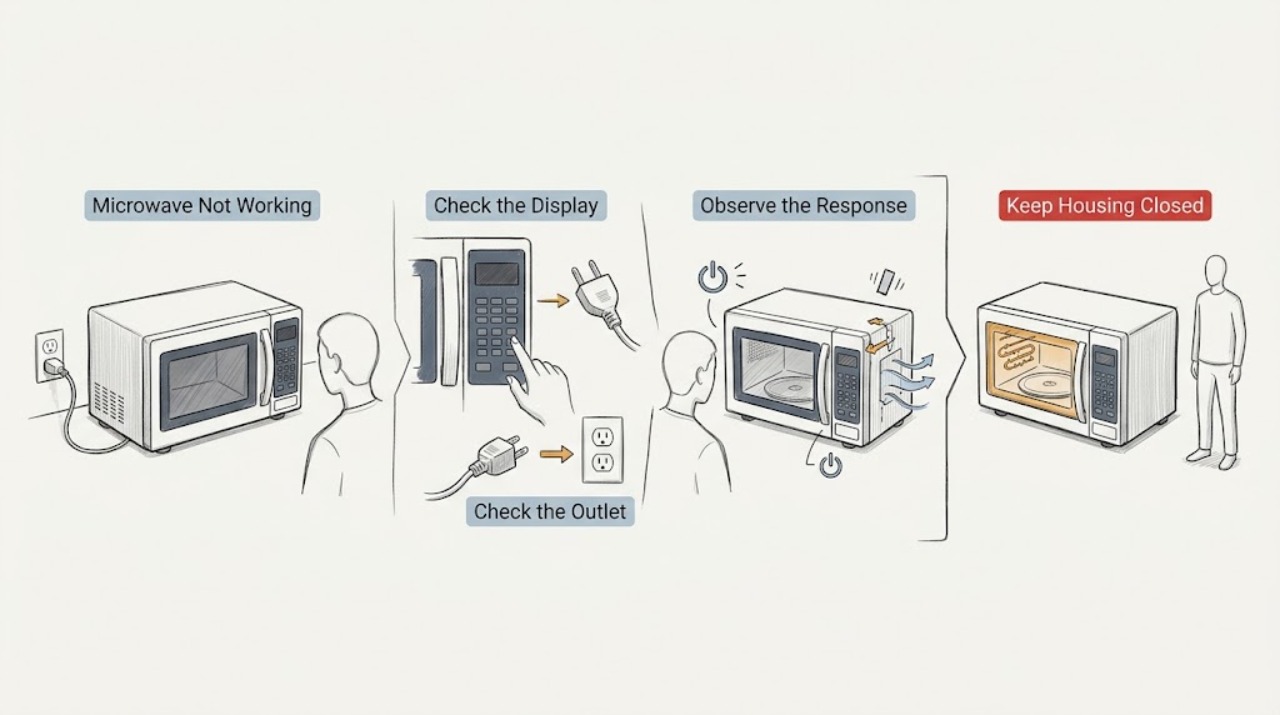
Work through in order
Diagnostic checks
Use only checks that match the exact appliance or system and its official guide.
-
Check 1
Without opening the cabinet, note whether the display and interior light are completely dead, the display is lit and beeps, the oven starts and then stops, or the fan/turntable runs without heating. Record any error text, breaker trip, odor, smoke, spark, water, or door damage.
Expected result: The panel is dark; the panel lights and beeps but Start does not begin cooking; the unit loses power during a cycle; or it runs with cold food.
Next step: Use the matching branch below. If any hazard symptom is present, stop and isolate power only when safe instead of continuing checks.
Stop if: Do not restart a unit with smoke, burning odor, sparks, damaged door/cord, liquid near controls, or repeated breaker trips.
Why this matters
Why: A dark panel points first to household power or a power/overheat condition; a lit panel shifts attention to the programming sequence and door interlock; a running-but-cold condition needs professional microwave service rather than a part guess.
-
Check 2
For a dark or suddenly dead microwave, check the household breaker or fuse serving it. If the breaker is on and the outlet is dry and accessible, test the outlet with a small lamp or night-light; confirm the microwave's three-prong plug is fully inserted in the grounded receptacle. Do not use an extension cord or open the receptacle.
Expected result: The breaker/fuse is tripped or blown; the outlet does not power the lamp; the lamp works but the microwave stays dead; or the breaker trips again when the microwave is used.
Next step: Have a qualified electrician address a dead outlet or recurring breaker issue. If the outlet is live and the microwave remains dead, unplug it and arrange appliance service; do not repeatedly reset or substitute a fuse.
Stop if: Stop immediately for a hot/discolored outlet, damaged plug/cord, smoke, sparks, burning odor, or a breaker that trips again.
Why this matters
Why: No power at the outlet is a house-circuit issue; a live outlet with a dark microwave points to the appliance or its cord. A repeat trip is a fault or overload warning, not a reason to keep resetting.
-
Check 3
If the panel is lit, make sure the clock is set, press Clear/Off to cancel an unfinished selection, enter a short cooking time using the normal controls, and press Start. Check that a delay-start or other programming sequence is not holding the panel, and use the exact model manual for keypad names.
Expected result: The microwave starts after Clear/Off and a new time; the panel beeps but does not accept input; a delayed or incomplete program was present; or the panel remains nonresponsive.
Next step: If the normal sequence works, monitor one ordinary cycle. If the panel remains nonresponsive, use the model-specific manual and arrange service rather than forcing keys or removing the console.
Stop if: Do not spray cleaner into the keypad, remove the control panel, or make electrical measurements.
Why this matters
Why: An incomplete program, delay, unset clock, or accidental Clear/Off can mimic a failed control. A persistent nonresponsive panel after the external reset points to a control or keypad fault that the owner should not diagnose internally.
-
Check 4
Open and close the door normally, checking that no dish, rack, packaging, or residue prevents a full latch. Inspect the visible door, screen, seal area, and hinges for damage or looseness; do not press, bend, or defeat the latch.
Expected result: A dish was touching the door; the door now latches firmly and Start works; the door will not latch; or the door/screen is visibly damaged.
Next step: Remove only a visible loading obstruction, close the door normally, and make one test with a microwave-safe cup of water if no hazard is present. Stop and arrange service for any latch, hinge, screen, seal, or interlock concern.
Stop if: Never operate with a damaged door or screen and never tape, hold, or bypass the interlock.
Why this matters
Why: GE says the door must engage its safety interlocks before microwave energy can enter. A loading obstruction can prevent start, while a loose, damaged, or non-latching door is a safety fault and not an adjustment to bypass.
-
Check 5
If the microwave shut off during a cycle, leave it off and inspect only the external air-clearance area described by the model manual. Remove objects covering the case vents and confirm an over-the-range unit's external airflow is not blocked; do not remove panels or place hands inside.
Expected result: The shutdown followed several minutes of cooking or long use; vents were covered or the unit was crowded; power returns after approximately 30 minutes; or power does not return.
Next step: Allow the unit to cool and make at most one normal, supervised retry after correcting an external obstruction. If it shuts down again or remains dead, leave it unplugged and arrange service.
Stop if: Do not continue operating a hot unit, block vents, or repeatedly cycle power to force recovery.
Why this matters
Why: GE identifies long cooking and blocked ventilation as possible overheating conditions. Recovery after cooling supports a thermal shutdown, but it does not prove the unit is safe if shutdown recurs; no recovery indicates a problem requiring repair.
-
Check 6
If the controls, fan, light, or turntable run but the food remains cold, verify that Timer rather than a cooking function was not selected and close the door firmly. If there is popping, arcing, or an unusual electrical/mechanical sound, stop the cycle and inspect only the visible food, spill, and cookware after power is disconnected safely.
Expected result: The timer was selected; a normal cooking cycle still produces no heat; metal/foil, a spill, empty-cavity operation, or food-related popping is visible; or the sound is electrical/mechanical.
Next step: Correct only a visible timer, spill, or prohibited cookware issue supported by the model manual. For persistent no heat, electrical/mechanical noise, arcing damage, or any uncertainty, stop using the microwave and call qualified service.
Stop if: Never run the microwave empty to test it, never use metal unless the exact manual explicitly permits the item, and never open the cabinet or perform live tests.
Why this matters
Why: A Timer selection or food/cookware issue can explain some apparent failures, while persistent no-heat or electrical/mechanical noise can involve internal high-voltage or interlock components. GE does not provide DIY internal repair advice for these conditions.
Use your observations
Decision map
Find the observation that best matches what you see, then follow the next safe action.
-
PATH 01Safety boundary
What you see
The display and interior light are dead, the outlet powers a lamp, and the breaker/fuse is on with no visible cord or fire hazard.
Do this next
Leave the microwave unplugged and arrange qualified appliance service. Provide the model number and whether the failure followed a long cycle or power interruption.
Why this path and its safety boundary
Why it matters: The home circuit is supplying power, so an internal appliance power, control, fuse, or thermal condition is more likely than a dead outlet; the symptom cannot identify a replaceable part.
Safety stop: Do not open the cabinet, replace an internal fuse, or keep restoring power.
-
PATH 02Safety boundary
What you see
The panel lights and beeps, but Start does nothing after the clock/programming check and the door is visibly intact and firmly latched.
Do this next
Use the exact model manual and arrange service if the panel still will not start. Do not bypass or test the interlock.
Why this path and its safety boundary
Why it matters: An incomplete or delayed program is less likely after Clear/Off and a fresh time entry; a keypad, control, or door-interlock fault becomes more likely.
Safety stop: Stop if the door is loose/damaged, sparks occur, or the unit trips the breaker.
-
PATH 03Safety boundary
What you see
The microwave lost power during a long cycle or after blocked external vents, then returns after cooling for approximately 30 minutes.
Do this next
Correct only the external obstruction allowed by the manual, make one normal retry, and stop if the shutdown returns.
Why this path and its safety boundary
Why it matters: GE's documented overheating explanation is plausible, but a repeat shutdown indicates the airflow, installation, or appliance needs service rather than repeated resets.
Safety stop: Do not operate while hot or with vents blocked.
-
PATH 04Safety boundary
What you see
The display, fan, light, or turntable runs, but a normal cooking cycle leaves food cold after Timer selection and door closure have been ruled out.
Do this next
Stop using the microwave and schedule qualified repair; do not order a magnetron, diode, capacitor, fuse, or control board from this symptom alone.
Why this path and its safety boundary
Why it matters: A heating-system, interlock, inverter, or other internal fault is possible. GE specifically warns that a high-voltage capacitor can retain charge after unplugging and recommends service.
Safety stop: Do not open the cabinet or perform continuity, voltage, or capacitor tests.
-
PATH 05Safety boundary
What you see
There is smoke, burning/electrical odor, visible arcing, melted material, repeated breaker tripping, a hot/damaged cord, liquid near controls, or a damaged door/screen.
Do this next
Keep clear and disconnect power only if safe; keep the door closed for an internal fire, call emergency services for an active fire, and arrange qualified service.
Why this path and its safety boundary
Why it matters: This is an immediate stop-use condition, not a normal control or heating symptom. Continued operation can increase fire, shock, or radiation-safety risk.
Safety stop: Do not restore power, run another test, touch wet controls, or open the cabinet.
Helpful context
Understand the symptom
Classify what “not working” means
Before changing settings, note whether the display is completely dark, the display is lit but Start does nothing, the oven starts and then loses power, or the fan/turntable runs while food stays cold. Also record the model number, whether the microwave is countertop, over-the-range, or part of a combination unit, any displayed code, and whether there was a breaker trip, smoke, odor, spark, liquid, or visible damage. GE's support pages are symptom-specific and direct owners to model-specific manuals, so do not assume that a control sequence or code from another model applies.
Use only external checks
The safe owner checks for this broad symptom are power delivery, the normal control sequence, unobstructed ventilation, visible door/cord condition, and accessible food or cookware issues. A lamp or night-light can show that an outlet has power, but it cannot prove that a microwave's internal supply, interlock, inverter, magnetron, capacitor, or control board is healthy. Do not remove covers, probe terminals, defeat a switch, or keep resetting a breaker.
Stop immediately for electrical, fire, or door hazards
Stop using the microwave for smoke, burning or electrical odor, visible arcing, melted plastic, a hot or damaged cord/plug, repeated breaker trips, a damaged or loose door, liquid entering the controls, or a fuse that blows again. Keep the door closed if food or materials ignite, disconnect power only if it is safe to do so, and call qualified appliance service; call emergency services for an active fire. Never operate with the door or screen damaged, never bypass the safety interlocks, and never open the cabinet for a DIY repair.
When checks do not resolve it
Need a professional?
Call qualified service for persistent no power with a live outlet, a nonresponsive panel, a damaged or non-latching door, repeated shutdowns or breaker trips, a run-with-no-heat symptom, or electrical/mechanical noise. Stop immediately for smoke, burning odor, sparks, a hot/damaged cord, liquid near controls, or fire; isolate power only if safe.
Safety scope: Do not open the cabinet or control console, bypass door interlocks, replace internal fuses, probe high-voltage components, make live measurements, operate an empty or damaged oven, or continue a test after smoke, arcing, burning odor, or repeated breaker trips.
Have this ready
- Give the complete model number, installation type, symptom category, display/code state, breaker/outlet result, door/latch observations, cycle and duration, whether the vents were blocked, reset/cooling result, and any smoke, odor, spark, liquid, cord, or visible damage.
Common questions
FAQ
What should I check first when my GE microwave has no display?
Check the breaker or fuse serving the microwave, then verify the outlet with a small lamp or night-light if it is dry and accessible. Confirm the three-prong plug is fully inserted. If the outlet works but the microwave remains dark, unplug it and arrange service rather than opening it.
Why is my GE microwave lit but not starting?
GE recommends checking that the door is securely closed, the clock is set, a prior or delay-start program is cleared, a cooking time is entered, and Start is pressed. If those steps do not restore operation, the keypad, control, or door interlock needs service.
Can I reset a GE microwave that shut off?
If there is no hazard, GE says to remove power and wait approximately 30 minutes when overheating may be involved, after ensuring external vents are not blocked. If power does not return or the microwave shuts down again, stop using it and schedule repair.
My GE microwave runs but does not heat. Can I test the magnetron or capacitor?
No. GE provides no DIY repair advice for this condition because an internal high-voltage capacitor can retain a dangerous charge after unplugging and special equipment is generally needed. Stop using the microwave and call qualified service.
Is popping or arcing always a failed microwave?
Not always. GE lists food, spills, empty-cavity operation, metal or metal-trimmed cookware, and an improperly positioned cooking rack as possible causes of popping or arcing. Correct only a clearly visible, model-supported cookware or spill issue; electrical/mechanical sounds, repeated arcing, or cavity damage require service.
Read the exact guide
Official sources
- GE Appliances Service and Support by Product LineGE Appliances · GE appliance support hub; exact manuals and service options depend on model and region.
- Microwave - Will Not StartGE Appliances · General GE microwave support article; exact control labels and procedures vary by model.
- GE Microwave Owner's Manual 49-40047GE Appliances · This is an older specific model manual; safety principles are cited only where the manual states them, and its model-specific settings must not be generalized.
- Frequently Asked Questions About GE MicrowavesGE Appliances · GE microwave FAQ index; linked topic behavior and controls remain model-specific.
- Microwave - Runs But Does Not HeatGE Appliances · General GE microwave support article; no internal repair procedure is authorized.
- Microwave - Arcing or Making SoundsGE Appliances · General GE microwave support article; cookware/rack permissions remain model-specific.
- Microwave - Touch Control Panel Not Operating CorrectlyGE Appliances · General GE microwave support article; keypad names and model features vary.
- Microwave - Power is OffGE Appliances · General GE microwave support article; installation clearances are model-specific.
Community feedback
Share a repair observation
Share a plain-text repair observation. Accepted observations are published automatically; this page may take a moment to update.