
On this page
Start here
Quick answer
First separate a completely dead Breville microwave from one that starts but does not heat, has a turntable or noise problem, or shows a status message. Check only the visible power connection, household supply, control setting, properly closed door, and model-specific turntable assembly; never defeat the door safety system, run the oven empty, open the cabinet, or test high-voltage parts. If the cord, plug, door, seal, hinge, latch, cavity, or oven is damaged, or there is smoke, sparking, burning odor, unusual heat, or a repeated breaker trip, stop using it and arrange Breville-authorized service.
Before you begin
Safety first
- Do not open the microwave cabinet, probe or discharge high-voltage components, perform a live electrical test, hold or defeat the door safety lock, run the oven empty, operate with a damaged door/seal/hinge/latch/cavity, or restart after smoke, sparking, burning odor, dangerous heat, liquid intrusion, damaged power parts, or a repeated breaker trip. Keep the door closed during an active smoke or fire event and isolate power only from a safe position.
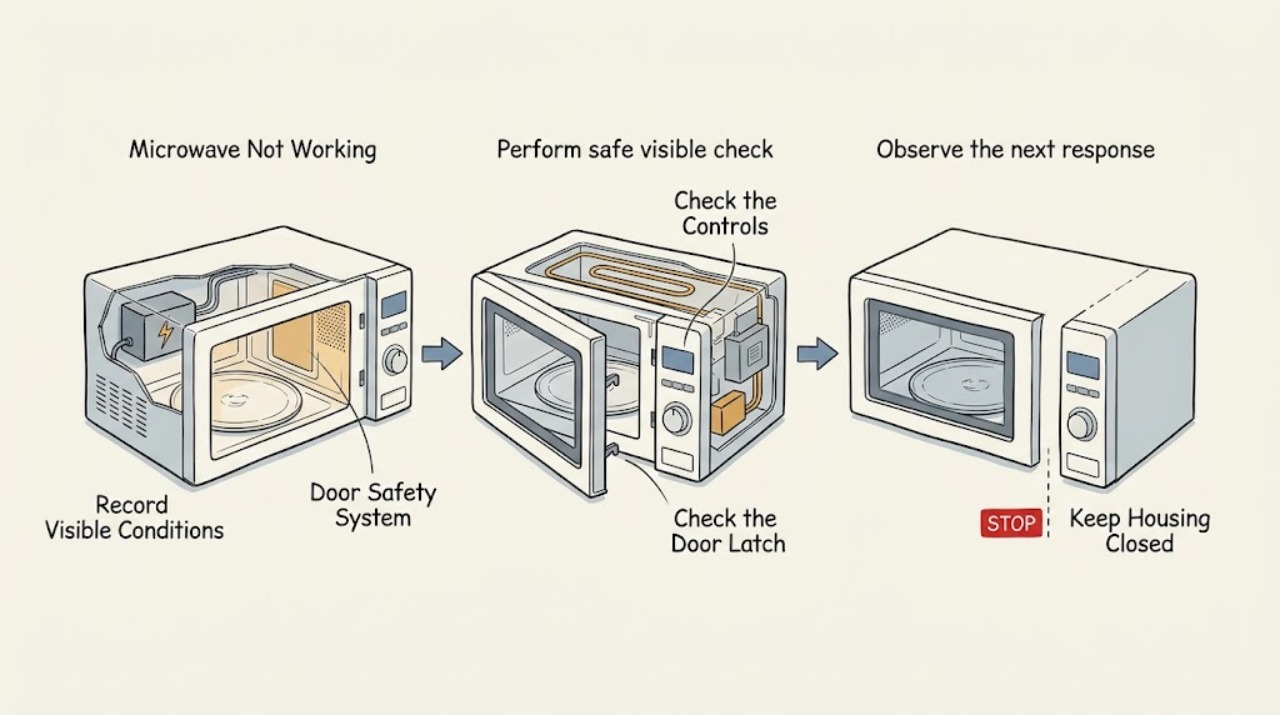
Work through in order
Diagnostic checks
Use only checks that match the exact appliance or system and its official guide.
-
Check 1
Classify the symptom before pressing START again and record the full Breville model. Note whether the display is dark, the controls light but the oven will not start, it runs but food stays cold, the glass turntable is stationary or noisy, or an exact status/message is displayed.
Expected result: The symptom and model match the visible behavior, or the model is uncertain or the oven shows damage, smoke, sparking, heat, or a burning odor.
Next step: Use the exact Breville manual or product hub for the recorded model. If a hazard or damage is present, leave the oven out of service and arrange authorized service without further tests.
Why this matters
Why: Power, door safety, heating, turntable, and display faults require different model-specific checks. An uncertain model or hazardous symptom is not a reason to borrow a reset or service procedure from another microwave.
-
Check 2
For a dark display or an oven that will not start, make only a safe visual check with the area dry: confirm the visible plug is seated, inspect the cord and plug for cuts, melting, looseness, or discoloration, and check the household breaker or outlet switch from a safe position. If the display works, confirm the control panel is programmed and the door closes normally into its safety lock; never hold or defeat that lock.
Expected result: The cord or plug is damaged, the outlet area is hot or discolored, the breaker trips again, the door will not close/latch normally, or the visible supply and door appear normal but the oven still will not start.
Next step: Keep the microwave unplugged when damage or a repeated trip is involved; use a qualified electrician for the household supply and Breville-authorized service for the appliance. Do not open the housing, repeatedly reset the breaker, or attempt a door-switch adjustment.
Why this matters
Why: A damaged or repeatedly tripping supply needs electrical attention, and a door safety system that does not engage can intentionally prevent a start. A normal-looking supply or door does not prove the internal fuse, control, or safety circuit is safe to test.
-
Check 3
If the microwave starts but does not heat, stop the cycle and review the exact model manual rather than running it empty or extending the time as a diagnostic. Confirm from outside that the door is fully closed and that there is no visible door, seal, hinge, latch, or cavity damage; if a normal cycle repeatedly leaves food cold, treat that as a service symptom.
Expected result: The door or sealing area is damaged, the oven has smoke/sparks/odor/abnormal heat, or the door appears normal but heating is absent or inconsistent.
Next step: Stop using the oven and arrange Breville-authorized service for persistent no-heat or any damage/hazard. Do not open the cabinet, probe high-voltage parts, or restart after an electrical or burning symptom.
Why this matters
Why: Breville lists proper door closure as a condition for heating, but a normal-looking door does not rule out the magnetron, high-voltage supply, thermal protection, control, or other internal fault. An empty run or cover removal cannot safely distinguish those causes.
-
Check 4
For a turntable that is stationary or noisy, switch off at the outlet and unplug before touching removable parts. Inspect the glass tray, roller ring, center hub, and cavity floor only for correct seating and visible food buildup, and use the model manual's gentle cleaning instructions; do not run the oven without the roller and glass turntable or force a damaged assembly.
Expected result: The roller or glass is mis-seated/dirty and the noise clears after the documented cleaning, or the turntable remains stopped/noisy, wobbles, cracks, scrapes, or the cavity floor or drive area is damaged.
Next step: Use the exact manual's unplugged cleaning and reseating step once. If the fault persists or any glass, roller, cavity, or drive damage is visible, keep the oven out of service and contact Breville-authorized service.
Why this matters
Why: Breville attributes BMO625 turntable noise to roller assembly or cleaning, while a persistent or damaged turntable can involve the drive or control path. A stationary table does not make it safe to remove covers or test the motor while powered.
-
Check 5
Record an exact display state rather than guessing an error code. On the BMO625 only, a brief 'EA1A' followed by a version-style display is documented as a normal model/software display; a time digit that stays at 0 or 1 has a model-specific instruction. Do not use undocumented button combinations or service codes on another Breville model.
Expected result: The documented BMO625 display returns to its normal mode, the model-specific STOP/CLEAR instruction resolves a digit-1 state, a digit-0 state persists, or an unlisted warning remains.
Next step: Follow only the exact model manual's documented user-level instruction. If the status persists, send the unit for repair or contact Breville support; do not open the panel or attempt an internal reset.
Why this matters
Why: A transient BMO625 information display is not necessarily a failure, but a persistent digit-0 state or an unlisted/persistent warning can indicate a control fault. The BMO625 instruction cannot be assumed to apply to another Breville microwave.
-
Check 6
Stop immediately for smoke, flame, sparking, a burning smell, dangerous heat, a damaged cord/plug, liquid entering the controls or vents, or a breaker trip associated with the microwave. If smoke or flame is present, switch off and unplug only from a safe position and keep the door closed; do not open the door to investigate an active fire or restart the oven.
Expected result: The hazard is active, power has been safely isolated, or the event stopped but left odor, scorch marks, heat, or other damage.
Next step: Leave the oven out of service and arrange Breville-authorized service. For active fire, dense smoke, or dangerous heat, leave the area and contact emergency services; do not remove the outer cover or touch damaged electrical parts.
Why this matters
Why: A stopped spark, smell, or smoke event does not prove that the door system, insulation, high-voltage section, or controls are undamaged. This is beyond user-level power, turntable, or display checks.
Use your observations
Decision map
Find the observation that best matches what you see, then follow the next safe action.
-
PATH 01Next step
What you see
The display is dark or the microwave will not start.
Do this next
Keep it unplugged for damage or repeated trips, use an electrician for the household supply, and use Breville-authorized service for the microwave. Do not hold the door switch, repeatedly reset power, or remove the cover.
Why this path and its safety boundary
Why it matters: The first pattern makes a household supply or door-safety problem more likely. If those appear normal, an internal fuse, control, or safety fault remains possible but cannot be diagnosed safely by opening the oven.
-
PATH 02Next step
What you see
The oven runs but food stays cold, or the door will not close normally.
Do this next
Stop using the microwave and arrange Breville-authorized service. Never operate with door damage, defeat the safety system, run empty, or perform a high-voltage test.
Why this path and its safety boundary
Why it matters: A damaged door or sealing system makes operation unsafe. A normal-looking door with no heat can still involve the high-voltage or heating system, so extending the run or testing the cabinet would not be an appropriate next step.
-
PATH 03Next step
What you see
The glass turntable is stopped or noisy during an otherwise started cycle.
Do this next
Use the exact model's unplugged cleaning/reseating procedure once. If it does not recover, keep the oven out of service and contact Breville-authorized service.
Why this path and its safety boundary
Why it matters: The first pattern supports a removable assembly issue documented for the BMO625. Persistence or damage makes the drive or control path more likely and is not a reason to run without the turntable or open the base.
-
PATH 04Next step
What you see
A Breville display shows a persistent status or the microwave has smoke, sparks, odor, dangerous heat, liquid intrusion, or a breaker trip.
Do this next
Use only the matching manual's external instruction; otherwise stop, isolate power only from a safe position, keep the door closed for smoke/fire, and arrange Breville-authorized service. Contact emergency services for an active fire or dangerous smoke/heat.
Why this path and its safety boundary
Why it matters: A documented transient display may be normal, but a persistent or unlisted status can be a control fault. Any smoke, spark, odor, heat, liquid, or power-trip symptom overrides normal troubleshooting and raises the internal safety boundary.
Helpful context
Understand the symptom
“Not working” can mean no display, a program that will not start, a cycle that runs without heating, a turntable that is noisy or stationary, or a model-specific status state. Breville's BMO625 troubleshooting table treats those as different paths: its power, door lock, turntable, heat, and display checks are tied to that model. Record the full model before using a procedure, because another Breville microwave can use different controls or messages.
A microwave contains a high-voltage section even after a cycle stops. Keep the door closed during any smoke event, use only the unplugged, external cleaning or turntable steps in the exact manual, and never hold a door switch closed, remove the outer cover, probe wiring, discharge components, or attempt an internal repair. Breville's manual says a damaged oven must be inspected or repaired by an authorised service centre.
When checks do not resolve it
Need a professional?
Arrange Breville-authorized service for a no-start condition after safe visible checks, persistent no heat, a damaged or misaligned door, a persistent or unlisted display state, a turntable fault that does not clear with the exact unplugged cleaning step, unusual noise, or any suspected internal electrical or high-voltage fault. Use a qualified electrician when the outlet, breaker, cord, plug, or household wiring is implicated; contact emergency services for active fire or dangerous smoke/heat.
Safety scope: Do not open the microwave cabinet, probe or discharge high-voltage components, perform a live electrical test, hold or defeat the door safety lock, run the oven empty, operate with a damaged door/seal/hinge/latch/cavity, or restart after smoke, sparking, burning odor, dangerous heat, liquid intrusion, damaged power parts, or a repeated breaker trip. Keep the door closed during an active smoke or fire event and isolate power only from a safe position.
Have this ready
- Provide the full Breville model, whether the display and interior light operate, the exact control/status message, whether the door closes and latches normally, whether the turntable rotates, whether the oven heats, when the issue began, and any smoke, spark, odor, heat, liquid, cord, plug, or breaker behavior.
Common questions
FAQ
Why is my Breville microwave not working at all?
Separate a dark display from a powered oven that will not start. Check only the visible plug, household supply, controls, and normal door closure; if those appear correct but the oven remains dead, use Breville-authorized service rather than opening the cabinet or adjusting the door lock.
What if my Breville microwave runs but does not heat?
Stop the cycle and confirm only that the door closes normally and has no visible damage, using the exact model manual for any safe user check. Do not run the oven empty, extend the time as a test, open the cabinet, or test high-voltage parts; persistent no heat needs authorized service.
Why is the Breville microwave turntable noisy or not moving?
Switch off and unplug it, then check only the model-specific glass tray and roller seating and clean visible food buildup as the manual describes. Do not run the oven without the turntable assembly; if noise, stoppage, wobble, scraping, or damage remains, arrange service.
What should I do if my Breville microwave sparks or smokes?
Stop using it. If smoke or flame is present, switch off and unplug only from a safe position and keep the door closed; leave the area and contact emergency services for active fire or dangerous smoke/heat. Otherwise keep it isolated and arrange Breville-authorized service—never restart or open the cabinet.
Read the exact guide
Official sources
- the Quick Touch™ Crisp Instruction ManualBreville · BMO625 microwave power, door safety lock, no-heat, turntable, display states, smoke response, and service boundary
- Product Hub – Find Support, Spare Parts & Service for Your MachineBreville · Breville support center, product registration, service cases, and product-specific support routing
- the Breville Quick Touch® - MICROWAVES Support & FAQsBreville · Breville microwave model-specific instruction manual, warranty/repair, parts, and support links
Community feedback
Share a repair observation
Share a plain-text repair observation. Accepted observations are published automatically; this page may take a moment to update.