
On this page
Start here
Quick answer
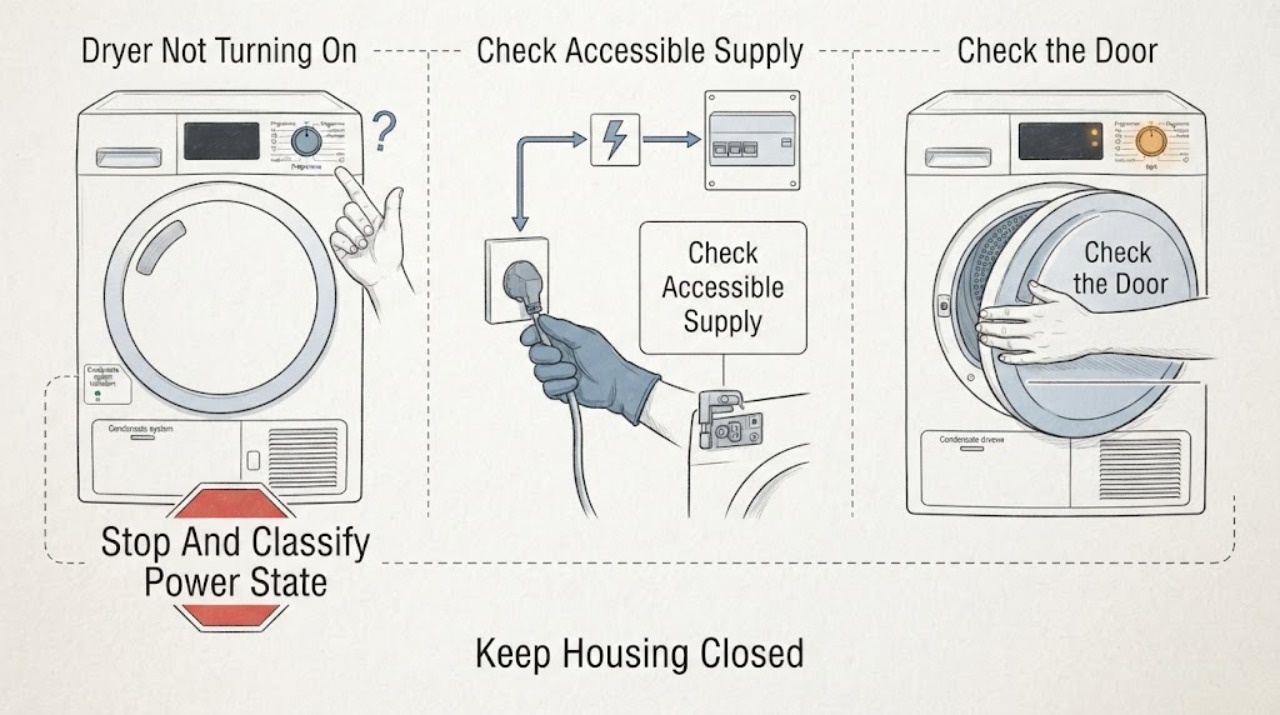
First separate a Siemens dryer with a completely blank display from one whose display lights but will not start. With the dryer cool and safe, check the accessible outlet and breaker once, confirm the door is fully closed, select a programme, press Start/Pause, and check for child-lock, delay-start, condensate-container, or filter prompts that apply to the model. Do not repeatedly reset a tripping breaker or run a dryer with smoke, a burning or melting smell, a hot connection, arcing, water near electrics, or uncontrolled heat. If one model-approved reset does not restore normal operation, keep the dryer off and arrange qualified Siemens service.
Before you begin
Safety first
- This article supports cool external observation, one safe supply check, normal door and control use, and model-approved container or filter care only. A qualified professional should handle panels, wiring, interlocks, control modules, pumps, thermal devices, motors, and any damaged or wet electrical equipment.
Work through in order
Diagnostic checks
Use only checks that match the exact appliance or system and its official guide.
-
Check 1
Do not start another cycle yet. Let the Siemens dryer cool, remove the load if it is safe to do so, and classify the symptom as a completely blank display, a display with no response, or a display that responds but will not begin the selected programme.
Expected result: Record whether any display or indicator is visible, whether buttons or the programme selector respond, whether the drum is stationary, and whether there was smoke, a burning or melting smell, unusual heat, water, a damaged cord, arcing, or a breaker event.
Next step: If any hazard symptom is present, keep the dryer off and use emergency help from a safe location for smoke or fire; otherwise continue only with the matching low-risk branch.
Stop if: Do not touch a hot connection, use a damaged cord or outlet, repeatedly reset a breaker, or restart to reproduce smoke, arcing, or an odor.
Why this matters
Why: A blank display points first toward supply or internal power; an active display with no start points toward controls, door recognition, lock or delay settings, or a model-specific condition. Heat, smoke, electrical damage, or water near electrics changes this to a safety stop.
-
Check 2
For a cool dryer with no hazard sign, confirm from the outside that the plug is fully seated and the outlet or dedicated circuit has not been switched off; check the relevant breaker once without opening an electrical enclosure or using a tester.
Expected result: Note whether another safe appliance works at the same outlet, whether the breaker is already off, whether it trips again, or whether the plug, cord, or outlet is warm, discolored, cracked, loose, wet, or damaged.
Next step: If the outlet and breaker remain stable, continue to the door and control checks. If the supply is dead, the breaker trips again, or any connection is damaged or warm, leave the dryer off and arrange qualified electrical or appliance service.
Stop if: Do not repeatedly reset the breaker, use an extension lead or adapter as a workaround, remove a plug while hot, or perform live electrical testing.
Why this matters
Why: A dead outlet or an off breaker can explain a blank display. A repeat trip or damaged or hot connection indicates a supply fault or overload that must not be tested by repeated resets.
-
Check 3
With the dryer powered and cool, set a normal programme, close the door firmly without slamming it, and press Start/Pause once; keep hands clear of the drum and do not force the door or latch.
Expected result: Check whether the display changes, a door symbol clears, a countdown begins, the drum starts, or an error or door indication remains. Look for laundry, a sheet, or an object caught in the seal that prevents full closure.
Next step: Remove only a loose, visible obstruction, close the door normally, and try Start/Pause once more. If the door does not align, latch, or remain closed, or the indication persists, keep the dryer off and arrange service.
Stop if: Do not bypass the door lock, run with a damaged seal or hinge, force the door, or reach into a moving drum.
Why this matters
Why: A response after selecting a programme and pressing Start/Pause indicates a selection or door-recognition issue rather than a completely dead appliance. A persistent door indication can be a closure obstruction or a door-lock fault; no response with a normal door keeps control or supply causes possible.
-
Check 4
Read the display symbols and the exact Siemens manual for child-lock or control-lock and delay-start controls; cancel a delay or unlock the controls only with the model's documented button sequence.
Expected result: Note a lock symbol, a countdown that has not reached the start time, an inactive Start/Pause control, or a normal unlocked display. Record the exact E-Nr. and any code instead of guessing what a symbol means.
Next step: Use one documented unlock or delay-cancel operation, then select the programme and press Start/Pause once. If the lock cannot be cleared, the control is unresponsive, or the code returns, stop and provide the E-Nr. and display details to service.
Stop if: Do not bypass a lock, hold random buttons repeatedly, disconnect wiring, or interpret an error code from another Siemens model.
Why this matters
Why: A lock or delay can make a powered dryer appear not to start, while a normal unlocked control state shifts the diagnosis toward door sensing, condensate conditions, control electronics, or another model-specific fault.
-
Check 5
If the display shows a condensate-container, filter, heat-exchanger, or related maintenance prompt, switch the programme off and follow only the exact Siemens manual's cool-appliance procedure; empty or clean an accessible container or filter only when the manual permits it.
Expected result: Record whether the container is full, the filter is visibly blocked, a heat-exchanger cleaning indicator is active, water is leaking, or no such prompt is present. Do not remove a container during an automatic-cleaning indication unless the manual explicitly allows it.
Next step: Refit the clean, dry, model-approved components and make one normal start attempt. If the prompt returns immediately, the container will not seat, water leaks, or the appliance is wet, keep it off and arrange service.
Stop if: Do not open a hot appliance, use sharp tools, wash or reinstall a wet electrical part, reach into the heat exchanger, or run without the required filter or container.
Why this matters
Why: A full container or blocked maintenance path can prevent or interrupt a cycle on applicable condenser or heat-pump designs. No prompt, a recurring prompt after correct care, or water near electrical parts points beyond a simple user check.
-
Check 6
After the dryer is cool, dry, free of hazard signs, and all model-approved external checks are complete, perform at most one power reset exactly as the Siemens manual permits; then select a normal programme and press Start/Pause once.
Expected result: Record whether the display returns, whether a programme begins, whether a code or lock symbol returns, whether the breaker trips, or whether the dryer remains blank or inactive.
Next step: If the dryer still will not turn on or start, keep it off and arrange qualified Siemens service with the E-Nr., symptom class, display symbols, prompt history, and supply observations.
Stop if: Do not repeat resets, bypass safety devices, remove panels, or continue testing after smoke, odor, arcing, water contact, abnormal heat, or a breaker trip.
Why this matters
Why: A single recovery after a transient event does not prove the cause. A repeated failure, returning code, repeat breaker trip, or no display after a stable supply check indicates that internal diagnosis is needed.
Use your observations
Decision map
Find the observation that best matches what you see, then follow the next safe action.
-
PATH 01Safety boundary
What you see
The display and indicators are completely blank after the dryer is connected.
Do this next
Perform one safe external outlet and breaker check. If the supply is stable but the display stays blank, keep the dryer off and arrange qualified service.
Why this path and its safety boundary
Why it matters: An accessible supply issue, breaker or outlet issue, cord or plug problem, or internal power fault is possible; a control setting cannot explain a truly blank display.
Safety stop: Stop for a hot, loose, wet, cracked, discolored, or damaged connection, or for a breaker that trips again.
-
PATH 02Safety boundary
What you see
The display and indicators are on, but the dryer does not begin after a programme is selected.
Do this next
Check the door, lock and delay symbols, select a programme, follow the manual for any tank or filter prompt, and press Start/Pause once. Persistent failure needs service.
Why this path and its safety boundary
Why it matters: The dryer may be waiting for Start/Pause, a closed door, an unlocked control, the end of a delay, or a model-specific tank or filter condition.
Safety stop: Do not bypass a door or control lock or keep trying if an error is accompanied by heat, odor, smoke, water, or a breaker event.
-
PATH 03Safety boundary
What you see
A door symbol remains, the latch will not engage, or the programme refuses to begin when the door appears closed.
Do this next
Remove only a loose visible obstruction and close the door normally; if recognition does not return, keep the dryer off and arrange service.
Why this path and its safety boundary
Why it matters: A visible obstruction, misalignment, damaged seal or hinge, or door-lock sensing problem is possible.
Safety stop: Do not force or prop the door, bypass the interlock, or run with a damaged seal or hinge.
-
PATH 04Safety boundary
What you see
A lock symbol, delay countdown, condensate-container prompt, filter prompt, or other model-specific indication is visible.
Do this next
Use the exact E-Nr. manual for one unlock, delay-cancel, container, or filter procedure and make one normal start attempt; a returning indication needs service.
Why this path and its safety boundary
Why it matters: The dryer may be waiting for a documented control action or maintenance condition rather than lacking power.
Safety stop: Do not guess a code, repeatedly press controls, remove a container during automatic cleaning, or handle a hot or wet appliance.
-
PATH 05Safety boundary
What you see
Smoke, a burning or melting smell, a hot connection, arcing, water near electrical parts, uncontrolled heat, or a repeated breaker trip occurs.
Do this next
Stop use. Leave for active smoke or fire and use local emergency help from a safe location; otherwise arrange qualified electrical or appliance service before any further test.
Why this path and its safety boundary
Why it matters: This is a fire, electrical, thermal, or water-contact hazard, not a routine no-start condition.
Safety stop: Do not reset the breaker again, touch a hot connection, use the dryer, or return to an unsafe area.
-
PATH 06Safety boundary
What you see
The supply is stable, the dryer is cool and dry, the door closes, locks or delay are cleared, applicable prompts are handled, and one documented reset does not restore operation.
Do this next
Keep the dryer off and arrange qualified Siemens service with the E-Nr., display behavior, cycle selection, code or symbol, and all observations.
Why this path and its safety boundary
Why it matters: A door switch, control, power module, condensate sensor or pump, thermal protection, or another internal fault remains possible and cannot be confirmed safely from outside.
Safety stop: Do not open panels, bypass safety devices, or order an internal component solely from the symptom.
Helpful context
Understand the symptom
First identify what not turning on means
A blank display suggests a supply, plug, outlet, breaker, or internal power problem. A lit display with no drum movement is a different symptom: the dryer may be waiting for a programme, Start/Pause, a closed door, a lock release, a delay to end, or a model-specific tank or filter condition. Record the E-Nr. and use the exact Siemens manual because controls, lock indicators, and condensate arrangements differ by model.
Use only low-risk external checks
Keep the dryer unloaded and cool while checking the plug, outlet, breaker position, door, display symbols, and accessible tank or filter prompts. Do not open the cabinet, bypass a door or thermal safety, probe an outlet, or work on wiring. A breaker that trips again, a hot or damaged connection, water near electrical parts, smoke, or a burning smell is a stop condition, not a reason to keep testing.
Know when the symptom needs service
If the display remains blank after one safe supply check, or the display is active but the door, controls, and model-specific prompts are normal and the cycle still will not start, the remaining causes can include the door switch, control, power module, condensate sensor or pump, or thermal protection. Those parts require a qualified diagnosis. Give the technician the E-Nr., exact display behavior, any symbol or code, breaker history, water or heat symptoms, and what changed before the fault.
Safety boundary
Stop conditions
- Stop immediately for smoke, flame, a burning or melting smell, a hot or damaged cord, plug, or outlet, arcing, uncontrolled heat, or repeated breaker trips.
- Keep the dryer off when water is near electrical parts, the cabinet or door is damaged or unstable, the door cannot latch, or a seal or hinge is damaged.
- Do not bypass a door, child, control, or thermal safety; do not open panels or perform live electrical, refrigerant, pump, motor, or wiring work.
- Do not repeatedly reset a breaker or power cycle the dryer, and do not run it without the model-required filter, container, or other safety component.
- Arrange qualified Siemens service when a stable external supply, normal door and controls, model-approved prompt handling, and one documented reset do not restore operation.
Only after diagnosis
Potential parts
- dryer door latch, door switch, or interlock
Consider this category only after a qualified diagnosis confirms that the door closes normally but the interlock signal is not recognized.
Confirm the exact Siemens E-Nr. and professional diagnosis; do not bypass or replace an interlock based only on a no-start symptom. - dryer control or power module
Consider this category only after the accessible supply, door, lock, delay, and model-specific prompt checks pass and a technician confirms an internal control or power fault.
Confirm the exact E-Nr. and diagnosis; control access and electrical repair require qualified service. - condensate sensor or pump component
Consider this category only when the exact Siemens design uses the component and a recurring tank or water-handling symptom is confirmed by a technician.
Confirm the exact E-Nr., dryer design, and diagnosis; do not open a wet appliance or assume every model uses the same condensate system.
When checks do not resolve it
Need a professional?
Arrange qualified Siemens appliance service when the display stays blank after one stable external supply check; when the display is active but the programme will not start after the door, lock, delay, Start/Pause, and applicable condensate or filter checks; when a code returns; or when a door, cord, cabinet, or electrical part is damaged. Use qualified electrical help for a hot connection, arcing, or repeated breaker trip, and use emergency help from a safe location for smoke or active fire.
Safety scope: This article supports cool external observation, one safe supply check, normal door and control use, and model-approved container or filter care only. A qualified professional should handle panels, wiring, interlocks, control modules, pumps, thermal devices, motors, and any damaged or wet electrical equipment.
Common questions
FAQ
Why is my Siemens dryer completely blank?
Check the plug, accessible outlet, and breaker once when the dryer is cool and there is no hazard sign. If the supply is stable but the display remains blank, keep the dryer off and arrange qualified Siemens service. Stop for a hot or damaged connection, smoke, odor, water near electrics, or another breaker trip.
Why does my Siemens dryer have power but not start?
Select a programme, close the door normally, check for a lock or delay symbol and any model-specific condensate or filter prompt, then press Start/Pause once. If the door indication, code, or no-start symptom persists, use the exact E-Nr. manual and arrange service rather than bypassing a safety.
Can a full condensate container stop a Siemens dryer from starting?
On applicable condenser or heat-pump designs, a full container or related water-handling prompt can prevent or interrupt a cycle. Follow the exact Siemens manual while the appliance is cool; recurring prompts, leakage, or water near electrics require service.
How do I tell not turning on from not starting?
Not turning on usually means no display or no response at all. Not starting means the display works but the dryer waits for a door, Start/Pause, lock or delay action, a prompt, or an internal condition. Record which state you see because it changes the first safe check.
When should I stop testing a Siemens dryer?
Stop for smoke, flame, a burning or melting smell, a hot or damaged cord or outlet, arcing, uncontrolled heat, water near electrical parts, a damaged door, or a repeated breaker trip. Leave for active smoke or fire and use emergency help from a safe location; otherwise arrange qualified service.
Read the exact guide
Official sources
- Siemens Hausgeräte dryer supportSiemens Home Appliances · Official Siemens support category for tumble dryers; available controls and troubleshooting vary by country and exact E-Nr.
- Dryer operating and installation instructionsBSH Home Appliances · Official BSH owner manual for a documented heat-pump dryer design; the exact Siemens E-Nr. manual controls where construction or controls differ.
Community feedback
Share a repair observation
Share a plain-text repair observation. Accepted observations are published automatically; this page may take a moment to update.