
On this page
Start here
Quick answer
First separate a Speed Queen dryer with no display or response from one whose controls light up but which will not start. With the area dry and no damage, smoke, burning smell, sparks, overheating, gas odor, or repeated breaker trips, confirm the cord is fully seated, inspect the laundry-room breaker or fuses, and remember that an electric dryer may use two supply fuses or breakers. Then close the loading door, select a valid cycle, and use the model's specified Start or timer control; a delay, control lock, or an unpressed timer knob can look like a dead machine. A gas model still needs electrical power for its controls and motor, while its gas valve must only be considered through the exact model instructions and without touching gas piping. One safe, model-approved reset or a cool-down retry for the motor overload protector is reasonable only when the guide allows it; if the dryer starts with the door open, starts without the intended control, repeatedly trips protection, or has gas odor, smoke, burning odor, overheating, arcing, or damage, stop using it and arrange qualified service.
Before you begin
Safety first
- This article covers ordinary visual checks and model-documented user controls only. Do not bypass safety devices, work on live wiring, open the appliance or electrical panel, adjust gas parts, manually ignite the dryer, or repeat a reset after protection opens again.
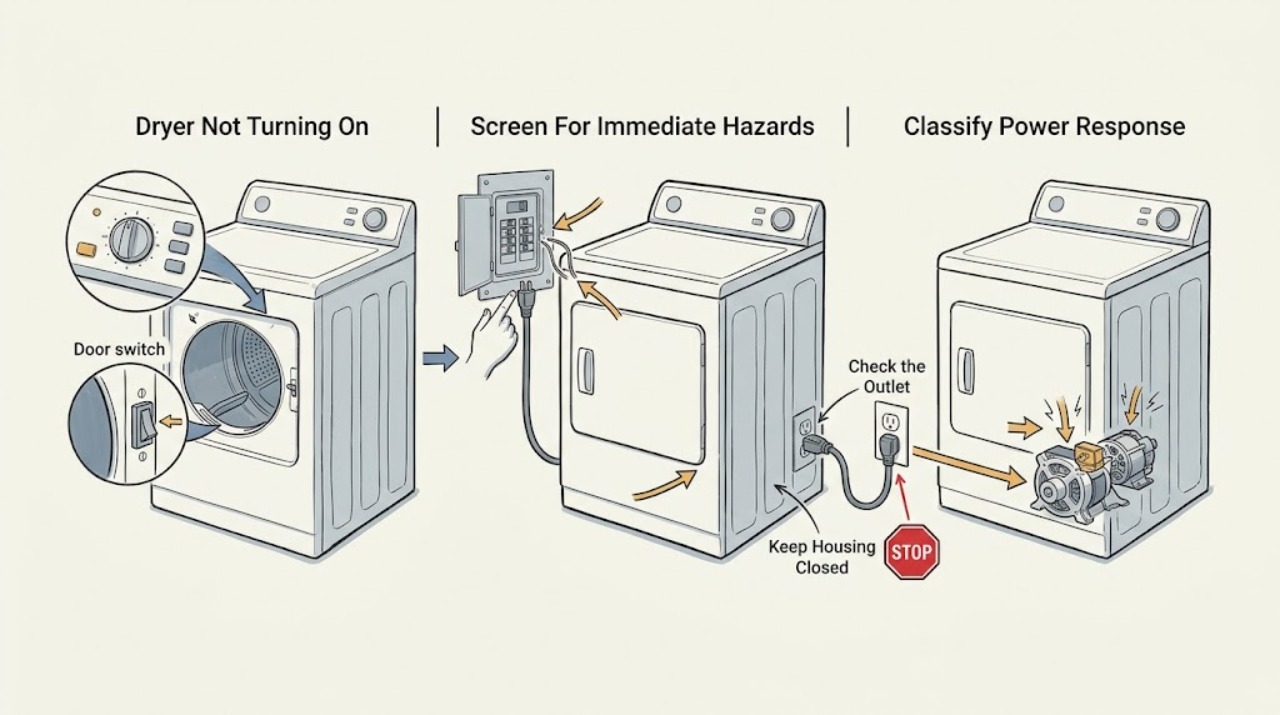
Work through in order
Diagnostic checks
Use only checks that match the exact appliance or system and its official guide.
-
Check 1
Before pressing controls again, look and smell from a safe position for gas odor, smoke, burning or melting odor, visible sparks or arcing, abnormal heat, water near the appliance, damaged wiring or cord insulation, or a breaker that trips again.
Expected result: Record whether any hazard is present, whether the odor is gas-like or electrical, whether smoke or sparks are visible, and whether protection has already tripped more than once.
Next step: If a hazard is present, stop using the dryer, keep people away, and follow the applicable emergency or qualified-service path. If no hazard is present, continue with the low-risk symptom split.
Stop if: Do not light anything, operate electrical switches in a gas-smelling area, run another cycle, open the cabinet, or repeatedly reset a tripping breaker.
Why this matters
Why: Any of these signs changes the task from a routine no-start check to a safety stop. A gas odor requires avoiding flames, electrical switches, and phones inside the building; smoke, arcing, overheating, water contact, or repeated trips can indicate a fire or shock risk.
-
Check 2
With the dryer off, classify the symptom without removing panels: note whether the console is completely blank, has any lights or display response, accepts a cycle selection, or responds but leaves the drum still when Start or the timer control is used normally.
Expected result: Record blank/no response, intermittent response, console response with no motor movement, or a cycle that begins and then stops; also record any displayed code or flashing pattern.
Next step: Use the matching branch below and preserve the exact symptom sequence for the model-specific manual or service request.
Stop if: Do not interpret a lit console as proof that the full supply or motor circuit is healthy, and do not remove covers to investigate it.
Why this matters
Why: A blank console focuses the next check on the household supply, cord, and controls. A responsive console with no motor movement focuses on the door, control state, selected cycle, or motor protection. A start-then-stop symptom makes overload, airflow, or another model-specific protection condition more relevant.
-
Check 3
From ordinary safe access, check that the power cord is fully seated at the dryer and wall connection, that the outlet and plug show no scorch marks, looseness, moisture, or damage, and that the dryer is not being powered through an extension cord or improvised adapter.
Expected result: Record a secure, dry, undamaged connection, or identify looseness, heat discoloration, moisture, damaged insulation, a loose receptacle, or an installation that does not match the model instructions.
Next step: If the connection is sound and dry, proceed to the appropriate breaker or fuse check. If it is damaged, wet, hot, or loose, stop and arrange qualified electrical or appliance service.
Stop if: Do not open the outlet, repair the cord, move a wet appliance, use an adapter or extension cord, or touch exposed conductors.
Why this matters
Why: A secure connection leaves the household protection and dryer controls as the next checks. Damage, moisture, heat discoloration, or an unsuitable connection can cause a no-power symptom and requires the circuit and appliance to remain out of use until assessed.
-
Check 4
Identify whether the dryer is electric or gas from its model label and exact documentation, then inspect the dedicated laundry-room breaker or fuses without opening the panel or touching wiring; only perform the single reset or fuse replacement allowed by the household and appliance instructions when there is no hazard.
Expected result: Record a normal breaker position and intact fuses, a tripped breaker, an open fuse, or a breaker/fuse that opens again. For an electric dryer, note that both supply fuses or breakers may matter; for a gas dryer, note that its controls and motor still need electrical power.
Next step: If one permitted reset restores normal operation and it remains stable, test one ordinary cycle while present. If protection opens again, the dryer remains blank, or the supply arrangement is uncertain, leave it off and request qualified service.
Stop if: Do not repeatedly reset protection, substitute fuse ratings, open an electrical panel, test live wiring, or continue after sparks, heat, smoke, or water exposure.
Why this matters
Why: A single tripped breaker or open fuse can explain a blank or non-starting dryer, but recurrence indicates a fault rather than a reset problem. An electric dryer can have partial supply, while gas heating needs its separate gas path only after the electrical and start conditions are correct.
-
Check 5
Remove anything caught at the opening, close the loading door normally, and check only the visible latch area for lint, clothing, misalignment, or damage; do not press or bypass the door switch to make the dryer run.
Expected result: Record a clean opening and positive closure, a door that will not latch, a visible obstruction, a loose or damaged latch, or a dryer that runs with the door open or starts without the intended control.
Next step: Clear only a visible obstruction and close the door once; if the fault remains, document the model and arrange service for the latch or door circuit.
Stop if: Do not force the door, tape or hold a switch closed, bypass an interlock, or run the dryer when it tumbles with the door open.
Why this matters
Why: A door that is not fully closed or whose interlock is not recognized can prevent a powered dryer from starting. Unsafe operation with the door open or without the intended Start action indicates failed safety behavior and is a removal-from-use condition.
-
Check 6
Using the exact model instructions, select a normal cycle rather than a no-heat or cool-only position, release any control lock or delay only through the documented controls, and press Start or push the timer knob as that model requires.
Expected result: Record whether the console accepts the cycle, shows a delay or lock, responds only after the timer control is pushed, or remains unresponsive; note the exact buttons, knob positions, and display behavior.
Next step: If the dryer starts normally, monitor the first cycle. If it does not, save the exact sequence and continue to the error-code and overload checks without repeating controls excessively.
Stop if: Do not force a knob, defeat a control lock, run with a damaged panel, or open the console to reach a control.
Why this matters
Why: A valid cycle and required Start or timer action can distinguish an operating-state issue from a supply or hardware failure. A persistent lock, delay, or unresponsive control after the documented sequence points to model-specific controls or service, not a reason to force a switch.
-
Check 7
Read the complete model and serial information from the rating label and record any exact displayed code, flashing sequence, or point in the cycle where the dryer stops; use the Speed Queen manuals page to locate the matching documentation.
Expected result: Record no code, a complete code, an alternating display, or a code that appears only after a reset or attempted start, together with the model family and symptom timing.
Next step: Follow only the exact model's documented user-level action, such as a single reset, or provide the recorded details to Speed Queen support when the manual does not resolve the no-start condition.
Stop if: Do not assign a code meaning from another model, enter an undocumented service mode, erase evidence by repeated resets, or dismantle the control panel.
Why this matters
Why: Speed Queen controls and diagnostic meanings are model-specific. A complete identity and repeatable code allow the correct manual or servicer to distinguish a control state from a power, door, motor, or supply fault; an incomplete code should not be guessed.
-
Check 8
If the dryer has power, the door and controls are correct, and there is no hazard, allow the motor to cool as the exact user guide describes, then make only one normal retry; do not repeatedly cycle the control to force a start.
Expected result: Record whether the motor starts after the cool-down, starts and stops again, hums without movement, or remains silent; note any return of a breaker trip, odor, heat, or unusual noise.
Next step: If the symptom recurs or the motor does not start after the documented cool-down, remove the dryer from use and request qualified diagnosis of the motor, protector, controls, or airflow-related condition.
Stop if: Stop immediately for smoking, grinding, burning smell, overheating, sparks, a repeated trip, or operation that begins without the intended control or with the door open.
Why this matters
Why: The Speed Queen guide says a motor overload protector can stop the motor and reset after cooling. A successful one-time retry can fit temporary overload, but recurrence, humming, abnormal noise, or another trip indicates a fault that needs service rather than repeated resets.
-
Check 9
For an electric model, keep the two-supply-fuse or breaker possibility in the diagnosis; for a gas model, confirm only from the model documentation whether the appliance is gas-heated and, when there is no gas odor, note whether the household gas service and appliance shutoff appear normally available without touching piping or ignition parts.
Expected result: Record electric or gas identity, whether the console and motor path have power, whether the gas appliance has an ordinary supply indication, and whether there is any odor, abnormal flame, ignition sound, or delayed ignition.
Next step: Use the exact model manual for any user-level gas-supply observation. If the gas path, flame, or appliance identity is uncertain, stop and use qualified appliance or gas service; do not open or adjust the gas system.
Stop if: Do not light the burner manually, repeat ignition attempts, adjust a gas valve or line, search for a leak, or operate the dryer with gas odor, delayed ignition, abnormal flame, smoke, or carbon-monoxide concerns.
Why this matters
Why: An electric dryer's partial supply can create a confusing no-start or no-heat symptom. A gas dryer's gas supply affects heating, but gas odor, delayed ignition, abnormal flame, or repeated ignition attempts changes the situation to an immediate safety stop; gas availability alone does not prove a no-start repair.
-
Check 10
If the low-risk checks do not restore normal starting, stop troubleshooting and submit the model, symptom classification, code, supply type, checks performed, and any safety signs through Speed Queen's official support or service path.
Expected result: Record whether the issue is blank/no power, powered/no start, starts then stops, recurrent protection trip, gas-related, or unsafe operation, and whether the official manual identifies a user-level remedy.
Next step: Keep the dryer disconnected or otherwise out of use when the symptom is unsafe or recurrent, and arrange model-specific service through the official Speed Queen support route.
Stop if: Do not remove panels, work on internal wiring, defeat safety devices, open the gas system, or continue operating a dryer that shows smoke, odor, overheating, arcing, or unsafe door behavior.
Why this matters
Why: A complete record helps a qualified servicer choose between household supply, door interlock, controls, motor overload, motor, or gas-system diagnosis without unsafe trial-and-error. Repeated failed starts or safety anomalies are not suitable for continued home testing.
Use your observations
Decision map
Find the observation that best matches what you see, then follow the next safe action.
-
PATH 01Safety boundary
What you see
There is gas odor, smoke, burning or melting odor, visible arcing, abnormal overheating, water near the appliance, damaged wiring, or a breaker that trips again.
Do this next
Stop using the dryer and keep people away. For gas odor, avoid flames, electrical switches, and phones inside the building, leave the area, and contact the gas supplier or emergency service from a safe location; for electrical or fire signs, use the appropriate emergency and qualified-service path.
Why this path and its safety boundary
Why it matters: This is a safety event, not an ordinary no-start problem.
Safety stop: Do not run another cycle, reset protection repeatedly, test for a leak, or open the appliance.
-
PATH 02Safety boundary
What you see
The console is blank and the dryer gives no response, with no immediate hazard.
Do this next
Check the cord and visible outlet condition, identify the model and electric/gas type, inspect the dedicated breaker or fuses, and use only one permitted reset; request service if blank or recurrent.
Why this path and its safety boundary
Why it matters: Power cord, household supply, partial supply, control, or protective shutdown is more likely than a door-only start-state issue.
Safety stop: Do not open the electrical panel or appliance, test live conductors, or continue after damage, moisture, heat, sparks, or repeated trips.
-
PATH 03Safety boundary
What you see
The console lights or responds, but the drum does not start after the normal cycle and Start or timer action.
Do this next
Close the door normally, select the exact documented cycle, clear a documented lock or delay, record any code, and allow one documented motor cool-down retry.
Why this path and its safety boundary
Why it matters: Door recognition, control lock or delay, cycle selection, timer action, or motor overload is more relevant than a completely open supply.
Safety stop: Do not bypass the door switch, force controls, or continue if the dryer starts with the door open or without the intended control.
-
PATH 04Safety boundary
What you see
The label or exact manual identifies an electric dryer, and a fuse or breaker is open or only part of the expected behavior is present.
Do this next
Use the household instructions for one safe inspection or reset only; if protection opens again or the arrangement is uncertain, leave the dryer off and use qualified service.
Why this path and its safety boundary
Why it matters: The guide notes that electric dryers may have two fuses or breakers, so a partial supply can produce confusing symptoms.
Safety stop: Do not substitute fuse ratings, repeatedly reset, or access wiring.
-
PATH 05Safety boundary
What you see
The label or exact product documentation identifies a gas-heated dryer.
Do this next
Use the exact manual for ordinary supply identification only, and arrange qualified appliance or gas service for any gas-path, flame, ignition, or no-start uncertainty.
Why this path and its safety boundary
Why it matters: The controls and motor still need electrical power, while gas supply affects heating; gas odor or abnormal ignition is an immediate safety boundary.
Safety stop: Do not light, adjust, open, or leak-test the gas system; leave immediately for persistent or strong gas odor.
-
PATH 06Safety boundary
What you see
The dryer starts only after cooling, stops again, hums, makes grinding or abnormal noise, or repeatedly opens a breaker or fuse.
Do this next
Remove the dryer from use and give the qualified servicer the timing, noise, code, supply type, and reset result.
Why this path and its safety boundary
Why it matters: A motor overload or another mechanical, electrical, airflow, or control fault remains possible; a temporary reset has not established a repair.
Safety stop: Do not keep retrying, run unattended, or dismantle the cabinet or motor circuit.
-
PATH 07Safety boundary
What you see
The model, code, control sequence, supply type, or required user-level procedure cannot be confirmed, or low-risk checks do not restore starting.
Do this next
Use the official model manual or contact Speed Queen support and provide the exact identity and observation record.
Why this path and its safety boundary
Why it matters: The remaining diagnosis is model-specific and should not be guessed from another Speed Queen dryer or another brand.
Safety stop: Do not enter undocumented diagnostic modes, open panels, or replace parts based only on a generic symptom.
Helpful context
Understand the symptom
Start with the safe symptom split
A blank display and no response suggest an electrical supply, cord, control, or internal protection issue. If the console lights or responds but the drum does not start, the door interlock, selected cycle, Start or timer control, delay or lock state, or a protective shutdown becomes more likely. The exact model matters: Speed Queen directs owners to enter the model number to retrieve the applicable operation and use-and-care documents, so do not transfer a code or control sequence from another dryer.
Electric and gas dryers share controls but not every supply check
Both versions need ordinary electrical power for the controls and motor. The guide warns that an electric dryer may have two fuses or circuit breakers, so one open leg can make the dryer appear dead or prevent heat even when part of the console responds. A gas dryer also depends on the model's gas supply for heat, but a no-start symptom is not a reason to open a gas line or repeat ignition attempts. Use the exact model guide and stop immediately for gas odor or an abnormal flame.
Treat the door and overload protector as safety boundaries
A closed loading door and intact door safety behavior are prerequisites for normal operation. Do not bypass the door switch or continue using a dryer that tumbles with the door open or starts without the intended Start control. The guide describes a motor overload protector that can stop the motor and reset after cooling; if the condition recurs, remove the dryer from use and request service rather than repeatedly trying to restart it.
Safety boundary
Stop conditions
- For gas odor, do not light an appliance, operate electrical switches, or use a phone in the building; clear the area and contact the gas supplier or emergency service from a safe location.
- Stop for smoke, burning or melting odor, sparks or arcing, abnormal overheating, water near electrical parts, damaged cord or wiring, or a breaker or fuse that opens again.
- Do not bypass the door switch or any safety device, and remove the dryer from use if it tumbles with the door open or starts without the intended Start control.
- Do not open panels, test live wiring, repair the cord, substitute fuse ratings, access the gas system, manually ignite a burner, or repeatedly reset protection.
- Do not keep retrying after a motor overload symptom, grinding noise, humming without movement, recurring stop, or any unsafe operating behavior; arrange qualified service.
Only after diagnosis
Potential parts
- door latch or door switch
Consider this category only after the exact model's door closes correctly but the control does not recognize it and a qualified diagnosis confirms the interlock fault.
Match the exact model and revision through Speed Queen documentation; do not bypass or substitute the safety device. - motor overload protector or motor
Consider this category only when the documented cool-down retry is followed by recurrence, humming, stopping, or a qualified diagnosis of the motor circuit.
Use the exact model documentation and qualified diagnosis; do not replace a protective component with a different rating or repeatedly reset it. - timer or electronic control
Consider this category only after supply, door, cycle, lock or delay, and overload checks are complete and the exact model diagnosis identifies the control fault.
Confirm the exact model, control version, and installation procedure through Speed Queen or an authorized servicer. - gas ignition or gas-control component
For a gas model only, consider this category after a qualified gas-appliance technician confirms an ignition or gas-control fault; a gas odor or abnormal ignition is a safety stop, not a parts-shopping signal.
Do not open, adjust, manually ignite, or substitute gas components; exact model and local safety requirements control.
When checks do not resolve it
Need a professional?
Arrange Speed Queen or qualified appliance service when the dryer remains blank after the permitted cord and household supply checks, the console responds but it will not start after the documented door and cycle controls, a code or model procedure is uncertain, an overload or breaker trip recurs, the door safety behavior is abnormal, or diagnosis would require opening the cabinet, electrical panel, control, motor circuit, or gas system. Use urgent safety or emergency help for gas odor, smoke, fire, arcing, severe overheating, or water contacting electrical equipment.
Safety scope: This article covers ordinary visual checks and model-documented user controls only. Do not bypass safety devices, work on live wiring, open the appliance or electrical panel, adjust gas parts, manually ignite the dryer, or repeat a reset after protection opens again.
Common questions
FAQ
Why is my Speed Queen dryer completely blank?
Start with a safe visual check of the cord and outlet, then inspect the dedicated laundry-room breaker or fuses as the household instructions allow. Electric models may use two supply fuses or breakers. Do not open panels or keep resetting protection; if the console stays blank or a breaker opens again, arrange qualified service.
What if the Speed Queen dryer has lights but will not start?
Close the loading door normally, select the exact documented cycle, clear a documented delay or control lock, and use the required Start or timer action. Record any complete code or flashing sequence. If it still will not start, a door interlock, control, timer, or motor overload needs model-specific diagnosis.
Does a gas Speed Queen dryer need electricity to start?
Yes. A gas-heated dryer still needs electrical power for its console and motor, while gas supply affects heating. Confirm the model from its label and documentation. Do not adjust gas piping or repeat ignition attempts, and leave the area for persistent or strong gas odor.
Can a Speed Queen dryer motor reset after it stops?
The user guide describes a motor overload protector that can stop the motor and reset after cooling. Allow only the documented cool-down and make one normal retry when there is no hazard. If the symptom returns, the motor, protector, airflow, control, or another fault needs qualified service.
When should I stop trying to start the dryer?
Stop for gas odor, smoke, burning or melting odor, sparks, arcing, abnormal heat, water near electrical parts, damaged wiring, repeated breaker or fuse trips, unsafe door behavior, grinding, or recurring motor stops. Use the official Speed Queen support or emergency path appropriate to the hazard.
Read the exact guide
Official sources
- Speed Queen | DR7004BGSpeed Queen · Speed Queen DR7004BG gas dryer page; it does not replace the exact installed model's documentation.
- User's GuideSpeed Queen · Official Speed Queen user guide for a family of electric and gas dryers; the exact model's guide controls the installed appliance.
- SupportSpeed Queen · Speed Queen consumer product support.
- Find ServiceSpeed Queen · Speed Queen consumer products.
- Manuals & DownloadsSpeed Queen · Speed Queen washers and dryers; the owner enters the model number to retrieve the applicable documents.
Community feedback
Share a repair observation
Share a plain-text repair observation. Accepted observations are published automatically; this page may take a moment to update.