
On this page
Start here
Quick answer
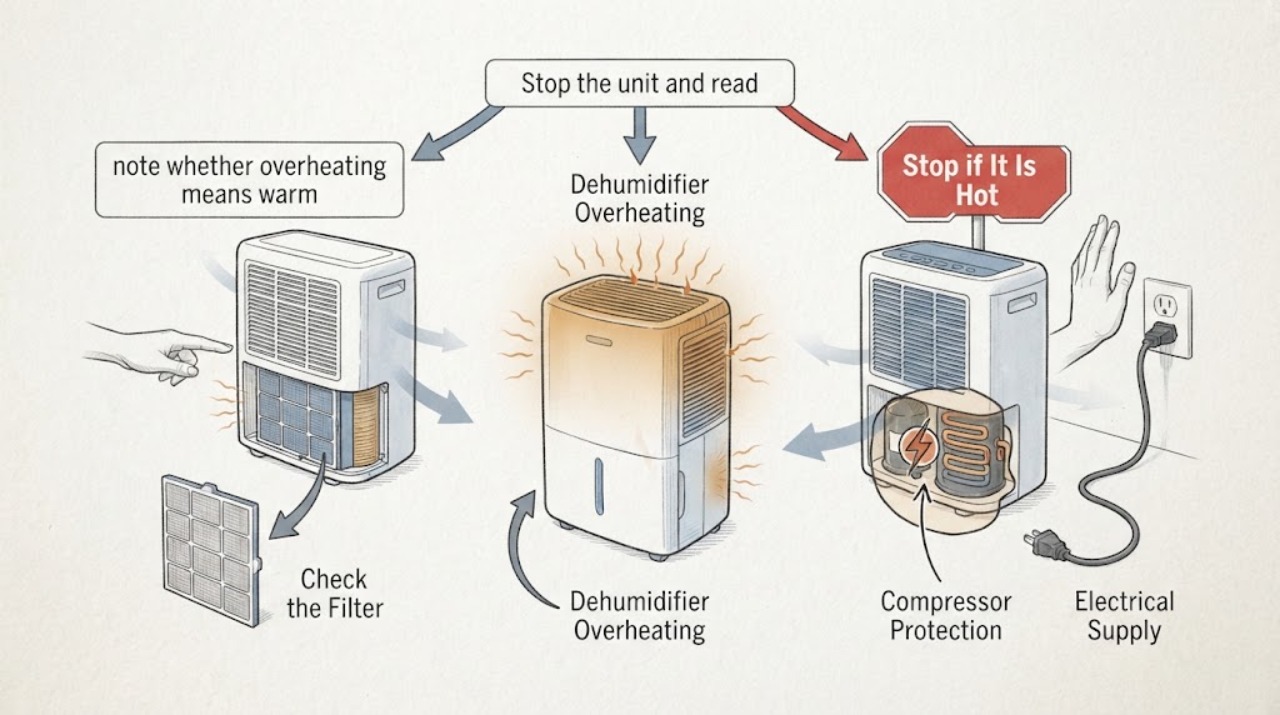
Treat a Whirlpool dehumidifier that overheats as a safety issue. First check the serial against the official Whirlpool recall, then distinguish normal warm exhaust from a hot housing, hot plug, odor, or repeated thermal shutdown. With power off, restore clear airflow, a clean filter, a ventilated 5-35°C room, and a correctly seated tank. A recalled unit, electrical heat, smoke, or recurring shutdown must remain unplugged for qualified service.
Work through in order
Diagnostic checks
Use only checks that match the exact appliance or system and its official guide.
-
Check 1
Stop the unit and read the model and serial label, including whether the bucket is front-mounted. Compare the serial prefix with Whirlpool Corporation recall information before any troubleshooting.
Expected result: A front-bucket unit has a recalled prefix, the prefix does not match, or the label cannot be read.
Next step: For a recalled match, unplug immediately and follow the recall remedy. If identity is uncertain, keep it unplugged until verified.
Why this matters
Why: The recall notice identifies a specific historical overheating/fire hazard; a match takes priority over cleaning or restarting.
-
Check 2
From outside, note whether overheating means warm exhaust air, a hot housing, a compressor that stops, or a hot plug/cord. Unplug for a hot or damaged connection and do not touch live wiring.
Expected result: Warm exhaust only, compressor cuts out, or plug/cord is abnormally hot or damaged.
Next step: Stop for abnormal electrical heat, odor, smoke, or damage. For a thermal cutout without a safety symptom, correct airflow and room conditions before one restart.
Why this matters
Why: Whirlpool documents warm air as normal in some modes and compressor thermal cutout as protection, while abnormal plug heat is a stop condition.
-
Check 3
With power off, clear clothing and objects from the inlet/outlet and provide the manual clearance around the unit. Check and clean the filter only as directed; do not operate without the filter.
Expected result: Airflow is blocked, the filter is dirty, or clearance is adequate.
Next step: Restore clear airflow and a clean, dry filter, then let the unit cool. If overheating returns, stop using it and arrange service.
Why this matters
Why: Restricted ventilation and a blocked filter can cause overheating or poor performance.
-
Check 4
Check ambient conditions and placement: the official guide gives a 5-35°C operating range, requires a stable indoor surface, and warns against cupboards or narrow spaces.
Expected result: Room is above 35°C, below 5°C, in direct sun, or the unit is confined; or conditions are normal.
Next step: Move only to a safe, ventilated indoor location and wait for conditions to normalize. Do not operate near a burner or in a cabinet.
Why this matters
Why: Out-of-range or confined operation can trigger protection and heat buildup; normal placement makes an internal fault more concerning.
-
Check 5
Check the water tank is seated and not full, and check continuous-drain hose routing without opening the cabinet.
Expected result: Tank is full/mis-seated, drain hose is obstructed, or water path is normal.
Next step: Empty/reseat the tank or correct the accessible hose setup as the model guide describes. Use service for leaks or recurrent shutdown.
Why this matters
Why: A full or incorrectly positioned tank can stop operation; a drain problem can add water and stress but does not explain dangerous electrical heat.
-
Check 6
After correcting a non-electrical airflow or room issue, leave the unit unplugged for about 45 minutes if its compressor thermal protection operated, then observe one supervised restart.
Expected result: It restarts normally, overheats again, shows an error, or will not restart.
Next step: Do not repeat restarts. Keep it unplugged and arrange qualified service for recurring overheating, an error, or no recovery.
Why this matters
Why: The wait is a documented protection recovery step, not proof that the underlying problem is repaired. Recurrence or a code needs service.
Use your observations
Decision map
Find the observation that best matches what you see, then follow the next safe action.
-
PATH 01Next step
What you see
The unit matches the Whirlpool recall description or has a hot/damaged cord, smoke, burning odor, or sparking.
Do this next
Unplug immediately if safe and follow recall or qualified service instructions; do not test it again.
Why this path and its safety boundary
Why it matters: This is an immediate fire/electrical safety boundary.
-
PATH 02Next step
What you see
The compressor stopped after operation, the room is confined or above the operating range, and airflow/filter is restricted.
Do this next
Correct placement and airflow, allow the documented cool-down, and make one supervised restart. Stop if it overheats again.
Why this path and its safety boundary
Why it matters: Thermal protection caused by operating conditions is more likely than a confirmed part failure.
-
PATH 03Next step
What you see
The exhaust is warm but the housing and plug are normal, room conditions are in range, and humidity is changing.
Do this next
Continue supervised use with clear airflow and filter maintenance; stop for abnormal heat, odor, or performance change.
Why this path and its safety boundary
Why it matters: Warm exhaust can be normal during dehumidification and is not by itself overheating.
-
PATH 04Next step
What you see
The unit repeatedly overheats despite clear airflow, a clean filter, correct room conditions, and a seated tank.
Do this next
Keep it unplugged and arrange qualified Whirlpool service. Do not dismantle or bypass thermal protection.
Why this path and its safety boundary
Why it matters: An internal fan, compressor, sensor, or control fault is possible, but the symptom does not identify the part.
Helpful context
Understand the symptom
Whirlpool manuals identify airflow, filter, room temperature, tank position, and compressor thermal protection as separate contributors.
A historical Whirlpool recall makes serial and bucket position part of the first check; do not assume a generic cleaning step is safe for a recalled unit.
When checks do not resolve it
Need a professional?
Arrange qualified service when the owner checks do not restore normal operation or the symptom recurs. Provide the exact model, observed pattern, and any displayed code; do not infer a replacement part from the symptom alone.
Common questions
FAQ
Is warm air from a Whirlpool dehumidifier always overheating?
No. Whirlpool documentation says warm air can be generated during normal dehumidifying modes. Treat a hot housing, abnormal plug heat, odor, smoke, repeated thermal shutdown, or a recall match as a stop condition.
What should I do after a Whirlpool dehumidifier compressor overheats?
The guide says to unplug the appliance, correct the problem, wait about 45 minutes, and restart. Use that once only after ruling out electrical danger; recurrence needs service.
Can a dirty filter cause overheating?
Whirlpool warns that a blocked filter or insufficient ventilation can cause overheating. Power off before cleaning and never operate without the filter.
Read the exact guide
Official sources
- Whirlpool Dehumidifier Operating InstructionsWhirlpool · Whirlpool dehumidifier operating temperature, airflow, filter, compressor protection, tank, and overheating safety guidance.
- Whirlpool Dehumidifier TroubleshootingWhirlpool · Whirlpool dehumidifier airflow, filter, tank, abnormal heat, and service troubleshooting.
- Dehumidifier 2002 - United States | CanadaWhirlpool Corporation · Whirlpool dehumidifier recall and overheating fire hazard identification.
Community feedback
Share a repair observation
Share a plain-text repair observation. Accepted observations are published automatically; this page may take a moment to update.