
On this page
Start here
Quick answer
Warm or hot air from the exhaust of a GE dehumidifier is normally produced while the compressor removes moisture; GE explains that the compressor generates heat and the exhaust carries that heat away. That is different from a hot cabinet, hot plug or cord, burning smell, smoke, melted plastic, repeated breaker trips, or a unit that stops and restarts abnormally. For ordinary warmth, first confirm that the inlet and outlet are clear, the filter is clean and completely dry, and the unit has the model-appropriate operating space. Check the humidity setting and whether the unit is in continuous operation, because high room humidity can make it run for long periods. Frost can also keep the fan running while the compressor is off for defrost. Turn the appliance off and unplug it from a dry, accessible point if there is an electrical or burning warning; do not open the case, bypass a thermal control, or perform live electrical or refrigerant tests. Arrange qualified service when abnormal heat, odor, smoke, cord or outlet heat, repeated trips, persistent icing, or failure to cycle remains after safe external checks.
Before you begin
Safety first
- The owner may observe externally, clear light objects, clean an accessible filter and grille with power disconnected, and record settings and timing. Qualified personnel must handle case removal, fans, capacitors, controls, thermal protection, wiring, compressor, refrigerant, sealed-system work and hazardous power connections.
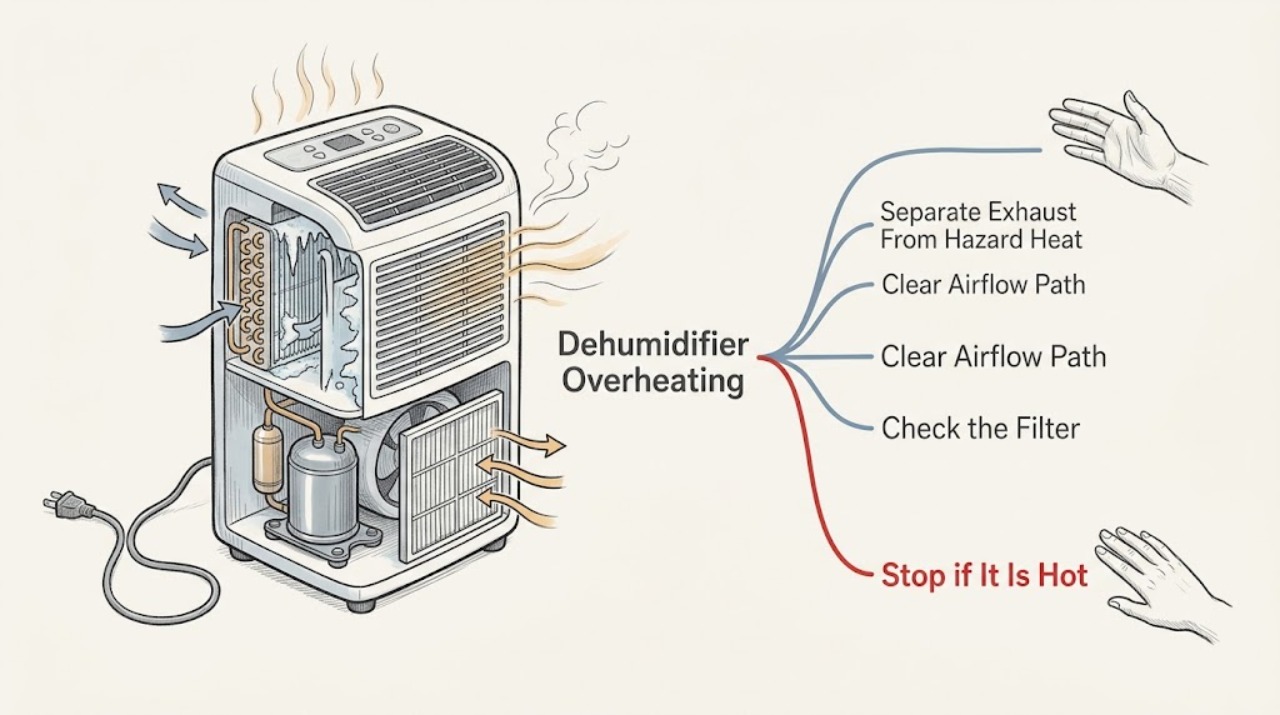
Work through in order
Diagnostic checks
Use only checks that match the exact appliance or system and its official guide.
-
Check 1
From outside the unit, identify where the heat is felt: exhaust air, cabinet surface, plug or cord, or wall receptacle. Note smoke, burning or electrical odor, melted plastic, discoloration, unusual noise, or a breaker trip.
Expected result: Only the exhaust is warm while moisture is being removed; the cabinet is unusually hot; the plug, cord or receptacle is hot or discolored; or smoke and odor are present.
Next step: For exhaust warmth without a hazard, continue with airflow and operating-state checks. For a hot or damaged power connection, smoke, burning smell, or melted material, stop using the unit and arrange qualified service; disconnect power only from a safe, dry, accessible point.
Stop if: Do not touch a hot or wet plug, spray the appliance, open the case, or restore power to reproduce smoke, odor or arcing.
Why this matters
Why: Warm exhaust can be normal compressor heat. Heat at power hardware or with smoke, odor or melted material is an electrical or equipment hazard, not a normal operating temperature.
-
Check 2
Turn the dehumidifier off and unplug it. Look for curtains, furniture, dust or other objects restricting the visible intake or outlet. Compare placement with the exact manual and GE's general airflow guidance; do not use a closet or tight corner as a test location.
Expected result: The unit is close to an obstruction or has less than the model's required space; airflow is weak; or the grilles are visibly dusty.
Next step: Move only light objects away and provide the spacing specified for the model. If grilles remain blocked, damaged, or inaccessible without opening the housing, arrange service.
Stop if: Do not move a heavy or running unit by its cord, remove a grille that requires case disassembly, or insert tools into an intake or outlet.
Why this matters
Why: Restricted intake or discharge makes heat removal and dehumidification less effective and can make the appliance appear to overheat. Clear external airflow makes that cause less likely but does not prove the compressor or fan is healthy.
-
Check 3
With power disconnected, remove the air filter only as shown by the exact owner's manual. Inspect it for dust, wetness or damage, wash it with warm soapy water when the model permits, rinse it, and let it dry completely before reinstalling. Clean visible grilles and case only with the model-approved method.
Expected result: The filter is clogged, wet, damaged or missing; the filter is clean and dry; or removal would require opening the cabinet or reaching past an internal component.
Next step: Reinstall a clean, dry, intact filter and observe from a safe distance. If the filter cannot be removed using the manual, the grille or case is damaged, or heat remains abnormal, stop and arrange service.
Stop if: Do not use chemical or abrasive cleaners, spray water into the machine compartment, run the unit with a wet filter, or bypass the filter.
Why this matters
Why: GE says a clogged filter can restrict airflow and reduce performance. A wet, damaged or missing filter is not a safe operating condition. A clean, dry filter makes that cause less likely but cannot rule out a fan, control or sealed-system fault.
-
Check 4
Read the display or dial from outside the unit. Record the humidity target, continuous or non-stop setting, fan setting, room temperature, and whether doors, windows or a clothes dryer are adding moisture. Do not repeatedly change settings while the casing or power connection is hot.
Expected result: The unit is in continuous operation or a high-moisture room; the target has not been reached; the unit reaches the target and cycles; or it never cycles despite normal conditions.
Next step: Use the exact manual to select the intended mode and allow room conditions to stabilize. If it remains hot, never cycles, or the fan runs continuously outside documented conditions, arrange service.
Stop if: Do not bypass a thermostat, humidistat or overload protector, and do not keep operating solely to see whether a hot unit eventually shuts down.
Why this matters
Why: GE says continuous operation can be normal in a particularly humid space, and a dehumidifier normally cycles when the set humidity is reached unless its mode calls for continuous operation. Never cycling with abnormal heat points toward a control, sensor, airflow or refrigeration issue rather than a setting alone.
-
Check 5
Without removing a grille or panel, note whether the unit is in a cool room, has visible frost at an accessible opening, blows cooler room air, or keeps the fan running while the compressor sound stops. Record the model and serial number, heat location, filter and airflow condition, cycling, frost, water collection, and any odor or breaker event.
Expected result: The fan runs while the compressor is off and frost is visible; the room is below the model's low-temperature limit; warm exhaust follows normal dehumidification; or the unit remains hot and does not cycle.
Next step: Use the exact manual for temperature limits and allow automatic defrost without forcing it. Arrange qualified appliance service for persistent frost, failure to resume, abnormal heat, or unexplained cycling; use qualified electrical service for hot power hardware, smoke or a burning odor.
Stop if: Do not scrape or chip frost, use a heat gun, open the housing, test capacitors or wiring, bypass thermal protection, add refrigerant, or perform live or sealed-system work.
Why this matters
Why: GE explains that frost can cause the compressor to cycle off while the fan runs until defrost is complete. Below 41°F, many models may freeze, although some models support low-temperature operation. Persistent case or power heat, abnormal cycling, or electrical symptoms require diagnosis beyond safe external checks.
Use your observations
Decision map
Find the observation that best matches what you see, then follow the next safe action.
-
PATH 01Next step
What you see
Only air leaving the exhaust is warm while the compressor is removing moisture, the intake and outlet are clear, the cord and plug are normal, and the unit cycles or follows its selected mode.
Do this next
Keep the appliance in the model-specified location and monitor cycling, humidity result and power connection. Escalate if heat changes location or is joined by odor, smoke, abnormal noise or poor operation.
Why this path and its safety boundary
Why it matters: This pattern is consistent with the heat produced by dehumidification, not proof of an overheating failure.
-
PATH 02Safety boundary
What you see
The unit is crowded by furniture or curtains, a filter is clogged or wet, or the visible intake/outlet is dirty, with no electrical hazard.
Do this next
Unplug, clear external obstructions, clean the filter and grilles using model instructions, dry all washable parts, and retest only when the appliance is safe. Persistent heat requires service.
Why this path and its safety boundary
Why it matters: Restricted airflow is a plausible reversible contributor to poor heat removal and performance; it does not establish that a motor or compressor is damaged.
Safety stop: Do not operate with a missing or wet filter or a blocked grille.
-
PATH 03Safety boundary
What you see
The display is in Continuous or Non-Stop mode, the room remains very humid, or frost causes the fan to run while the compressor is off.
Do this next
Confirm the intended mode and temperature range in the exact manual. Let automatic defrost complete; recurrent frost, failure to cycle, or abnormal heat needs service.
Why this path and its safety boundary
Why it matters: Long operation can be expected in that mode or load, and frost control may temporarily stop the compressor. Below 41°F is unsuitable for many models, but the exact manual controls.
Safety stop: Do not force defrost or touch coils behind a grille.
-
PATH 04Safety boundary
What you see
The plug, cord, receptacle or cabinet is hot, discolored or melted; smoke, burning/electrical odor, arcing, repeated breaker trips or water near electrical parts is present; or the unit keeps overheating after airflow checks.
Do this next
Stop using the dehumidifier. If safe and dry, disconnect power without touching damaged parts; otherwise leave it alone and isolate the circuit only from a safe location. Arrange qualified appliance or electrical service and do not restore power for testing.
Why this path and its safety boundary
Why it matters: This is not a user adjustment or filter-cleaning problem. Continued operation can worsen an electrical, motor, control, compressor or sealed-system fault.
Safety stop: Do not open the case, take live measurements, bypass overload protection, or move a smoking, wet or damaged unit.
Helpful context
Understand the symptom
First decide what is actually hot
A warm exhaust stream is part of the refrigeration cycle, so it does not by itself prove overheating. Compare the exhaust with the cabinet, plug and cord, and surrounding room. Heat concentrated at the exhaust while the appliance is removing moisture is a different observation from a hot plastic case, hot receptacle, burning odor, smoke, or a breaker that trips. Those warning signs end owner troubleshooting.
Airflow is the safe first check
Before cleaning, switch the unit off and unplug it. Keep curtains, furniture and other objects away from the intake and discharge, and use the spacing in the exact owner's manual. GE's general guidance calls for 18 inches of air space on all sides. A filter may be behind a front grille on one design or a rear grille on another, so remove it only as the manual describes; reinstall it fully dry and never run the appliance without the filter.
Long operation is not automatically a thermal fault
A high humidity load, a continuous or non-stop setting, or moisture entering through doors, windows or laundry can make the unit run for a long time. GE says a unit normally cycles at its set humidity unless continuous operation is selected, while fan operation can continue during defrost. Use the exact model controls and observe whether the compressor cycles; do not keep resetting a unit that is hot or unsafe.
Safety boundary
Stop conditions
- Stop using the dehumidifier for smoke, burning or electrical odor, arcing, melted or discolored plastic, a hot or damaged cord, plug or receptacle, repeated breaker trips, water near electrical parts, or a cabinet that becomes abnormally hot.
- Do not open the housing, reach past a grille, test a capacitor or wiring, bypass a thermal protector, force defrost, add refrigerant, or perform live electrical or sealed-system work.
- Disconnect power only from a safe, dry, accessible point. If the plug or receptacle is hot, wet or damaged, do not touch it; use qualified electrical service.
- Do not run the unit without a fully dry, intact filter or with blocked inlet/outlet grilles. Use the exact owner's manual because filter location and temperature limits vary by model.
Only after diagnosis
Potential parts
- air filter
Consider replacement only if the exact model uses a replaceable filter that is damaged, missing or no longer serviceable; a dirty but intact filter normally calls for cleaning first.
Filter location, dimensions and fit vary by GE model. Confirm the full model number and manufacturer's fit information before ordering. - fan motor or fan assembly
Consider only after qualified diagnosis confirms inadequate airflow or a fan fault after external obstructions and the filter have been addressed.
Fan assemblies, connectors and access differ by model. Do not order a motor from heat symptoms alone or open the housing yourself. - temperature or overload control
Consider only when qualified service confirms a control or protection failure rather than normal warm exhaust, restricted airflow or a room-condition issue.
Electrical protection and control parts are model-specific and require professional diagnosis and installation. Never bypass or substitute a protector based on appearance.
When checks do not resolve it
Need a professional?
Arrange qualified appliance service when the cabinet or power hardware is hot, the unit smells burnt, smokes, trips a breaker, repeatedly overheats, will not cycle in the selected mode, has persistent frost, or remains abnormal after external airflow and filter checks. Use qualified electrical service for a hot or damaged outlet, cord, plug, arcing or exposed wiring. Warm exhaust alone can be monitored only when the appliance otherwise operates normally and has no hazard signs.
Safety scope: The owner may observe externally, clear light objects, clean an accessible filter and grille with power disconnected, and record settings and timing. Qualified personnel must handle case removal, fans, capacitors, controls, thermal protection, wiring, compressor, refrigerant, sealed-system work and hazardous power connections.
Common questions
FAQ
Is warm air from a GE dehumidifier normal?
Usually: GE says the compressor generates heat and the dehumidifier exhausts warm or hot air while removing moisture. Warm exhaust alone is different from a hot cabinet, hot plug, burning odor, smoke or melted plastic. Stop using the unit for those warning signs.
Why is my GE dehumidifier getting hotter than usual?
Compare the exhaust with the cabinet and power connection, then check external airflow and the filter with power disconnected. A blocked grille or clogged filter can reduce airflow, but persistent case heat, abnormal cycling or an electrical smell needs qualified service.
Can a dirty filter make a GE dehumidifier overheat?
A clogged filter can restrict airflow and reduce performance, so it is a reasonable safe external check. Turn the unit off and unplug it, clean the filter as the exact manual allows, dry it completely and reinstall it. If heat remains abnormal, do not assume the filter caused it.
Why does the fan keep running when my GE dehumidifier feels warm?
The fan can continue while humidity rises, during a frost-related defrost cycle, or briefly after the compressor stops. Continuous or non-stop mode can also be intentional. If the fan never cycles in the expected mode, or the unit is abnormally hot, arrange service rather than bypassing a control.
Should I keep using a GE dehumidifier with a burning smell or hot plug?
No. Stop using it for a burning or electrical odor, smoke, a hot or damaged plug, cord or receptacle, melted plastic, water near electrical parts or repeated breaker trips. Disconnect only from a safe, dry, accessible point and arrange qualified appliance or electrical service; do not restore power for testing.
Read the exact guide
Official sources
- Dehumidifier - Fan Stays On, Will Not Shut OffGE Appliances · General cycling guidance; exact model mode and manual control expected behavior.
- Dehumidifier - Air FilterGE Appliances · General filter guidance; removal and reset details must follow the exact model manual.
- Dehumidifier - Will Not Shut OffGE Appliances · General distinction between expected continuous mode and failure to shut off at a set point; exact controls are model-specific.
- Dehumidifier - Ideal Operating ConditionsGE Appliances · General placement and environmental guidance; exact model low-temperature limits may differ.
- Dehumidifier - Exhaust Air Temperature WarmGE Appliances · General GE guidance explaining why warm or hot exhaust can be normal; it does not clear abnormal cabinet or power heat.
- Dehumidifier - Compressor Not OperatingGE Appliances · General explanation of models with automatic defrost; not evidence every model has the same control.
- Dehumidifier - Automatic Humidistat (Humidity Control) OperationGE Appliances · General humidistat behavior; labels and controls vary by model.
- Dehumidifier - Not Reaching Proper Humidity LevelGE Appliances · General external checks for airflow and humidity performance; it does not authorize internal repair.
- Support for GE Dehumidifiers and Air PurifiersGE Appliances · Brand support page confirming dehumidifier troubleshooting and service pathways; not a model-specific overheating diagnosis.
- Dehumidifier OperationGE Appliances · General mechanism explaining why dry air is heated before discharge; not a model-specific repair guide.
- Dehumidifier - Cleaning and MaintenanceGE Appliances · General cleaning guidance for older and newer designs; use only procedures matching the model.
Community feedback
Share a repair observation
Share a plain-text repair observation. Accepted observations are published automatically; this page may take a moment to update.