
On this page
Start here
Quick answer
A GE dehumidifier normally makes compressor and condenser-fan sounds, may drip water into the bucket, cycles on and off, and exhausts warm air while removing moisture. First record whether the sound is a steady air rush/hum, a normal water drip or cycle change, a beep with a full bucket, or a new rubbing, grinding, rattling, buzzing, or repeated clicking sound. Check only external conditions with the unit on a stable, dry surface: the air intake/discharge are not blocked, the washable filter is clean according to the exact manual, the bucket is seated, and any external drain hose is not visibly stressed or loose. Frost can make the compressor stop while the fan continues during defrost; a dirty filter can also affect fan behavior. A persistent abnormal noise, error code, pump symptom, damaged cord, burning odor, smoke, sparking, water near electricity, or noise that coincides with loss of dehumidification requires qualified service. Do not open the cabinet, reach into the fan, test the compressor or capacitor, handle refrigerant, or perform live electrical tests.
Before you begin
Safety first
- The user may clear external airflow obstructions, clean the filter as the exact manual directs, empty/reseat a user-accessible bucket, and inspect a visible drain hose. Qualified service must handle fan/motor, compressor and start components, pump internals, wiring, controls, frost/coil access, refrigerant, cabinet removal, and live testing. Disconnect power only from a dry, safe position when a hazard is present.
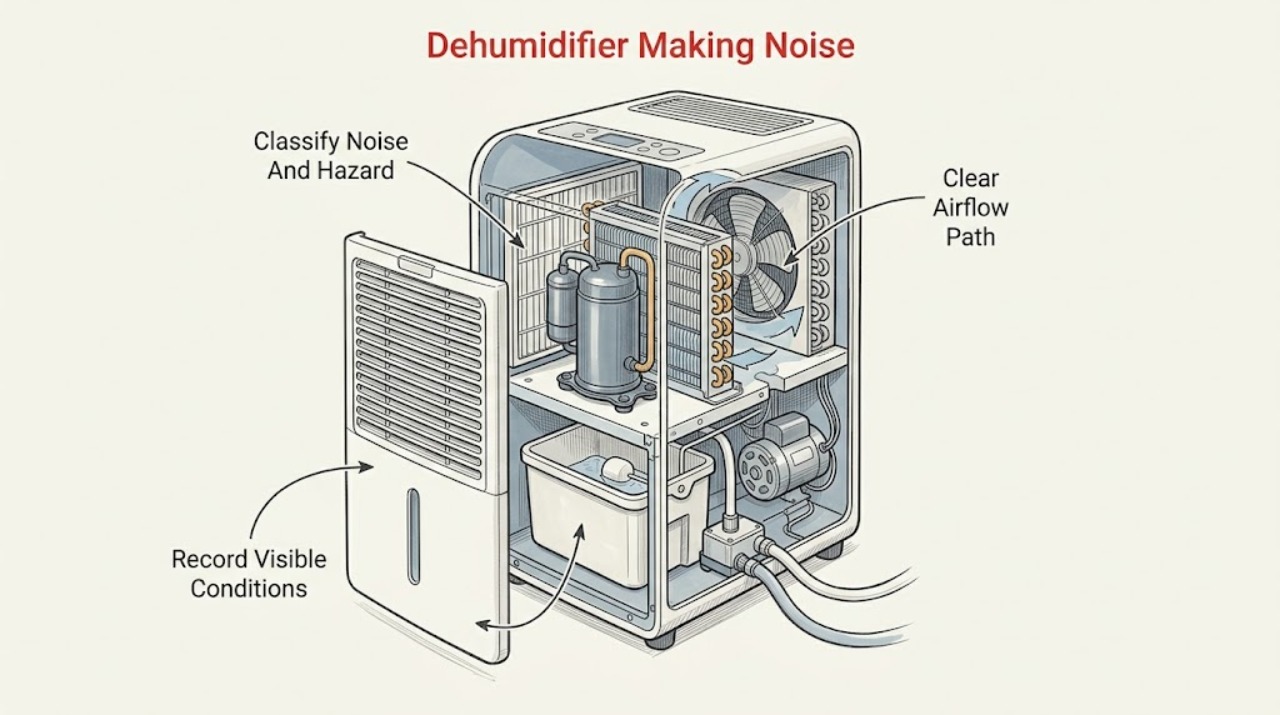
Work through in order
Diagnostic checks
Use only checks that match the exact appliance or system and its official guide.
-
Check 1
From a dry, safe position, identify whether the sound is an air rush, compressor hum, water drip, normal cycle change, beep, rubbing, grinding, rattling, buzzing, or repeated clicking. Note whether it starts with fan-only operation, compressor operation, bucket filling, pump mode, or defrost, and check for smoke, odor, heat, sparking, water, or a damaged cord.
Expected result: The sound matches normal airflow/compressor/water/cycling, a beep accompanies a water-full or pump indication, or the sound is new/harsh/irregular or paired with a hazard.
Next step: For a hazard, stop the unit and arrange qualified service. Otherwise continue with external placement, airflow, bucket, and model checks without reproducing a dangerous sound.
Stop if: Do not reach through grilles, tilt the appliance while running, or run it unattended to record a fault.
Why this matters
Why: GE identifies several operating sounds as normal, while a new mechanical/electrical noise or hazard cannot be safely classified from the outside.
-
Check 2
Record the complete model and serial number from the accessible label or paperwork, then check the exact manual for fan speeds, bucket/float arrangement, automatic defrost, continuous drain, and built-in pump features. Do not infer configuration from the cabinet shape or a generic GE label.
Expected result: The model has a front bucket and external drain, a built-in pump, a digital error display, or a configuration that cannot be confirmed.
Next step: Use only the matching manual for settings and removable-part access. If the model cannot be safely identified, document the external symptom and arrange service rather than selecting a part.
Stop if: Do not remove panels or guess a pump, fan, filter, or compressor arrangement.
Why this matters
Why: GE product pages and support articles show that features such as pump mode, bucket design, fan speeds, and error codes vary by model.
-
Check 3
With the unit off if you need to move an accessible object, check that the front/rear air path is not blocked by a wall, curtain, furniture, or debris and that the dehumidifier stands securely on a dry surface. Follow the exact manual for the required clearance and filter access; do not insert anything into a grille.
Expected result: Airflow is blocked, the filter is visibly dirty from the permitted external access, the unit is unstable or contacting a surface, or the location and airflow are clear.
Next step: Clear only external obstructions and clean the filter as the exact manual directs, with power disconnected when the manual requires it. If the abnormal sound remains, continue to the bucket/drain and service branches.
Stop if: Do not hose the cabinet or coil, remove fan guards, or operate in standing water.
Why this matters
Why: GE says restricted airflow reduces efficiency, and its fan guidance identifies a dirty filter as a factor affecting fan behavior. A contact or unstable location can change how a normal vibration is heard, but it does not prove an internal failure.
-
Check 4
If the sound is a beep, water slosh, or intermittent pump noise, inspect only the user-accessible bucket and visible drain connection with the unit off. Confirm the bucket is seated as the manual shows, the float is not visibly obstructed, and an external drain hose is connected and routed as specified. For a pump model, check only the normal pump-on setting and visible hose connection.
Expected result: The bucket is full or mis-seated, the float is obstructed, the drain hose is loose/kinked, the pump indicator or code is present, or the bucket/drain path appears normal.
Next step: Empty/reseat the bucket or correct a plainly visible hose connection only as the exact manual allows. If the noise, code, leak, or pump symptom returns, stop and arrange service.
Stop if: Do not reach inside the pump, disconnect a pressurized/hidden line, or run the unit with the bucket removed unless the manual explicitly permits the observation.
Why this matters
Why: GE links beeps to a full bucket and pump-mode failure, and says bucket position, pump settings, and visible hose installation matter on pump models. Persistent noise or a hidden pump fault requires service.
-
Check 5
Observe one normal cycle without opening the unit: note whether the fan continues after the compressor stops, whether the sound changes as frost defrosts, and whether warm or slightly cool exhaust matches the operating mode. Do not force a restart or scrape frost.
Expected result: The fan runs briefly after compressor shutdown, fan-only operation continues during visible/model-appropriate defrost, the compressor restarts after frost clears, or a harsh sound persists independent of cycle state.
Next step: Allow the documented defrost behavior to finish. If the fan does not behave as the manual describes, frost keeps returning, or noise persists in every mode, arrange qualified service.
Stop if: Do not remove coil covers, chip ice, apply heat, or touch a fan or compressor.
Why this matters
Why: GE says fan operation can continue after the compressor cycles off, including while frost is being removed, and that warm or cooler exhaust depends on dehumidifying versus defrost/fan mode. A persistent harsh sound is not explained by normal cycling alone.
-
Check 6
Record any display code, water-full light, pump light, or repeated beep before changing settings. If the exact GE guidance allows it and there is no hazard, disconnect power for the documented 30-second reset, then restore the normal setting once; do not repeatedly reset to chase the noise.
Expected result: The code clears and the sound returns to normal, the code reappears, the water-full/pump indication remains, or no display indication changes.
Next step: Monitor only a normal, hazard-free unit after a successful documented reset. For a returning code, persistent beep, pump indication, or unchanged abnormal noise, arrange service with the exact model and code.
Stop if: Do not enter diagnostics, bypass bucket/float protection, or power the unit after water or cord damage.
Why this matters
Why: GE says some codes may clear after a 30-second disconnect, but a returning code indicates a problem. A reset can change control state without identifying a fan, pump, or compressor part.
-
Check 7
Stop troubleshooting and arrange qualified service for grinding, scraping, electrical buzzing, repeated hard clicking, persistent rattling after external placement checks, a noise with loss of dehumidification, or any electrical/water hazard. Provide the model, noise description, cycle state, filter/bucket/drain observations, code, and timing.
Expected result: The sound is a documented normal operating sound, or it remains new, harsh, irregular, or associated with poor moisture removal, a code, leakage, heat, odor, or electrical symptoms.
Next step: Leave a hazardous unit unplugged and arrange a local qualified dehumidifier service provider; include the exact model and evidence. Do not order an internal part from a noise description.
Stop if: No cabinet removal, live testing, refrigerant work, fan access, or compressor/capacitor testing.
Why this matters
Why: Normal compressor/fan/water/cycling sounds can be monitored. Remaining possibilities include a motor, fan, compressor/start device, pump, control, wiring, frost, or sealed refrigeration fault that GE's public guidance does not identify by sound alone.
Use your observations
Decision map
Find the observation that best matches what you see, then follow the next safe action.
-
PATH 01Safety boundary
What you see
The sound is a steady air rush, compressor hum, water drip into the bucket, warm exhaust, or a normal on/off cycle with normal dehumidification and no hazard.
Do this next
Monitor the sound and maintain the model-specified airflow and filter care. Escalate if its character changes, becomes harsh, or is joined by poor dehumidification or an error.
Why this path and its safety boundary
Why it matters: GE identifies these sounds and warm exhaust as normal consequences of the compressor, condenser fan, water collection, and cycling.
Safety stop: Do not open the cabinet to make a normal sound quieter.
-
PATH 02Safety boundary
What you see
A beep or water/pump noise accompanies a full-bucket light, pump indicator, E0/P1-type code, mis-seated bucket, or visible drain-hose issue.
Do this next
Empty/reseat the bucket and correct only the visible model-approved hose or pump setting. If the indication or noise returns, arrange service.
Why this path and its safety boundary
Why it matters: GE links a 10-second beep to a full bucket or pump-mode failure and says pump models require the bucket and pump hose to be correctly installed.
Safety stop: Do not open the pump, bypass the float, or run with a disconnected drain path.
-
PATH 03Safety boundary
What you see
The fan remains on after the compressor stops, the air becomes slightly cooler during a defrost period, frost is suspected, or the filter is dirty.
Do this next
Let the model-appropriate defrost behavior finish and clean the filter as the manual directs. Arrange service if frost returns, fan behavior remains abnormal, or the noise is mechanical.
Why this path and its safety boundary
Why it matters: GE says frost can keep the fan on while the compressor is off and that a dirty filter can affect fan operation; this is not automatically a failed fan motor.
Safety stop: Do not scrape coils, apply heat, remove guards, or test the fan.
-
PATH 04Safety boundary
What you see
The sound changes when the dehumidifier is near a wall or obstruction, the filter is visibly blocked, or the unit is contacting an unstable surface.
Do this next
Clear external obstructions, restore the manual's clearance, and clean the accessible filter with power off as directed. Escalate if the sound persists in the correct location.
Why this path and its safety boundary
Why it matters: Restricted airflow can reduce performance and a location/contact change can alter how normal vibration is heard, but it does not identify an internal part.
Safety stop: Do not place the unit in standing water or insert tools through the grille.
-
PATH 05Safety boundary
What you see
Grinding, scraping, electrical buzzing, repeated hard clicking, or abnormal rattling persists after safe external checks, or the sound accompanies poor dehumidification, a returning code, heat, odor, smoke, sparking, or cord damage.
Do this next
Leave the unit off for a hazard symptom and arrange qualified local dehumidifier service. Give the model, timing, operating mode, code, and external observations to the technician.
Why this path and its safety boundary
Why it matters: The remaining possibilities include fan/motor, compressor/start, pump, control, wiring, frost, or sealed-system faults that cannot be diagnosed safely by listening.
Safety stop: Do not operate unattended, remove covers, perform live tests, handle refrigerant, or substitute internal parts.
Helpful context
Understand the symptom
Normal sound depends on what the machine is doing
GE describes a dehumidifier as operating much like a refrigerator: compressor and condenser-fan noise, water dripping into the bucket, and normal cycling are expected. Warm exhaust is also normal while the compressor removes moisture. A constant air rush or brief cycle change is therefore not the same symptom as a new scraping, grinding, electrical buzz, or repeated click. Record the sound and operating state before assuming a part has failed.
Use external observations to narrow the path
Note whether the sound starts with the fan, compressor, water collection, bucket-full state, pump mode, or defrost. Keep the front and rear airflow path clear and follow the exact model manual for filter cleaning. GE says frost can keep the fan running while the compressor is off during defrost, and that a dirty filter can affect fan operation. These observations can guide service, but they do not justify reaching through a grille or opening the housing.
Stop for electrical, water, or mechanical hazards
Disconnect power only from a dry, safe position if there is standing water, a wet or damaged cord, smoke, burning odor, sparking, unusual heat, or repeated tripping. Never operate the dehumidifier where standing water may accumulate. Keep hands, tools, and clothing away from the fan and coil. Internal motors, compressor/start components, pump, wiring, and refrigerant work belong to qualified service.
When checks do not resolve it
Need a professional?
Arrange qualified local dehumidifier service for persistent harsh noise, a returning error or pump indication, abnormal fan/compressor behavior, loss of dehumidification, or any internal mechanical/electrical diagnosis. Stop immediately for smoke, burning odor, sparking, unusual heat, standing water near the appliance, a damaged cord, or repeated electrical trips.
Safety scope: The user may clear external airflow obstructions, clean the filter as the exact manual directs, empty/reseat a user-accessible bucket, and inspect a visible drain hose. Qualified service must handle fan/motor, compressor and start components, pump internals, wiring, controls, frost/coil access, refrigerant, cabinet removal, and live testing. Disconnect power only from a dry, safe position when a hazard is present.
Have this ready
- Complete model and serial number, room conditions, noise description and timing, fan/compressor/pump/defrost state, filter and airflow observations, bucket/drain position, display code or beeps, and whether dehumidification changed. Do not recreate a hazardous symptom.
Common questions
FAQ
What sounds are normal on a GE dehumidifier?
GE says compressor noise, condenser-fan noise, water dripping into the bucket, and normal cycling are expected. Warm exhaust is also normal while the unit is removing moisture. A new grinding, scraping, electrical buzz, or harsh repeated click is a different symptom and needs service if it persists.
Why does the fan keep running while my GE dehumidifier is noisy?
GE says the fan can run after the compressor cycles off and can remain on while frost defrosts; a dirty filter can also affect fan operation. Clean the filter only as the exact manual directs and arrange service if fan behavior or noise remains abnormal.
Why is my GE dehumidifier beeping and making a water sound?
GE says a 10-second beep can indicate a full bucket or a pump-mode failure, with the water-full or pump light flashing. Check the model-approved bucket seating and visible pump hose; a returning indication or leak needs service.
Can I open a GE dehumidifier to find a rattling fan?
No. Keep the grille, fan, compressor, wiring, and refrigeration system closed. Clear only external obstructions and clean the accessible filter with power disconnected as the manual requires; persistent rattling or grinding needs qualified service.
When should I stop using a noisy GE dehumidifier?
Stop for smoke, burning odor, unusual heat, sparking, a damaged cord, standing water near the appliance, repeated trips, or a persistent harsh noise with poor dehumidification or an error. Isolate power only from a dry, safe position and arrange qualified service.
Read the exact guide
Official sources
- Dehumidifier - Fan Stays On, Will Not Shut OffGE Appliances · Supports fan behavior, frost defrost, humidity cycling, and dirty-filter observations; exact timing and control behavior are model-dependent.
- Dehumidifier - Normal SoundsGE Appliances · Supports the normal compressor, condenser-fan, water-drip, cycling, and warm-air distinctions; it does not diagnose an abnormal noise or identify a part.
- Dehumidifier - Exhaust Air Temperature WarmGE Appliances · Supports normal warm exhaust during dehumidification and cooler air during defrost/fan mode; it does not diagnose fan or compressor noise.
- Dehumidifier - BeepingGE Appliances · Supports model-dependent full-bucket and pump indications; exact lights and codes vary by model.
- Dehumidifier - Not Reaching Proper Humidity LevelGE Appliances · Supports external airflow and filter observations that can accompany a noise complaint; it does not identify a mechanical noise source.
- GE® Dehumidifier - ADER50LR - GE AppliancesGE Appliances · Used only as an example that GE models can have a bucket, external drain, automatic defrost, washable filter, and electronic controls; these features are not asserted for every GE dehumidifier.
- Dehumidifier - Compressor Not OperatingGE Appliances · Supports only the frost/defrost explanation for models equipped with automatic defrost; it does not authorize compressor testing.
- Dehumidifier - Fault or Error CodesGE Appliances · Supports only the model-dependent error/reset and pump-hose checks described by GE; persistent codes need exact-manual/service review.
- Owner manuals, installation instructions | GE AppliancesGE Appliances · Supports matching the complete model to its manual; it does not diagnose a noise or establish a universal part.
- Use and Care of models AHD14AA, AHD20M, AHD25AA, AHD30M, AHD40AAGeneral Electric · Applies only to the listed older AHD models; used for clearly labeled safety and historical external-check boundaries, not universal GE specifications.
- Dehumidifier - Internal Pump Not WorkingGE Appliances · Applies only to models equipped with an internal pump; supports pump setting, bucket placement, full-bucket trigger, and visible hose-length guidance.
Community feedback
Share a repair observation
Share a plain-text repair observation. Accepted observations are published automatically; this page may take a moment to update.