
On this page
Start here
Quick answer
First identify when the sound occurs and whether it matches normal operation. Electrolux dehumidifier manuals describe rushing air from the fan, dripping water during dehumidification, gurgling or hissing from refrigerant movement, and a high-pitched compressor chatter as normal model-family sounds. A hum or vibration that changes when the unit is placed squarely on a firm, level floor can be a support or contact issue; a loose bucket, filter cover, grille, cord, hose, or nearby object can also rattle if your model has those parts. Check only accessible items, clear airflow, and the humidity/timer or defrost state in the exact manual. Stop for scraping, grinding, repeated harsh clicking, burning or electrical odor, smoke, sparks, a hot or damaged cord, water near electrics, or a breaker trip. Do not remove panels, reach the fan or compressor, open the refrigerant circuit, or perform live electrical tests. If the sound remains after safe placement and visible checks, or the unit loses airflow, collects water abnormally, overheats, or repeatedly trips, leave it off when safe and arrange qualified service for the fan, compressor, pump, wiring, or controls.
Before you begin
Safety first
- The user may listen from a dry position, turn the unit off, unplug before accessible cleaning or movement, check level/support and external contact, clean a filter or grille as the exact manual permits, reseat a bucket or external hose, and read documented controls. Cabinet removal, fan/compressor/pump/motor/wiring access, live tests, refrigerant work, and repairs involving water and electricity are for qualified personnel.
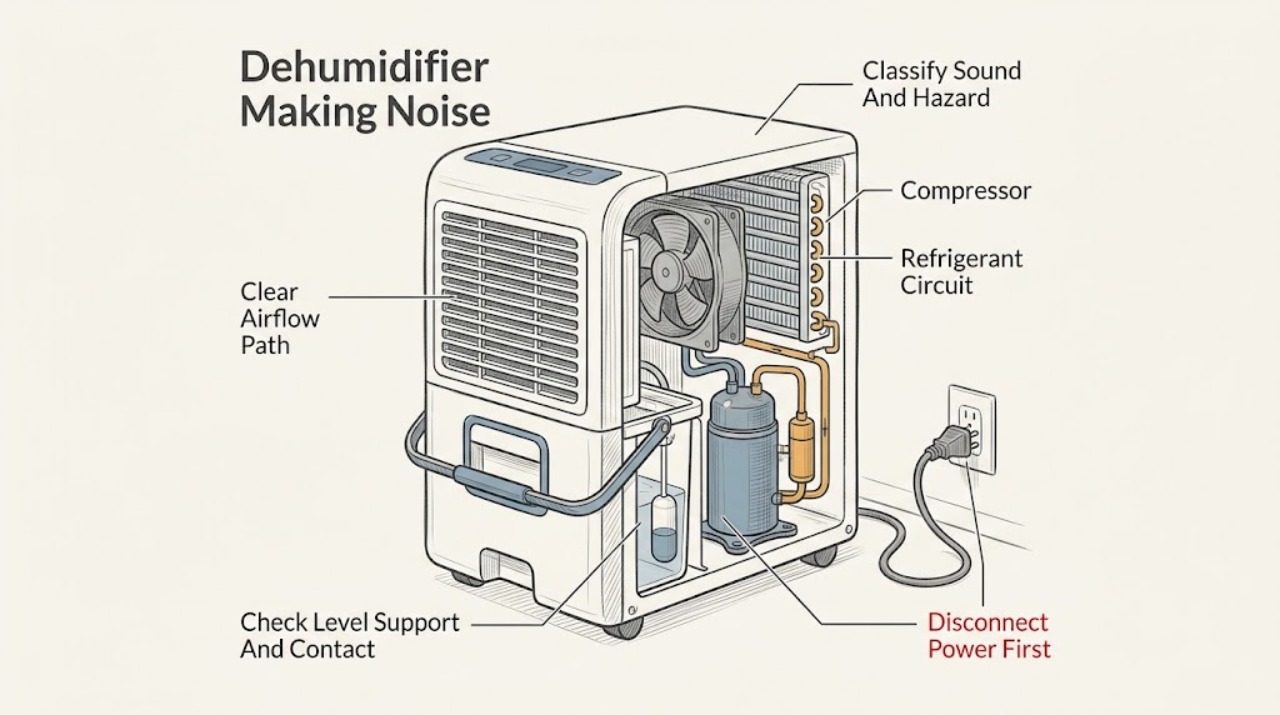
Work through in order
Diagnostic checks
Use only checks that match the exact appliance or system and its official guide.
-
Check 1
From a dry position, listen briefly without touching the cabinet or grilles and record when the sound occurs: startup, fan-only operation, compressor operation, water collection, defrost, shutdown, or continuously. Compare it with rushing air, dripping, gurgling/hissing, or a high-pitched compressor chatter described in the exact Electrolux manual. Look for smoke, sparks, burning/electrical odor, a hot or damaged cord or outlet, water near electrical parts, melted plastic, or a breaker trip.
Expected result: The sound matches a documented airflow, dripping, refrigerant, or compressor sound; it is a new rattle, scrape, grind, squeal, or repeated click; it changes with operating state; or a hazard sign is present.
Next step: For a documented-sounding noise without hazards, continue with placement and accessible-item checks. For a harsh or hazardous noise, stop the unit and isolate power only if safe; arrange qualified service.
Stop if: Do not keep restarting the unit to reproduce smoke, sparks, burning odor, hot wiring, water near electrics, or repeated breaker trips.
Why this matters
Why: A documented sound that follows the cycle is more likely normal. A new harsh mechanical or electrical sound is not identified by the normal-sound list and needs visible checks followed by service if it remains. A hazard sign overrides further noise testing.
-
Check 2
Turn the unit off and unplug it before moving or inspecting the outside. Confirm that it stands upright and squarely on a firm, level surface that supports the unit and bucket; check that it is not touching a wall, furniture, trim, or another appliance. Inspect only accessible items for contact or looseness: the bucket, filter cover or grille, drain hose/cap if fitted, cord, and objects on or beside the cabinet.
Expected result: The cabinet rocks, one caster or foot is unloaded, the unit touches another surface, the bucket/filter/grille/hose is loose, or the support and accessible items are stable.
Next step: Correct only the placement or visible fit and keep the airflow clear, then run one monitored test if no hazard is present. If the unit is heavy, wet, built in, damaged, or still vibrates severely, do not move it further; arrange service.
Stop if: Do not tip a full unit, remove cabinet panels, reach through grilles, place improvised supports under a running unit, or continue with a damaged or unstable appliance.
Why this matters
Why: An uneven support or cabinet contact can turn normal fan or compressor movement into humming or vibration. A loose accessible cover, bucket, hose, or nearby object can create a rattle. A stable cabinet with secure visible items makes an internal mount, fan, compressor, or electrical source more likely.
-
Check 3
With the unit unplugged and cool, inspect the accessible air intake/outlet, grille, and filter. Remove only loose dust using the exact manual's permitted method, reinstall a dry filter correctly, and make sure the bucket is empty or seated and its full indicator/float is not visibly stuck. If a continuous-drain hose or pump filter is provided, inspect only its external connection and accessible filter as the model manual directs.
Expected result: Airflow is blocked, the filter or grille is heavily dusty, the bucket is full or mis-seated, a float/full indicator remains active, a hose is kinked or touching the cabinet, or these visible conditions are normal.
Next step: Restore only the accessible filter, bucket, grille, and hose conditions named by the exact manual, then monitor one cycle. If the fan remains harsh, airflow is weak, water leaks, the pump hums without moving water, or the noise returns, arrange service.
Stop if: Do not operate with the filter removed, insert tools into the grille, wash electrical parts, open the pump or fan housing, or work on a wet energized appliance.
Why this matters
Why: Restricted airflow can make the fan work harder and alter the sound; a full or mis-seated bucket can stop operation or change water-related sounds. A pump-equipped model may have a documented accessible pump-filter check, but an internal blockage or motor problem cannot be confirmed from noise alone.
-
Check 4
Read the exact display and control state. Check the humidity setpoint, CONTINUOUS or other mode, fan speed, timer/delay-start setting, bucket-full indication, frost/defrost behavior, and whether the unit was just switched off and on. Allow the model's documented compressor delay to finish; one Electrolux guide specifies a three-minute delayed compressor start after a quick restart. Do not change several settings at once.
Expected result: The fan is cycling with humidity, the unit is in CONTINUOUS or a timer delay, the compressor is in its documented restart delay, a full-bucket or defrost state is shown, or the controls are normal but the noise is persistent.
Next step: Wait for the documented delay or cycle, then return only one control to the desired documented setting and observe. If a code persists, the sound does not follow the normal cycle, or performance is abnormal, record the display and arrange service.
Stop if: Do not bypass a timer, force a compressor restart, defeat a full-bucket switch, or alter internal controls.
Why this matters
Why: Normal control logic can make fan and compressor sounds start, stop, or continue at different times. A delayed compressor or defrost state is not proof of a failed motor. Persistent noise with normal settings and no visible airflow or support issue makes an internal mechanical, electrical, pump, or refrigeration fault more likely.
-
Check 5
During one supervised, hazard-free cycle, note whether the sound is accompanied by normal airflow, water dripping into the bucket or drain, or a change when the compressor cycles. Keep hands away from the top outlet, coil area, bucket water, and any steam or hot exhaust. Stop the test if the sound becomes scraping, grinding, electrically crackling, or sharply louder, or if cooling/dehumidification or airflow changes abruptly.
Expected result: The sound follows airflow, water collection, or compressor cycling and remains stable; it occurs only at a particular cabinet position; or it is independent of the cycle and accompanied by performance loss or a hazard.
Next step: If the sound is stable and documented, keep the unit level and clear and continue normal monitoring. If it is worsening, not cycle-linked, or paired with abnormal performance, stop use and arrange qualified diagnosis.
Stop if: Do not touch coils, fan blades, compressor, wiring, refrigerant tubing, or moving parts during the test; do not continue if hot, wet, or electrically abnormal.
Why this matters
Why: A stable cycle-linked sound is consistent with the normal sounds documented for applicable Electrolux families. A position-dependent sound supports contact or support vibration. A cycle-independent or worsening sound with poor airflow, overheating, leakage, or electrical signs is more concerning for an internal fan, compressor, pump, motor, control, or wiring fault.
-
Check 6
After the sound classification, level/support, accessible-item, airflow, bucket, and control checks, record the exact model, sound description and timing, humidity setting, fan/compressor behavior, airflow, bucket/drain state, display codes, and any odor, heat, leak, or breaker event. Leave the machine unplugged when safe if the sound is abnormal or hazardous. Do not remove the cabinet or perform electrical or refrigerant tests.
Expected result: The noise stops after a visible correction; remains but matches a documented normal sound; persists with normal placement and settings; or is accompanied by scraping, grinding, repeated clicking, electrical odor, overheating, leakage, weak airflow, or repeated trips.
Next step: Continue use only when the sound is stable, documented as normal for the exact model, and no abnormal performance or hazard is present. Otherwise leave it off, protect the area from water, and arrange qualified Electrolux/appliance service with the diagnostic record.
Stop if: Do not open panels, bypass controls, replace internal parts by sound alone, perform live tests, or work on the fan, compressor, pump, wiring, or refrigerant circuit.
Why this matters
Why: A noise that stops after a safe correction supports a placement, contact, bucket, filter, airflow, or operating-state cause. Persistent or worsening noise despite those checks can involve a fan, compressor, pump, motor mount, wiring, control, or sealed system; the sound does not identify a part. Hazard signs require stop-use handling.
Use your observations
Decision map
Find the observation that best matches what you see, then follow the next safe action.
-
PATH 01Next step
What you see
The sound is rushing air, dripping, gurgling/hissing, or high-pitched compressor chatter and it follows the fan, water collection, or compressor cycle without heat, odor, leakage, or performance change.
Do this next
Keep the unit level, supported, clear around the grilles, and operated at the documented setting. Monitor for a change in pitch, timing, vibration, airflow, or dehumidification.
Why this path and its safety boundary
Why it matters: The pattern is consistent with normal sounds listed in applicable Electrolux dehumidifier guides. The exact model still controls the final sound description and operating behavior.
-
PATH 02Next step
What you see
Hum or vibration changes when the unit is placed squarely on a firm, level surface, moved away from a wall, or an accessible bucket, filter cover, grille, hose, cord, or nearby object is secured.
Do this next
Keep the corrected placement and run one monitored cycle if there are no hazards. If severe vibration or rattling remains, arrange service rather than opening the cabinet.
Why this path and its safety boundary
Why it matters: Cabinet support or contact is more likely than an internal component fault. Electrolux guides require level support and clearance; loose accessible items should be corrected only from outside.
-
PATH 03Next step
What you see
The sound changes with fan speed, a continuous/timer/humidity state, a full bucket, a dirty filter or grille, a recent restart, or a documented compressor delay/defrost state.
Do this next
Correct only the documented filter, grille, bucket, drain, or control condition and allow the normal cycle/delay to finish. If the noise or performance problem returns, record the exact display and seek service.
Why this path and its safety boundary
Why it matters: Operating logic, restricted airflow, or water-bucket status is more likely than a failed compressor or fan. A short restart delay is a protective operating behavior on applicable Electrolux families.
-
PATH 04Safety boundary
What you see
Scraping, grinding, squealing, severe vibration, or repeated clicking continues independently of the cycle after stable placement, clear airflow, secure accessible items, and normal controls.
Do this next
Stop use and arrange qualified Electrolux/appliance diagnosis, providing the exact model, recording, timing, and visible checks. Do not attempt an internal repair.
Why this path and its safety boundary
Why it matters: An internal fan, compressor, motor mount, pump, bearing, obstruction, or control issue is more likely, but the noise cannot select a part. Continued operation may worsen damage or obscure the diagnostic pattern.
Safety stop: Do not remove covers, reach the fan or compressor, insert tools into grilles, or perform live or sealed-system testing.
-
PATH 05Safety boundary
What you see
Noise is accompanied by smoke, sparks, burning/electrical odor, a hot or damaged cord, water near electrics, abnormal heat, a significant leak, or repeated breaker trips.
Do this next
Stop the dehumidifier and isolate power only if it can be done without contact with water or damaged electrical parts. Keep people away from the area and arrange qualified service; do not restart to test.
Why this path and its safety boundary
Why it matters: This is a stop-use safety condition, not a sound-identification exercise. The source may involve energized wiring, motor/compressor failure, pump or drain water, or another internal fault that cannot be safely confirmed by the user.
Safety stop: Do not touch wet electrical parts, reset a breaker repeatedly, remove panels, or attempt to contain an internal refrigerant or electrical fault.
Helpful context
Understand the symptom
Match the sound to the operating moment
A sound during startup, compressor operation, airflow, or water collection is more informative than the word “loud.” Electrolux guides list rushing air, dripping, gurgling or hissing, and high-pitched compressor chatter as normal on applicable dehumidifier families. Note whether the sound is steady, cycles with the compressor or fan, changes when the humidity setpoint is reached, or continues after the unit should be off. A new scraping, grinding, electrical crackle, or harsh repeating click should not be normalized from a generic sound list.
Rule out cabinet vibration and accessible loose items
Place the dehumidifier on a firm, level surface that supports it with a full bucket, and leave the clearance specified by the exact manual. Check that the bucket, filter, grille, drain hose or cap if fitted, cord, and nearby objects are not loose or touching the cabinet. Correct only visible placement or fit. Do not remove covers or reach through a grille to touch a fan; a rattle that remains with the cabinet stable and accessible items secure needs service diagnosis.
Settings and airflow change what you hear
A fan may run continuously in a continuous mode, cycle with room humidity, or continue briefly after the compressor stops depending on the model. A timer, humidity setpoint, recent restart, low room temperature, full bucket, dirty filter, or blocked grille can change fan and compressor behavior. Use the exact manual's controls and clean only the accessible filter or grille as directed. Do not infer a failed compressor from a pause or a failed fan from a short post-compressor run.
Internal noise diagnosis is a service task
Persistent grinding, scraping, severe vibration, electrical buzzing, repeated clicking, or a noise accompanied by poor dehumidification can involve a fan, compressor, pump, motor mount, wiring, control, or sealed refrigeration system. The sound alone does not select a part. Stop for electrical or overheating signs and keep the machine unplugged when safe. Do not open the cabinet, bypass a control, add refrigerant, or perform a live test.
Safety boundary
Stop conditions
- Stop immediately for smoke, sparks, burning or electrical odor, a hot or damaged cord/plug/outlet, melted plastic, water near electrical parts, abnormal heat, a significant leak, or repeated breaker trips.
- Stop if the unit is unstable, damaged, wet internally, or must be tipped or moved while the bucket is full.
- Do not remove cabinet panels, reach through grilles, touch the fan, compressor, pump, motor, wiring, or refrigerant tubing, or perform live electrical or sealed-system tests.
- Unplug before cleaning the accessible filter, grille, cabinet, bucket, hose, or pump filter where the exact model manual permits; never wash or immerse electrical parts.
- Do not normalize scraping, grinding, repeated harsh clicking, electrical crackling, or severe vibration because a different model lists some normal sounds.
- Arrange qualified service when abnormal noise remains after safe placement, accessible-item, airflow, bucket, and documented control checks, or when dehumidification, airflow, drainage, or temperature behavior changes.
When checks do not resolve it
Need a professional?
Arrange qualified Electrolux/appliance service when scraping, grinding, squealing, severe vibration, repeated clicking, or electrical buzzing persists after the unit is level, clear, and stable and accessible items, filter, bucket, drain, and documented controls have been checked. Stop immediately for smoke, burning odor, sparks, a hot/damaged cord or outlet, water near electrical parts, abnormal heat, a significant leak, or repeated breaker trips. Internal fan, compressor, pump, motor mount, wiring, controls, live testing, and refrigerant work are professional tasks.
Safety scope: The user may listen from a dry position, turn the unit off, unplug before accessible cleaning or movement, check level/support and external contact, clean a filter or grille as the exact manual permits, reseat a bucket or external hose, and read documented controls. Cabinet removal, fan/compressor/pump/motor/wiring access, live tests, refrigerant work, and repairs involving water and electricity are for qualified personnel.
Common questions
FAQ
What sounds are normal on an Electrolux dehumidifier?
Applicable Electrolux owner guides describe rushing air from the fan, dripping water during dehumidification, gurgling or hissing as refrigerant passes through the evaporator, and high-pitched compressor chatter as normal sounds. Use the exact model guide because sound timing and controls vary. A new scraping, grinding, electrical crackle, or severe vibration is not automatically normal.
Why is my Electrolux dehumidifier humming or vibrating?
Turn it off and unplug it before checking that it stands upright on a firm, level surface and is not touching a wall, furniture, or another appliance. Reseat accessible items such as the bucket, filter cover, grille, hose, or cord if the exact model has them. If severe vibration or humming remains with stable support, the source may be an internal fan, compressor, motor mount, pump, or control and needs service diagnosis.
Why does my Electrolux dehumidifier make a clicking or rattling noise?
Note whether it is a brief cycle-linked sound or a repeated harsh noise. Check only accessible cabinet contacts, the bucket, filter/grille, drain hose or cap, cord, and nearby objects after unplugging. A repeated scrape, grind, harsh click, or rattle that persists with the unit level and visible items secure should be diagnosed by a qualified technician; do not open the cabinet.
Why does the fan sound change or run after the compressor stops?
Fan behavior can change with humidity, fan-speed, continuous, timer, or defrost settings. A compressor may also have a model-documented restart delay, and some dehumidifier designs keep the fan moving air during or after a cycle. Check the exact manual's display and allow the documented cycle to finish. A fan that becomes harsh, loses airflow, or is accompanied by overheating needs service.
Can a full bucket or dirty filter cause unusual dehumidifier noise?
A full or incorrectly seated bucket can stop operation or change water-related sounds, while a dirty filter or blocked grille can restrict airflow and alter the fan sound. Unplug first, then empty and reseat the bucket and clean the accessible filter or grille exactly as the model manual permits. If airflow stays weak or the noise returns, arrange service.
When should I stop using a noisy Electrolux dehumidifier?
Stop immediately for smoke, sparks, burning/electrical odor, a hot or damaged cord or outlet, water near electrical parts, abnormal heat, a significant leak, or repeated breaker trips. For a non-hazardous persistent scrape, grind, severe vibration, harsh click, or electrical buzz after safe visible checks, leave it off and arrange qualified service. Do not remove panels, reach the fan or compressor, perform live tests, or open the refrigerant circuit.
Read the exact guide
Official sources
- Dehumidifier Complete Owner’s GuideElectrolux Home Products · Model-family guidance for pump drain-filter access, bucket and grille care, normal sounds, fan noise, airflow, clearance, and low-temperature operation; only pump-equipped models have this arrangement.
- Dehumidifier Complete Owner’s GuideElectrolux Home Products · Model-family guidance for level support, clearance, bucket fit, compressor restart delay, operating range, normal fan/water/refrigerant/compressor sounds, filter and grille care, and service boundary; exact model instructions control.
- Dehumidifier Complete Owner’s GuideElectrolux Home Products · Model-family guidance for fan speed, humidity and timer controls, bucket/full state, filter and grille cleaning, normal sounds, airflow, and troubleshooting; exact model instructions control.
Community feedback
Share a repair observation
Share a plain-text repair observation. Accepted observations are published automatically; this page may take a moment to update.