
On this page
Start here
Quick answer
A Frigidaire dehumidifier can make changing fan and compressor sounds during normal dehumidification: the fan may cycle with room humidity, and it may continue for a short period after the compressor stops. A rattle points first to the bucket or filter cover; humming or vibration calls for a flat, level floor with the castors supported evenly. Check these items with the unit off and unplugged, and keep the bucket seated. A water-related sound should be interpreted with the bucket and drain arrangement for the exact model: a full bucket can pause operation, while a damaged or tilted bucket can leak. If the noise is sharp, scraping, electrical, progressively louder, present with burning odor or a hot cord, or remains after the visible checks, stop using the unit and arrange service. Do not open the cabinet, reach through the grille, test the fan or compressor live, or work on the refrigerant circuit.
Before you begin
Safety first
- The user may identify the model, record the sound, unplug the unit, reseat an accessible bucket or filter cover, place the unit on a firm level floor, and clean accessible surfaces as the exact care guide permits. Cabinet removal, fan or compressor diagnosis, internal wiring, live tests, refrigerant work, pump/base access, and sealed-system repair belong to qualified service.
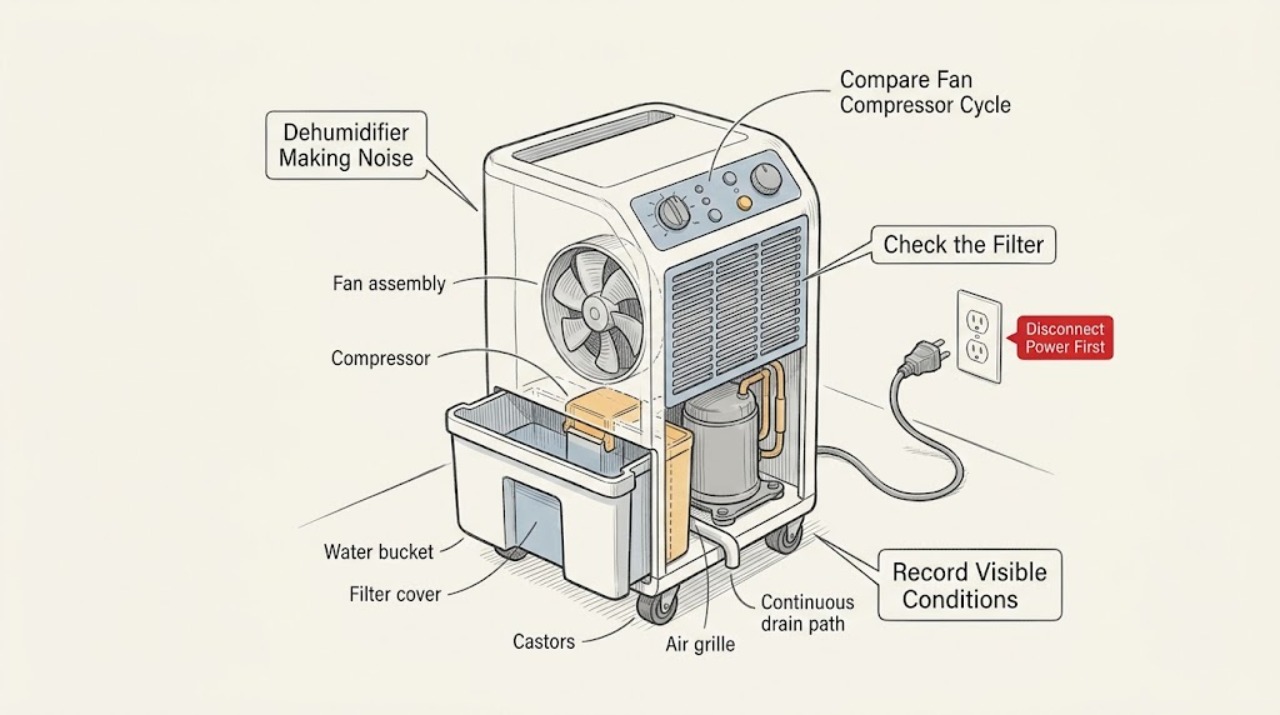
Work through in order
Diagnostic checks
Use only checks that match the exact appliance or system and its official guide.
-
Check 1
From outside the appliance, record whether the sound is a brief start/stop cycle, a steady hum, a floor vibration, a rattle, a water or sloshing sound, a scrape, or an electrical buzz. Note whether it occurs while the fan is running, after the compressor stops, during bucket filling, after moving the unit, or continuously. Read the exact model and serial label from the side or back near the bucket without moving a running unit or reaching through a grille.
Expected result: The sound follows the humidity cycle, changes when the unit vibrates, follows bucket or filter movement, accompanies water collection, or is sharp, scraping, electrical, or hazardous.
Next step: Keep the unit operating only long enough to observe a normal, non-hazardous pattern. For a persistent, sharp, or hazardous sound, switch it off, unplug it from a dry position, and arrange service. Keep the model information and a short recording for the technician.
Stop if: Do not put fingers or tools through a grille, move the unit while running, or remove covers to locate the sound.
Why this matters
Why: Cycle-linked fan behavior can be normal; a rattle or vibration makes a loose cover, bucket, or uneven support more likely. A persistent mechanical or electrical sound cannot be classified from a generic Frigidaire model label alone.
-
Check 2
Check the display's relative-humidity reading and setpoint using the exact model guide. Observe whether the fan stops below the setpoint, restarts when humidity rises above it, or runs briefly after the compressor stops. If a continuous-run setting is shown on the model, note whether that mode explains a longer compressor and fan run. Do not enter a service mode or repeatedly change the setpoint just to provoke a sound.
Expected result: The fan cycles with humidity, the fan runs briefly after compressor shutoff, Continuous Run is selected, the sound is unrelated to the cycle, or the compressor and fan appear to run continuously with an abnormal sound.
Next step: Leave a normal cycle alone and use the desired humidity setting described by the exact manual. If an unwanted continuous mode is documented for the model, return it to the desired humidity setting. Arrange service for a non-cycle-linked or worsening noise.
Stop if: Do not infer a failed compressor from a short fan run, and do not open the cabinet or test compressor terminals.
Why this matters
Why: Frigidaire documents fan cycling and a brief post-compressor fan period as normal dehumidification behavior. Continuous Run can keep the compressor running and make the unit warmer. A sound that does not track those patterns is more likely mechanical or internal and needs service if it persists.
-
Check 3
Turn the dehumidifier off, unplug it, and wait for moving parts to stop. Remove and reinstall only the accessible water bucket and filter cover as shown in the exact user guide. Check for a visibly cracked bucket, a cover that does not latch or sit flat, or a foreign object on the mating surfaces. Do not force a cover, reach behind the filter, or dismantle the fan housing.
Expected result: The bucket or filter cover was loose, the bucket is cracked or tilted, the cover is damaged, or both parts seat securely with no visible damage.
Next step: Replace or service only a visibly damaged model-specific bucket or cover after confirming fitment. If the parts seat correctly but the noise returns, keep the unit unplugged and arrange service rather than adding padding or adhesive.
Stop if: Do not run the unit with a cracked bucket, missing cover, exposed filter compartment, or loose foreign object, and do not tape, glue, or wedge the assembly.
Why this matters
Why: Frigidaire identifies an improperly installed bucket or filter cover as a possible rattle source and a damaged or tilted bucket as a leak source. Secure, undamaged parts make an internal vibration, motor, or other fault more likely if the rattle returns.
-
Check 4
With the unit unplugged, place it on a firm, flat, level floor so its castors or feet are supported evenly. Check the visible front/rear grille and filter for dust or an object, and inspect the bucket area for pooling water. If the exact model uses a continuous drain, inspect only the visible connector and hose for an obvious kink, loose connection, or damaged washer; do not disconnect a pressurized or inaccessible path.
Expected result: The unit rocks, a castor is unsupported, the grille or filter is visibly restricted, the bucket is full or leaking, or the visible floor and water path are normal.
Next step: Level the unit, clean the accessible filter or grille only as the care guide permits, and empty or reseat the bucket. For a damaged bucket, drain connector, hose, or inaccessible water path, stop using the unit and arrange model-specific service.
Stop if: Do not tilt the unit while powered, move a full bucket carelessly, disassemble a pump, open the base, or reach into a wet electrical area.
Why this matters
Why: Uneven support can amplify humming or vibration. Restricted airflow can lengthen operation, while a full, tilted, or damaged bucket can change water handling and create splashing or leakage. A normal visible path with persistent noise points toward internal service.
-
Check 5
After the safe bucket, cover, level, airflow, and mode checks, listen only from outside the closed cabinet. Note whether the abnormal sound remains, increases, changes with fan/compressor operation, or is accompanied by unusual heat, smoke, burning odor, a hot cord, sparks, water near controls, or repeated breaker operation. Do not restart the unit solely to retest a hazardous symptom.
Expected result: The noise clears after a visible correction, remains with a normal cycle, is progressively louder or scraping, or occurs with an electrical, water, or overheating hazard.
Next step: Keep the unit off and arrange qualified Frigidaire service for persistent noise. Disconnect power from a dry, safe location and seek urgent qualified help for smoke, sparks, burning odor, a hot or damaged cord, water near electrical parts, or repeated breaker operation.
Stop if: Do not open the cabinet, probe wiring, lubricate the motor, handle refrigerant, puncture tubing, or bypass a safety control.
Why this matters
Why: A corrected loose cover or uneven support can explain a simple rattle or vibration. Persistent or hazardous noise is more consistent with a fan motor, compressor, control, wiring, sealed refrigeration, or other internal issue that cannot be identified safely by sound alone.
Use your observations
Decision map
Find the observation that best matches what you see, then follow the next safe action.
-
PATH 01Safety boundary
What you see
The fan starts and stops as humidity crosses the setpoint, or the fan runs briefly after the compressor stops, with no scraping, electrical smell, or unsafe heat.
Do this next
Use the exact model's humidity and fan settings and monitor the unit from a stable, level surface. Arrange service if the sound becomes harsh, continuous outside the cycle, or progressively louder.
Why this path and its safety boundary
Why it matters: The sound pattern is consistent with documented normal dehumidification behavior rather than a confirmed failed part.
Safety stop: Do not dismantle the cabinet or force the fan to run continuously.
-
PATH 02Safety boundary
What you see
The sound is a loose rattle and the bucket or filter cover is not seated, latches poorly, or shows visible damage.
Do this next
With power disconnected, reseat only the accessible part according to the exact guide. Replace a visibly damaged model-specific bucket or cover, and arrange service if the rattle returns with both parts secure.
Why this path and its safety boundary
Why it matters: A loose accessible component is more likely than a compressor fault; a cracked or tilted bucket can also create water leakage.
Safety stop: Do not wedge, tape, glue, or run the unit with a cracked bucket or unsecured cover.
-
PATH 03Safety boundary
What you see
The sound is a hum or vibration, the unit rocks or is not supported evenly, or the visible grille/filter airflow is restricted.
Do this next
Unplug the unit, place it on a firm level floor, and clean only the accessible grille or filter as the care guide permits. If vibration remains with stable support and a clear visible path, arrange service.
Why this path and its safety boundary
Why it matters: Uneven support can amplify operating vibration, while restricted airflow can lengthen operation and change the sound; neither result identifies an internal part by itself.
Safety stop: Do not run the appliance while tilted, open the base, or clean internal coils or electrical parts.
-
PATH 04Safety boundary
What you see
The noise is a water or sloshing sound and the bucket is full, tilted, cracked, not seated, or connected to a visible continuous drain path.
Do this next
With power off, empty and reseat the bucket and inspect only visible water connections permitted by the exact guide. Stop using the unit for a crack, recurring leak, inaccessible hose, or water near electrical parts and arrange service.
Why this path and its safety boundary
Why it matters: Water handling is more likely than a fan noise. A full bucket can pause operation, and a damaged or tilted bucket can leak; the correct drain arrangement depends on the model.
Safety stop: Do not tilt a running unit, open the base, disconnect an inaccessible drain, or operate it with pooled water near controls.
-
PATH 05Safety boundary
What you see
The noise is sharp, scraping, electrical, progressively louder, or remains after the bucket, cover, level surface, airflow, and documented mode checks; or it occurs with smoke, burning odor, sparks, a hot cord, water near electrical parts, or repeated breaker operation.
Do this next
Keep the unit unplugged and arrange qualified Frigidaire service. Isolate power only from a dry, safe location and provide the model, recording, timing, display state, and visible observations.
Why this path and its safety boundary
Why it matters: An internal fan, motor, compressor, control, wiring, or sealed refrigeration fault is more likely, and operation is unsafe when an electrical or overheating hazard is present.
Safety stop: Do not open the cabinet, test live parts, lubricate or bend internal components, handle refrigerant, or repeatedly restart the unit.
Helpful context
Understand the symptom
Classify the sound by timing and pattern
A fan that starts and stops as room humidity crosses the setpoint is documented Frigidaire behavior. When the setpoint is reached, the compressor stops and the fan may continue briefly to dry the evaporator and improve the next humidity measurement. That changing pattern is different from a rattle that follows movement, a vibration that changes when the unit is supported, or a scraping or electrical sound that persists regardless of the cycle. Record the sound, when it occurs, the display state, and whether the unit is collecting water before changing anything.
Bucket, filter cover, and floor checks are the safe first branch
Frigidaire's noise guidance starts a rattle investigation with the bucket and filter cover and starts a hum or vibration investigation with a flat, level floor and even castor support. Perform those checks only with power disconnected. A full bucket can pause operation, and a damaged or tilted bucket can leak, so a water sound or splash should be considered together with the bucket's seating and condition rather than treated as a compressor diagnosis.
Continuous mode and room conditions change the sound pattern
Frigidaire says Continuous Run, shown as CO on applicable models, keeps the compressor running continuously and is intended for short periods during high humidity. High room moisture, open windows or doors, a large room, restricted grille airflow, and a dirty filter can also lengthen operation. These facts explain a longer operating sound but do not make a sharp, grinding, electrical, or progressively worsening noise normal. Use the exact model's display and care instructions; do not assume every dehumidifier has the same control labels.
Internal sound and refrigeration work require service
The compressor, fan motor, controls, sensors, wiring, and sealed refrigeration circuit are inside the appliance. A noise that remains after the bucket, cover, level surface, visible grille, and documented mode checks—or a noise accompanied by heat beyond the expected warm exhaust, smoke, burning odor, a hot cord, water near electrical parts, or repeated breaker operation—needs qualified diagnosis. Do not open the cabinet or attempt to lubricate, bend, puncture, recharge, or electrically test internal parts.
Safety boundary
Stop conditions
- Do not operate the dehumidifier with a cracked bucket, unsecured filter cover, pooled water near controls, or a failed visible drain connection.
- Do not reach through a grille, remove the cabinet, open the base, or probe the fan, compressor, wiring, or controls.
- Do not perform live electrical tests, lubricate internal parts, puncture tubing, handle refrigerant, or bypass a safety control.
- Do not tilt or move a full or running unit to chase a water sound; disconnect power first and follow the exact model guide.
- Stop for smoke, burning odor, sparks, a hot plug or cord, water near electrical parts, or repeated breaker operation and arrange qualified service.
Only after diagnosis
Potential parts
- water bucket
Consider only when inspection confirms a crack, distortion, or persistent leak in the bucket and the exact model identifies the replacement as compatible.
Bucket shape, float, handle, and seating vary by model; verify the complete model and user guide before ordering. - filter cover
Consider only when a qualified or model-guided inspection confirms that a damaged cover is the source of a rattle and the filter assembly itself is intact.
Filter covers are model-specific and should not be selected from a noise symptom alone.
When checks do not resolve it
Need a professional?
Arrange Frigidaire service when a rattle returns with the bucket and filter cover secure, humming or vibration remains on a level floor, water noise is accompanied by a full or damaged bucket or recurring leak, or any sharp, scraping, electrical, or progressively louder sound persists. Stop immediately for smoke, burning odor, sparks, a hot or damaged cord, water near controls, or repeated breaker operation; isolate power only from a dry, safe location.
Safety scope: The user may identify the model, record the sound, unplug the unit, reseat an accessible bucket or filter cover, place the unit on a firm level floor, and clean accessible surfaces as the exact care guide permits. Cabinet removal, fan or compressor diagnosis, internal wiring, live tests, refrigerant work, pump/base access, and sealed-system repair belong to qualified service.
Common questions
FAQ
Is it normal for a Frigidaire dehumidifier fan to turn on and off?
Yes, Frigidaire says the fan can cycle during normal dehumidification as room humidity moves below and above the setpoint. After the compressor stops at the setpoint, the fan may run briefly to dry the evaporator. A sharp, scraping, or electrical sound is not explained by that normal cycle and should be escalated if it persists.
Why is my Frigidaire dehumidifier rattling?
Start with the accessible bucket and filter cover. Frigidaire's noise guide identifies improper installation of either as possible rattle sources. Unplug the unit, reseat the parts using the exact manual, and check that the bucket is not cracked. If the rattle returns with both parts secure, arrange service rather than wedging the cover.
What should I do if my Frigidaire dehumidifier hums or vibrates?
Turn it off and unplug it, then place it on a firm, flat, level floor with the castors or feet supported evenly. Frigidaire identifies uneven support as a possible humming or vibration cause. If the sound remains on a stable surface or becomes harsher, stop using the unit and arrange service.
Can a full water bucket cause noise or stop my Frigidaire dehumidifier?
A full bucket can pause operation, and a tilted or damaged bucket can leak. Turn the unit off, unplug it, and empty and reseat the bucket as the exact manual shows. If water continues, the bucket is cracked, or a drain path is inaccessible, keep the unit off and arrange service.
Does Continuous Run make a Frigidaire dehumidifier sound different?
On applicable models, Frigidaire says Continuous Run, shown as CO, keeps the compressor running continuously and can make the unit feel warmer. That explains longer operating sound, but not a sharp, scraping, electrical, or progressively worsening noise. Use the exact model's humidity controls and arrange service for an abnormal sound.
When should I stop using a noisy Frigidaire dehumidifier?
Stop for a persistent or worsening rattle, scraping, electrical buzz, smoke, burning odor, sparks, a hot or damaged cord, water near controls, repeated breaker operation, or a leak that does not clear after a safe bucket check. Unplug from a dry, safe position and arrange qualified service. Do not open the cabinet or work on the fan, compressor, wiring, or refrigerant circuit.
Read the exact guide
Official sources
- Support for DehumidifiersFrigidaire · Supports the model-specific support boundary by listing separate dehumidifier guides for noise, settings, water, frost, codes, care, and troubleshooting.
- Dehumidifier Noise GuideFrigidaire · Supports the rattling, bucket/filter-cover, humming, vibration, and level-surface checks for Frigidaire dehumidifiers; it does not diagnose every model's internal components.
- Dehumidifier - Putting out Hot AirFrigidaire · Supports the distinction between expected operating warmth and a persistent hot condition and explains why Continuous Run changes compressor runtime; it is not a noise diagnosis by itself.
- Dehumidifier - Water Leaking IssuesFrigidaire · Supports checking a damaged or tilted bucket, visible drain connector washer, and possible frost-related base water; it is not a noise diagnosis or universal drain installation guide.
- Dehumidifier - Runs too muchFrigidaire · Supports checking open windows/doors, room size and moisture, visible grille restrictions, and humidity settings when operation is prolonged; it does not authorize internal cleaning or repair.
- Where can I find my model and serial number?Frigidaire · Supports locating a dehumidifier's model and serial label near the bucket so the exact manual and service path can be selected.
- Dehumidifier - Not Collecting WaterFrigidaire · Supports the full-bucket pause, airflow, setting, fan-speed, and filter checks that can accompany water-related operation; exact bucket and drain designs vary by model.
- Dehumidifier - Fan turning on and off periodicallyFrigidaire · Supports normal fan cycling, humidity-setpoint behavior, Continuous Run context, and the post-compressor fan period for Frigidaire dehumidifiers; exact controls can vary by model.
- Dehumidifier - Clean and CareFrigidaire · Supports disconnecting power before accessible cleaning and using the owner manual for bucket disassembly; it does not authorize internal electrical or refrigeration work.
- Dehumidifier - Room is not dry enoughFrigidaire · Supports the full-bucket pause, front-grille airflow, humidity, and low-room-temperature checks that help interpret operating cycles; it is not a direct noise diagnosis.
Community feedback
Share a repair observation
Share a plain-text repair observation. Accepted observations are published automatically; this page may take a moment to update.