
On this page
Start here
Quick answer
First classify the sound and stop if it is genuinely strange: Hisense's dehumidifier guide lists compressor noise, fan air movement, pump noise, and clicking as sounds that can occur during normal operation, while the same guide says to unplug and contact Hisense if the product makes a strange noise or emits an odor or smoke. Check the exact model label because not every unit has Quiet mode or a pump. With the unit off and unplugged, keep the louvers clear, place it on a firm stable surface, make sure the bucket is seated, and clean or reinstall the air filter only as the model guide permits. A sound that remains loud or becomes scraping, grinding, rattling, or electrical after those external checks may involve the fan, compressor, pump, or another internal part; do not insert anything into the grille or open the cabinet. Leave it unplugged and arrange qualified Hisense service for persistent noise, smoke, smell, water near electricity, a damaged cord, or a unit that is not operating normally.
Before you begin
Safety first
- This article covers stopping and unplugging, observing timing, checking stable placement and clear louvers, and handling only model-approved external filter, bucket, and hose checks. It does not authorize cabinet removal, live testing, fan/pump disassembly, or refrigerant work.
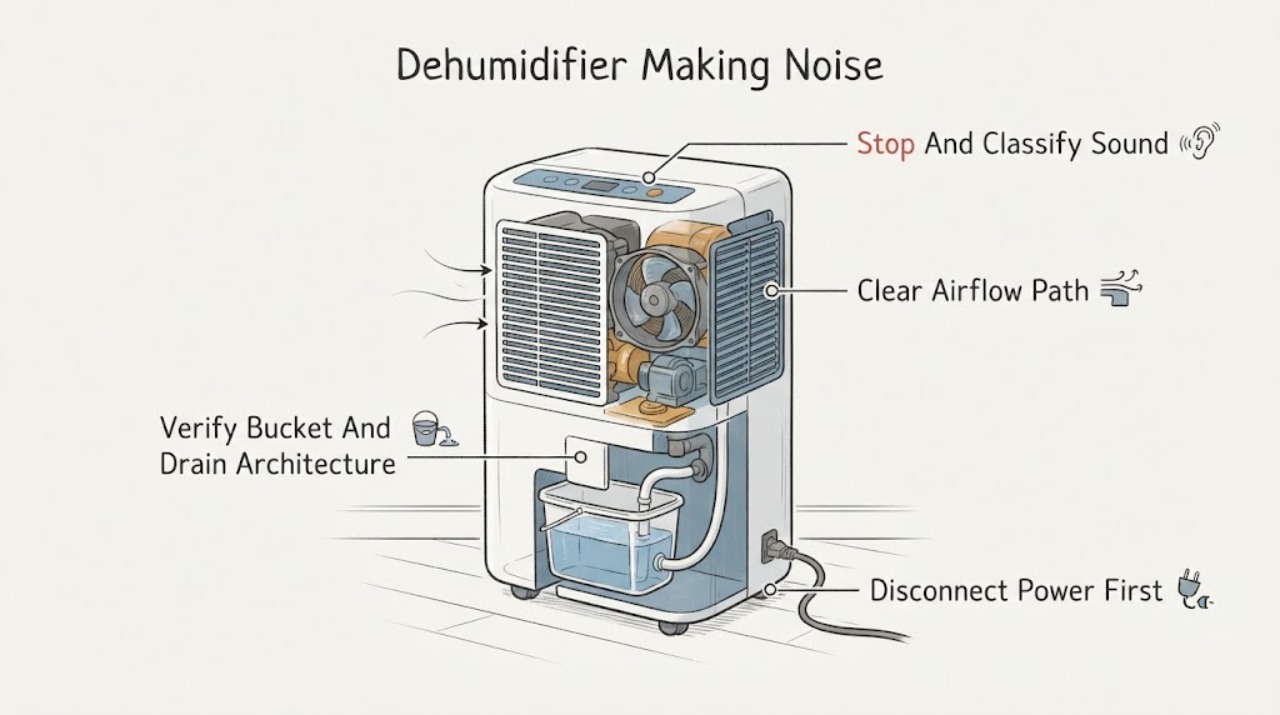
Work through in order
Diagnostic checks
Use only checks that match the exact appliance or system and its official guide.
-
Check 1
Turn the dehumidifier off, unplug it, and record whether the sound is steady airflow, compressor hum, pump noise, a click at cycling, a rattle or vibration, scraping or grinding, or an electrical sound. Note whether it occurs in fan-only operation, with the compressor, or during drainage.
Expected result: The sound matches a documented normal category, is new or unusually harsh, continues after the cycle, or comes with smell, smoke, water, a damaged cord, or a performance change.
Next step: Use the model-specific external checks only when there is no smoke, odor, water near electricity, or damaged equipment. For a strange sound or hazard sign, keep it unplugged and contact Hisense service.
Stop if: Do not restart repeatedly to reproduce a suspicious noise or touch the appliance with wet hands.
Why this matters
Why: Timing can distinguish documented operating sounds from a potentially mechanical or electrical fault, but hazard signs override all further checks.
-
Check 2
With the unit unplugged and the fan stopped, verify a firm, level placement and clear air inlet and outlet/louvers. Remove only an external object that is visibly contacting the cabinet, and clean or reinstall the accessible air filter according to the exact model guide.
Expected result: The cabinet was unstable or touching something, an inlet/outlet was blocked, the filter was dirty or mis-seated, or the external setup was already clear and stable.
Next step: Correct the clear external condition and observe only after the unit is dry and reassembled. Arrange service if the noise remains, becomes scraping or grinding, or is accompanied by smoke, smell, or poor operation.
Stop if: Do not run without the filter, spray water into the cabinet, or insert fingers, sticks, or tools into the air path.
Why this matters
Why: An external contact or airflow restriction can change sound, while a clean, stable, unobstructed unit with persistent noise points beyond a basic setup issue.
-
Check 3
Identify the exact model and whether it uses a bucket only, gravity hose, or pump. With the unit off and unplugged, reseat the bucket fully and inspect only the external drain hose for a kink, loose connection, or contact with the cabinet.
Expected result: The bucket was misaligned, a hose is kinked or loose, the model has an optional pump, or no external water-path condition is visible.
Next step: Correct only a clearly documented bucket or external-hose condition. Leave the unit unplugged and call service for persistent pump noise, water inside the housing, or any internal water-path issue.
Stop if: Do not dismantle the pump, remove internal covers, move a full unit, or operate near standing water.
Why this matters
Why: Pump and drainage arrangements differ across Hisense models; an external seating or hose condition may explain a water-related sound, but it does not establish an internal pump fault.
-
Check 4
After external checks, note whether a click or change from compressor sound to fan sound coincides with a humidity-setpoint event, automatic de-icing, or a restart. Do not defeat a control or repeatedly power-cycle the unit.
Expected result: The sound is a brief cycle change with normal operation, the fan runs while the compressor is off, the unit is icing, or the sound is continuous and harsh.
Next step: Allow the model's documented delay or de-icing behavior to complete without intervention. Stop and arrange service for ice with abnormal noise, repeated failed starts, or a persistent harsh sound.
Stop if: Do not force the compressor to restart, chip ice, or open the refrigeration compartment.
Why this matters
Why: Hisense documents compressor cycling, a restart delay, and de-icing that allows the fan to run; continuous scraping, grinding, or harsh noise is not identified by those normal-sound instructions.
-
Check 5
Record the model, serial number, sound description and timing, fan speed and mode, bucket or drain configuration, filter/setup condition, and any smell, smoke, water, ice, or loss of dehumidification. Give these observations to Hisense customer service or a qualified appliance technician.
Expected result: The noise stopped after a documented external correction, returned despite a clear setup, or involves an internal fan, compressor, pump, control, cord, or refrigeration symptom.
Next step: Keep the unit unplugged until qualified service confirms safe operation, or replace it if repair is not practical. Use the exact model support page rather than a generic parts listing.
Stop if: Do not disassemble, perform electrical tests, access refrigerant components, or continue operating with smoke, odor, water near electricity, or damaged wiring.
Why this matters
Why: An external correction is limited evidence about placement or airflow; recurrence or an internal symptom requires model-specific diagnosis and authorized parts.
Use your observations
Decision map
Find the observation that best matches what you see, then follow the next safe action.
-
PATH 01Safety boundary
What you see
The sound is steady fan airflow, a compressor hum, optional pump noise, or a brief click at compressor or unit cycling, with no smell, smoke, water hazard, damage, or performance change.
Do this next
Confirm the model's fan/mode, bucket or drain configuration, and Quiet feature if present. Monitor rather than replacing parts; call service if the sound changes or becomes harsh.
Why this path and its safety boundary
Why it matters: Hisense identifies these categories as sounds that may occur during normal operation for the covered guide, although exact sound level and features vary by model.
Safety stop: Stop if a normal-looking sound is accompanied by smoke, smell, electrical interruption, water near electricity, or loss of safe operation.
-
PATH 02Safety boundary
What you see
Rattle or vibration changes when the unit is placed firmly and level, an external object is removed, the louvers are cleared, or the model-approved filter is cleaned and seated.
Do this next
Keep the unit stable, unobstructed, dry, and correctly filtered. Arrange service if the noise returns, persists, or turns into scraping or grinding.
Why this path and its safety boundary
Why it matters: The changed symptom makes external contact or airflow more plausible, but does not prove that the fan or motor is undamaged.
Safety stop: Do not insert anything into the grille or operate without the filter.
-
PATH 03Safety boundary
What you see
Noise occurs only during drainage on a model with a pump or hose, and the external bucket, hose, and connector are not correctly seated or are visibly kinked.
Do this next
Correct the documented external connection with the unit unplugged. Call service for continuing pump noise, internal water, or a pump indicator that remains abnormal.
Why this path and its safety boundary
Why it matters: Hisense documents loud pump sounds and model-dependent drain arrangements; a pump feature cannot be assumed on a model whose specification omits it.
Safety stop: Do not reach into the water path, dismantle the pump, or operate in standing water.
-
PATH 04Safety boundary
What you see
The sound is new, harsh, scraping, grinding, or electrical; persists after external checks; or occurs with smell, smoke, water near electricity, damaged cord, ice, heating/operation loss, or repeated electrical interruption.
Do this next
Unplug when safe, keep the dehumidifier out of use, and arrange Hisense or qualified service with the model and symptom record.
Why this path and its safety boundary
Why it matters: The official guide treats a strange noise, smell, or smoke as a customer-service boundary, and internal fan, compressor, pump, control, or refrigeration work is not a user repair.
Safety stop: Do not open the cabinet, perform live tests, touch wet controls, or continue running to collect evidence.
Helpful context
Understand the symptom
Identify when the sound occurs
Note whether the sound starts with fan-only operation, when the compressor engages, when an optional pump drains water, or only at on/off cycling. Hisense documents these as normal sound categories for the models covered by its guide, but that does not make every loud or new sound normal. Stop the unit before moving it or examining the grille, and do not run it repeatedly just to reproduce a hazardous noise.
Normal compressor, fan, pump, and cycling sounds
A steady air-moving sound, a compressor hum that may be loud, an optional pump sound, or a click as the compressor cycles can fit the normal-sounds section of the Hisense guide. The guide also says the fan may periodically run to read humidity without the compressor. Compare the sound with the selected fan speed, mode, bucket/drain configuration, and whether the sound stops when the cycle stops; do not use a sound-level number from one model as a universal limit for every Hisense unit.
Check the external setup and airflow
Turn the dehumidifier off, unplug it, and wait for the fan to stop. Confirm that it stands on a firm, stable, level surface and that the air inlet and outlet/louvers are not blocked by a wall, cloth, dust buildup, or an object. Clean the accessible air filter only with the procedure for the exact model; Hisense warns not to use the appliance without its filter and not to insert fingers or sticks into the air path. These checks can remove an obvious airflow or cabinet-contact issue, but a persistent mechanical noise still requires service.
Treat bucket and pump features as model-specific
If the sound occurs near water removal, identify whether the unit has a pump, a gravity drain hose, or only a bucket. Hisense says pump sounds may be loud and provides separate hose and pump instructions; a pump indicator or drain problem is not evidence that every model contains a pump. With the unit unplugged, check only that the bucket is fully seated and any external hose is correctly connected and not kinked. Do not reach inside the cabinet, lift the appliance while full, or dismantle the pump or water path.
Do not confuse low-temperature cycling with a mechanical fault
Hisense's guide says the automatic de-icing function can turn off the compressor and allow the fan to run, then cycle the compressor back on when the correct temperature returns. It also documents a compressor restart delay after an immediate stop and restart. A change from compressor hum to fan sound, or a click after a mode or temperature event, can therefore be operating behavior. Ice, a scraping sound, repeated attempts to restart, or an odor is not a reason to bypass the control; stop and use the exact manual or service route.
Escalate persistent or hazardous noise
Record the model and serial information, sound type, timing, fan/mode setting, bucket or drain arrangement, and any change in dehumidification. Hisense states that a strange noise, smell, or smoke requires unplugging and customer service, and that repairs should be performed by qualified personnel using authorized factory parts. A noise that persists with a clear external setup, or that comes from a fan, compressor, pump, control, or sealed refrigeration area, is not a user-level parts swap.
Safety boundary
Stop conditions
- Unplug and stop for a strange or escalating noise, smell, smoke, water near electricity, damaged cord or plug, or repeated electrical interruption.
- Do not insert fingers, sticks, tools, or vacuum attachments into the air inlet or outlet; the fan can cause injury.
- Do not disassemble, modify, access the compressor, fan motor, pump, wiring, or refrigeration circuit, or perform live electrical tests.
- Use the exact model's instructions for Quiet mode, pump, hose, bucket, filter, and restart behavior; features differ across Hisense dehumidifiers.
- Arrange qualified service for persistent scraping, grinding, harsh humming, internal water, abnormal ice, or noise that remains after safe external checks.
When checks do not resolve it
Need a professional?
Contact Hisense customer service or a qualified appliance technician for a strange or persistent noise, especially scraping, grinding, harsh electrical humming, or pump noise that does not match the model's documented behavior. Stop immediately for smoke, smell, water near electricity, a damaged cord, repeated breaker trips, internal water, or loss of safe operation. Do not open the cabinet or access sealed refrigeration or electrical parts.
Safety scope: This article covers stopping and unplugging, observing timing, checking stable placement and clear louvers, and handling only model-approved external filter, bucket, and hose checks. It does not authorize cabinet removal, live testing, fan/pump disassembly, or refrigerant work.
Read the exact guide
Official sources
- Hisense DH5022K1W Energy Star 35 Pint Dehumidifier Spec SheetHisense USA · Official Hisense USA specification sheet for model DH5022K1W; its pump-mode absence and listed sound range apply only to that model.
- Hisense DH7021K1W Energy Star 50 Pint 3-Speeds Dehumidifier Spec SheetHisense USA · Official Hisense USA specification sheet for model DH7021K1W; its sound level and features are not a universal limit or feature list for every Hisense dehumidifier.
- Hisense DH100KP1WG / DH10019TP1WG Dehumidifier User ManualHisense USA · Official Hisense USA-hosted Use and Care guide for the listed models; the guide warns that illustrations and controls may differ on another model, so pump, Quiet, filter, bucket, and timing instructions require exact-model confirmation.
- Hisense Energy Star 50 Pint 3-Speed Dehumidifier DH5023KP — SupportHisense USA · Official Hisense USA support page for model DH5023KP; it establishes the model-specific support route but does not authorize generic repair steps.
Community feedback
Share a repair observation
Share a plain-text repair observation. Accepted observations are published automatically; this page may take a moment to update.