
On this page
Start here
Quick answer
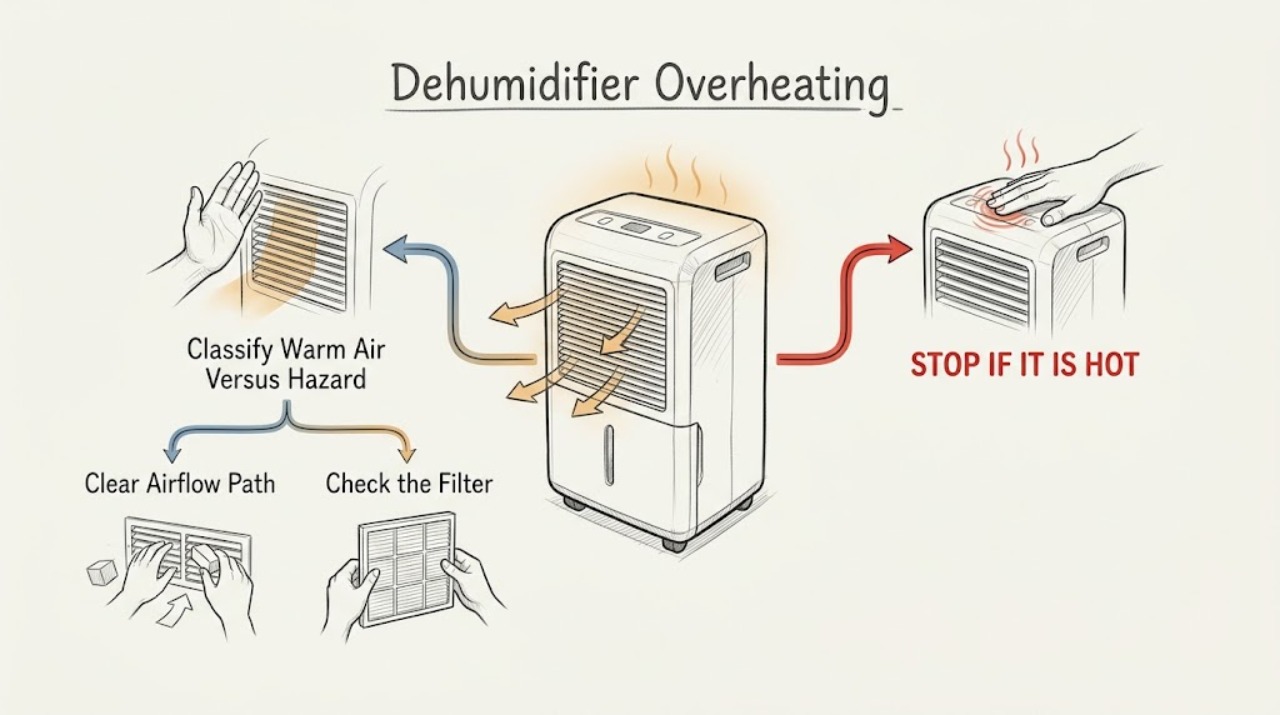
Warm air from the outlet is expected on the Electrolux DF dehumidifier family because the unit returns dry, warm air to the room; that alone is not proof of overheating. Treat an unusually hot cabinet or plug, burning smell, smoke, sparks, repeated breaker operation, or a unit that keeps running while airflow is weak as a stop condition. From a dry, accessible position, turn the unit off, disconnect power safely, and check the model-matched manual, air filter, intake and outlet clearance, room conditions, bucket fit, and selected mode. Do not open the housing or test internal wiring: a fan, compressor, thermal protector, control, or other electrical fault needs qualified service.
Before you begin
Safety first
- The user may identify the model, switch the unit off, disconnect power from a dry accessible position, inspect visible intake and outlet clearance, clean and dry the removable filter as the exact manual allows, check placement and user settings, and observe from a safe position. Qualified service must handle the fan motor, compressor, thermal protector, controls, wiring, cord replacement, sealed refrigeration circuit, internal covers, and energized testing.
Work through in order
Diagnostic checks
Use only checks that match the exact appliance or system and its official guide.
-
Check 1
From a dry position, note whether the symptom is simply warm air leaving the outlet or whether there is unusually intense heat, a burning smell, smoke, a spark, a hot or damaged plug or cord, water near electrical parts, or a repeated protection trip. Do not touch a hot plug or reach through a grille to investigate.
Expected result: The air is warm but there is no odor, smoke, spark, electrical heat, or repeat trip; or one of the hazard signs is present.
Next step: For ordinary warm air, continue with the external airflow and environment checks below. For any hazard sign, stop using the dehumidifier, isolate power only if safe, and arrange prompt qualified service.
Stop if: Do not keep running the unit to see whether a burning smell, hot plug, smoke, spark, or repeated protection event goes away.
Why this matters
Why: Warm discharge air without hazard signs is consistent with the documented operating principle. Any odor, smoke, spark, hot or damaged electrical connection, water near electrical parts, or repeat trip makes an electrical or internal fault more likely and makes continued operation unsafe.
-
Check 2
Turn the dehumidifier off and disconnect it from power from a dry, accessible position before cleaning. Inspect the front intake grille, outlet, and the visible space around the unit for furniture, curtains, clothing, dust, or other blockage. Do not insert tools or fingers into either opening.
Expected result: The intake or outlet is covered or visibly restricted, the grille is dusty, or the airflow path is open.
Next step: Move only the external obstruction and clean the grille or case with the manual's permitted soft brush or vacuum approach, without spraying liquid into the unit. If airflow remains weak or heat returns after the external obstruction is removed, stop and arrange service.
Stop if: Do not wash the machine, spray through the grilles, remove the rear cover, or force a fan or internal component.
Why this matters
Why: Restricted airflow can make the unit work poorly and can contribute to excess heat because the manual requires unobstructed intake and discharge areas. A clear visible path does not rule out an internal fan or coil problem.
-
Check 3
With power disconnected, remove the air filter only as shown for the exact model. Check for lint or dust, clean it using the manual's permitted warm soapy-water method, let it dry fully, and reinstall it in the correct orientation. Confirm that the bucket is also seated correctly before any normal test.
Expected result: The filter is clogged, wet, missing, reversed, or not seated; or it is clean, dry, correctly oriented, and in place.
Next step: Correct only the filter and bucket conditions described by the model manual, then make one supervised normal test. If the unit still overheats, has weak airflow, or repeatedly shuts down, leave it off and arrange service.
Stop if: Do not operate without the filter, install a wet filter, use a dishwasher for the filter, or dismantle the air path to reach coils or a motor.
Why this matters
Why: The official manual warns that dirt and lint can clog the unit and reduce performance, and says not to operate without the filter. A clean, dry, correctly fitted filter makes that user-maintenance cause less likely but does not prove the fan, coil, compressor, or control is healthy.
-
Check 4
Compare the installation with the exact model manual: place the unit level, keep the intake and outlet open, restore the manual's surrounding clearance, and note the room temperature and whether doors or windows are introducing a large amount of humid air. Keep the unit in an enclosed area rather than a tightly blocked closet.
Expected result: Clearance is restricted, the unit is in a confined or very humid area, room conditions are outside the documented operating range, or the placement is level and unobstructed.
Next step: Correct the placement or room condition without moving a heavy or wet unit unsafely, then allow one normal cycle while monitoring from a safe position. If the case remains unusually hot or the unit runs abnormally long with weak moisture removal, stop and request service.
Stop if: Do not enclose the dehumidifier in a cabinet, place objects on it, direct it at a heat source, or continue operating it in a condition that causes electrical or thermal warning signs.
Why this matters
Why: The opened DF manual specifies an enclosed operating area, unrestricted airflow, clearance around the unit, and an operating range of 5–35°C (41–96°F). Restricted placement or unsuitable conditions can extend operation and reduce performance; suitable placement makes an internal thermal or airflow fault more likely if the heat persists.
-
Check 5
Read the exact model's display or controls and record the selected humidity, continuous or dryer mode, timer, bucket-full indicator, and any automatic stop. Check that a deliberately selected continuous mode or timer is not being mistaken for a fault, and remember that the compressor may wait about three minutes before restarting after a quick off/on cycle.
Expected result: The unit is in continuous or dryer mode, a timer is active, the selected humidity has not been reached, the bucket indicator is on, or the mode is ordinary but the heat and long runtime persist.
Next step: Use only the matching manual to change an unintended user setting, empty and correctly refit the bucket if indicated, and observe one normal cycle. If abnormal heat, weak airflow, odor, or repeat trips continue, stop using the unit and arrange qualified service.
Stop if: Do not bypass a bucket or control sensor, enter an undocumented service mode, or repeatedly power-cycle a hot unit.
Why this matters
Why: The DF manual says the unit can remain on in continuous mode, can stop when the selected moisture level is reached, and can delay compressor restart to prevent overheating and possible breaker operation. Those behaviors can explain long or interrupted cycles. Persistent abnormal heat with an ordinary mode and clear airflow is not explained by the setting alone.
-
Check 6
After at most one safe correction to a blocked grille, dirty and dry filter, restricted clearance, bucket fit, or unintended mode, run the dehumidifier only while supervised from a safe position. Record whether airflow is normal, the compressor starts after its delay, water is collected, the selected mode stops normally, and the heat or odor returns.
Expected result: The unit returns to normal operation; it remains unusually hot or weak; it cycles off and on with a trip; or it develops an odor, smoke, spark, or hot electrical connection.
Next step: If the symptom persists or returns, stop operation and provide the technician with the exact model, mode, room conditions, filter and clearance results, runtime, and any electrical warning. Leave the unit disconnected when there is a safety symptom.
Stop if: Do not open the housing, test live circuits, bypass thermal protection, handle refrigerant tubing, or continue a test after heat, odor, smoke, sparks, or a repeat trip.
Why this matters
Why: Recovery after an external correction supports that condition as the immediate cause. Continued abnormal heat, weak airflow, failure to collect water, unusual cycling, or a recurring protection event makes an internal fan, compressor, thermal protection, control, wiring, or sealed-system fault more likely; the observation cannot identify which part safely.
Use your observations
Decision map
Find the observation that best matches what you see, then follow the next safe action.
-
PATH 01Safety boundary
What you see
The outlet air is warm, airflow is normal, there is no burning smell or electrical heat, and the unit operates within its selected mode.
Do this next
Keep the intake and outlet clear, keep the filter fitted and dry, and use the exact model's humidity or timer settings. Monitor for a change in odor, airflow, electrical heat, or protection behavior.
Why this path and its safety boundary
Why it matters: The pattern matches the DF manual's described dry, warm discharge and normal air movement more than an overheating fault.
Safety stop: Stop using the unit if the warmth changes to unusually intense heat, a hot plug, burning smell, smoke, sparks, or repeated protection operation.
-
PATH 02Safety boundary
What you see
Heat or long runtime appears with a blocked grille, dirty or missing filter, restricted clearance, confined placement, or room conditions outside the documented range.
Do this next
Disconnect power, correct only the visible condition allowed by the manual, reinstall a clean dry filter, and make one supervised normal test. Escalate if the heat or weak airflow remains.
Why this path and its safety boundary
Why it matters: An external airflow, filter, placement, or environment condition is more likely than an immediately proven internal component failure, although the manual does not make a safe internal diagnosis from this symptom.
Safety stop: Do not run without the filter, cover an opening, spray into the unit, or keep testing if an electrical or burning warning appears.
-
PATH 03Safety boundary
What you see
The unit is in continuous or dryer mode, the room is very humid or open to outside air, the bucket is correctly fitted, and there are no hazard signs.
Do this next
Use the exact manual to select the intended humidity or timer setting and improve room enclosure while preserving airflow. If the unit stays unusually hot, airflow weakens, or water collection and control behavior remain abnormal, stop and arrange service.
Why this path and its safety boundary
Why it matters: A longer runtime can be explained by the selected mode or moisture load; the DF manual says continuous operation is available and that higher room moisture makes the unit operate longer.
Safety stop: Do not use continuous operation to mask a burning smell, unusual heat, poor airflow, or a recurring trip.
-
PATH 04Safety boundary
What you see
The filter, visible airflow path, clearance, bucket fit, room conditions, and intended mode are normal, but the unit remains unusually hot, has weak or absent airflow, cycles abnormally, or repeatedly trips protection; or there is a burning smell, smoke, spark, hot plug, or damaged cord.
Do this next
Stop using the dehumidifier, isolate power only from a safe dry position, and arrange qualified Electrolux or appliance service. Keep the model and rating-label information available.
Why this path and its safety boundary
Why it matters: An internal fan, compressor, thermal protector, control, wiring, or sealed refrigeration problem is more likely, and the manual's owner checks cannot safely identify the component.
Safety stop: Do not remove covers, perform energized tests, bypass protection, repair the cord, force the fan, open the refrigeration circuit, or repeatedly reset a tripped breaker.
Helpful context
Understand the symptom
What counts as normal warmth
A compressor dehumidifier moves room air across dehumidifying coils and returns dry, warm air. The DF manual also identifies airflow through the unit as a normal sound and says the compressor has a short automatic restart delay. Warm outlet air or ordinary airflow is therefore different from a hot electrical smell, smoke, a hot plug, repeated protection operation, or a housing that becomes unusually hot. Do not use touch alone to keep testing a suspect unit.
Stop before cleaning or investigating
If there is a burning smell, smoke, sparking, a damaged or hot cord or plug, water near electrical parts, or a breaker that trips again, stop the dehumidifier and keep it disconnected if that can be done from a dry, safe position. Do not keep resetting the breaker, use an extension lead or adapter, remove covers, reach into the grilles, or try to repair the compressor, fan, controls, wiring, or refrigerant circuit.
Confirm the exact Electrolux family
The opened DF manual is labeled for EXD1, 6DN3W, and EXD20DN3W. Electrolux controls and clearances can differ across markets and model families. Read the model and rating label near the bucket or on the side or back, then use that model's manual for any control or cleaning detail. The checks below stay at the shared, external level and do not assume that every Electrolux dehumidifier has the same layout.
Only after diagnosis
Potential parts
- air filter
Consider this only when the exact model is identified and the installed filter is damaged, missing, or cannot be cleaned and dried as the manual requires.
Confirm the complete model and manufacturer fit information; Electrolux dehumidifier filter shapes and access differ by family. - fan motor or fan assembly
Consider this only after qualified diagnosis confirms weak or absent airflow with the grille, filter, placement, and visible path clear.
Do not infer a fan part or fit from the brand alone; verify the exact model and manufacturer fit information. - thermal protector or control component
Consider this only when qualified service confirms abnormal thermal protection or control behavior after the external checks are complete.
This is an internal electrical category, not a user replacement instruction; confirm the model-specific part and service documentation. - compressor or sealed-system component
Consider this only when qualified diagnosis confirms a compressor or sealed-system fault after airflow, filter, environment, mode, and bucket checks do not explain the symptom.
Compressor and refrigerant components are model-specific and require qualified handling; do not order from the symptom alone.
When checks do not resolve it
Need a professional?
Safety scope: The user may identify the model, switch the unit off, disconnect power from a dry accessible position, inspect visible intake and outlet clearance, clean and dry the removable filter as the exact manual allows, check placement and user settings, and observe from a safe position. Qualified service must handle the fan motor, compressor, thermal protector, controls, wiring, cord replacement, sealed refrigeration circuit, internal covers, and energized testing.
Common questions
FAQ
Is warm air from an Electrolux dehumidifier normal?
Usually, warm outlet air is expected from the opened DF manual's operating principle: the unit draws room air across dehumidifying coils and returns dry, warm air. Warm air is different from unusually intense heat, a hot plug, burning smell, smoke, sparks, or repeated protection operation; stop and arrange service for those signs.
Can a dirty filter make an Electrolux dehumidifier run hot?
A dirty filter can restrict the air path and reduce performance. Disconnect power, clean and fully dry the filter using the exact model manual, reinstall it correctly, and keep it fitted. If heat or weak airflow remains, do not open the unit; arrange service.
Why does my Electrolux dehumidifier run continuously?
Continuous or dryer mode can deliberately keep the unit operating, and the DF manual says higher room moisture makes it run longer. Open doors or windows, a large space, restricted airflow, an unsuitable room temperature, or an unintended setting can extend runtime. If the unit is also unusually hot, has weak airflow, smells of burning, or trips protection, stop using it and arrange service.
How much clearance does an Electrolux dehumidifier need?
The opened DF manual calls for clearance around the unit and says the intake and discharge must not be restricted; use the exact model's installation instructions for the precise layout. Do not operate it inside a tightly blocked cabinet or with clothing, curtains, or objects covering an opening.
What should I do if the dehumidifier plug is hot or smells burnt?
Stop using the unit. If you can do so without touching a hot or damaged connection, disconnect power from a dry, safe position and leave it disconnected. Do not keep resetting a breaker, use an adapter or extension lead, open the housing, or test live wiring; arrange qualified appliance or electrical service.
Could the compressor or fan be causing an overheating Electrolux dehumidifier?
Yes, but the symptom does not identify the part. After the filter, visible intake and outlet, clearance, room conditions, bucket fit, and intended mode are normal, persistent weak airflow, unusual cycling, abnormal heat, or repeated protection operation needs qualified diagnosis of the fan, compressor, thermal protection, control, wiring, or sealed system.
Read the exact guide
Official sources
- DF Dehumidifier manual V1 - 141211_EN-FR-IT.pdfElectrolux · Official Electrolux user manual opened as a PDF; use the exact model manual for other Electrolux dehumidifier families and market variants.
Community feedback
Share a repair observation
Share a plain-text repair observation. Accepted observations are published automatically; this page may take a moment to update.