
On this page
Start here
Quick answer
If a GE dehumidifier will not start, first decide whether it is completely dead or has power but is waiting for the humidity set point, a bucket/full-water interlock, a defrost cycle, or a model-specific fault. GE provides model-specific Owner Centers and says the manual controls the temperature limits, controls, bucket arrangement, and reset procedure. Check the plug and breaker from a dry position, make sure the bucket is fully seated and the control is calling for dehumidification, and inspect only the accessible filter/air path. GE says a 30-second power disconnect/reconnect can reset a non-hazardous unit, but do not use that as a repeated test. Low room temperature can cause frost controls to stop the compressor on some models. Stop and unplug only when safe for smoke, burning odor, a hot or damaged cord, water near electrical parts, sparks, or repeated breaker trips; leave internal electrical, fan, compressor, sealed-system, and refrigerant work to qualified service.
Before you begin
Safety first
- Do not open the cabinet, bypass bucket/humidity/frost controls, make live measurements, handle refrigerant, test a compressor or capacitor, use direct heat or sharp tools on frost, or repeatedly reset a breaker. Disconnect power only when safe.
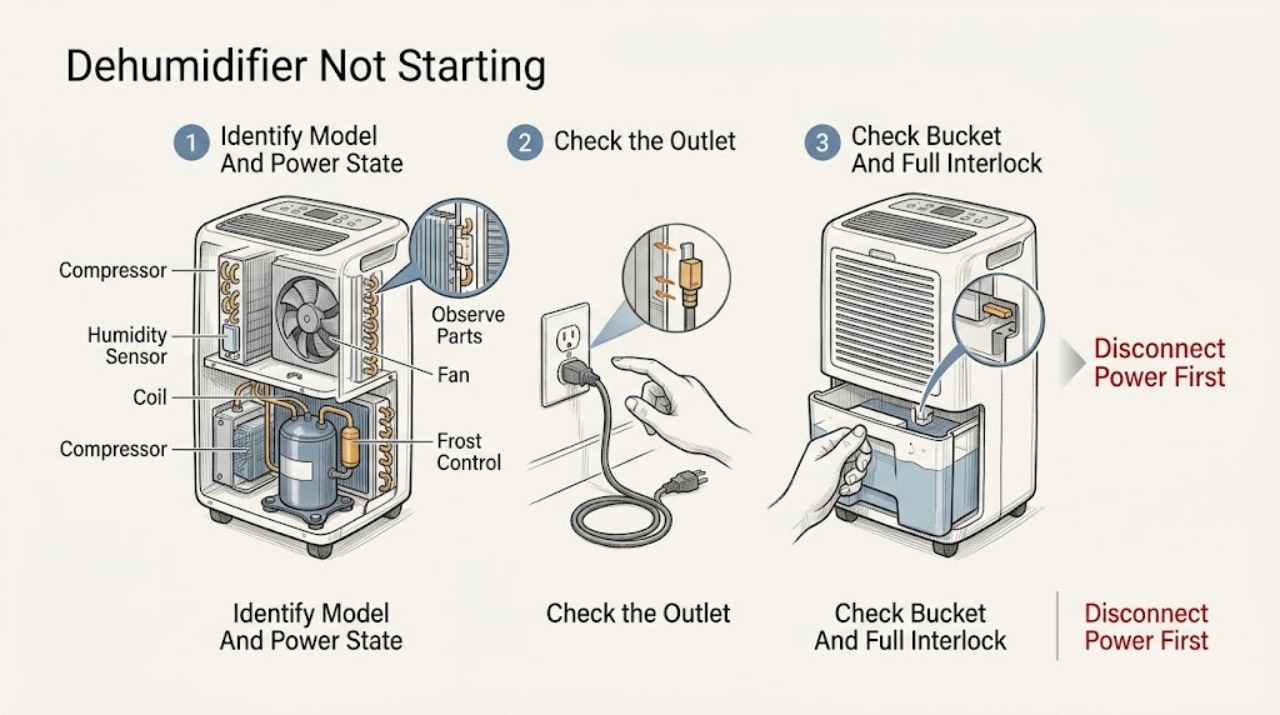
Work through in order
Diagnostic checks
Use only checks that match the exact appliance or system and its official guide.
-
Check 1
From a dry, safe position, record the complete GE dehumidifier model number and whether the display, indicator lights, fan, or compressor show any response when the normal control is used. Note the exact timing of any start and stop.
Expected result: The unit is completely dark, the display works but no fan starts, it starts briefly then stops, or the model cannot be identified safely.
Next step: Use the exact model Owner's Manual for controls and limits. If the label requires moving or opening the unit, give the missing information to service.
Stop if: Stop for odor, heat, smoke, sparks, water near electrical parts, or visible cord damage.
Why this matters
Why: No display makes the receptacle, plug, cord, breaker, or internal power path more relevant. A powered but idle unit can be waiting on humidity, bucket, frost, or a control condition; timing alone does not identify a part.
-
Check 2
Check that the plug is fully seated in the intended grounded receptacle and look at the accessible plug and cord for moisture, scorching, melting, looseness, or fraying. From a dry position, check whether the home breaker or fuse has operated; do not open the panel.
Expected result: The outlet has no power, the breaker trips again, the plug/cord is damaged or wet, an extension cord/adapter is being used, or the receptacle and cord appear normal.
Next step: Have an electrician assess a dead, loose, hot, damaged, or repeatedly tripping circuit. If the circuit is stable and the cord is sound, continue with bucket and control checks without opening the cabinet.
Stop if: Do not reset repeatedly, use a larger fuse/breaker, touch wet equipment, or repair a damaged cord with tape.
Why this matters
Why: A no-power or recurring breaker symptom can be household wiring, the receptacle, or the appliance. Damage or moisture is a stop-use condition. A normal external connection does not clear internal electrical components.
-
Check 3
Turn the normal control to off if the model requires it, remove and empty the bucket only if it is safe and accessible, then reinstall it exactly as the Owner's Manual shows. Confirm the full-bucket indicator is clear and the bucket is fully seated; do not hold or bypass the float/switch.
Expected result: The bucket is full, mis-seated, visibly damaged, the full indicator remains on, or the bucket is correctly seated and the indicator is clear.
Next step: Correct only the accessible bucket position or empty it as the manual directs, then set the unit normally. Call service if the indicator remains on with a sound seated bucket.
Stop if: Do not defeat the float or bucket switch, pour water into the cabinet, or operate with a damaged/leaking bucket.
Why this matters
Why: GE dehumidifiers use bucket/full-water shutoff arrangements that vary by model; a full or mis-seated bucket can prevent operation. A clear indicator and correct seating make humidity, temperature, power, or internal diagnosis more relevant.
-
Check 4
Verify that the normal humidity control is not set to off or to a target already met, and note the room temperature and whether doors/windows or a dryer are changing the humidity. Use only the model's documented operating range and allow the unit time to respond.
Expected result: The target is already met, the room is below the model's low-temperature limit, the control is off/incorrect, or humidity and temperature are within the model range but the unit remains idle.
Next step: Set a model-appropriate target through the normal controls and improve room airflow without blocking the appliance. If it remains idle within the documented range, continue to a single safe reset or service.
Stop if: Do not bypass a humidity or frost control, apply direct heat, or assume another model's temperature limit.
Why this matters
Why: A dehumidifier can intentionally remain off when the sensed humidity is below the set point. GE says very low temperatures can frost coils and trigger frost controls, while some models support low-temperature operation; the model manual decides which behavior applies.
-
Check 5
With power disconnected only for safe, model-approved maintenance, inspect the accessible air inlet/outlet and filter for blockage. Look through the normal openings for obvious frost without removing a grille or using a sharp tool or heat source.
Expected result: Airflow is blocked, the filter is dirty, frost is visible, or no external blockage/frost is found.
Next step: Clean or reinstall the accessible filter only as the exact manual directs and allow a documented defrost period at a suitable room temperature. If frost returns or the unit will not start, arrange service.
Stop if: Do not remove panels, scrape coils, use a hair dryer, pour water into the machine, or touch internal electrical parts.
Why this matters
Why: Restricted airflow can reduce operation, while frost can cause a model's frost control or defrost behavior to pause the compressor. Visible frost does not prove a refrigerant or compressor fault, and hidden coils/components need service.
-
Check 6
If there is no hazard and the exact model support allows it, disconnect power for 30 seconds, reconnect, set the model's controls, and observe one normal start attempt. If an error code appears, record it and follow only the exact model manual.
Expected result: The unit starts normally, remains idle with no error, an error returns, or the breaker trips/there is a hazard.
Next step: Monitor one normal cycle if it starts. Otherwise leave the unit disconnected as appropriate and contact GE support or a qualified local dehumidifier servicer; GE notes Bodewell does not service dehumidifiers.
Stop if: Do not repeat resets, bypass a code, open the cabinet, or make live measurements.
Why this matters
Why: A successful reset supports a temporary control state, not proof that the appliance is repaired. A recurring code or no-start condition needs model-specific diagnosis; a breaker or hazard response is a stop-use event.
Use your observations
Decision map
Find the observation that best matches what you see, then follow the next safe action.
-
PATH 01Safety boundary
What you see
The GE dehumidifier has no display or indicator response and the receptacle, breaker, or cord is not confirmed safe and powered.
Do this next
Keep the unit off and have an electrician check the circuit or a qualified technician assess the appliance after the circuit is verified.
Why this path and its safety boundary
Why it matters: A supply, receptacle, breaker, cord, or internal power issue is more likely than a humidity-setting issue.
Safety stop: Do not repeatedly reset a breaker or touch a wet/damaged cord or receptacle.
-
PATH 02Safety boundary
What you see
The full-bucket indicator is on, the bucket is full/misaligned, or the appliance starts only after the bucket is moved.
Do this next
Empty and reseat the bucket exactly as the manual directs, then retry once. Service is needed if the indicator remains on with a correctly seated bucket.
Why this path and its safety boundary
Why it matters: The water-level interlock is more likely preventing operation; this is model-dependent and does not justify bypassing the sensor.
Safety stop: Do not hold the float or bucket switch closed or run with a damaged bucket.
-
PATH 03Safety boundary
What you see
The display works, the bucket is seated, and the unit is idle while room humidity is at/below the target or room temperature is below the model's operating range.
Do this next
Use the model's documented target and temperature range, allow conditions to change, and monitor. If it remains idle within range, use service rather than bypassing controls.
Why this path and its safety boundary
Why it matters: A normal humidity control or frost-protection response is more likely than a dead motor.
Safety stop: Do not defeat the humidity or frost control or apply direct heat.
-
PATH 04Safety boundary
What you see
Visible frost, a blocked filter/inlet/outlet, or a cold room accompanies the no-start or brief-start symptom.
Do this next
Perform only model-approved filter cleaning and allow safe defrost; call a servicer if frost returns or the unit still will not start.
Why this path and its safety boundary
Why it matters: Restricted airflow or frost control/defrost behavior is more likely, but recurring frost can also require internal diagnosis.
Safety stop: Do not scrape coils, use direct heat, remove grilles, or handle refrigerant.
-
PATH 05Safety boundary
What you see
The unit remains dead or will not start after external checks and one permitted reset, an error returns, the breaker trips again, or smoke, odor, heat, sparks, water, or visible damage is present.
Do this next
Keep the dehumidifier disconnected when safe and contact a qualified local dehumidifier servicer; use an electrician for circuit symptoms. For active fire call emergency services.
Why this path and its safety boundary
Why it matters: A persistent control, fan, compressor, sealed-system, wiring, or household electrical issue is possible; a symptom alone cannot select a part. Hazard signs require immediate stop-use.
Safety stop: Do not restore power to test, open the cabinet, bypass protection, or order an internal part from the symptom alone.
Helpful context
Understand the symptom
Clarify what “not starting” means
Record the model number, whether the display or indicator lights work, whether the fan moves air, whether the bucket/full indicator is lit, and whether the unit starts briefly and stops. Also note room temperature, humidity setting, recent power interruption, and whether the unit was moved or cleaned. GE has multiple dehumidifier designs, so do not borrow a button sequence or bucket procedure from another model.
Separate a control wait from a no-power condition
A unit with no display or fan response needs a safe plug, receptacle, breaker, and cord check. A powered unit that does not run may be satisfied with the humidity set point, stopped by a full or mis-seated bucket, or protecting itself from frost. A brief, model-documented reset can clear a control state, but a recurring failure requires the model manual or service rather than repeated resets.
Do not open the cabinet
Do not remove the cabinet, probe live wiring, bypass the bucket switch, defeat frost or humidity controls, handle refrigerant, or test the compressor or capacitor. Disconnect power before any model-approved cleaning and keep water away from the electrical/machine compartment. Stop use for smoke, burning or chemical odor, sparks, a hot/damaged plug or cord, water near electrical parts, or repeated breaker trips; isolate power only if safe.
When checks do not resolve it
Need a professional?
Contact an electrician for a dead, hot, loose, damaged, wet, or repeatedly tripping circuit. Contact a qualified local dehumidifier servicer when the GE unit stays dead or idle after model-specific external checks and one permitted reset, when an error returns, or when fan, compressor, sealed-system, wiring, or control diagnosis is needed. GE's support article notes that Bodewell does not service dehumidifiers.
Safety scope: Do not open the cabinet, bypass bucket/humidity/frost controls, make live measurements, handle refrigerant, test a compressor or capacitor, use direct heat or sharp tools on frost, or repeatedly reset a breaker. Disconnect power only when safe.
Have this ready
- Complete model and serial information, display/indicator state, bucket/full-light result, humidity setting, room temperature, timing of any start/stop, filter and frost observations, reset result, error code, breaker behavior, and cord/receptacle condition.
Common questions
FAQ
Why does my GE dehumidifier have power but not start?
Check whether the humidity target has already been reached, the bucket is full or mis-seated, or the room is below the model's operating range and frost control is active. Use the exact manual and do not bypass a sensor; persistent no-start needs service.
Can I reset a GE dehumidifier that will not start?
For a non-hazardous unit, GE says to disconnect power for 30 seconds, reconnect, and reset the controls. Try that only once as a model-compatible step. If the problem returns, use the Owner's Manual and arrange service rather than repeating resets.
Can cold room temperature prevent a GE dehumidifier from starting?
Yes, depending on the model. GE says dehumidifiers may not operate satisfactorily below 41°F because coils can freeze, while some models support low-temperature operation. Check the exact manual and do not apply direct heat to the coils.
Who repairs an out-of-warranty GE dehumidifier?
GE's support guidance says to consult the model warranty information and check local service providers for out-of-warranty dehumidifier repair; it specifically notes that Bodewell does not service dehumidifiers.
Read the exact guide
Official sources
- Dehumidifier - Fault or Error CodesGE Appliances · GE dehumidifiers with a displayed code; code meanings and pump features vary by model.
- Dehumidifier - Not Collecting WaterGE Appliances · General GE dehumidifier guidance; a no-start symptom may overlap but the exact model manual controls the procedure.
- Dehumidifier - Ideal Operating ConditionsGE Appliances · General GE guidance; some models support low-temperature operation and the exact manual controls limits.
- Troubleshooting for AHF45AAGE Appliances · Exact AHF45AA model only for model identity and linked manual; controls and limits vary across GE dehumidifiers.
- Support for GE Dehumidifiers and Air PurifiersGE Appliances · GE dehumidifier support hub; exact troubleshooting and warranty terms require the model manual.
- GE Dehumidifier Use and Care ManualGE Appliances · Legacy models documented by this manual only; use as a mechanism example, not proof of current-model control layout.
Community feedback
Share a repair observation
Share a plain-text repair observation. Accepted observations are published automatically; this page may take a moment to update.