
On this page
Start here
Quick answer
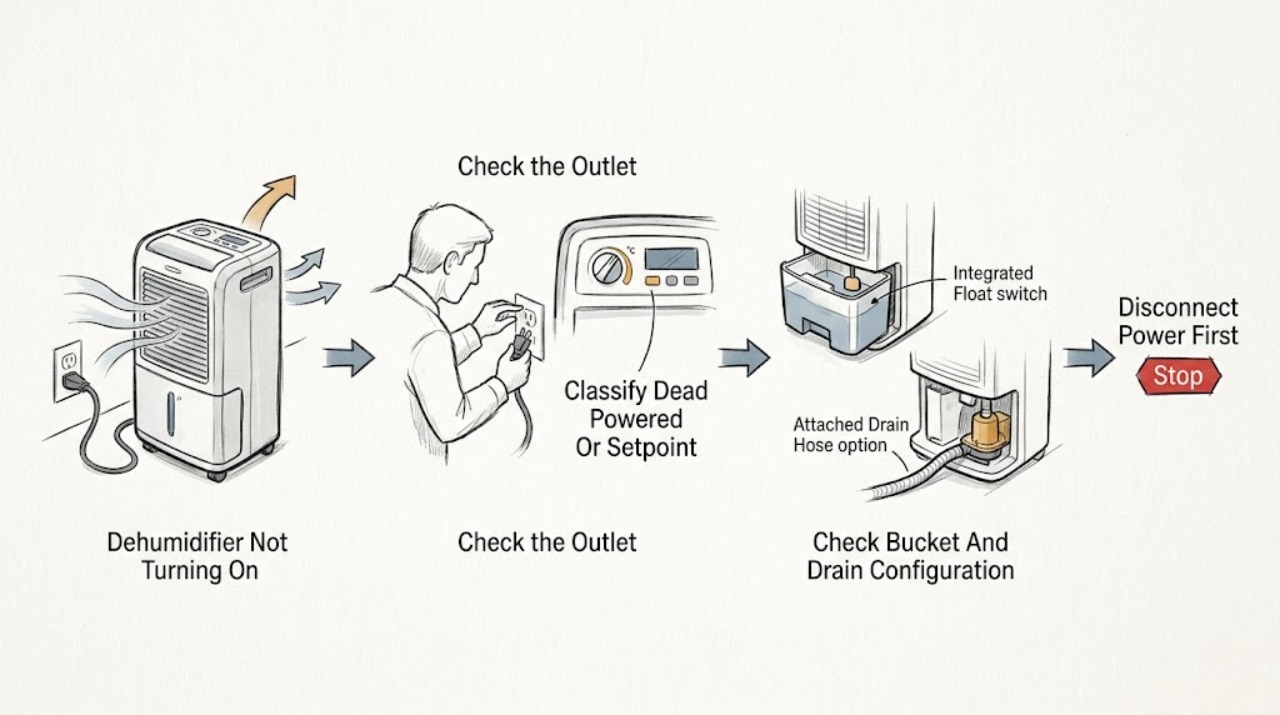
First decide whether the GE dehumidifier is electrically dead, powered but waiting at its humidity setpoint, or stopped because the bucket is full, removed, or not seated. Check the plug and outlet, then confirm the bucket is fully and securely in place; GE says the bucket must be seated for the dehumidifier to operate. Set the humidity control below the room's current relative humidity using the exact model instructions—an older GE manual describes the unit stopping when the selected dryness has been reached, so no water collection alone does not prove a no-start fault. If the display shows a model-specific code, record it before any reset; GE identifies “88” at power connection as a normal startup display on applicable models, while recurring fault codes need the exact manual. With dry hands and no visible hazard, disconnect power for 30 seconds and reconnect once, then restore the documented settings. If the outlet is dead, a breaker trips, the cord is hot or damaged, there is smoke, burning odor, water near electricity, or the unit still will not start after these checks, stop using it and arrange qualified electrical or appliance service.
Before you begin
Safety first
- The user may inspect a dry plug and outlet, record the model and code, empty and securely reseat the bucket, follow visible model-approved hose or pump checks, adjust documented humidity settings, clean an owner-accessible filter while unplugged, and perform one 30-second reset. Qualified personnel must handle cabinet access, live measurements, bucket-switch bypass, pump, fan, compressor, control, sensor, wiring, and sealed-system work.
Work through in order
Diagnostic checks
Use only checks that match the exact appliance or system and its official guide.
-
Check 1
Press a normal control once and record whether the display or indicator lights, whether the fan moves air, whether the compressor sound occurs, and whether the bucket-full or other indicator is lit. Note the exact model, room conditions, selected humidity, and any displayed code; do not repeatedly press or cycle the controls.
Expected result: The display is dark; the display works but the fan is silent; the fan runs but the compressor does not; the bucket/full indicator is active; the unit shows 88, E0, P1, or another code; or it starts after a normal delay.
Next step: Use the power, bucket, setpoint, code, or pump branch matching the result and retrieve the model manual from GE support.
Stop if: Stop immediately for smoke, burning odor, sparks, abnormal heat, a hot or damaged cord, water near electricity, exposed wiring, or repeated breaker trips.
Why this matters
Why: A dark display favors a power path. A powered but idle unit can be at its humidity setpoint, blocked by the bucket condition, or in a model-specific state. Codes and pump indicators narrow the path only when interpreted for the exact model.
-
Check 2
With dry hands and no visible damage, confirm the plug is fully seated in the intended outlet and check the outlet with another suitable appliance if safe. Disconnect the dehumidifier for 30 seconds, then reconnect once as GE documents for an unresponsive unit or fault code. Do not open the receptacle or use a damaged cord.
Expected result: The plug was loose; the outlet is dead; the breaker or GFCI has tripped; the reset restores the display; the reset does nothing; or the cord/receptacle is hot, wet, loose, or damaged.
Next step: Correct only the visible plug position. Have an electrician address the outlet, breaker, or GFCI; arrange qualified appliance service when the supply is sound but the unit remains unresponsive.
Stop if: Do not repeatedly reset, bypass a GFCI, use a damaged cord or unsafe adapter, or touch a hot, wet, loose, or sparking connection.
Why this matters
Why: A loose plug or household supply issue can make the unit appear dead. Recovery after one reset can indicate a transient control state. A dead outlet needs electrical diagnosis, while a stable outlet with a dead unit points toward the dehumidifier.
-
Check 3
Turn the control off before removing the bucket. Empty it if full, then reinstall it straight and fully so it is securely seated. If the exact model has a gravity hose or pump, check only the visible hose connection, drain direction, pump setting, and bucket seating described in its manual; do not disconnect internal tubing.
Expected result: The bucket was full, removed, crooked, or not seated; a gravity hose is kinked or not routed downward; a pump hose is not secure; the pump mode is not enabled; or bucket and hose conditions are normal.
Next step: Restore only the bucket, visible hose, or documented pump setting and try one normal start. Arrange service if the bucket switch, pump, or internal drain path appears involved.
Stop if: Do not defeat the bucket interlock, use a hose longer than the exact model permits, open the pump housing, or continue with a leak.
Why this matters
Why: A full or unseated bucket can intentionally stop operation. Drain-hose and pump conditions can create a water or code stop on applicable models, but a normal setup with no start shifts suspicion toward power, controls, or an internal fault.
-
Check 4
Use the exact model control instructions to set a humidity target that calls for dehumidification, rather than assuming a silent unit is failed. Check that doors and windows are closed and that curtains, furniture, or a dirty filter are not blocking the front or rear airflow. Note whether the room is very cold, newly installed, or already dry; turn the unit off and unplug it before any permitted filter or grille cleaning.
Expected result: Room humidity is below the setpoint; the control is at OFF or a continuous/target mode is misunderstood; airflow is blocked; the filter is dirty; the room is cold; or settings and airflow are normal but the unit remains silent.
Next step: Restore documented settings, clear visible obstructions, and clean only the owner-accessible filter as directed. Allow the model's normal operating period, then arrange service if it still will not start.
Stop if: Do not open the cabinet, scrape coils, use heat to thaw frost, spray liquid into the unit, or run it with restricted airflow or a water leak.
Why this matters
Why: A dry room, control state, blocked airflow, dirty filter, or low-temperature operating condition can prevent normal dehumidifying without proving a power fault. Normal conditions after correction make a control, fan, compressor, or internal fault more likely.
-
Check 5
After the one safe reset and visible plug, bucket, drain, setting, and airflow checks, leave the dehumidifier off if it remains dead or repeatedly stops. Record the model, code, bucket and hose configuration, reset result, fan/compressor response, room temperature and humidity, and any water or odor for a qualified servicer.
Expected result: The display remains dark with a verified outlet; a fault code returns; the unit trips protection; the fan or compressor is abnormal; the bucket switch or pump appears to fail; or it starts and operates normally after the safe correction.
Next step: Use a qualified local dehumidifier servicer or the model warranty/support path. Use an electrician for the household supply, breaker, GFCI, or receptacle.
Stop if: Stop for smoke, burning odor, sparks, abnormal heat, water near electricity, exposed wiring, a damaged cord, or repeated protection trips.
Why this matters
Why: Persistent no-start or recurring code can involve the power cord, control, switch, fan, compressor, pump, sensor, or internal wiring. The observed symptom does not select a replacement part.
Use your observations
Decision map
Find the observation that best matches what you see, then follow the next safe action.
-
PATH 01Safety boundary
What you see
The GE dehumidifier has no display, fan, indicator, or response, and the plug or outlet has not yet been verified.
Do this next
Make one dry visual power check and one 30-second disconnect/reconnect. Have an electrician address a supply problem; leave the unit off for appliance service if the supply is sound.
Why this path and its safety boundary
Why it matters: A loose plug, dead outlet, tripped breaker/GFCI, damaged cord, or internal input fault is more likely than a humidity-setpoint stop.
Safety stop: Do not touch a hot, wet, damaged, or sparking connection or repeatedly reset protection.
-
PATH 02Safety boundary
What you see
The display responds, but the fan or compressor is idle and the room is at or below the selected relative-humidity target, with no bucket warning.
Do this next
Check the exact model's humidity setting and observe under a genuine humidity demand; do not force continuous operation or infer an internal failure from no water alone.
Why this path and its safety boundary
Why it matters: The unit may be operating as designed: GE says no water is collected below the selected humidity, and older GE controls stop at the selected dryness.
Safety stop: Escalate if controls are unresponsive, the unit never starts when the room is clearly humid, or a fault code appears.
-
PATH 03Safety boundary
What you see
The full-bucket indicator is lit, the bucket was removed or is not seated, or a pump/gravity-drain setup shows a hose or pump condition.
Do this next
Empty and fully reseat the bucket, then restore only the documented visible hose or pump settings and try once.
Why this path and its safety boundary
Why it matters: The bucket interlock or water-removal configuration can intentionally prevent operation or trigger a model-specific stop.
Safety stop: Do not defeat the bucket switch, open the pump, disconnect internal tubing, or continue with a leak.
-
PATH 04Safety boundary
What you see
The display shows 88 at startup, or E0/P1/another code appears and the control otherwise responds.
Do this next
Record the code, follow the exact manual's visible hose/bucket check if applicable, and perform one 30-second reset. Arrange service if the code returns.
Why this path and its safety boundary
Why it matters: GE says 88 can be a normal startup display on applicable models; E0/P1 relate to pump-out conditions on applicable pump models, while a recurring unrecognized code requires the exact manual.
Safety stop: Do not invent a code meaning, repeatedly reset, or open the cabinet.
-
PATH 05Safety boundary
What you see
The outlet is usable, bucket and settings are correct, but the unit remains dead, the fan/compressor is abnormal, protection trips, or smoke, odor, heat, water, or exposed wiring is present.
Do this next
Stop using the unit, isolate power only from a safe dry location, and arrange qualified appliance service or an electrician as appropriate.
Why this path and its safety boundary
Why it matters: A cord, control, sensor, fan, compressor, pump, wiring, or electrical safety fault is possible and is outside user-level checks.
Safety stop: Do not perform live tests, bypass switches, remove the cabinet, or continue operating.
Helpful context
Understand the symptom
“Not turning on” can be a normal stop state
A GE dehumidifier can appear off because it has reached the selected humidity, the room is too dry for the setpoint, the bucket safety switch is open, the unit is in a model-specific defrost or protection state, or it has no usable power. Distinguish a dark display and silent fan from a powered display with no compressor or no water collection. If the display shows “88” immediately after power is connected, GE says that can be a normal startup indication on applicable models. Record the exact model and any code before changing settings.
Bucket and control conditions are part of the start circuit
The removable bucket is not just a water container: GE states that it must be fully and securely seated for the dehumidifier to operate. A full bucket, a removed bucket, or a bucket that has not engaged its switch can therefore look like a power failure. A humidity setting at or above the room's relative humidity can also leave the compressor and fan off. Pump and gravity-drain models have different hose and bucket rules, so do not transfer a pump procedure to a non-pump model.
Keep resets and cleaning within the user boundary
When the area is dry and there is no visible damage, a single 30-second power disconnect/reconnect is the model-supported reset described by GE. After reconnecting, restore the exact model's humidity and pump settings and observe once. Unplug before cleaning the grille, filter, or bucket. Do not open the cabinet, defeat the bucket switch, probe wiring, handle a capacitor or compressor, or continue operating after smoke, burning odor, water near electricity, or repeated protection trips.
Safety boundary
Stop conditions
- Stop immediately for smoke, burning odor, sparks, abnormal heat, water near electricity, exposed wiring, or a hot, wet, loose, or damaged plug, cord, receptacle, or control.
- Do not repeatedly reset a breaker or the dehumidifier, bypass the bucket or float switch, or keep operating after a protection trip.
- Unplug before cleaning or maintenance; do not open the cabinet, probe energized parts, handle capacitors, or access fan, compressor, pump, sensor, or control wiring.
- Do not disconnect internal water tubing, use an unapproved hose arrangement, spray liquid into the unit, or continue with a leak.
- If the unit remains dead after one safe model-supported reset and visible checks, leave it off and arrange qualified appliance or electrical service.
When checks do not resolve it
Need a professional?
Arrange a qualified local dehumidifier servicer when the GE unit remains unresponsive after a sound outlet, one documented reset, a fully seated bucket, correct settings, and visible airflow checks; a fault code returns; the fan, compressor, pump, control, sensor, cord, or wiring requires diagnosis; or a water leak persists. Use an electrician for a dead outlet, breaker, GFCI, receptacle, grounding, or household wiring issue. Stop immediately for smoke, burning odor, sparks, abnormal heat, water near electricity, a hot or damaged cord, exposed wiring, or repeated protection trips. Provide the exact model and serial information, display/code, outlet and reset result, bucket and hose configuration, humidity setting, room conditions, fan/compressor response, and safe steps attempted.
Safety scope: The user may inspect a dry plug and outlet, record the model and code, empty and securely reseat the bucket, follow visible model-approved hose or pump checks, adjust documented humidity settings, clean an owner-accessible filter while unplugged, and perform one 30-second reset. Qualified personnel must handle cabinet access, live measurements, bucket-switch bypass, pump, fan, compressor, control, sensor, wiring, and sealed-system work.
Common questions
FAQ
Why is my GE dehumidifier completely dead?
Check the plug and outlet from a dry, hazard-free position, then disconnect power for 30 seconds and reconnect once. Also verify that the bucket is fully seated, because GE says the bucket must be in place for the unit to operate. If the outlet is good but the display remains dark, arrange appliance service; a dead household circuit needs an electrician.
Can a GE dehumidifier be on but not run?
Yes. If room humidity is below the selected target, GE says the unit may not collect water, and older GE controls stop when the selected dryness is reached. A full or unseated bucket can also stop operation. Check the exact control setting and bucket condition before assuming a failed motor.
What does 88, E0, or P1 mean on a GE dehumidifier?
GE says 88 can be a normal startup display on applicable models until relative humidity is set. E0 or P1 are associated with pump-out conditions on applicable built-in-pump models. Record the exact model and follow its manual; a recurring or different code needs service-level diagnosis.
Does the bucket have to be installed for a GE dehumidifier to start?
Yes, on GE models covered by the bucket guidance, the bucket must be in place and securely seated for the dehumidifier to operate. Empty it if full, reinstall it fully, and follow the exact model's pump or drain instructions if fitted. Do not bypass the bucket switch.
When should I stop troubleshooting a GE dehumidifier that will not turn on?
Stop for smoke, burning odor, sparks, abnormal heat, water near electricity, a hot or damaged cord, exposed wiring, or repeated protection trips. Also stop after one safe reset if the unit remains dead or a code returns; leave it off and arrange qualified appliance or electrical service.
Read the exact guide
Official sources
- Dehumidifier - Fault or Error CodesGE Appliances · Applies to GE models that display the described codes; 88, E0, and P1 are not universal across all models.
- Dehumidifier - Draining OptionsGE Appliances · Applies to GE pump and non-pump dehumidifiers; hose, pump, bucket, and drain rules are model-dependent.
- Support for GE Dehumidifiers and Air PurifiersGE Appliances · Applies to GE dehumidifier families; exact controls, codes, and support options vary by model.
- Dehumidifier - Not Collecting WaterGE Appliances · Applies to GE dehumidifiers; no-water symptoms must be separated from a truly dead unit and exact controls vary by model.
- Dehumidifier Installation and Operating InstructionsGE Appliances · Only an older compatible GE dehumidifier manual; exact control labels, temperature limits, and defrost behavior must not be generalized to every GE model.
- Dehumidifier - CleaningGE Appliances · Applies to GE dehumidifiers; grille, filter, and bucket access vary by model.
Community feedback
Share a repair observation
Share a plain-text repair observation. Accepted observations are published automatically; this page may take a moment to update.