
On this page
Start here
Quick answer
Start with the exact model and separate a completely dark unit from one whose display is lit. For Frigidaire dehumidifiers, check the accessible grounded receptacle, plug, cord, breaker and GFCI/AFCI once; use no extension cord or power strip. If the unit has power but does not run, empty and correctly reseat the water bucket, then check that the humidity setpoint is calling for dehumidification rather than a reached setpoint or an unintended mode. Clear visible airflow blockage and clean the filter only as the model manual permits; Frigidaire says a full bucket can pause the unit and low room temperature can prevent satisfactory operation. If the display remains dead with a normal supply, an error code appears, the unit repeatedly stops, or the compressor/control/sealed system would need testing, leave it off and arrange service. Do not open the cabinet, bypass the bucket interlock, probe live parts, or add refrigerant.
Before you begin
Safety first
- This article covers model identification, accessible grounded power observations, bucket emptying/reseating, normal humidity/mode controls, external airflow/filter care, and room-condition observations. A trained Frigidaire technician or qualified electrician must handle cabinet removal, interlock/sensor diagnosis, wiring, capacitors, fan/compressor, pumps, sealed refrigeration, and live testing.
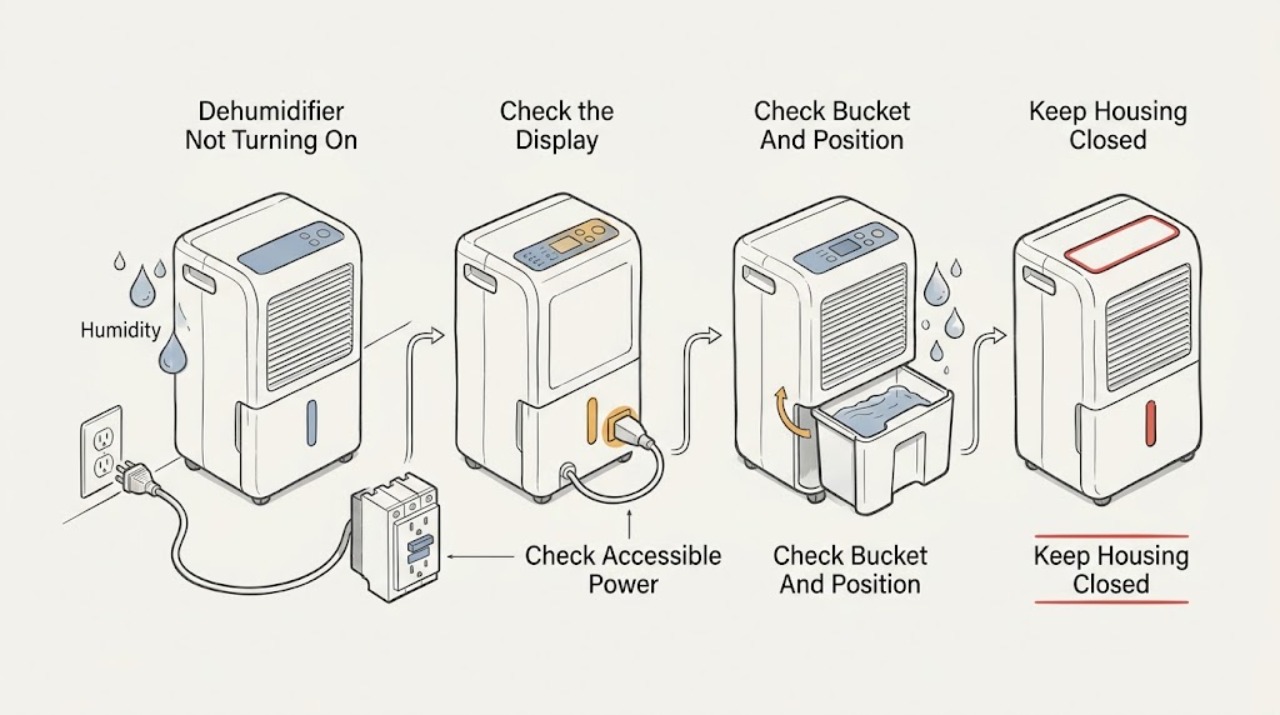
Work through in order
Diagnostic checks
Use only checks that match the exact appliance or system and its official guide.
-
Check 1
Find the model and serial label on the side or back of the Frigidaire dehumidifier near the water bucket. Record whether the whole display is dark, the display is lit but the fan/compressor does not start, a Full Bucket or other indicator is lit, or an error code is shown. Use the exact model's Use and Care manual for any button names or bucket instructions.
Expected result: The unit is completely dark, the panel is lit, a bucket/full indicator appears, the display shows a code, or the fan starts and stops after a delay.
Next step: Continue with the matching power, bucket, setting, airflow/temperature, or fault branch. Do not remove a panel to identify a model or hidden switch.
Stop if: Do not pull the cabinet apart, bridge a bucket switch, or use a generic code chart as a substitute for the exact model manual.
Why this matters
Why: A dark unit points first to the accessible power path. A lit unit with a bucket or setting indicator points to an operating condition rather than total power loss. A code or persistent no-start needs model-specific interpretation; a fan pause can be normal when the setpoint has been reached.
-
Check 2
From a dry position, inspect the dehumidifier's plug and cord, confirm it is connected directly to a properly installed grounded receptacle, and check the household breaker and GFCI/AFCI if present. Confirm no extension cord or power strip is being used. Use another small appliance only to confirm the receptacle, without opening the dehumidifier.
Expected result: The receptacle is dead, the breaker or GFCI/AFCI is tripped, the cord/plug is damaged or hot, another appliance also has no power, or the receptacle appears normal but the dehumidifier remains dark.
Next step: Restore a tripped household device only once if it can be done safely and the circuit is otherwise normal. Leave the dehumidifier disconnected for a damaged/hot cord, repeated trip, or normal receptacle with a dark display, and arrange qualified electrical or Frigidaire service.
Stop if: Do not use an extension cord, power strip, adaptor, live voltage probe, or repeated breaker reset.
Why this matters
Why: Frigidaire's no-power guidance treats an unavailable receptacle, tripped protection, damaged cord/plug, or prohibited extension/power-strip connection as an external supply problem. A normal receptacle with a dark unit leaves the appliance's internal power path unresolved.
-
Check 3
If the display is lit, turn the unit off and disconnect power before handling the bucket. Empty the bucket, inspect it for obvious damage, and reinstall it fully and squarely according to the exact model manual. If a bucket-full light or similar indicator is present, confirm it clears after the bucket is correctly seated; do not hold or bypass the bucket-position switch.
Expected result: The bucket is full, tilted, damaged, not fully seated, the full-bucket indicator clears after reseating, or the indicator remains with an empty correctly seated bucket.
Next step: Make one normal restart attempt after safe emptying and reseating. If the indicator persists, the bucket is cracked, water leaks, or the unit will not start, leave it off and arrange service; use the model manual for any pump or continuous-drain configuration.
Stop if: Do not operate with a cracked bucket, defeat the bucket interlock, reach into the cabinet, or handle wet electrical areas.
Why this matters
Why: Frigidaire states that a full bucket can pause the unit and that emptying it should allow the unit to come back on or function properly. Persistent full-bucket indication with a correctly seated bucket leaves the position sensor, wiring, control, or water path unresolved.
-
Check 4
Read the displayed room RH and the selected humidity setpoint using the normal controls. Check whether the unit is in Continuous mode (often shown as CO), whether the room is already below the setpoint, and whether the fan is set for the room conditions. Change only the setting allowed by the exact model manual, then observe whether a normal run begins.
Expected result: Room RH is below the setpoint, the setpoint is too high for the desired drying, CO/Continuous mode is selected, or the unit still will not run with a valid humidity demand.
Next step: Set a model-authorized RH target or exit Continuous mode when appropriate and allow the unit a normal start opportunity. If a valid demand produces no fan/compressor response, continue to the airflow/temperature and service branches.
Stop if: Do not guess hidden service settings, repeatedly change setpoints, or treat a normal humidity-controlled pause as a failed motor.
Why this matters
Why: Frigidaire documents that the unit can shut off when RH is below the setpoint and restart when RH rises above it. Continuous mode changes run behavior and is intended for short high-humidity periods; a valid demand with no start makes a bucket, power, temperature, or internal fault more likely.
-
Check 5
With power disconnected, clear objects from the front and rear air paths and clean the accessible filter only as the exact manual directs. Confirm the room is not below Frigidaire's documented 41°F/5°C lower operating condition, and allow clearance around the unit. Restore power only after the filter and cabinet are dry.
Expected result: The grille or filter is blocked, the room is below the documented lower operating condition, frost is visible, airflow is clear and the room is suitable, or the unit still will not start.
Next step: Clear only external obstructions and reinstall a dry filter, then make one normal start attempt. If heavy frost, a recurring stop, or no response remains, turn the unit off and arrange service rather than defrosting with a heat source or opening the cabinet.
Stop if: Do not scrape coils, use a heater or flame to defrost, remove covers, touch the compressor, or work on the fan while powered.
Why this matters
Why: Frigidaire says restricted airflow can prevent proper operation, low room temperature can prevent satisfactory operation, and frost protection can stop the compressor while the coil recovers. Clear airflow and suitable conditions can explain a pause; persistent no-start after those checks points beyond user maintenance.
-
Check 6
If a code, service indicator, repeated stop, or abnormal temperature appears, record the exact characters and the conditions when it appears. Compare it with the exact model's manual and Frigidaire's official error-code guidance; do not clear it before recording. Keep the unit off if it overheats or repeatedly stops.
Expected result: The code corresponds to a sensor, sealed-system, compressor-overload, electronic-control, or pump/drain condition, or no code is shown but the unit remains unresponsive after the external checks.
Next step: Provide the exact model, code, display behavior, bucket and power results, room conditions, and last normal operation to Frigidaire service. Do not select or order an internal part from a generic code or symptom.
Stop if: Do not open the cabinet, probe sensors or wiring, test a compressor, add refrigerant, or repeatedly restart a unit with a fault or overheating symptom.
Why this matters
Why: Frigidaire's error-code guidance routes sensor, sealed-system, compressor-overload, and electronic-control failures to assistance. A pump code may permit only the documented hose/bucket inspection; a generic no-start symptom cannot identify which internal assembly failed.
-
Check 7
Prepare a service record containing the exact model and serial, display state, receptacle/breaker/GFCI result, cord condition, bucket/full-indicator result, RH/setpoint and mode, airflow/filter/room-temperature observation, any frost or water, error code, and whether the fan or compressor ever started.
Expected result: The unit resumes after one documented external correction, remains dark with a normal supply, has a lit display but no run, repeatedly stops, or shows a code or hazard.
Next step: Use the dehumidifier only if it runs normally without a hazard. Otherwise leave it off and contact Frigidaire service; use a qualified electrician for a receptacle/cord/protection issue and qualified plumbing help for a drain connection problem.
Stop if: Stop immediately for smoke, burning odor, abnormal heat, water near electrical parts, damaged cord/plug, repeated protective-device trips, or refrigerant/sealed-system damage.
Why this matters
Why: A resolved power, bucket, humidity, airflow, or room-condition issue supports an external operating condition. A persistent no-start or recurring stop after those checks leaves the internal control, sensor, fan, compressor, pump, or sealed system unresolved.
Use your observations
Decision map
Find the observation that best matches what you see, then follow the next safe action.
-
PATH 01Safety boundary
What you see
No display, indicator, fan, or response is present.
Do this next
Check the accessible supply once without opening the unit. If it is normal but the display remains dark, leave the dehumidifier off and arrange qualified electrical or Frigidaire service.
Why this path and its safety boundary
Why it matters: The accessible receptacle, breaker/GFCI/AFCI, plug/cord, or the dehumidifier's internal power path is more likely than a humidity setting or full bucket.
Safety stop: Do not use an extension cord, repeatedly reset protection, or open the cabinet.
-
PATH 02Safety boundary
What you see
The panel is lit and a Full Bucket indicator is present, the bucket is full, or the unit resumes after emptying and correctly reseating it.
Do this next
Empty and reinstall the bucket once according to the exact manual. Stop for a leak, cracked bucket, persistent indicator, or any need to bypass the position interlock.
Why this path and its safety boundary
Why it matters: A full or incorrectly positioned bucket can pause operation. If an empty, undamaged bucket is correctly seated but the indicator remains, the bucket switch, sensor, control, or water path needs service-level diagnosis.
Safety stop: Do not operate with a damaged bucket or touch wet electrical areas.
-
PATH 03Safety boundary
What you see
The display is normal, RH is below the selected setpoint, or the unit is in Continuous mode and appears paused or behaves differently from expected.
Do this next
Check the RH/setpoint and mode using normal controls, make one model-authorized adjustment, and observe whether the unit starts when a valid demand exists. Escalate if it remains unresponsive.
Why this path and its safety boundary
Why it matters: Frigidaire documents humidity-controlled fan/compressor cycling and a Continuous mode that changes run behavior. A unit below setpoint may be operating normally rather than failing to turn on.
Safety stop: Do not enter unknown service settings or repeatedly power-cycle the unit.
-
PATH 04Safety boundary
What you see
The grille/filter is blocked, the room is below 41°F/5°C, frost is present, or the unit has insufficient clearance.
Do this next
Clear external airflow, clean and dry the accessible filter, and move the unit only if that can be done safely. Do not use a heat source to defrost; arrange service for heavy frost or a recurring no-start.
Why this path and its safety boundary
Why it matters: Restricted airflow, low ambient temperature, or documented frost protection can stop or limit dehumidification. These conditions do not prove a failed compressor or fan.
Safety stop: Do not scrape coils, open covers, touch powered fans, or add refrigerant.
-
PATH 05Safety boundary
What you see
The receptacle is normal, the bucket is empty and seated, a valid humidity demand exists, airflow and room temperature are suitable, but the fan/compressor never starts.
Do this next
Turn the unit off and arrange Frigidaire service with the model, display, and completed checks. Do not continue repeated start attempts.
Why this path and its safety boundary
Why it matters: The remaining possibilities include internal power/control, bucket sensing, fan, compressor, temperature/humidity sensing, or sealed-system faults. The official support material does not justify selecting a part from this external symptom.
Safety stop: Do not remove panels, probe wiring, test capacitors or compressors, or handle refrigerant.
-
PATH 06Safety boundary
What you see
An error code appears, the unit repeatedly stops, becomes abnormally hot, smells burned, smokes, trips protection, or has water near electrical parts.
Do this next
From a safe dry position, unplug or switch off the unit, keep clear of hot or wet areas, record the code, and contact Frigidaire service or qualified electrical help as appropriate.
Why this path and its safety boundary
Why it matters: This is a stop-use or service condition. Frigidaire routes sensor, sealed-system, compressor-overload, and electronic-control errors to assistance, and says a unit that continues to run hot should be unplugged and referred for help.
Safety stop: Do not restart, wipe a live wet area, bypass protection, open the cabinet, or perform live testing.
Helpful context
Understand the symptom
Use the exact Frigidaire model before interpreting a no-start
Frigidaire's Owner Center groups support by dehumidifier category, but display layouts, bucket geometry, drain options, and controls vary by model. The model and serial label is typically on the side or back near the water bucket. Record it before using a manual or interpreting a display code. A completely dark panel is a power-path question; a lit panel that will not run is more often a bucket-position, humidity-setting, airflow, temperature, mode, or fault-indicator question. A fan that cycles off can also be normal when room humidity is below the setpoint, so do not call every pause a failure.
Safe user checks and the service boundary
Keep checks to the dry, accessible receptacle and plug, normal household protection, visible bucket/filter installation, external airflow clearance, and normal controls. Unplug the unit before cleaning the cabinet or bucket and wring excess water from any cleaning cloth. Stop for a damaged cord or plug, scorching, smoke, burning odor, repeated breaker/GFCI trips, water entering electrical areas, abnormal overheating, or a unit that needs its cabinet opened. Do not bypass the bucket switch, remove panels, probe voltage, handle the compressor or sealed refrigerant circuit, or replace a control, sensor, fan, or pump based only on a no-start symptom.
Safety boundary
Stop conditions
- Stop immediately for smoke, burning odor, sparks, abnormal overheating, water near electrical parts, a damaged/hot cord or plug, or repeated breaker/GFCI/AFCI trips.
- Do not use an extension cord, power strip, adaptor, or ungrounded receptacle; do not open a hard-wired or energized connection.
- Do not bypass the bucket-position interlock, operate with a cracked bucket or leaking cabinet, or handle wet electrical areas.
- Do not remove panels, probe live wiring, test capacitors/compressors, scrape coils, use a heat source to defrost, or add refrigerant.
- A persistent dark display, lit-display no-run, recurring fault, heavy frost, or error code after the model-authorized external checks requires Frigidaire service.
When checks do not resolve it
Need a professional?
Safety scope: This article covers model identification, accessible grounded power observations, bucket emptying/reseating, normal humidity/mode controls, external airflow/filter care, and room-condition observations. A trained Frigidaire technician or qualified electrician must handle cabinet removal, interlock/sensor diagnosis, wiring, capacitors, fan/compressor, pumps, sealed refrigeration, and live testing.
Common questions
FAQ
Why is my Frigidaire dehumidifier completely dark?
Check the accessible grounded receptacle, plug, cord, breaker, and GFCI/AFCI once from a dry position. Do not use an extension cord or power strip. If the receptacle is normal but the display remains dark, leave the unit off and arrange Frigidaire or qualified electrical service instead of opening the cabinet.
Can a full or badly seated bucket keep a Frigidaire dehumidifier from turning on?
Yes. Frigidaire says a full bucket can pause the unit or keep it from functioning properly. Empty and correctly reseat the undamaged bucket once using the exact model manual. If the Full Bucket indicator remains or there is a leak, stop and arrange service; do not bypass the bucket interlock.
Could the humidity setting make my Frigidaire dehumidifier seem like it will not start?
Yes. The fan can shut off when room RH is below the setpoint, and Continuous mode changes normal run behavior. Check the RH and setpoint with the normal controls and make one model-authorized adjustment. A valid humidity demand with no response needs service-level diagnosis.
What if a Frigidaire dehumidifier is warm or has frost and will not run?
Warm exhaust can be normal because the compressor and fan generate heat, and frost protection can temporarily stop the compressor. Keep airflow clear and use only the documented operating range and filter care. Do not scrape coils or use a heat source; recurring heavy frost or continued overheating requires service.
Should I replace a sensor, compressor, or control board if my Frigidaire dehumidifier will not turn on?
No. A dark or unresponsive unit cannot identify an internal part. Frigidaire routes sensor, sealed-system, compressor-overload, and electronic-control error conditions to assistance. Provide the exact model, display/code, power, bucket, RH, airflow, and temperature observations to service instead of performing live or cabinet-open testing.
Read the exact guide
Official sources
- Dehumidifier - Putting out Hot AirFrigidaire · Official Frigidaire Owner Center support article applying to Dehumidifiers; exact temperature/protection behavior varies by model.
- Where can I find my model and serial number?Frigidaire · Official Frigidaire Owner Center identification article applying to all appliances; its dehumidifier section locates the label near the water bucket.
- Dehumidifier - Frost BuildupFrigidaire · Official Frigidaire Owner Center support article applying to Dehumidifiers; exact coil access and service actions remain model-specific.
- Dehumidifiers Error Code GuideFrigidaire · Official Frigidaire Owner Center error-code guide applying to the Dehumidifier category; the exact model manual controls code availability and user actions.
- Dehumidifier - Room is not dry enoughFrigidaire · Official Frigidaire Owner Center support article applying to Dehumidifiers; setpoint and control labels vary by model.
- Dehumidifier - No PowerFrigidaire · Official Frigidaire Owner Center support article applying to the Dehumidifier category; exact model manuals control model-specific controls and electrical details.
- Support for DehumidifiersFrigidaire · Official Frigidaire support landing page for the Dehumidifiers category; it indexes related articles but does not replace an exact model manual.
- Dehumidifier - Water Leaking IssuesFrigidaire · Official Frigidaire Owner Center support article applying to Dehumidifiers; internal leak sources require model-specific service.
- Dehumidifier - Clean and CareFrigidaire · Official Frigidaire Owner Center support article applying to Dehumidifiers; bucket disassembly and filter access remain model-specific.
- Dehumidifier - Not Collecting WaterFrigidaire · Official Frigidaire Owner Center support article applying to Dehumidifiers; model manuals control bucket and drain construction.
- Dehumidifier - Fan turning on and off periodicallyFrigidaire · Official Frigidaire Owner Center support article applying to Dehumidifiers; exact fan timing can vary by model.
Community feedback
Share a repair observation
Share a plain-text repair observation. Accepted observations are published automatically; this page may take a moment to update.