
On this page
Start here
Quick answer
When an Admiral washing machine will not start, first note whether the panel has power and whether a Control Lock, lid-lock, door-lock, delay, or error indication is present. Whirlpool's official guidance for its appliance family says a locked control prevents commands, the lid or door must be fully closed and latched, and some models require pressing and holding Start for up to 3 seconds. If the washer is plugged in and appears intact, one model-directed 5-minute power reset may clear a temporary control issue. If there are no lights, a breaker or GFCI trips again, the lid or door will not lock, the washer remains unresponsive after reset, water is leaking, or a code returns, stop using it and arrange qualified appliance or electrical service. Never bypass a lid or door lock, open the console, or work on wiring while energized.
Before you begin
Safety first
- This article supports external observation, model-directed control use, clearing a visible closure obstruction, and one safe power reset on an intact dry washer. Lock, cabinet, console, wiring, motor, pump, valve, and control repairs require qualified service.
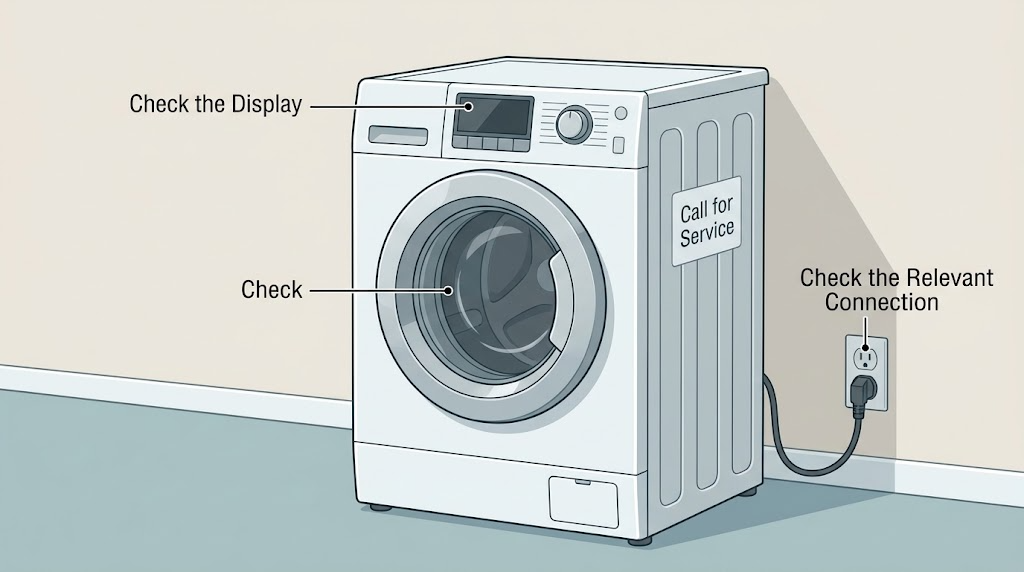
Work through in order
Diagnostic checks
Use only checks that match the exact appliance or system and its official guide.
-
Check 1
From a dry position, check whether the Admiral washer's console has any lights or text, whether the power cord is fully seated in its intended outlet, and whether a nearby outlet or GFCI has lost power; do not touch a hot, wet, damaged, or sparking cord or receptacle.
Expected result: Classify the washer as powered with a normal or fault display, powered but unresponsive, completely dark, or affected by a tripped protective device or damaged outlet or cord.
Next step: If the outlet and cord are safe and the protective device has tripped only once, restore power according to local safe use and observe the washer; if power remains absent or trips again, stop and arrange electrical or appliance service.
Stop if: Do not use an extension cord, open the outlet or washer, reset a repeatedly tripping breaker or GFCI, or handle damaged or wet electrical equipment.
Why this matters
Why: A powered panel shifts the check toward control lock, lid or door latch, Start input, or cycle state. A dark panel can reflect the outlet, breaker or GFCI, cord, or washer supply, and repeated trips are not a simple start-button problem.
-
Check 2
If the panel is lit but touch commands or buttons do not respond, look for a Control Lock, padlock, or similar indicator and use only the exact model manual's unlock control or hold duration.
Expected result: Record whether the lock indicator clears and controls respond, remains on, or is not present while the console is still unresponsive.
Next step: With the lock cleared, select a valid cycle and continue to the lid or door and Start checks; if the control remains locked or unresponsive, keep the washer out of service and request support.
Stop if: Do not pry buttons, enter service diagnostics, open the console, or bypass the control lock to start a cycle.
Why this matters
Why: Whirlpool says an active Control Lock prevents control operation. If unlocking does not restore response, the problem may involve the control, power supply, or another model-specific fault rather than the lock setting.
-
Check 3
Remove clothing or debris that is visibly preventing closure, then close the Admiral washer lid or front door firmly without slamming and observe whether the latch or lock engages when Start is selected as the model directs.
Expected result: Classify the result as latch engages and the cycle begins, lid or door looks closed but does not lock, lock indicator flashes or an error appears, or the lid or door is physically damaged or stuck.
Next step: Follow the exact model instructions for a clean, unobstructed latch; if the lock will not engage, the washer will not start, or the latch is damaged, stop and arrange qualified appliance service.
Stop if: Do not force, tape, wedge, or bypass the lid or door lock, reach into a moving basket, or dismantle the latch.
Why this matters
Why: Whirlpool states that the lid or door must be completely closed and latched for relevant models to operate. A latch that will not engage can be caused by obstruction, alignment, the lock assembly, or control logic; it is not permission to bypass the interlock.
-
Check 4
With a valid cycle selected and the lid or door latched, press and hold Start or Push to Start only for the duration shown by the exact model instructions; do not repeatedly change cycles while the washer is accepting the command.
Expected result: Record whether a countdown appears and the washer begins filling or locking, the panel beeps but does not start, or the controls show Err, a lock state, or another message.
Next step: Use the exact model manual for the displayed message; if Start still does not engage after the lid or door and lock checks, proceed to one documented reset and then service if unresolved.
Stop if: Do not hold a control indefinitely, override a displayed lock, or continue pressing Start when the washer is leaking, smoking, sparking, or making an abnormal mechanical noise.
Why this matters
Why: Whirlpool notes that some models require holding Start for up to 3 seconds and may show a countdown. Err or a refusal to start can indicate an open door, a cycle change at the wrong time, a lock state, or a model-specific condition.
-
Check 5
If the washer is dry, cool, electrically intact, and not leaking, perform one model-appropriate control reset by disconnecting it from power for 5 minutes as Whirlpool describes; unplug only an accessible, undamaged cord, and do not remove a panel to reach wiring.
Expected result: After reconnecting, record whether the console returns normally and a cycle starts, the washer remains dark or unresponsive, or the not-starting condition or code returns.
Next step: Keep the washer out of service and arrange qualified appliance or electrical service if it does not start after the one reset or if the condition returns; provide the model, display, latch result, and reset result.
Stop if: Do not repeatedly cycle power, operate a leaking or damaged washer, turn a breaker on and off to force operation, or open the console or electrical enclosure.
Why this matters
Why: A successful one-time reset supports a temporary control state but does not prove the latch, supply, or control is healthy. A repeat failure, no response, or returning code requires diagnosis rather than more resets.
Use your observations
Decision map
Find the observation that best matches what you see, then follow the next safe action.
-
PATH 01Safety boundary
What you see
The panel is dark, the outlet has no power, or a breaker or GFCI trips again when the washer is connected.
Do this next
Stop using the washer and arrange qualified electrical or appliance assessment; provide the outlet, cord, and protective-device observations without opening anything.
Why this path and its safety boundary
Why it matters: The cause may be the household supply, cord, washer input, or an electrical fault, not merely a control setting.
Safety stop: Do not use an extension cord, repeatedly reset the protective device, open the outlet or panel, or handle a wet or damaged cord.
-
PATH 02Safety boundary
What you see
The panel is powered and a Control Lock or padlock indicator is on, but there is no visible electrical or water hazard.
Do this next
Use the exact Admiral model manual's unlock control, then select a valid cycle and check the lid or door latch.
Why this path and its safety boundary
Why it matters: The controls may be intentionally locked and will not accept a cycle command.
Safety stop: Do not enter service mode or bypass the lock if the documented unlock control does not work.
-
PATH 03Safety boundary
What you see
The lid or door is visibly closed but the lock does not engage, the lock indicator flashes, or an interlock message remains.
Do this next
Stop using the washer and arrange qualified appliance service after checking only for a visible obstruction allowed by the model instructions.
Why this path and its safety boundary
Why it matters: The washer cannot safely accept a cycle; an obstruction, alignment issue, lock assembly, or control fault may be involved.
Safety stop: Do not tape, wedge, hold, defeat, or electrically bypass the lid or door lock.
-
PATH 04Safety boundary
What you see
The panel is powered, the lock is cleared, the lid or door is latched, and the display shows a countdown, Err, cycle state, or requires a held Start input.
Do this next
Follow the exact manual for the message and hold Start only as instructed; if the washer still will not start, perform one documented reset and escalate if it returns.
Why this path and its safety boundary
Why it matters: The machine may be waiting for the model-specific Start gesture or rejecting a cycle change because of its current state.
Safety stop: Do not keep changing cycles, force a lock, or ignore a leak, abnormal noise, smoke, or electrical odor.
-
PATH 05Safety boundary
What you see
The washer starts normally after one 5-minute power reset and no hazard, code, leak, or latch problem returns.
Do this next
Run only a normal supervised cycle appropriate to the model and record the result; request service if the not-starting condition recurs.
Why this path and its safety boundary
Why it matters: A temporary control state is plausible, but the reset has not identified or repaired a failing part.
Safety stop: Do not treat a one-time restart as permission to ignore repeated trips, a returning code, a damaged cord, a leaking washer, or a failing lock.
-
PATH 06Safety boundary
What you see
The washer remains unresponsive after the documented checks and one reset, shows an unlisted or returning code, leaks, or has a damaged latch, cord, or control.
Do this next
Keep the washer out of service and arrange qualified appliance or electrical assessment with the exact model, display, checks, and results.
Why this path and its safety boundary
Why it matters: The cause may involve the control, input supply, latch or lock, motor or drive, water-control state, or another model-specific subsystem that cannot be identified from the symptom alone.
Safety stop: Do not guess a replacement part, open the cabinet, bypass safety devices, or continue operating the washer to see if the fault clears.
Helpful context
Understand the symptom
Start with the condition that prevents the cycle from being accepted
A washer can appear dead when its control is locked, or it can appear ready while refusing to start because the lid or door has not latched. Whirlpool's top-load and front-load guidance treats those as separate checks and notes that the exact model determines whether a lid or door must lock before operation. Record the panel lights and any displayed text before trying a reset.
Admiral model details matter
Admiral machines are included in Whirlpool Corporation's appliance-family documentation, but top-load and front-load controls are not interchangeable. A Start countdown, Control Lock key, lid-lock behavior, and displayed code can vary by model. Use the exact model manual for the button combination and water or door requirements; do not force a latch or use another washer's procedure.
A reset is a diagnostic checkpoint, not a repair
Whirlpool describes disconnecting a washer from power for 5 minutes as a way to reset its control. If the washer starts afterward and the condition does not return, a temporary control state is plausible. A repeat failure, no response, a tripped protective device, a leak, or a damaged cord changes the decision to qualified service.
Safety boundary
Stop conditions
- Stop using the washer for a leak, smoke, sparking, burning odor, damaged cord or receptacle, repeated breaker or GFCI trip, abnormal mechanical noise, or water near electrical equipment.
- Do not bypass, tape, wedge, hold closed, or electrically defeat the lid or door lock; do not reach into a moving basket or force a stuck latch.
- Do not open the console or cabinet, expose wiring, replace a control or lock, or perform live electrical tests as a not-starting check.
- Do not repeatedly reset power, repeatedly press Start, use an extension cord, or continue operation under a returning or unlisted error.
- Arrange qualified appliance or electrical service for no power, persistent unresponsiveness, failed latch, returning code, water leak, damaged control, or any cause that remains uncertain after one documented reset.
When checks do not resolve it
Need a professional?
Arrange qualified appliance service when an Admiral washer remains unresponsive after the exact control-lock, lid or door, Start, and one 5-minute reset checks; also call for a failed latch, returning or unlisted code, leak, or damaged control. Contact a qualified electrician for a dead outlet or repeated breaker or GFCI trip. Treat smoke, sparking, burning odor, or water near electrical equipment as an urgent hazard and keep clear.
Safety scope: This article supports external observation, model-directed control use, clearing a visible closure obstruction, and one safe power reset on an intact dry washer. Lock, cabinet, console, wiring, motor, pump, valve, and control repairs require qualified service.
Common questions
FAQ
Why will my Admiral washing machine not start even though the panel is lit?
Check for Control Lock, confirm the lid or front door is fully closed and latched, and press and hold Start only as the exact model manual requires. If the lock or controls remain unresponsive, perform one safe 5-minute power reset and arrange service if the washer still will not start.
Does the Admiral washer need the Start button held down?
Some Whirlpool-family washer models require Start or Push to Start to be held for up to 3 seconds, sometimes with a countdown. Use the exact Admiral model instructions; do not keep pressing the button if the lid or door will not lock or another error appears.
How do I reset an Admiral washing machine that will not start?
If the washer is dry, cool, intact, and not leaking, disconnect it from power for 5 minutes as Whirlpool describes, then reconnect it and try one normal cycle. If it is hard-wired, do not open a panel or improvise wiring work. A returning no-start condition needs qualified service.
What if the Lid Locked light flashes on an Admiral washer?
The lid may not be fully closed or latched, or a cycle may have stopped while the basket is still moving. Check only for a visible obstruction and wait for safe movement to stop. Do not bypass the lid lock; arrange service if it will not engage or the light keeps flashing.
When should I call for Admiral washer service?
Call when the washer has no power, a breaker or GFCI trips again, the lid or door will not lock, the panel remains unresponsive after one documented reset, a code returns, or there is a leak, damaged cord, smoke, burning odor, or abnormal noise. Use qualified appliance or electrical service and do not open or bypass safety parts.
Read the exact guide
Official sources
- Not Starting or Not Operating - Front Load WasherWhirlpool Product Help · Whirlpool family support guidance for front-load washers; exact Admiral controls, codes, and installation requirements are model-dependent.
- Use & Care GuideWhirlpool Corporation · The guide explicitly names Admiral among covered Whirlpool Corporation brands; the particular Admiral washer's model number and own guide control exact operation.
- How to Reset a WasherWhirlpool Product Help · Whirlpool washer reset guidance across multiple models; it does not replace the exact Admiral owner's manual or authorize wiring work.
- Not Starting - WasherWhirlpool Product Help · Whirlpool family support guidance for top-load washers; an Admiral model's own manual controls the exact button and latch behavior.
Community feedback
Share a repair observation
Share a plain-text repair observation. Accepted observations are published automatically; this page may take a moment to update.