
On this page
Start here
Quick answer
Confirm the washer has power, the door is fully closed, a normal program is selected, and the Start command has actually been pressed. Then check the display for Delayed Start, Child Lock, or an error and use the exact Asko manual for your model to clear or interpret it. If the door will not latch, the controls stay dead, an error returns, the machine trips power, leaks, overheats, or would require opening the cabinet, stop and arrange qualified service; do not bypass the door lock or work on live wiring.
Before you begin
Safety first
- The user may check accessible power, program selection, door closure, display state, and only the model manual’s documented external checks. Do not bypass the door lock, open the cabinet, probe live wiring, remove water-filled components, or replace internal parts without qualified diagnosis.
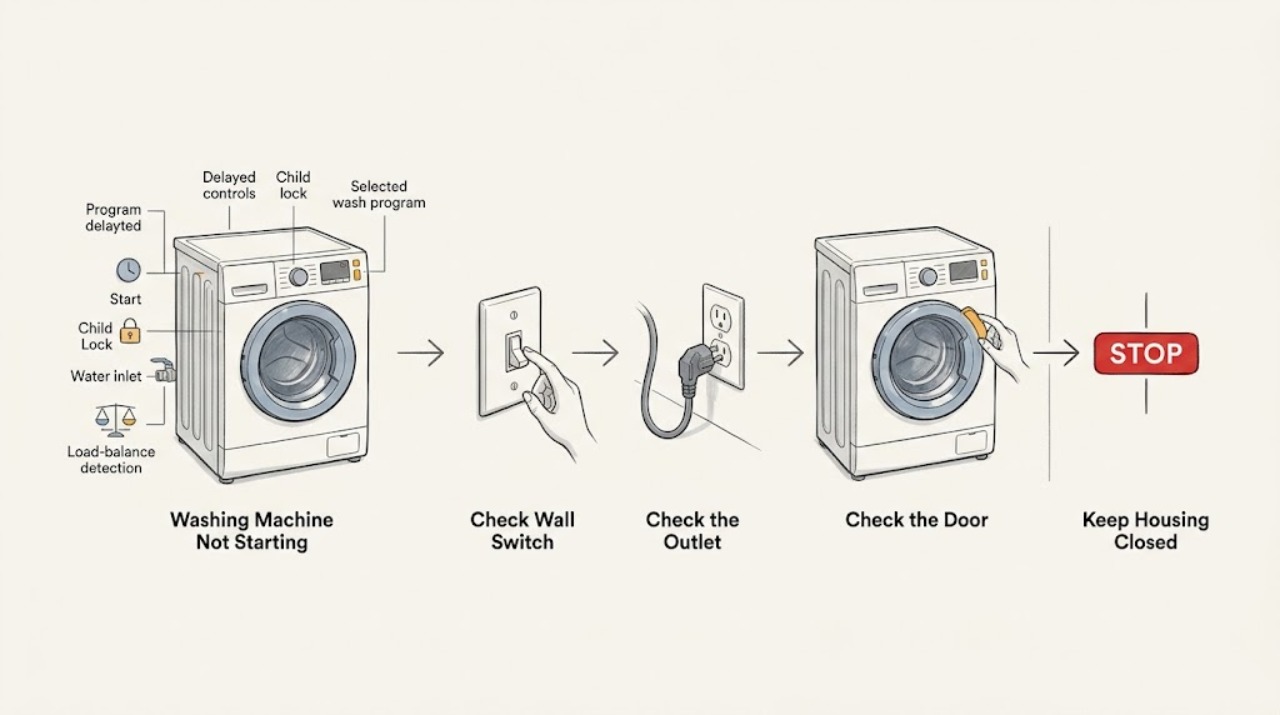
Work through in order
Diagnostic checks
Use only checks that match the exact appliance or system and its official guide.
-
Check 1
Empty any loose items from the door area, switch the washer on, select a normal wash program, close the door firmly, and press the model’s Start or Start/Stop control once as shown in the manual.
Expected result: The display shows a selected program and remaining time and the washer begins, or the display remains idle and the door or controls do not respond.
Next step: If it still does not begin, note the display symbols and continue with the power, door, and control-state checks. Do not repeatedly press Start or force the door.
Stop if: Stop for a damaged door, broken latch, smoke, burning smell, water leak, or a control that activates unpredictably.
Why this matters
Why: A missed start command or incomplete door closure can look like a failed washer; an active display with no response after the correct sequence points to a control state, door-interlock, supply, or fault condition.
-
Check 2
Check whether the washer display or indicator is powered, confirm the plug is fully seated in the intended grounded outlet, and inspect the accessible household breaker or residual-current device without removing covers.
Expected result: The display is blank, the breaker has opened, the plug or outlet is loose, or accessible power appears normal while the washer remains unresponsive.
Next step: Restore only an obvious accessible connection or breaker state once, if safe. If the breaker opens again or the washer remains dead, arrange electrical or appliance service.
Stop if: Stop for repeated trips, a hot or scorched outlet, damaged cord, exposed conductors, moisture at the outlet, or uncertainty about grounding.
Why this matters
Why: No supply can prevent any start command; a normal display and outlet do not prove that an internal control or door-interlock circuit is healthy.
-
Check 3
With the cycle stopped, inspect the door opening for trapped clothing or debris and close the door gently until it is fully seated; do not slam it, hold the lock closed, or use an emergency-opening tool while a program is being selected.
Expected result: The door closes and the display recognizes it, or the door will not latch, springs back, stays locked unexpectedly, or shows a door-related symbol.
Next step: Remove only an obvious accessible obstruction and try the normal start sequence once. If the door still will not latch or the lock indication is inconsistent, arrange service.
Stop if: Stop for cracked glass, a torn seal, a loose hinge, a broken latch, a door that opens during a cycle, or any need to remove the front panel.
Why this matters
Why: The washer normally requires a closed door before it can start; a door that cannot latch can reflect an obstruction or a damaged latch, hinge, seal, or interlock rather than a program problem.
-
Check 4
Read the display for Delayed Start, Child Lock, a lock icon, a countdown, or an error message, and use the exact Asko manual for the appliance’s model to cancel a setting or interpret the message.
Expected result: A delayed or locked state is shown, an error is shown, or the display appears ready with no blocking indication.
Next step: Follow only the model-specific manual, record an error before resetting anything, and run one normal start attempt. If the error returns or no manual procedure restores operation, arrange service.
Stop if: Stop if an error indicates overheating, water leakage, electrical fault, or another condition the manual says requires service.
Why this matters
Why: The washer may be waiting by design or refusing a start because of a detected condition; the same icon or long-press cannot be assumed to mean the same thing across models.
-
Check 5
If the program begins but does not progress, observe whether water enters, whether the display reports an inlet or other error, and whether the drum briefly redistributes the load; do not remove hoses or filters while the machine is powered or full of water.
Expected result: The washer fills and advances, reports a water or other error, or remains paused while the drum tries to rebalance or never begins movement.
Next step: Follow the model manual for an accessible water-tap or load-arrangement check only if it explicitly covers that condition. If the drum remains stopped, water is trapped, or an error returns, arrange service.
Stop if: Stop for a leak, standing water with a failed drain, hose damage, unusual heat or smell, repeated error, or any need to access a powered component.
Why this matters
Why: A start-then-stop condition can be caused by a detected supply, door, or load condition and is not the same as a blank display; the displayed error and exact model guide determine the next safe check.
-
Check 6
Arrange qualified Asko appliance service when the washer still will not start after the documented power, door, program, and display checks, or when the failure is intermittent; provide the model, display message, door behavior, and exact point where the sequence stops.
Expected result: The no-start persists, returns after a temporary reset, or is accompanied by a damaged door, leak, smell, unusual sound, electrical trip, or repeated error.
Next step: Keep the washer out of service if a safety symptom is present and use Asko’s manual and service-support path for model-specific diagnosis.
Stop if: Stop for smoke, burning smell, exposed wiring, repeated electrical trips, uncontrolled filling, leaking water, or a door that will not remain secured.
Why this matters
Why: The remaining possibilities include the door-interlock circuit, control electronics, inlet or drain controls, wiring, or another internal fault that cannot be identified safely from the symptom alone.
Use your observations
Decision map
Find the observation that best matches what you see, then follow the next safe action.
-
PATH 01Next step
What you see
The display and indicators are blank.
Do this next
Arrange qualified service and follow the exact model guidance.
Why this path and its safety boundary
Why it matters: Check the plug and accessible breaker or residual-current device once. If supply is normal but the washer remains dead, arrange electrical or appliance service without opening the cabinet.
-
PATH 02Next step
What you see
The door will not latch or the washer does not recognize a closed door.
Do this next
Arrange qualified service and follow the exact model guidance.
Why this path and its safety boundary
Why it matters: Check only for an obvious accessible obstruction and close the door gently. Do not bypass the interlock; arrange service for a damaged or inconsistent latch or lock indication.
-
PATH 03Next step
What you see
Delayed Start, Child Lock, a lock icon, or a countdown prevents an immediate start.
Do this next
Arrange qualified service and follow the exact model guidance.
Why this path and its safety boundary
Why it matters: Use the exact model manual to cancel or unlock the setting. Do not guess at a reset combination or treat a lock symbol as a hardware failure.
-
PATH 04Next step
What you see
An error message or symbol appears when Start is pressed.
Do this next
Arrange qualified service and follow the exact model guidance.
Why this path and its safety boundary
Why it matters: Record the message, consult the exact model manual, and perform only its documented accessible check. If it returns, arrange qualified service.
-
PATH 05Next step
What you see
The washer starts to fill or move, then pauses or does not progress.
Do this next
Arrange qualified service and follow the exact model guidance.
Why this path and its safety boundary
Why it matters: Treat this as a start-then-stop condition: observe water entry and any displayed message, and follow the model manual for a supply or load check. Do not remove powered or water-filled components.
-
PATH 06Next step
What you see
No safe external check restores operation, or there is smoke, a leak, burning smell, electrical trip, exposed wiring, or a damaged door.
Do this next
Arrange qualified service and follow the exact model guidance.
Why this path and its safety boundary
Why it matters: Stop using the washer and arrange qualified Asko appliance service. Do not bypass the lock, open live controls, or reset away a recurring error before recording it.
Helpful context
Understand the symptom
Separate a no-start from a start-then-stop
If the display is blank, begin with the electrical supply. If the display is active but the program never begins, confirm the door, selected program, Start command, and any delayed or locked state. If the drum begins and then pauses, record any displayed error and whether the washer is trying to balance the load; that is a different path from a dead control panel.
Use the exact model manual for control states
Asko models vary in their display, Start/Stop behavior, child-safety settings, and error wording. The official Asko manual finder asks for a product code or model name, while an Asko product sheet shows Delayed Start and Child Lock as features on particular models. Do not assume a long-press or reset sequence from another washer.
Keep the service boundary clear
A user can check the plug, accessible breaker, door closure, display state, and an obvious control setting. Door-interlock parts, control boards, wiring, water valves, and other internal components need qualified diagnosis. Never bypass a lock, open the cabinet with power connected, or continue using a washer with smoke, a burning smell, a leak, or repeated electrical trips.
Safety boundary
Stop conditions
- Smoke, burning smell, arcing, exposed wiring, a hot or damaged cord, or repeated electrical trips.
- Water leaking, uncontrolled filling, standing water with a failed drain, or a damaged inlet or drain hose.
- A door, hinge, seal, latch, or interlock that is damaged or cannot reliably remain secured.
- A recurring error, overheating indication, or failure that returns after a documented model-specific reset.
- Any need to bypass a door lock, open the cabinet, probe live wiring, or remove a water-filled component.
Only after diagnosis
Potential parts
- door latch or door-interlock assembly
Consider this category only if the door is correctly closed but a qualified diagnosis confirms that the latch or interlock is not being recognized.
Confirm the exact model and manufacturer fit information; do not bypass or replace the lock based only on a no-start symptom. - control board or user-interface control
This category is conditional on normal accessible power and door recognition with a technician finding an internal control fault.
Internal controls require model-specific diagnosis and safe electrical handling before any replacement. - water inlet valve or inlet component
Consider only if the washer accepts a program but cannot fill and a qualified diagnosis rules out the tap, hose, filter, and control command.
Confirm model-specific fit and water connections; do not remove a hose from a powered or water-filled appliance. - drain pump or drain control
Consider only for a start-then-stop or trapped-water condition after the manual’s safe accessible checks and a technician’s diagnosis.
Confirm the exact model and safe service procedure; a no-start symptom alone does not identify the drain component.
When checks do not resolve it
Need a professional?
Arrange qualified Asko appliance service when the washer remains inactive after the exact model’s power, door, program, and display checks, or immediately for leaks, electrical symptoms, overheating, a damaged door, recurring errors, or any internal diagnosis.
Safety scope: The user may check accessible power, program selection, door closure, display state, and only the model manual’s documented external checks. Do not bypass the door lock, open the cabinet, probe live wiring, remove water-filled components, or replace internal parts without qualified diagnosis.
Common questions
FAQ
Why does my Asko washing machine have power but not start?
Check that the door is fully recognized as closed, a normal program is selected, and the Start control has been pressed. Then check for Delayed Start, Child Lock, or an error on the display using the exact model manual.
Can a closed door still prevent an Asko washer from starting?
Yes. If the latch or door-interlock is not recognized, the washer may not begin even when the door appears shut. Check only for an accessible obstruction and do not bypass the lock; arrange service if recognition is inconsistent.
How do I clear Child Lock or Delayed Start on an Asko washer?
Use the exact manual for the model because the controls and long-press sequences vary. Do not guess a combination or factory-reset the washer before recording any displayed error.
What if the Asko washer starts and then stops?
Note whether water enters, the drum moves, or an error appears. A water, door, or load-balance condition can follow a different path from a dead control panel; follow the model manual’s documented external check and arrange service if it does not progress.
When should I stop troubleshooting an Asko washing machine that will not start?
Stop for a leak, smoke, burning smell, repeated electrical trips, exposed wiring, overheating, a damaged door, uncontrolled filling, or any need to bypass the lock or open the cabinet. Keep the washer out of service and arrange qualified appliance service.
Read the exact guide
Official sources
- User manualsASKO Global · Official ASKO manual finder; use it to obtain the reader’s exact manual before applying model-specific button sequences or error guidance.
- Hoe kan ik mijn ASKO wasmachine resetten?ASKO Service Netherlands · Official ASKO Netherlands support article in Dutch; reset behavior and service instructions may vary by model and market.
- W2084.W.U — Washing machine — Product group: Washing MachineASKO · Official ASKO product sheet for the listed model; these features and labels are not assumed for every ASKO washer.
- WASHING GUIDEASKO · Official ASKO multilingual washing guide; use the exact model’s full manual for model-specific controls and errors.
Community feedback
Share a repair observation
Share a plain-text repair observation. Accepted observations are published automatically; this page may take a moment to update.