
On this page
Start here
Quick answer
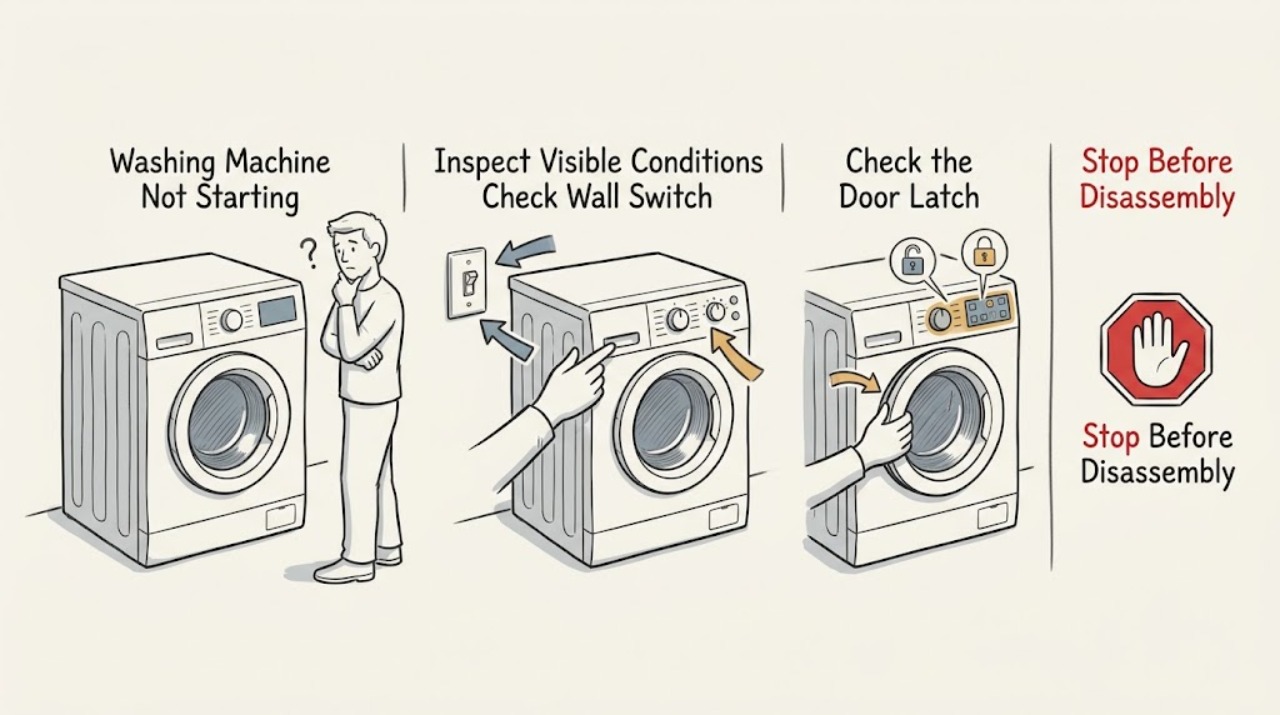
If a Bosch washing machine will not start, first separate a completely dead control panel from a powered washer that refuses to begin a programme. Check the plug, switched outlet, and household protection, then make sure the door closes and locks without laundry caught in the seal. Select a valid programme and use the exact Start or Start/Reload control as described in the model manual; Bosch notes that some buttons need a deliberate hold rather than a quick tap. Check for an active child lock, tap or error symbol, and an overloaded drum. Stop for smoke, a burning smell, water at electrical parts, repeated electrical trips, or a door that will not safely lock; do not bypass the lock or open the machine for live electrical testing.
Work through in order
Diagnostic checks
Use only checks that match the exact appliance or system and its official guide.
-
Check 1
With the washer idle, observe whether the display, indicator lights, or control sounds work. Record any key/lock, door, tap, or error symbol and whether the failure affects every programme or only one selection.
Expected result: The washer is completely dark, or the controls illuminate but the selected programme will not begin.
Next step: Use the external power checks for a dark panel; use the door, lock, programme, and Start-control checks for a powered panel.
Why this matters
Why: A dark panel sends the diagnosis toward the plug, socket, switch, fuse, or circuit protection. A lit panel indicates that the user interface has power, so door locking, control lock, programme choice, or the start input becomes more likely.
-
Check 2
Inspect the plug and switched socket from outside the appliance. Confirm the plug is fully inserted and the socket can power a suitable lamp or other appliance. Check the household breaker or fuse only from the normal user-accessible point; do not open the washer or its electrical connection.
Expected result: The socket and plug supply are sound and the washer wakes up, or the socket is dead / protection trips again / the cord or plug is damaged.
Next step: If supply is unsafe or will not hold, stop and arrange qualified electrical or appliance service. If the panel wakes normally, continue with the door and programme checks.
Why this matters
Why: A supply problem can make the washer appear not to start at all. A repeated trip, damaged cord, or hot/scorched connection is an electrical fault and not a programme-setting issue.
-
Check 3
Open and close the door without forcing it. Check that no garment is caught between the glass, seal, and housing and that the drum is not so full that the door cannot close. Close until the normal latch action is felt or heard, then observe the door symbol.
Expected result: The door was obstructed or not latched, or it closes normally but the door symbol remains unlocked or the programme still does not start.
Next step: Remove only the visible obstruction and retry the normal door closure once. If the latch will not engage or the door is damaged, stop and arrange service; never bypass the interlock.
Why this matters
Why: Bosch identifies a door that is not locked properly, including an overloaded drum or trapped item, as a direct reason a programme will not start. A door that cannot latch after the obstruction is removed points to the lock, hinge, seal, or control path.
-
Check 4
Select a normal programme, confirm the required options are accepted, and press the model's Start or Start/Reload control for the deliberate duration specified by the manual. On some Bosch models, Bosch says a brief press is insufficient and holding too long can produce a double beep instead of starting.
Expected result: The cycle begins, the machine beeps or rejects the input, or the display remains unchanged despite a valid selection.
Next step: Follow the exact manual for the model's Start control and options. If the normal input is repeatedly rejected, stop before opening the console and request service.
Why this matters
Why: A correct start input can resolve an otherwise normal washer. A rejection or unchanged display after a valid door and programme state suggests a control, lock, or model-specific fault rather than a need to keep pressing.
-
Check 5
Check for a child lock or control lock symbol and for any tap, door, or error indication. Use the model manual's user-level unlock or error guidance; do not guess at a button combination or clear a message by disconnecting a machine that is full of water.
Expected result: A documented lock or operating condition is active, or the symbol/code returns after the normal user-level step.
Next step: Apply only the manual's documented user action. If the washer remains unable to start, record the exact display and arrange Bosch-qualified service.
Why this matters
Why: A child lock or displayed condition can intentionally prevent a start. A recurring error, a locked door with water inside, or a code that cannot be cleared needs model-specific diagnosis.
-
Check 6
After the external checks, note whether the washer hums, clicks at the door, briefly attempts to fill, or stays completely inactive. Look only for accessible signs such as a visible leak or damaged hose; do not remove panels, reach into the drum while powered, or perform internal electrical checks.
Expected result: The door locks and the washer attempts a cycle, or it remains inactive / leaks / makes an abnormal electrical sound.
Next step: Stop for a leak, smoke, burning odor, abnormal sparking, or repeated trip. Otherwise provide the model, exact display, programme, door state, and observed sequence to a qualified service provider.
Why this matters
Why: A locking or fill attempt shows that the start command is reaching at least part of the machine, while total inactivity after a valid command or a safety symptom points to professional diagnosis.
Use your observations
Decision map
Find the observation that best matches what you see, then follow the next safe action.
-
PATH 01Safety boundary
What you see
There is smoke, a burning smell, visible electrical damage, water at electrical parts, abnormal sparking, or a breaker trips again.
Do this next
Stop operating the washer. Isolate power only if it is safe to do so, keep clear of damaged parts, and arrange qualified electrical or appliance service. Do not reset protection repeatedly or open the appliance.
Why this path and its safety boundary
Safety stop: Continue with the external power, door, programme, and lock checks.
-
PATH 02Safety boundary
What you see
The washer is completely dark after the plug, socket, switch, and household protection have been checked safely.
Do this next
Treat the symptom as an unresolved supply or internal control fault and request service rather than replacing internal parts or opening the washer.
Why this path and its safety boundary
Safety stop: Continue with the door-latch, programme, Start-control, and displayed-symbol checks.
-
PATH 03Safety boundary
What you see
The door will not close and lock, or a door symbol remains active after visible clothing obstruction is removed.
Do this next
Stop and arrange service for the door, seal, hinge, lock, or control path. Never bypass the door interlock.
Why this path and its safety boundary
Safety stop: Select a valid programme and use the exact Start or Start/Reload action for the model.
-
PATH 04Safety boundary
What you see
A valid programme, closed door, and normal Start action are confirmed but the washer still does not begin or repeatedly returns an error.
Do this next
Stop user-level troubleshooting and provide the exact model, display message, and observed sounds to Bosch-qualified service.
Why this path and its safety boundary
Safety stop: Allow the programme to proceed and monitor for normal filling and drum movement without opening the door during operation.
Helpful context
Understand the symptom
Identify which start failure you have
A blank panel means the washer may not be receiving usable power. A lit panel with no programme action is more often a door-lock, control-lock, selection, or start-input condition. Note any key symbol, door symbol, tap symbol, error code, beeps, or change after pressing Start, and record the model number before using a model-specific reset.
Keep the door lock as a safety boundary
The washer should not be forced into a cycle when the door is obstructed, visibly damaged, or unable to close and lock. Remove only clothing that is visibly caught at the opening; do not defeat the interlock, reach into a moving drum, or remove panels to reach the lock.
Use Bosch's exact model information
Bosch washer controls and symbols vary by model and region. Use the model-specific manual or support tool for child-lock release, programme selection, and displayed-code instructions rather than applying a sequence copied from another washer.
Only after diagnosis
Potential parts
- door lock or interlock assembly
Consider this category only after a qualified diagnosis confirms that the door closes correctly but the lock does not signal a safe start condition.
Confirm the exact Bosch model and the manufacturer's fit information before ordering any part. - control module or start input
Consider this category only when external power, door lock, control-lock state, and programme selection are confirmed but the normal Start input is not accepted.
Controls and interfaces are model-specific; use the exact model documentation and technician diagnosis before purchase.
When checks do not resolve it
Need a professional?
Arrange qualified service when the washer remains dark after a safe supply check, the breaker trips again, the door cannot safely latch, a lock or error message returns, a normal Start action is repeatedly rejected, or internal wiring, control, pump, inlet, or door-lock diagnosis is needed. Have the exact model number, display message, programme and options, door condition, power history, and observed beeps or sounds ready.
Common questions
FAQ
Why is my Bosch washing machine not starting even though the display is on?
Check the door latch, trapped laundry, child or control lock, selected programme, and the model's Start or Start/Reload action. Bosch notes that a brief press or an overly long press can be rejected on some models.
What should I check if my Bosch washer has no lights?
Check the plug, switched socket, household power, and circuit protection from outside the appliance. If the supply is sound but the washer stays dark, arrange service instead of opening the machine.
Can I bypass the Bosch washing-machine door lock to start a cycle?
No. The door must close and lock normally before a programme starts. Remove only a visible clothing obstruction; a door that will not latch or a recurring door symbol needs qualified service.
Read the exact guide
Official sources
- Bosch Washing Machine Troubleshooting & RepairBosch Home Appliances · Bosch washer manuals, support, error codes, self-help, parts, and repair resources
- Washing machine programme is not startingBosch Home Appliances UK · Bosch washing machine door-lock and Start-button troubleshooting
- Washing machine is not turning onBosch Home Appliances UK · Bosch washing machine no-power checks and service escalation
Community feedback
Share a repair observation
Share a plain-text repair observation. Accepted observations are published automatically; this page may take a moment to update.