
On this page
Start here
Quick answer
Separate a blank, unresponsive machine from one that powers on but will not begin a programme. For a blank display, unplug the washer, test the socket with another appliance, and reconnect it after the reset interval in the AEG guidance. For a powered washer, close the door firmly, remove clothing that prevents the latch from engaging, check whether Child Lock is active, confirm the water tap is open, and read any displayed error code. If the socket is faulty, water is leaking, the door will not lock, a code persists, or the machine remains unresponsive after these external checks, stop and use a qualified electrician or authorised appliance service.
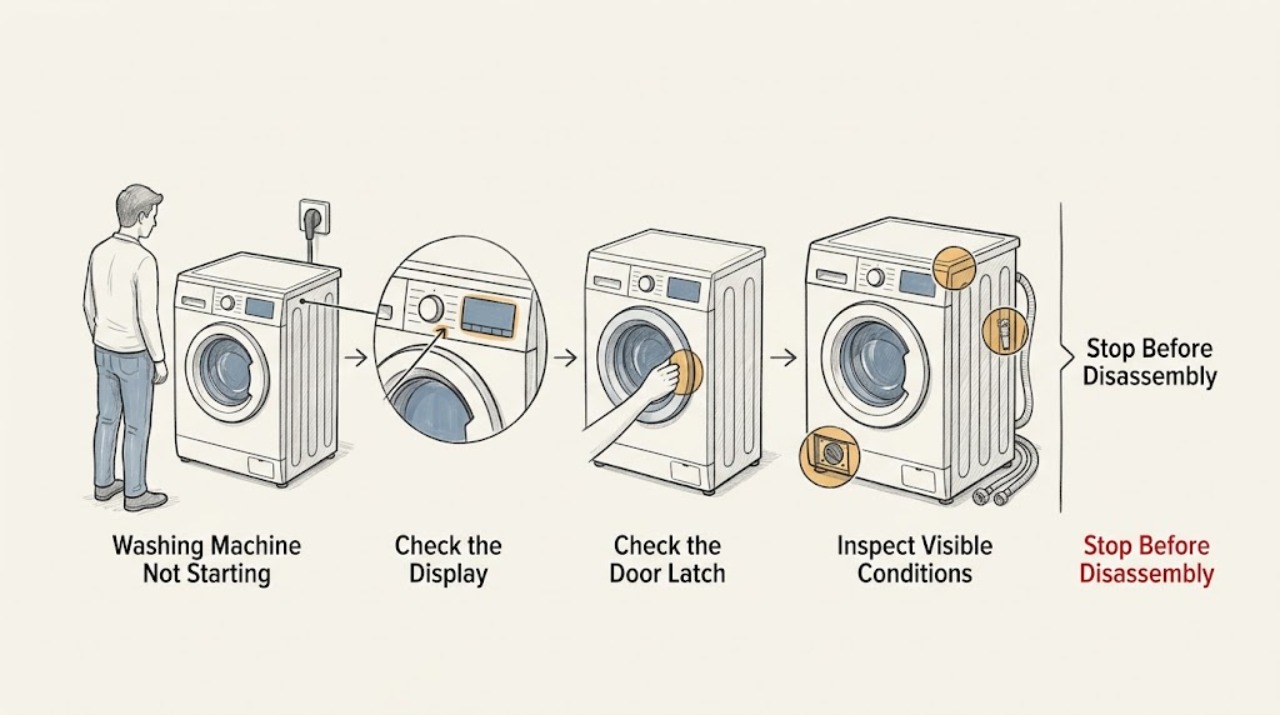
Work through in order
Diagnostic checks
Use only checks that match the exact appliance or system and its official guide.
-
Check 1
Decide whether the washer is completely unresponsive or has a lit display. If it is unresponsive, unplug it and test the wall socket with another suitable appliance; then leave the washer disconnected for 15 minutes before reconnecting it.
Expected result: The test appliance also fails, or the test appliance works while the washer remains blank; alternatively, the washer powers up after reconnection.
Next step: If the socket fails, stop and arrange qualified electrical help. If the washer remains blank on a working socket, schedule appliance service. If it powers up, continue with the door, controls, and water checks.
Stop if: Stop for a hot outlet, burning smell, sparking, a damaged cord, water near electrical parts, or a breaker that trips again.
Why this matters
Why: A failed test appliance points to the socket or household supply. A working socket with a blank washer points toward the washer's power path. A successful reset suggests a temporary control state, but it does not prove an internal fault is gone.
-
Check 2
If the display works but the programme does not begin, open and close the door firmly, check that no garment is caught in the seal or latch, and remove enough laundry for the door to close without pressure.
Expected result: The door closes and latches after the load is reduced, or it still will not latch and the programme remains idle.
Next step: With the door latched, restart the programme once. If it still will not lock or the machine reports a door fault, stop user troubleshooting and arrange service rather than bypassing the lock.
Stop if: Stop if the glass, hinge, seal, latch, or door frame is damaged, or if the door must be forced shut.
Why this matters
Why: A door that cannot close securely prevents the start command from being accepted. If the door looks closed but never locks, the latch, lock feedback, seal, or control may need diagnosis.
-
Check 3
Look for a padlock or Child Lock symbol and use only the button combination shown by the symbols or the exact model manual; on supported AEG models, the designated buttons are held for several seconds before retrying Start.
Expected result: The padlock indicator clears and the controls accept a programme, or the indicator remains and the controls do not respond.
Next step: After the lock clears, select the programme again and check the door. If the lock remains, stop pressing combinations at random and use the model manual or service support.
Stop if: Stop if the panel is wet, cracked, hot, or intermittently activating on its own.
Why this matters
Why: An active Child Lock intentionally blocks operation and can look like a failed control panel. If the lock cannot be cleared using the model instruction, the issue may be a control or button fault rather than a locked setting.
-
Check 4
Check the water tap is fully open and inspect the accessible inlet hose for kinks, twists, or leaks. If an E10, E11, or C1 code or a water-flow warning appears, turn off the tap before inspecting an accessible inlet filter and follow the model manual.
Expected result: The tap was closed, the hose is restricted or leaking, an inlet filter is visibly blocked, or the water path appears open and sound.
Next step: Open a sound tap and straighten a safe, accessible hose, then retry once. If water does not enter, the hose leaks, or the code returns, close the tap and arrange service; do not remove a hidden filter or valve without model instructions.
Stop if: Stop for a burst or leaking inlet hose, water inside the cabinet, a stuck tap, or any need to open a pressurized connection.
Why this matters
Why: A washer may power up yet refuse to start filling when water flow is absent or restricted. A leak or damaged hose is a safety issue; an open, sound water path shifts suspicion to the inlet valve, sensor, drain condition, or control.
-
Check 5
If the washer hums, stops after the Start command, or was just serviced at the pump filter, switch it off and unplug it. Check that an accessible pump filter is correctly seated and hand-tight, and inspect for a blocked drain only as described in the model instructions; note every displayed code.
Expected result: The filter is loose or mis-seated, debris is present, water remains in the drum, or the filter and drain path are clear but the programme still will not start.
Next step: Refit an accessible filter by hand only, restore the appliance, and run the model-approved test. If the pump still hums, does not drain, or the washer remains blocked, arrange authorised service and provide the code and filter history.
Stop if: Stop for standing water near electrics, a filter that will not move by hand, a damaged seal, a pump that grinds, or an active leak.
Why this matters
Why: AEG explains that a pump filter disturbed during cleaning can allow air into the pump and prevent a programme from starting. A blocked drain or remaining water can also keep the washer from progressing; a clear path with persistent failure points toward an internal pump, sensor, lock, or control fault.
Use your observations
Decision map
Find the observation that best matches what you see, then follow the next safe action.
-
PATH 01Next step
What you see
The display is blank and another appliance also fails at the socket.
Do this next
Treat it as a socket or household supply issue and use a qualified electrician; do not open the washer.
-
PATH 02Next step
What you see
The socket works but the washer remains blank after the documented reset.
Do this next
Arrange appliance service for the washer's power path or controls.
-
PATH 03Next step
What you see
The display works but the door will not latch or a door-related code appears.
Do this next
Remove load obstruction and close the door normally; if it still will not lock, use service and never bypass the interlock.
-
PATH 04Next step
What you see
A padlock symbol is displayed and controls do not accept input.
Do this next
Use the model-specific Child Lock release shown on the panel or in the manual, then retry the programme.
-
PATH 05Next step
What you see
E10, E11, C1, or a similar water-flow warning appears, or the washer does not take in water.
Do this next
Check the open tap, inlet hose, accessible filters, and drain condition; close the tap and arrange service for leaks or persistent failure.
-
PATH 06Next step
What you see
The washer hums or stopped after the pump filter was cleaned.
Do this next
Confirm the accessible filter is seated and hand-tight; if draining or starting remains abnormal, arrange service for pump or internal fault diagnosis.
Helpful context
Understand the symptom
“Won't start” describes two different states: the appliance may have no usable power, or the display may work while a programme is blocked. Start with what the display, door, and pump do when Start is selected. This prevents a door or water problem from being mistaken for a failed control board.
Use only accessible, external checks. Disconnect the mains plug before inspecting a hose or filter, turn off the water supply before loosening an inlet connection, and keep the washer upright. Do not bypass the door lock or open live electrical parts.
Safety boundary
Stop conditions
- Stop and disconnect the appliance for smoke, burning smell, sparking, a hot or damaged outlet/cord, repeated breaker trips, or water near electrical parts.
- Do not bypass the door lock, open live electrical panels, loosen a pressurized water fitting, or use tools to force a filter or tap.
- Stop and arrange authorised appliance service for a persistent error code, a door that will not lock, a machine that remains blank after a working-socket reset, a leaking hose, or a pump that hums without draining.
When checks do not resolve it
Need a professional?
Use a qualified electrician for a failed socket, household supply fault, damaged outlet, or repeated breaker trip., Arrange AEG or qualified appliance service when the machine remains unresponsive, the door lock does not engage, a water or control code persists, or external checks do not restore a programme., Request service promptly for water leaks, standing water near electrics, a damaged seal, or a pump/filter that cannot be safely reseated.
Common questions
FAQ
Why does my AEG washing machine have power but not start?
Check the door latch first, then Child Lock, water supply, and any code on the display. An overloaded drum can keep the door from closing, and a water-flow fault can stop the programme after the start command.
How do I reset an AEG washing machine that will not start?
For a completely unresponsive machine, AEG's general guide says to unplug it, test the socket with another appliance, leave it unplugged for 15 minutes, and reconnect it. If the socket works but the washer remains blank, arrange service.
Can Child Lock stop an AEG washer from starting?
Yes. A padlock symbol indicates that Child Lock is active on supported models. Use the designated buttons shown by the padlock or the model manual; do not guess at combinations or bypass the lock.
What should I check if the washer shows E10 or E11?
AEG associates E10 and E11 with water-flow problems. Check that the tap is open, the inlet hose is not kinked, and accessible filters are clean; persistent no-fill, a leak, or a recurring code needs service.
Read the exact guide
Official sources
- Washing Machine Error E10, E11 or C1? How to Fix Water Supply & Drain IssuesAEG Support · Official AEG guidance for washers and washer dryers with no-fill or water-flow symptoms; model-specific hose, filter, and drain procedures remain subject to the user manual.
- After cleaning the pump filter, the washing machine hums and does not start washingAEG Support · Official AEG guidance for the specific symptom of humming and no start after pump-filter cleaning; the article limits this to an accessible, model-approved filter check.
- Washing Machine Not Working or Not Turning On – Troubleshooting GuideAEG Support · Official AEG guidance for washing machines and washer dryers; supports power/socket testing, reset, door closure, overload, Child Lock, error-code, and service decisions.
- Recently installed washing machine does not startAEG Support · Official AEG guidance used for the external water-supply and newly installed appliance boundary; model and installation instructions control any transport or plumbing procedure.
Community feedback
Share a repair observation
Share a plain-text repair observation. Accepted observations are published automatically; this page may take a moment to update.