
On this page
Start here
Quick answer
If an Admiral washing machine is not working, first stop if there is smoke, a burning smell, a damaged cord, water near electrical parts, or a leak. Then note whether the display has power, whether Control Lock is active, whether the lid or door is fully latched, whether the water valves are open, and whether Start must be held. Check only the accessible outlet, breaker or GFCI, controls, lid or door, hoses, and filter or drain areas described by the exact model manual. If the machine remains dead, will not latch, repeatedly trips power, leaks, or stops partway through a cycle, disconnect it safely and arrange qualified appliance service; do not bypass a lid lock or open the cabinet.
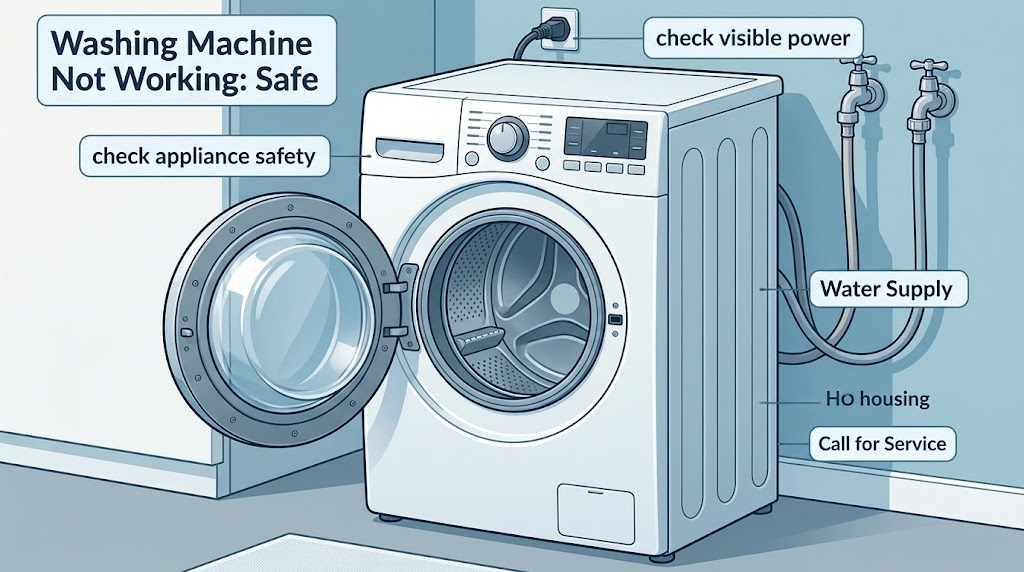
Work through in order
Diagnostic checks
Use only checks that match the exact appliance or system and its official guide.
-
Check 1
Before pressing Start, inspect from a dry, stable position for smoke, a burning smell, a hot or damaged cord, sparking, water around the outlet or cabinet, a burst hose, or an active leak. Do not touch wet electrical parts or reach under a powered washer.
Expected result: There is an electrical, water, heat, or structural hazard; or no immediate hazard is visible.
Next step: If a hazard is present, stop use, disconnect power only if safe to do so, close the water valves if safely accessible, and arrange emergency or qualified appliance service. If no hazard is present, continue without removing panels.
Stop if: Stop for smoke, burning odor, sparking, exposed wiring, hot or damaged cord, uncontrolled water, or water near electricity.
Why this matters
Why: A hazard changes this from a start-up problem to a safety response. No visible hazard only permits the external checks below; it does not prove the appliance is safe internally.
-
Check 2
Check whether the display or control lights have power, whether the power cord is fully seated in a grounded three-prong outlet, and whether a household breaker or GFCI has tripped. Do not use an extension cord or remove an outlet cover.
Expected result: The display is dark; a breaker or GFCI is tripped; the cord or outlet looks damaged; or the display is active and the outlet appears normal.
Next step: If there is no damage and household practice permits one reset, reset the breaker or GFCI once. If it trips again, the outlet is damaged, or the washer stays dead, leave it off and arrange qualified electrical or appliance service.
Stop if: Do not keep resetting a tripping circuit or operate the washer from an adapter or extension cord.
Why this matters
Why: A dead control can be caused by the supply path, while an active display shifts attention to controls, latching, water, or the cycle itself. A damaged connection is an electrical repair boundary, not a reason to improvise a power connection.
-
Check 3
With the display active, inspect the control panel for Control Lock and select a normal cycle. Press and hold Start for the duration stated by the exact Admiral manual rather than tapping it repeatedly.
Expected result: Control Lock is illuminated or controls do not respond; the cycle begins after the correct Start hold; or the controls respond but the cycle still does not begin.
Next step: If the manual provides an unlock sequence, use it once and retry the normal cycle. If controls remain unresponsive or the cycle does not begin, stop repeated attempts and document the display for service.
Why this matters
Why: Control Lock can make the panel appear dead, and some washer controls require a deliberate Start hold. If the panel accepts the command but nothing begins, the latch, water supply, control, or another subsystem remains in question.
-
Check 4
Close the top-load lid or front-load door fully and observe whether it visibly latches without forcing it. Check only for clothing or a loose object caught at the seal; do not defeat the interlock, insert a tool, or pull the door open during a cycle.
Expected result: The lid or door closes and latches; it appears closed but will not latch; or the washer starts only when the lid or door is manipulated.
Next step: Remove only an obvious loose obstruction while the washer is stopped, then close the lid or door normally once. If it still will not latch, stop and arrange service.
Stop if: Do not bypass, tape, pry, or electrically defeat the lid or door lock.
Why this matters
Why: The washer may not start until its model-specific lid or door interlock is engaged. A latch that needs force or manipulation indicates a mechanical or control fault and should not be bypassed.
-
Check 5
From behind the machine only if the connections are already safely accessible, verify that the hot and cold supply valves are open, both inlet hoses are connected, and there is no kink or active leak. Do not pull a heavy washer forward or loosen a hose under pressure.
Expected result: A valve is closed, a hose is kinked or disconnected, a leak is present, or the visible water connections look normal.
Next step: If a valve is clearly closed and can be opened safely by hand, follow the model manual and check for leaks without moving the machine. If a hose is damaged, a leak is active, or the washer still will not start, close the supply if safe and request service.
Why this matters
Why: Some washer models will not operate correctly without the required water supply, and a kink or leak can stop a cycle or cause damage. Normal visible connections do not clear an internal inlet valve, sensor, drain, or control problem.
-
Check 6
If there is no water or electrical hazard and the exact manual permits it, disconnect the washer from power for the stated reset period, then reconnect it and observe the control panel. Do not remove a cabinet panel or repeatedly cycle power.
Expected result: The control returns and the washer starts; the display remains dead; the same lock or error returns; or the breaker trips during reconnection.
Next step: Make at most one normal start attempt after the permitted reset. If the symptom remains or power trips, leave the washer disconnected and arrange qualified appliance service.
Why this matters
Why: A power cycle can clear a temporary control state but cannot repair a failed latch, motor, pump, wiring, or water component. A recurring indication or trip is evidence for service, not for more resets.
-
Check 7
After an obvious safe correction, run one supervised normal or empty cycle and observe whether the washer fills, tumbles or agitates, drains, and spins in the expected order. Do not reach into the drum or run another cycle to conceal a leak or abnormal noise.
Expected result: The cycle completes; it stops at fill, wash, drain, or spin; it makes abnormal noise; it leaks; or it stops with the lid or door locked.
Next step: Turn the controls off, disconnect power and water if safe, and arrange service for any incomplete cycle, leak, abnormal noise, or locked-lid condition. If it completes once, monitor the next use and record any recurrence.
Stop if: Stop immediately for leakage, grinding, burning odor, smoke, exposed wiring, or a door or lid that remains locked unexpectedly.
Why this matters
Why: The stopped stage narrows the service description but does not identify a failed part. A leak, locked door, abnormal noise, or repeated stop can create water, electrical, or mechanical risk.
Use your observations
Decision map
Find the observation that best matches what you see, then follow the next safe action.
-
PATH 01Next step
What you see
Smoke, burning odor, sparking, a hot or damaged cord, uncontrolled water, or water near electricity is present.
Do this next
Stop using the washer, disconnect or close water only if safe, keep people away, and arrange emergency or qualified appliance help; do not restart it.
-
PATH 02Next step
What you see
The display is dark, the outlet or cord is damaged, or a breaker or GFCI trips again.
Do this next
Leave the washer off and arrange qualified electrical or appliance assessment rather than using an adapter or repeatedly resetting power.
-
PATH 03Next step
What you see
Control Lock is active, Start was not held as the manual requires, or the panel does not accept commands.
Do this next
Use the exact Admiral manual's unlock or Start procedure once. If the controls remain unresponsive, request service.
-
PATH 04Next step
What you see
The lid or door does not fully latch, or the washer will start only when the latch is manipulated.
Do this next
Remove only a loose visible obstruction if safe, then stop if latching remains abnormal; never bypass the interlock and arrange service.
-
PATH 05Next step
What you see
A required water valve is closed, an inlet hose is kinked or disconnected, or a leak is visible.
Do this next
Correct only an obvious safe valve position or loose routing allowed by the manual; isolate a leak and request service if the condition persists.
-
PATH 06Next step
What you see
The washer powers on but stops at fill, wash, drain, or spin, leaks, makes abnormal noise, or repeats the failure after one permitted reset.
Do this next
Stop operating it and provide the exact stopped stage, display indication, water behavior, and timing to a qualified appliance technician.
-
PATH 07Next step
What you see
One supervised cycle completes normally after an obvious external correction and no hazard is present.
Do this next
Use the washer within the exact manual's limits, monitor the next cycle, and arrange service if the symptom recurs.
Helpful context
Understand the symptom
What “not working” means here
A washing machine that has no display is a different starting point from one that powers on but will not start, fill, agitate, spin, or drain. Top-load and front-load models also use different lid or door interlocks. Use the observations below to identify the stopped stage without assuming that the Admiral brand has one universal control sequence.
Keep the checks external
Do not reach into a moving drum, defeat a lid or door lock, remove panels, handle wet wiring, or work on a powered appliance. Do not keep resetting a breaker that trips. If water is leaking near electricity, the cord is hot or damaged, or there is smoke or a burning smell, leave the washer disconnected if that can be done without approaching the hazard and arrange qualified help.
What to record for service
Record the Admiral model label, whether the display responds, any lock or error indication, the selected cycle, whether Start was held, whether the lid or door latches, whether both water valves are open, the last stage reached, and when the symptom began. Photos of the control panel and hose connections can help without opening the washer.
Safety boundary
Stop conditions
- Do not bypass a lid or door lock, reach into a moving drum, open the cabinet, test live wiring, handle a wet cord or outlet, or keep resetting a tripping breaker.
- Stop for active leakage, water near electrical equipment, smoke, burning odor, sparking, abnormal mechanical noise, or a locked lid or door that does not release normally.
When checks do not resolve it
Need a professional?
Use qualified appliance service when safe external power, control, latch, water-supply, and one-time reset checks do not restore normal operation, or when the washer leaks, trips power, stops in a cycle, or needs internal access.
Have this ready
- Provide the Admiral model label, washer design, display and lock indications, selected cycle, Start-button behavior, lid or door latch result, water-valve and hose observations, stopped cycle stage, leak or noise details, and any recent move, installation, or power event.
Common questions
FAQ
Why does my Admiral washer have power but not start?
Check the visible Control Lock state, the exact Start-button hold, the fully closed and latched lid or door, and the required water valves. If these are normal and the cycle still does not begin, the latch, control, water, or another internal system needs professional diagnosis.
What should I check if the Admiral washer has no lights?
Check the grounded outlet, fully seated power cord, and household breaker or GFCI only from a safe position. Do not use an extension cord. If power is absent, the connection is damaged, or the circuit trips again, leave the washer off and arrange qualified service.
Can I bypass the lid or door lock to make the washer run?
No. The lock is part of the washer's operating and safety sequence. Do not tape, pry, bridge, or electrically bypass it; a lid or door that will not latch needs the exact model manual and qualified service.
Is it safe to reset an Admiral washing machine?
A single power cycle may be allowed by the exact model manual when there is no hazard, but it cannot repair a failed latch, motor, pump, wiring, or water component. If the symptom or breaker trip returns, stop resetting and arrange appliance service.
Read the exact guide
Official sources
- Not Starting or Not Operating - Front Load WasherWhirlpool Product Help · Whirlpool multi-brand front-load washer door, water-supply, control, Start-button, and reset guidance; possible Admiral applicability must be confirmed against the exact Admiral model manual
- Not Starting - WasherWhirlpool Product Help · Whirlpool multi-brand top-load washer start, Control Lock, lid latch, Start-button, and reset guidance; possible Admiral applicability must be confirmed against the exact Admiral model manual
- No Power - WasherWhirlpool Product Help · Whirlpool multi-brand washer power guidance; possible Admiral applicability must be confirmed against the exact Admiral model manual
Community feedback
Share a repair observation
Share a plain-text repair observation. Accepted observations are published automatically; this page may take a moment to update.