
On this page
Start here
Quick answer
Start by separating no power from a control or cycle-start problem. Check the cord and household breaker or GFCI from outside the machine. If the panel has lights but ignores touches, look for Control Lock; if it responds, select a valid cycle and hold Start for the model's required time. The lid or door must close and latch, and both water supplies may be required on some models. If the machine still does not respond, disconnect power for five minutes and try once, provided there is no leak, burning smell, sparking, or other hazard. A washer that remains dead, will not latch, repeatedly trips protection, or stops again after these checks needs professional diagnosis.
Before you begin
Safety first
- Keep the lid or door closed while the basket may move. Do not use an extension cord, pry a locked lid or door, bypass the lock, remove the console, or perform live electrical tests. Make only external checks with dry hands and no water near the electrical connection.
Work through in order
Diagnostic checks
Use only checks that match the exact appliance or system and its official guide.
-
Check 1
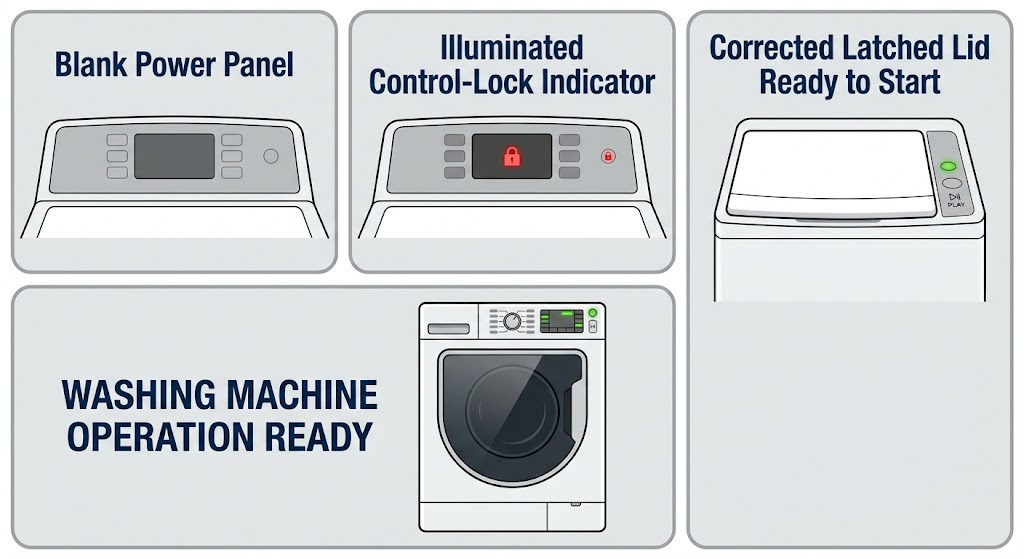
Look at the control panel without opening the cabinet: note whether any lights or display are on, whether a Control Lock or padlock indicator is lit, and whether a breaker or GFCI for the laundry circuit has tripped.
Expected result: The panel is completely blank, the household protection is tripped, or the panel is lit but the controls do not respond.
Next step: If safe and dry, restore a tripped breaker or GFCI once and confirm the cord is in a grounded three-prong outlet rather than an extension cord. If the protection trips again, stop and call an electrician or appliance technician. If the panel is lit but locked, continue to the Control Lock check.
Why this matters
Why: A blank panel or tripped protection points first to the external power path. A lit panel with no touch response is consistent with Control Lock rather than a total loss of power.
-
Check 2
If the Control Lock light, padlock, LoC, or LC indication is present, use the Control Lock key or the model's paired key and hold it for the documented duration; Amana describes three seconds for the referenced controls.
Expected result: The lock indicator clears and touch commands work, or the indicator remains and the panel still ignores input.
Next step: If controls respond, select a valid cycle. If the indicator will not clear, use the exact model manual once and then stop repeated button attempts; arrange service if the controls remain unavailable.
Why this matters
Why: A cleared indicator means the machine was intentionally preventing input. A persistent lock may reflect a different control layout, a failed control interface, or a fault that cannot be diagnosed safely from the display alone.
-
Check 3
Set the selector fully on a named cycle, then press and hold Start or Push to Start as required by the model; watch for a countdown, a click, or the first fill or sensing response.
Expected result: The cycle starts, a countdown appears but the machine does not engage, the selector is between cycle positions, or there is no response at all.
Next step: Reposition the selector to a valid cycle and repeat the model-specific Start hold once. If there is still no response, continue to the lid or door and water checks rather than holding the button continuously.
Why this matters
Why: Amana notes that some models require holding Start for up to three seconds and that an unassigned selector position can prevent starting. A start command with no response after a valid selection points beyond a simple button press.
-
Check 4
With the machine stopped, inspect the visible lid or door contact area for clothing, packing material, lint, or soil build-up; close the lid or door firmly and observe whether it latches or gives the normal start-up click.
Expected result: A loose visible obstruction is present and can be removed, the lid or door closes and latches, or the hinge, glass, lid, latch, or striker is damaged or will not engage.
Next step: Remove only loose visible material with the appliance stopped, wipe the external contact area with a soft damp cloth if needed, and retry once. Never defeat the lock. If the lid or door remains unable to latch, leave the machine unused and arrange service.
Why this matters
Why: Amana states that the lid or door must be closed and latched for operation, and that obstructions or build-up can prevent latching. A click and brief sensing movement can be normal on some top-load models; damage or a latch that never engages is a hardware or alignment fault.
-
Check 5
Check the external hot and cold water valves and inlet hoses, especially after installation or a move; confirm both valves are open and the hoses are connected and not visibly kinked.
Expected result: A valve is closed, a hose is kinked or disconnected, an anti-flood device is fitted, or the external water setup looks correct but the washer still will not start or advance.
Next step: Correct only an obvious external valve or hose issue without loosening a pressurized connection, then retry the selected cycle once. If an anti-flood device is involved, follow its maker's instructions. If the condition persists, continue to reset/service rather than replacing an inlet part based only on the symptom.
Why this matters
Why: Amana's front-load guidance says both hot and cold supplies must be connected for correct operation, while its general start guidance notes that an anti-flood device can affect performance. A correct external supply with persistent failure needs model-specific diagnosis.
-
Check 6
If there is no hazard and the external checks did not help, disconnect the washer from power for five minutes, reconnect it, and try one normal cycle with the correct lid or door position and cycle selection.
Expected result: The washer resumes normal response, or it remains dead, fails to latch, trips protection, displays a recurring indication, or stops again.
Next step: If it works, monitor the next cycle and record any repeat symptom. If it fails again, keep it out of use and give a technician the symptom, display indication, machine style, and model information. Do not repeat resets indefinitely.
Why this matters
Why: Amana describes a five-minute control power cycle as a possible way to clear a temporary control issue; it is not a repair for failed power, latch, wiring, motor, or control hardware.
Use your observations
Decision map
Find the observation that best matches what you see, then follow the next safe action.
-
PATH 01Next step
What you see
No lights or display are present, or the breaker/GFCI trips again.
Do this next
Stop resetting the protection. Check only the external cord and outlet condition; use an electrician or qualified appliance technician for a recurring trip or internal power diagnosis.
-
PATH 02Next step
What you see
The panel is lit but touch commands do not respond and a lock indicator is present.
Do this next
Use the model-specific Control Lock command once. If the lock cannot be cleared, stop and request service for the controls.
-
PATH 03Next step
What you see
A valid cycle is selected but the machine does not begin after the required Start hold.
Do this next
Check the lid or door latch and the external water supply, then try a single five-minute control reset if safe. Persistent failure requires service.
-
PATH 04Next step
What you see
The lid or door will not close, latch, or stay recognized.
Do this next
Remove only a loose visible obstruction and close it gently once. Do not bypass the lock; damaged or non-engaging hardware needs professional diagnosis.
-
PATH 05Next step
What you see
The machine is recently installed or moved, or a valve, hose, or anti-flood device is implicated.
Do this next
Correct an obvious external setup issue using the installation instructions, then retry once. If the supply is correct and the machine still does not operate, arrange service.
-
PATH 06Next step
What you see
The washer remains nonfunctional after the external checks and one safe reset, or the same fault returns.
Do this next
Keep the appliance out of use and provide the technician with the exact symptom, display state, cycle point, machine style, and model information.
Helpful context
Understand the symptom
What not working means here
A blank panel, a lit panel that will not accept input, and a cycle that begins then stops are different symptoms. Identify which one you have before replacing anything. Amana publishes separate guidance for top-load and front-load machines, so the model manual controls the exact button sequence and lock behavior.
Keep the checks external
The checks below use the plug, household protection, controls, visible lid or door area, and external water valves. Do not remove the console or cabinet, defeat a lid or door lock, probe live wiring, or reach into a moving basket. If the appliance is wet around electrical parts or smells hot, stop immediately.
Use the symptom to choose the branch
No lights sends you to the supply branch. Lights with no touch response sends you to Control Lock. A selected cycle that does not begin sends you to the Start, lid or door, and water checks. A repeat failure after a single documented reset is a service case rather than a reason to keep cycling power.
Only after diagnosis
Potential parts
- lid or door lock and latch assembly
Consider this category only when the visible contact area is clear but the lid or door still fails to latch or remain recognized, and a model-specific diagnosis confirms the lock path.
Confirm the complete Amana model and manufacturer fit information before ordering; do not infer compatibility from appearance or a no-start symptom. - control interface or control board
Consider this category only if power is confirmed, Control Lock is cleared, the cycle and Start input are correct, and a technician confirms a control fault.
Use the exact model's parts and programming information; control components are not interchangeable by name alone. - water inlet valve or inlet component
Consider this category only if external valves and hose routing are correct but a technician confirms an inlet-flow or valve fault that explains the failure to fill or advance.
Verify exact model fit and the diagnosed water path before ordering; do not replace an inlet component solely because the washer will not start.
When checks do not resolve it
Need a professional?
Arrange qualified appliance service when the Amana washer remains nonfunctional after the external supply, control-lock, cycle-selection, lid or door, water, and one-time reset checks; when a latch, hinge, lid, door, or striker is damaged; when a control indication will not clear; or when the same fault returns. Call an electrician for a household breaker or GFCI that repeatedly trips.
Common questions
FAQ
Why does my Amana washer have lights but not start?
Check for Control Lock, select a valid cycle, and hold Start for the model's required time. Then check that the lid or door closes and latches and that the external water supply is connected. Persistent failure needs service.
How long should I unplug an Amana washing machine to reset it?
Amana's product-help guidance describes disconnecting power for five minutes, then reconnecting it. Use this once only when there is no electrical or water hazard; a repeat failure is not fixed by repeated resets.
Can an Amana washer refuse to work because the lid or door is not latched?
Yes. Amana says the lid or door must be closed and latched for operation, and visible clothing, packing material, lint, or soil can interfere with the contact area. Do not bypass the lock if it still will not engage.
What if the washer has no power at all?
Check the grounded outlet, cord connection, and household breaker or GFCI from outside the appliance. If protection trips again, stop and use an electrician or qualified technician instead of opening the washer.
Read the exact guide
Official sources
- Not Starting - WasherAmana Product Help · Amana top-load washers that do not start
- Lid Not Latching - WasherAmana Product Help · Amana top-load washers whose lid will not latch or remain recognized
- Not Starting or Not Operating - Front Load WasherAmana Product Help · Amana front-load washers that will not start or operate
- How to Reset a WasherAmana Product Help · Amana washers requiring a control reset or Control Lock check
- 6 THINGS YOU NEED TO KNOW IF YOUR WASHER WON'T STARTAmana · Amana washers that will not start after cycle selection
- No Power - WasherAmana Product Help · Amana top-load washers with no power or an unresponsive control panel
Community feedback
Share a repair observation
Share a plain-text repair observation. Accepted observations are published automatically; this page may take a moment to update.