
On this page
Start here
Quick answer
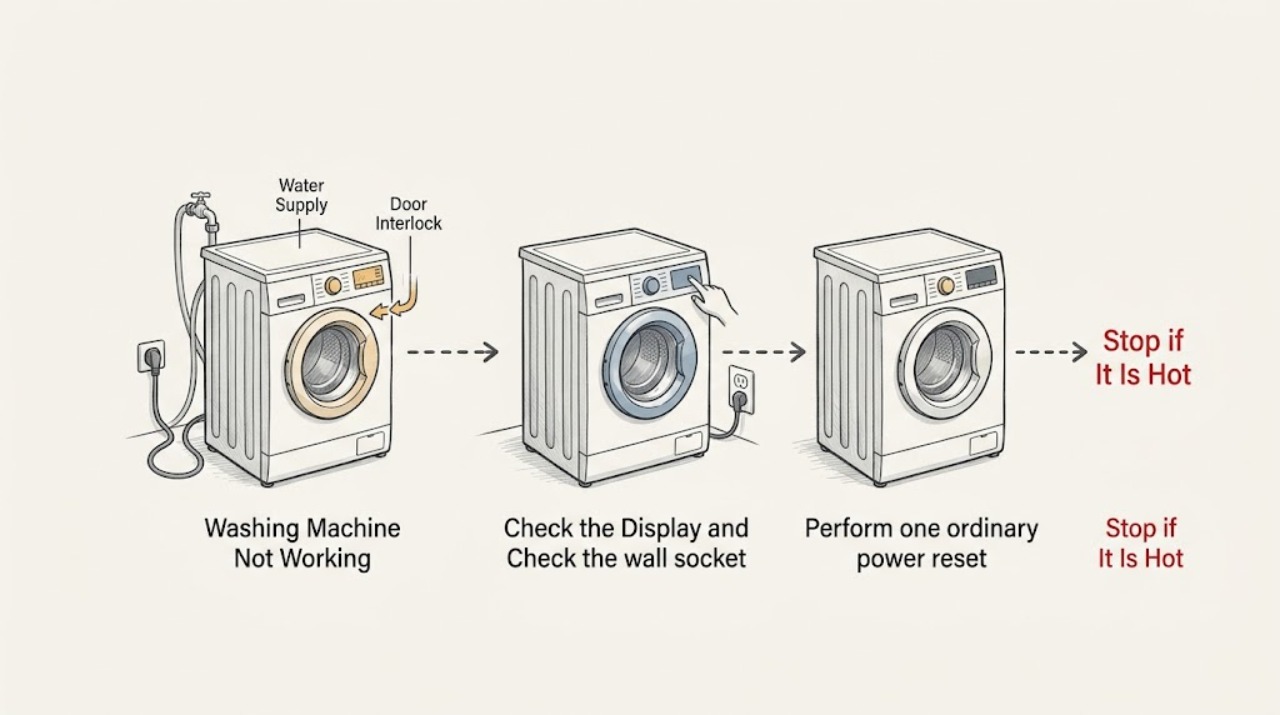
If an AEG washing machine is not working, first separate a completely dead appliance from one that has power but will not start a programme. Check the socket and power connection from a safe, dry position, then perform one model-appropriate power reset. If the display works, make sure the door is fully closed, the load is not preventing the latch from engaging, the child lock or delay-start setting is not active, and Start/Pause has been pressed. Confirm the water supply is on and the inlet hoses are not kinked, then record any exact error code. Do not open the cabinet, bypass the door lock, work on live wiring, or keep resetting a tripped circuit. If the socket is faulty, the machine stays unresponsive, the door cannot latch, an error returns, water leaks, or the machine stops with an electrical or mechanical warning, leave it unused and arrange qualified appliance service or an electrician for the house supply.
Work through in order
Diagnostic checks
Use only checks that match the exact appliance or system and its official guide.
-
Classify the power and display state
Press the normal power control once from a dry, safe position and observe the display, indicator lights, and any sound. Do not keep pressing the control or move the appliance to reach its rear connection.
Expected result: The display is blank, the display lights but no programme can be selected, the display shows a padlock or delay, or an error code appears.
Next step: Follow the matching branch and photograph or transcribe any message before changing settings.
Stop if: Stop immediately for smoke, burning odor, sparking, a hot plug or cord, visible damage, or water at the electrical connection; leave the appliance unused and arrange urgent qualified help.
Why this matters
Why: A blank display points toward the supply or appliance power path. A lit display means the user controls are available and shifts the check to door, lock, programme, water, or error conditions.
-
Check the wall socket and plug safely
If the plug, cord, socket, and surrounding floor are dry and undamaged, disconnect the washer as directed by AEG and test the same socket with another ordinary appliance. Do not use an extension lead or open the socket, plug, fuse, or washer cabinet.
Expected result: The test appliance works, the test appliance also has no power, the plug or cord is loose or damaged, or the socket trips or smells hot.
Next step: If the socket is faulty or unsafe, leave it unused and arrange a qualified electrician. If the socket works, reconnect the washer only once for the reset check below.
Stop if: Stop for heat, scorch marks, moisture, exposed conductors, a loose socket, shock, repeated tripping, or any need to open electrical hardware.
Why this matters
Why: A working test appliance shifts suspicion toward the washer. A dead or abnormal socket points to the household supply, while a damaged plug or cord needs electrical assessment rather than a washer reset.
-
Perform one ordinary power reset
With the washer safely disconnected at the plug, leave it without power for the interval specified by the AEG support guidance or the exact model manual, then reconnect it and try the power control once. Do not bypass the plug, use a damaged outlet, or repeatedly cycle the supply.
Expected result: The display returns and remains responsive, the machine is still blank, a previous error returns, or the circuit trips when power is restored.
Next step: If the machine remains unresponsive or the circuit trips, leave it disconnected and arrange appliance or electrical service. If the display works, continue with the door and programme checks.
Stop if: Stop after one failed reset, any repeat trip, or any heat, odor, liquid, or abnormal sound; do not keep cycling power.
Why this matters
Why: A one-time recovery can clear a temporary control state but does not prove an internal repair. A blank display, recurring error, or tripped circuit after reconnection needs professional diagnosis.
-
Check door closure and the load
With the machine off, inspect the door opening, seal, and latch area for laundry caught in the seal or an obvious obstruction. Close the door normally without slamming it, and remove only enough laundry to avoid overloading; do not force or bypass the lock.
Expected result: The door closes and latches, laundry is trapped in the seal, the drum is overloaded, the door will not align, or the lock symbol remains.
Next step: Correct only a visible load or seal obstruction, close the door once, and press Start/Pause. If the door will not latch or the lock indicator remains, stop and arrange service.
Stop if: Stop for a torn seal, broken glass, a door that springs open, water behind the door, a stuck lock, or any need to dismantle the interlock.
Why this matters
Why: AEG states that an overloaded drum can prevent the door from closing securely and that the programme will not start without a secure door. Misalignment, a damaged seal, or a lock that never engages is not a setting issue.
-
Check ordinary programme controls
Select a normal programme, confirm that Delay Start or Pause is not active, check for a padlock or control-lock symbol, and press Start/Pause once. Use the exact model manual for the button combination that changes a lock setting; do not hold random buttons or repeatedly cancel the programme.
Expected result: The machine starts, a delay or pause remains, the child or control lock symbol is present, or the controls do not respond despite a lit display.
Next step: Clear only a confirmed user setting using the model manual. If the lock cannot be cleared or the panel remains unresponsive, record the symbols and request service.
Stop if: Stop if the panel flashes an unknown code, the machine starts and stops repeatedly, or a control change would require opening the cabinet.
Why this matters
Why: A delayed programme, pause state, or control lock can make a working washer appear inactive. A lit but unresponsive panel after the normal control check can indicate a control or electronics fault.
-
Verify water supply and visible hoses
From a safe standing position, confirm that the relevant water tap or taps are turned on and look for a visibly kinked, pinched, loose, or leaking inlet hose. Do not disconnect a hose, remove an inlet screen, or reach behind the appliance while it is connected.
Expected result: Water is off, a hose is kinked or visibly damaged, the connection leaks, the supply appears normal, or the machine shows a water-inlet warning.
Next step: Restore a clearly closed tap only if it turns normally and there is no leak; otherwise stop. If the supply is normal but the washer will not fill or the warning returns, arrange appliance service.
Stop if: Stop for a leak, burst or swollen hose, a stuck tap, water near electrics, a hidden connection, or any need to disconnect plumbing without a safe isolation procedure.
Why this matters
Why: AEG and Electrolux guidance state that the washer will not function properly without water supply and that hose restrictions can prevent filling. A leak or inaccessible connection needs service rather than a forced adjustment.
-
Capture the exact code and service history
Read the complete display message, beep or light pattern, and note whether the machine was recently installed, moved, interrupted by an outage, or stopped mid-cycle. Use the AEG manual or model-specific support page to interpret the code; do not substitute a code meaning from another model.
Expected result: There is a known model-specific code, an unlisted code, no code, a repeated stop during a cycle, or a symptom that began after installation or moving.
Next step: Give the exact code, model, sequence, and installation history to an authorised AEG or qualified appliance technician. Keep the machine unused if the fault repeats.
Stop if: Stop if the code indicates leakage, electrical trouble, an unsafe lock, or an internal fault, or if diagnosis would require panels, live tests, or bypassing a safety device.
Why this matters
Why: AEG groups codes by water supply, draining, door lock, motor, heating, leakage or power conditions, but the exact model determines the meaning and remedy. A recent installation or move can introduce door, hose, or transport-related conditions.
Use your observations
Decision map
Find the observation that best matches what you see, then follow the next safe action.
-
PATH 01Safety boundary
What you see
The display is blank and another appliance also fails at the same socket.
Do this next
Leave the socket and washer unused and arrange qualified electrical service for the household supply.
Why this path and its safety boundary
Safety stop: Do not open the socket, replace a fuse with a different rating, or keep resetting a tripped circuit.
-
PATH 02Safety boundary
What you see
The socket works, but the AEG washer remains blank after one model-approved reset.
Do this next
Leave the machine disconnected and arrange authorised AEG or qualified appliance service for the appliance power path.
Why this path and its safety boundary
Safety stop: Do not remove panels, test internal power, or substitute a cord or component from appearance alone.
-
PATH 03Safety boundary
What you see
The display works but the door will not close or the lock indicator remains.
Do this next
Check only for laundry or a visible seal obstruction. If the door or lock still will not engage, request appliance service.
Why this path and its safety boundary
Safety stop: Do not force the door, bypass the interlock, or dismantle the lock.
-
PATH 04Safety boundary
What you see
The display shows a padlock, delay, pause, or another ordinary control state.
Do this next
Use the exact model manual to clear the user setting once, then press Start/Pause normally. Request service if the setting returns or controls stay unresponsive.
Why this path and its safety boundary
Safety stop: Do not hold random buttons, repeatedly cancel, or open the control panel.
-
PATH 05Safety boundary
What you see
The door closes, but the machine will not fill and the water supply is off, restricted, or leaking.
Do this next
Restore a clearly closed tap only if it turns normally and no leak is present; otherwise isolate the situation safely and arrange plumbing or appliance service.
Why this path and its safety boundary
Safety stop: Do not disconnect hoses, remove inlet filters, or reach behind the machine while a leak or electrical hazard exists.
-
PATH 06Safety boundary
What you see
A specific or recurring error code appears, or the washer stops again after a temporary recovery.
Do this next
Stop repeated resets, record the exact code and sequence, and arrange model-specific authorised service.
Why this path and its safety boundary
Safety stop: Do not assume a code meaning from another model or bypass a door, water, motor, heating, or leakage protection state.
-
PATH 07Safety boundary
What you see
There is water on the floor, a damaged cord or hose, burning odor, smoke, sparking, shock, severe vibration, or a broken door or seal.
Do this next
Stop using the washer, keep people away from the hazard, isolate water or power only through a safe accessible control, and seek prompt qualified service or local emergency help.
Why this path and its safety boundary
Safety stop: Do not continue a cycle, move a leaking appliance, open panels, or handle damaged electrical parts.
Helpful context
Understand the symptom
Not working can describe two different failures
A completely blank AEG washer has a power or supply path to investigate, while a lit display that will not begin a programme points more toward the door interlock, child lock, delay, water supply, or a displayed fault. A washer can also stop after starting because it cannot fill, drain, or safely lock the door. The exact model manual and the message on the display control any model-specific procedure.
Keep checks outside the cabinet
The safe user-level scope is the wall connection, normal controls, door and seal, visible water taps and hoses, and the display. AEG advises disconnecting the appliance before repair work and turning off water when working on hoses. Do not remove panels, bypass a lock, reach behind a live appliance, or test internal parts.
Record what changed
Write down whether the display is blank, whether the socket powers another ordinary appliance, the door and lock behavior, the selected programme, any padlock or delay symbol, the water-supply state, and the exact error code. A recent move or first installation matters because installation, hose, and door conditions can prevent a programme from starting.
When checks do not resolve it
Need a professional?
Arrange authorised AEG or qualified appliance service when the washer remains unresponsive after a safe socket check and one model-approved reset, when the door will not latch, a programme will not begin despite normal controls and supply, a code returns, or the machine stops with a leak, drain, motor, heating, or other internal fault. Use a qualified electrician for a faulty socket, damaged supply connection, or repeated circuit trip.
Have this ready
- Provide the AEG model and product number if safely visible, blank or lit display state, exact error or light pattern, socket test result, reset result, door and lock behavior, programme and control-lock state, water-tap and hose observations, recent installation or move, and what happened immediately before the failure.
Common questions
FAQ
Why is my AEG washing machine completely blank?
Check the socket with another ordinary appliance from a safe, dry position, then perform one model-approved power reset. If the socket works but the washer remains blank, leave it disconnected and arrange appliance service rather than opening the cabinet.
Why does my AEG washer have power but not start a cycle?
The door may not be securely closed, a child lock or delay may be active, Start/Pause may not have been pressed, the water supply may be unavailable, or a code may be blocking the programme. Check those visible states once and use the exact model manual for controls.
Can I bypass the AEG washing machine door lock?
No. Do not bypass, dismantle, or force the door interlock. Check only for laundry caught in the seal or an obvious closure obstruction; a door that will not latch needs qualified appliance service.
Should I keep resetting an AEG washing machine that stops?
No. Use one model-approved reset and observe the result. If the washer stays blank, a code returns, the circuit trips, or it stops with a leak or abnormal sound, leave it unused and arrange service.
When does an AEG washer need a technician?
Request service for persistent no-response, an unlatched door, recurring error, water leak, damaged cord or hose, repeated circuit trips, or a fault that would require opening the cabinet or working on internal components.
Read the exact guide
Official sources
- Recently installed washing machine does not startAEG · Official AEG support article used only for the installation-specific branches involving temperature, door closure, water supply, and recent movement. It does not establish a cause for an established washer without that history.
- Laundry Water Supply GuideElectrolux · Official Electrolux-group support guidance used for the general relationship between open water supply, inlet hoses, kinks, and washer filling. It is not a substitute for the exact AEG model manual.
- Washing machine displays error message EF0, EFo, EF3 or emits 15 beeps / 15 flashesAEG · Official AEG warning-code support article used for the principle that repeated warning conditions, leakage indications, and appliance malfunction require model-specific professional diagnosis. It is not used to assign this topic an EF0-family code.
- Washing Machine Not Working or Not Turning On – Troubleshooting GuideAEG · Official AEG support guidance used for distinguishing no-response from programme-start symptoms and for socket, reset, door, control-lock, error-code, and professional-service checks. Exact button behavior remains model-specific.
- What are the most common washing machine faults and how do I fix them?AEG · Official AEG support article used for common no-start causes, water and door categories, and the instruction to disconnect before repair and turn off water when working on hoses.
Community feedback
Share a repair observation
Share a plain-text repair observation. Accepted observations are published automatically; this page may take a moment to update.