
On this page
Start here
Quick answer
If your Amana dryer is completely dark, check the outlet and household fuse or breaker before touching the controls. If the display lights but the drum does not start, dry the control panel, release Control Lock if its indicator is on, press and hold Start for the period specified for your model, close the door firmly, and select Automatic Dry or Timed Dry rather than a non-starting option. If a breaker trips again, the cord or outlet is damaged, the door will not latch, or the dryer remains idle after these external checks, stop and use an electrician or qualified appliance service.
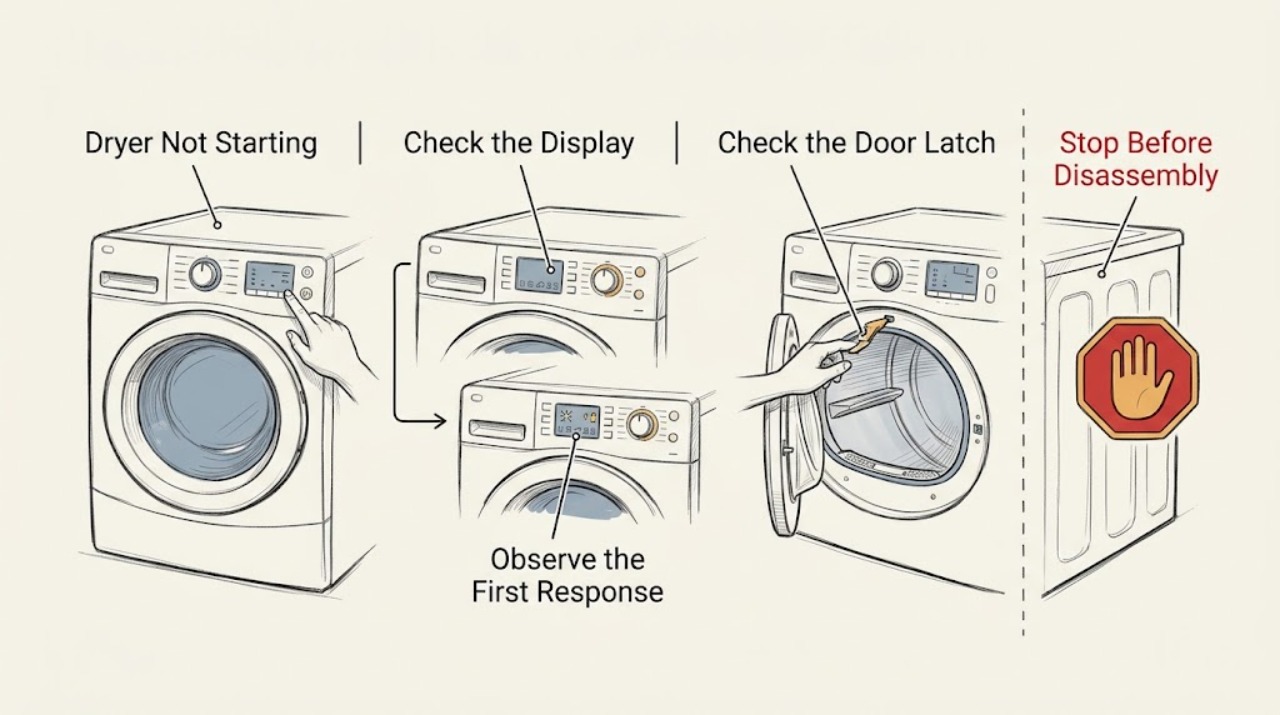
Work through in order
Diagnostic checks
Use only checks that match the exact appliance or system and its official guide.
-
Check 1
Check whether the drum light, display, or status indicators operate. If the dryer is dark, confirm the plug is seated and inspect the household breaker or fuse; electric models may have two supply breakers, while gas models use a different supply arrangement.
Expected result: The dryer is dark and a breaker or fuse is abnormal, the outlet is not usable, or the controls light normally.
Next step: Reset a tripped breaker only once if there is no damage or odor. If the supply fails again or the outlet/cord is damaged, stop and use an electrician. If the dryer powers up, continue to the control check.
Stop if: Stop for repeated trips, heat damage, a loose or scorched outlet, a damaged cord, smoke, or burning odor.
Why this matters
Why: No indicator power points toward the outlet, household supply, cord, or dryer power path. A lit display means the start problem is more likely controls, door, cycle, or an internal drive/control fault.
-
Check 2
If the controls light, dry your hands and wipe moisture from the control panel with a clean, dry cloth. Check for Control Lock, then press and hold Start, Push to Start, or Hold to Start as required by the model instead of tapping it once.
Expected result: The panel responds after drying or unlocking, the Start command is accepted, or the controls remain unresponsive.
Next step: After the controls respond, select an appropriate cycle and check the door. If they remain unresponsive with no lock indicator, stop repeated button tests and arrange service.
Stop if: Stop if the panel is cracked, wet behind its surface, hot, or activating by itself.
Why this matters
Why: Moisture can reduce touch response, Control Lock intentionally prevents operation, and some Amana start buttons require a deliberate hold. If none of these changes the response, the panel, control, or start circuit may need service.
-
Check 3
Open and close the dryer door firmly, checking that clothing, lint, or packing material is not caught in the latch. Select Automatic Dry, Accudry, or Timed Dry when available rather than Wrinkle Reduction or another option the model says will not start the dryer.
Expected result: The latch engages after clearing an obstruction, the dryer starts on a suitable cycle, or the door still does not latch and the cycle remains idle.
Next step: Run a short empty test only after the door closes normally. If the latch will not engage or the dryer stops immediately, arrange service rather than bypassing the interlock.
Stop if: Stop for damaged glass, hinge, seal, latch, door frame, or a door that must be forced shut.
Why this matters
Why: The motor will not run unless the door latch is confirmed. A correct cycle is also necessary on models that do not start from a wrinkle-reduction setting.
-
Check 4
If the dryer was recently moved, installed, or affected by an outage, record whether the controls, drum light, and motor all behave differently. Do not remove the rear cover or terminal cover; use the model manual to confirm only the accessible power connection and cycle controls.
Expected result: The dryer lost operation after a move or outage, one function has power while another does not, or all external functions behave normally but the drum will not start.
Next step: For a supply concern, use an electrician. For a powered dryer with a latched door, responsive controls, and correct cycle that still will not tumble, arrange qualified appliance service.
Stop if: Stop for loose wiring, a damaged cord, exposed terminals, a repeated trip, or any request to measure live voltage.
Why this matters
Why: A supply or connection problem can leave some indicators active while the motor circuit is unavailable. Normal external behavior with no drum movement points toward the door switch, motor, drive, or control and cannot be safely diagnosed from the outside.
-
Check 5
Before service, record the model number, display or indicator state, whether the drum light works, whether the Start command registers, the door-latch result, selected cycle, breaker/fuse history, and any noise or odor when Start is pressed.
Expected result: The dryer is completely dead, controls respond but the door does not lock, the door locks but the motor does not run, or a fault repeats after a single external correction.
Next step: Stop user troubleshooting once these external observations are recorded and arrange appliance service. Use an electrician for a confirmed household supply fault.
Stop if: Stop for smoke, sparking, burning odor, unusual grinding, a hot cabinet, or any water near the appliance.
Why this matters
Why: These observations separate a supply issue from a control/lock issue and a possible motor or internal circuit fault, giving the technician useful symptoms without unsafe panel access.
Use your observations
Decision map
Find the observation that best matches what you see, then follow the next safe action.
-
PATH 01Next step
What you see
The dryer is dark and the outlet or household breaker/fuse is abnormal.
Do this next
Use a qualified electrician for the household supply or damaged outlet; do not open the dryer.
-
PATH 02Next step
What you see
The panel lights but Control Lock is active or the touch panel does not respond.
Do this next
Dry the panel, release Control Lock using the model control, and hold Start as required; use service if the panel remains unresponsive.
-
PATH 03Next step
What you see
The door will not latch or clothing/material blocks the latch.
Do this next
Clear only the accessible obstruction and close the door normally; arrange service for a damaged or non-latching door.
-
PATH 04Next step
What you see
The dryer is set to a cycle that does not initiate operation on that model.
Do this next
Select Automatic Dry, Accudry, or Timed Dry as supported by the model and retry once.
-
PATH 05Next step
What you see
Controls respond, the door latches, and the cycle is correct but the drum still does not move.
Do this next
Stop external troubleshooting and arrange appliance service for the motor, drive, switch, or control diagnosis.
-
PATH 06Next step
What you see
Smoke, burning odor, sparking, unusual heat, or repeated breaker trips occur.
Do this next
Stop using the dryer and disconnect it if safe; use an electrician or appliance professional based on the observed hazard.
Helpful context
Understand the symptom
A dryer that does not start can be electrically dead, powered but locked, unable to confirm a closed door, or set to a cycle that does not initiate tumbling. The display, control response, and door-latch behavior are more useful clues than the absence of drum movement alone.
Keep this diagnosis at the external-check level. Unplug before inspecting the cord, outlet area, or rear of the appliance. Do not remove panels, bypass the door switch, test live terminals, or continue after a burning smell, smoke, sparking, water exposure, or a repeated breaker trip.
Safety boundary
Stop conditions
- Stop for smoke, burning odor, sparking, a hot or damaged outlet/cord, water near electrical parts, unusual grinding, or repeated breaker trips.
- Do not bypass the door switch, open the console or terminal cover, measure live voltage, or use an adapter or extension cord as a workaround.
- Stop and arrange service when a powered dryer still will not start after the controls, door, cycle, and accessible supply checks, or when the fault returns immediately.
When checks do not resolve it
Need a professional?
Use a qualified electrician for a failed outlet, household supply issue, damaged cord, or breaker/fuse that trips again., Arrange Amana or qualified appliance service for a non-latching door, unresponsive control panel, powered no-tumble condition, recurring no-start, or suspected internal fault., Stop using the dryer and obtain prompt professional help for smoke, burning odor, sparking, unusual heat, or water near electrical parts.
Common questions
FAQ
Why does my Amana dryer have power but not start?
Check Control Lock, dry the touch panel, hold Start as required, close the door firmly, remove anything blocking the latch, and select a supported drying cycle. If the door latches and controls respond but the drum remains idle, arrange service.
How long should I hold the Start button on an Amana dryer?
Amana says Start, Push to Start, or Hold to Start may need to be pressed and held for two to five seconds. Use the exact model manual if the button behavior differs.
Can a door problem stop an Amana dryer from running?
Yes. The dryer will not run unless the door is securely latched. Check for clothing or packing material caught in the latch, but do not bypass the door switch or force a damaged door.
What should I do if my Amana dryer is completely dark?
Check the plug and household breaker or fuse. Electric dryers may use two breakers; gas dryers use a different supply arrangement. If the outlet or household supply is faulty or the dryer remains dark on a working outlet, use an electrician or appliance service.
Read the exact guide
Official sources
- Dryer Not Starting or No OperationAmana Product Help · Official Amana guidance for dryers that do not start or operate; supports the external power, Start, door, cycle, and lock checks while leaving internal faults to service.
- No Power - Gas DryerAmana Product Help · Official Amana guidance for a gas dryer with no power; used only for the external household supply check and escalation boundary.
- Controls are Not Working - DryerAmana Product Help · Official Amana control-panel guidance for supported dryers; model-specific lock controls remain subject to the owner's manual.
Community feedback
Share a repair observation
Share a plain-text repair observation. Accepted observations are published automatically; this page may take a moment to update.