
On this page
Start here
Quick answer
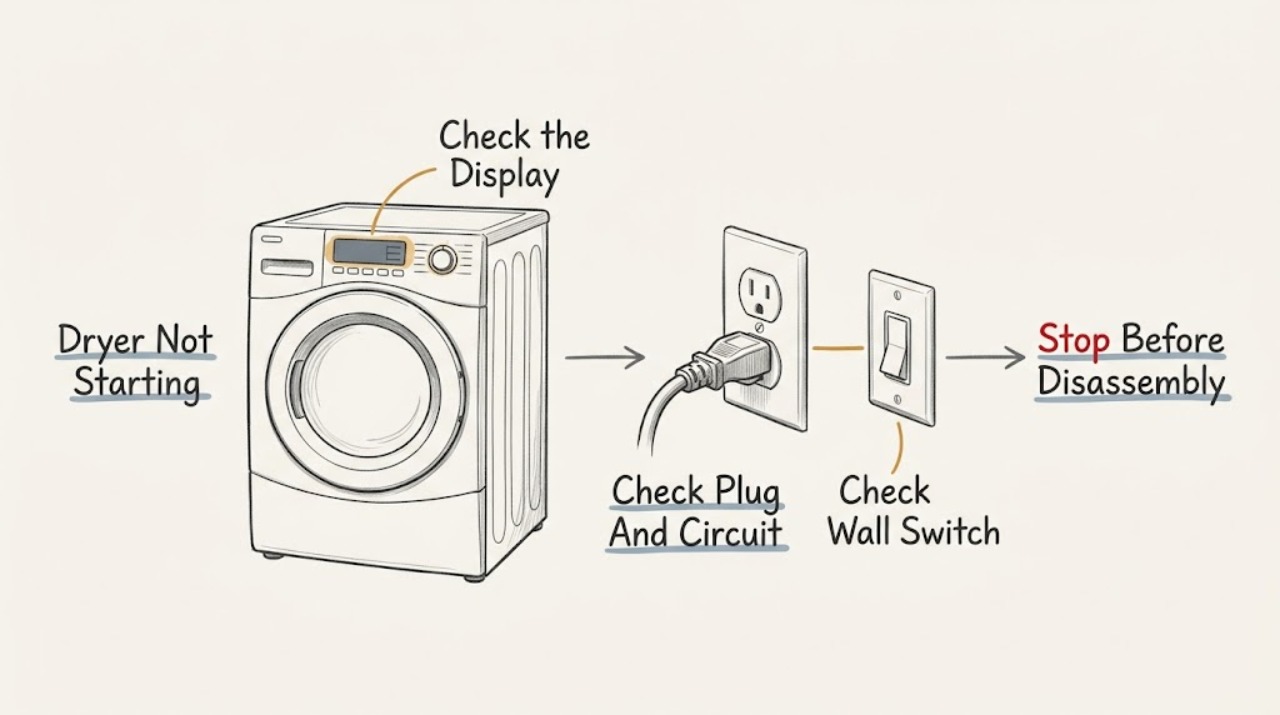
When a Crosley dryer will not start, begin with the external sequence: make sure the door is latched, the cycle and temperature or fabric settings are selected, the Start or Start/Pause control is fully pressed, and the plug and household breakers or fuses are supplying power. If the dryer has a display showing a model-specific setting, follow the owner's manual. A scorched or pushed-in door switch, burned cord or terminal connection, repeated breaker operation, or a dryer that still does not respond after these checks requires qualified service; do not bypass a switch or open the cabinet.
Work through in order
Diagnostic checks
Use only checks that match the exact appliance or system and its official guide.
-
Check 1
Close the dryer door firmly until the latch engages. Select a valid cycle, temperature or fabric setting, and drying time as specified by the model manual, then press or hold Start/Start-Pause completely.
Expected result: Note whether the door closes evenly, the control panel responds, a Start or Pause indicator changes, or the dryer remains completely silent with no drum movement.
Next step: If the dryer starts after the door and controls are corrected, monitor it for normal operation. If it remains unresponsive, turn it Off and check the external power supply.
Stop if: Stop if the door cannot latch, the latch area is damaged, or the control is stuck or physically damaged.
Why this matters
Why: An unlatched door, an incomplete cycle selection, or an incompletely pressed Start control can prevent the dryer from beginning. If the controls respond but the drum does not start, continue to the power and switch checks.
-
Check 2
With the dryer Off, check that the power plug is fully seated in the wall outlet and inspect the household breaker or fuse box for the dryer circuit. The dryer should use the circuit and supply specified by its installation instructions; do not use an extension cord or open the outlet.
Expected result: Record whether the control panel has power, whether the outlet is live, and whether one or more breakers or fuses are open. If the breaker opens again immediately, do not keep resetting it.
Next step: Restore a tripped breaker or replace a fuse only once when safe. If power is present and the dryer still will not start, continue to the visible door-switch and cord inspection; if the circuit trips again, arrange service.
Stop if: Stop for a hot or damaged receptacle, a burned or frayed cord, exposed conductors, or a breaker that trips again.
Why this matters
Why: A loose plug, loss of power, or an opened breaker or fuse can explain a dryer that will not start. A power supply that is present but a completely unresponsive dryer points to an appliance-side fault.
-
Check 3
Open the door and inspect the visible door-switch area without removing the switch or cabinet. Check for a switch that is visibly pushed in, scorched, loose, or not contacted by the closed door. Do not press or hold it to bypass the door safety.
Expected result: The switch and surrounding area are intact, or there is visible scorching, displacement, damage, or a door that cannot contact the switch correctly.
Next step: If the switch and door appear intact, continue to any model-specific display or Start/Pause check. If the switch is damaged or the door cannot actuate it normally, leave the dryer unused and arrange qualified service.
Stop if: Stop if the switch is scorched, wiring is visible, the door or latch is broken, or inspection would require removing a panel.
Why this matters
Why: A damaged or pushed-in door switch can prevent a Crosley/GE-supported dryer from operating. The visible condition is enough to choose service; it is not a safe invitation to bypass or electrically test the switch.
-
Check 4
If the display shows a model-specific setting, error, or paused state, use only the Crosley owner's manual to identify the normal user control sequence. If no display is present, make one final Start/Pause attempt after the door, cycle, and power checks; do not remove the cabinet or inspect internal terminals.
Expected result: Note whether a model-specific indicator clears, the Start/Pause light shows a paused cycle, an error remains, or the dryer still does not respond.
Next step: If the dryer remains unable to start, stop troubleshooting and arrange qualified service with the model and observed symptoms. Do not bypass a door switch, fuse, or control to force operation.
Stop if: Stop for any persistent error, smoke, burning odor, repeated breaker trip, or need to remove a panel or terminal cover.
Why this matters
Why: Some dryers can be paused or require a model-specific setting, but a persistent error or no response after valid user controls indicates an appliance fault. Internal cord connections, terminal blocks, motor, thermal devices, and control parts are not homeowner no-start checks.
Use your observations
Decision map
Find the observation that best matches what you see, then follow the next safe action.
-
PATH 01Safety boundary
What you see
The door is not latching, the cycle or temperature is not selected, or Start/Pause was not fully pressed.
Do this next
Correct the visible door or control selection issue and make one normal start attempt.
Why this path and its safety boundary
Safety stop: If the door or latch remains damaged or the dryer still will not start, arrange service.
-
PATH 02Safety boundary
What you see
The plug is loose, the outlet has no power, or the dryer circuit breaker or fuse is open.
Do this next
Restore the electrical supply once when safe and observe the dryer. Stop if the circuit opens again.
Why this path and its safety boundary
Safety stop: Do not open the receptacle, modify the cord, or repeatedly reset a tripping breaker.
-
PATH 03Safety boundary
What you see
The door switch is scorched, pushed in, loose, or not actuated by a correctly closed door.
Do this next
Leave the dryer unused and arrange qualified service to evaluate the door switch and related wiring.
Why this path and its safety boundary
Safety stop: Do not tape, hold, short, or bypass the switch to run the dryer.
-
PATH 04Safety boundary
What you see
The dryer has correct user settings and power, the door is intact, and it still does not start or shows a persistent error.
Do this next
Arrange qualified dryer service and provide the model, whether the panel has power, and the result of the door and circuit checks.
Why this path and its safety boundary
Safety stop: Do not remove cabinet panels or inspect the motor, thermal devices, terminal block, gas system, or control wiring.
Helpful context
Understand the symptom
A no-start symptom is different from a dryer that starts but does not heat. Crosley guidance directs you to check the latched door, a live outlet, the household circuit, and the Start/Pause control before requesting service. On some supported models, a display setting may also need the correct model-specific selection; use the manual for that exact control sequence.
The door switch and power cord are safety components. You can inspect them from the outside, but do not tape down, short, bypass, or replace a switch or terminal connection as a workaround. A scorched switch, burned connection, frayed wire, or repeated breaker trip is a stop-and-service result.
If a gas Crosley dryer has power but does not start, do not open the gas cabinet or attempt to relight or alter the gas system. No-start troubleshooting ends at the user controls, door closure, external power supply, and visible cord or switch condition.
Only after diagnosis
Potential parts
- door switch or start-control component
Consider a replacement only after qualified service identifies a failed door or start-control component following the external checks.
Confirm the exact Crosley model and manufacturer's fit information before ordering; do not infer fit from appearance or a similar symptom.
When checks do not resolve it
Need a professional?
Arrange qualified service when the dryer has power but remains unresponsive after a valid door, cycle, and Start/Pause check; when the door switch, latch, cord, or terminal connection is damaged; when an error persists; or when the breaker trips again. Stop immediately for smoke, burning odor, exposed wiring, or a gas-related concern.
Common questions
FAQ
What should I check first when my Crosley dryer will not start?
Make sure the door is latched, a valid cycle and temperature or fabric setting are selected, Start/Start-Pause is pressed completely, and the plug and household circuit are supplying power. If it remains unresponsive, arrange service.
Can a Crosley dryer door switch stop the dryer from starting?
Yes. A scorched or pushed-in door switch can prevent operation. Inspect it only from the outside; do not press, tape, short, or bypass it. A damaged switch or latch requires qualified service.
Why does my Crosley dryer have power but not start?
If the panel has power, check that the door is latched, the cycle is selected, and Start/Pause was fully pressed. A persistent no-start condition can involve the door switch, control, motor, or another internal device and should be serviced rather than bypassed.
What if my Crosley dryer breaker trips when I try to start it?
Do not keep resetting the breaker. Leave the dryer Off and arrange qualified service, especially if the cord or receptacle is hot, burned, damaged, or if smoke or a burning odor is present.
Read the exact guide
Official sources
- Dryer - Will Not Run or StartGE Appliances · Supports door closure, cycle selection, Start control, door-switch inspection, dedicated circuit, and service checks.
- Crosley Dryer Use and Care GuideCrosley · Supports the Crosley no-start checks for a latched door, live outlet, circuit breaker or fuse, and Start/Pause after an opened door.
- Troubleshooting for YFD45GSPMDGGE Appliances · Confirms the official Crosley dryer Owner Center and its Dryer Will Not Start support path; model-specific settings must be checked against the reader's manual.
Community feedback
Share a repair observation
Share a plain-text repair observation. Accepted observations are published automatically; this page may take a moment to update.