
On this page
Start here
Quick answer
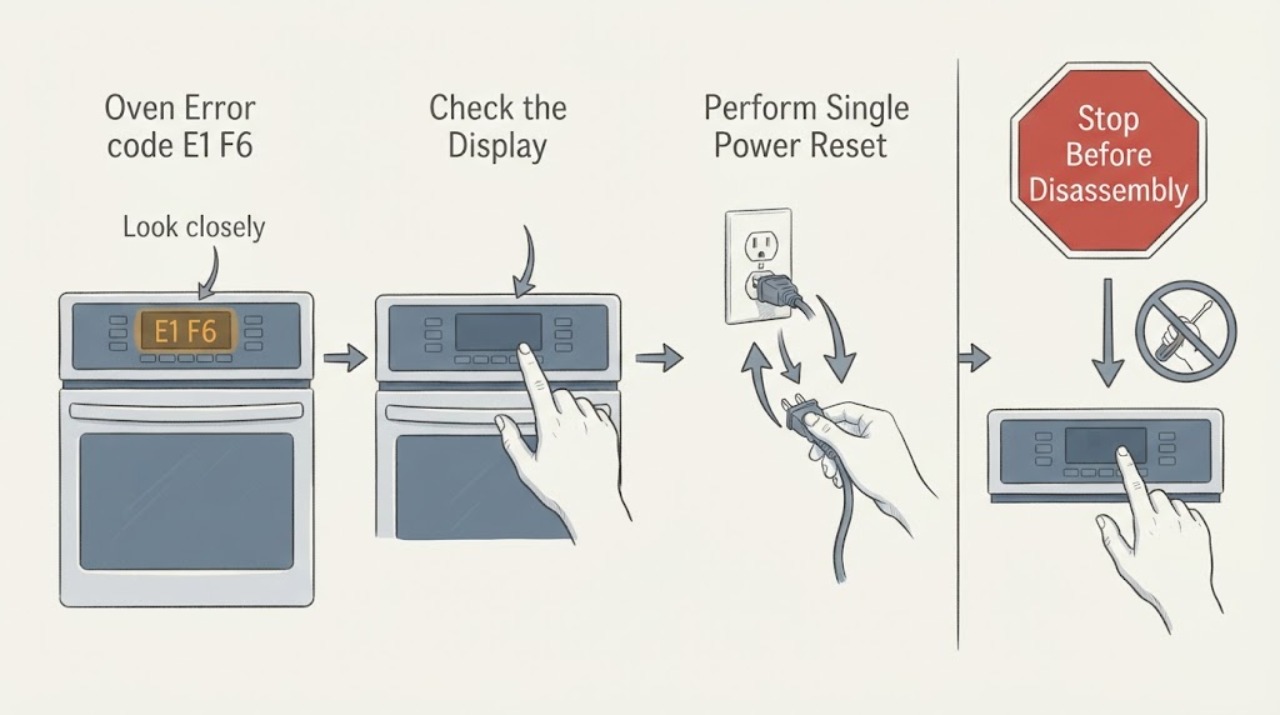
Amana's official cooking-appliance guidance says error codes may appear in either F# E# or E# F# order, so an E1 F6 report should first be matched to the exact model and display. Amana's range page for F6 E1 says the code can involve the Appliance Manager or associated wiring, and directs a one-minute power-down, one-minute return-to-power and one-minute observation before verifying operation. This reset does not prove a board or wiring failure. If the code returns, the display is different, or there is heat, smoke, burning odor or electrical damage, stop using the oven and arrange qualified service rather than opening the console or testing live wiring.
Work through in order
Diagnostic checks
Use only checks that match the exact appliance or system and its official guide.
-
Check 1
With the oven cool and idle, record the display exactly, including whether it reads E1 F6, F6 E1 or another code. Photograph or transcribe the model number from the rating label without removing panels, then use Amana's manual lookup for that model.
Expected result: The display matches E1 F6/F6 E1 and the model can be matched, or the display/model remains uncertain.
Next step: If the exact model and code match, continue with the range-code step below. If not, stop code-specific troubleshooting and obtain the correct manual or qualified support.
Why this matters
Why: Amana says cooking-appliance codes may be shown in either F# E# or E# F# order, while its manuals and support are model-based. An unverified order or model is not enough to apply a different code page.
-
Check 2
Only when there is no smoke, burning odor, visible electrical damage or other immediate hazard, turn off the oven's circuit breaker(s) for one minute, then restore power as Amana directs for F6 E1. Do not remove covers or touch wiring.
Expected result: Power returns normally, the code is gone, or the display is still showing the code/another fault.
Next step: Proceed to the one-minute observation. Do not repeat resets as a substitute for service if the code returns.
Why this matters
Why: Amana's F6 E1 range guidance uses a one-minute power-down and power-up because the issue may involve the Appliance Manager or associated wiring; this is a reset and not a component diagnosis.
-
Check 3
After power is restored, watch the display for one minute as Amana directs. If the code stays away and the oven is otherwise safe, verify operation only according to the exact model manual; do not run a self-clean cycle as a test.
Expected result: The code does not return, the code returns within the observation period, or the oven will not operate normally.
Next step: If the code returns or operation is abnormal, leave the oven off and arrange qualified Amana service. Record the exact code, model, timing and what happened after the reset.
Why this matters
Why: A code that stays away after reset may have been transient, but it does not establish that the appliance is repaired. A returning code or abnormal operation requires service evaluation.
-
Check 4
Stop using the oven for a repeated E1 F6/F6 E1 display, smoke, a burning smell, arcing, a hot or damaged cord, unusual overheating or a control panel that is physically damaged. Do not open the console, alter any safety device or perform live electrical measurements.
Expected result: The code recurs without a hazard, or a heat/electrical hazard is present or its source is uncertain.
Next step: Keep the oven off and schedule qualified service. If smoke, fire or a gas odor is present, leave the area and use appropriate emergency or gas-safety support.
Why this matters
Why: Amana's public range guidance points to the Appliance Manager or associated wiring as possible areas, but it does not authorize a consumer internal diagnosis or identify a replacement part.
Use your observations
Decision map
Find the observation that best matches what you see, then follow the next safe action.
-
PATH 01Next step
What you see
The display is confirmed as E1 F6/F6 E1 and the code disappears after one documented power reset and one-minute observation.
Do this next
Use the exact model manual for normal operation and monitor. If the code returns, stop using the oven and arrange service.
Why this path and its safety boundary
Why it matters: The official reset sequence cleared the display for now, but it does not identify or prove repair of an Appliance Manager, wiring or other component.
-
PATH 02Next step
What you see
The same code returns after the reset or the oven does not operate normally.
Do this next
Leave the oven off, provide the model and exact display to qualified Amana service, and do not open the control area.
Why this path and its safety boundary
Why it matters: Amana's range guidance says the possible issue may involve the Appliance Manager or associated wiring and directs service; the failed part is not determined from the code alone.
-
PATH 03Next step
What you see
The display is not actually E1 F6/F6 E1, or the model cannot be identified.
Do this next
Use the exact model manual or Amana Owner's Center to identify the correct code before taking further action.
Why this path and its safety boundary
Why it matters: The code-specific Amana page may not apply, and the task lacks enough identity to transfer another code meaning.
-
PATH 04Next step
What you see
Smoke, burning odor, arcing, visible electrical damage or dangerous overheating is present.
Do this next
Keep clear and leave the oven off; use qualified service or emergency support as appropriate. Do not restore power repeatedly or inspect live wiring.
Why this path and its safety boundary
Why it matters: The symptom is an immediate safety boundary, not a reset problem.
Helpful context
Understand the symptom
Confirm the code order and model
Amana's general cooking-appliance guidance says error displays can use either F# E# or E# F# order. Record the exact display and obtain the model number before applying a code page. Amana's manual lookup and Owner's Center use model information to locate the correct documents and support path.
Use Amana's documented one-minute reset once
For its F6 E1 range page, Amana directs the user to turn off the circuit breaker(s) for one minute, restore power, watch the oven for one minute and verify operation. Do this only when no immediate electrical, smoke or heat hazard is present. The reset does not identify a failed board or wiring connection.
A returning code needs service
If the display returns or the oven does not operate normally, leave it off and arrange qualified service. Amana lists the Appliance Manager and associated wiring as possible areas, but the public guidance does not support console removal, live measurements or a specific replacement part without model-specific diagnosis.
Treat heat and electrical signs as a stop condition
Smoke, burning odor, arcing, a hot or damaged cord, visible damage or dangerous overheating require the oven to remain off. Do not repeatedly restore power, alter any safety device or open the control area; use qualified service or emergency support as appropriate.
When checks do not resolve it
Need a professional?
Arrange qualified Amana service if E1 F6/F6 E1 returns after the documented one-minute power reset, the oven will not operate normally, the exact model/code cannot be confirmed, or any smoke, burning odor, arcing, visible electrical damage or dangerous overheating is present. Supply the model and serial information, exact display order, time of appearance and reset result.
Common questions
FAQ
Is E1 F6 the same as Amana F6 E1?
Amana's general cooking-appliance page says codes may be shown in either F# E# or E# F# order, but you should still confirm the exact display and model before applying the F6 E1 range page.
What does Amana F6 E1 mean on a range?
Amana says there may be a problem with the Appliance Manager or associated wiring, but the public page does not confirm a particular failed component. It gives a one-minute power reset, one-minute observation and service escalation if the code returns.
Should I replace the oven control board for E1 F6?
No. The code alone does not prove a board failure, and no model is supplied. Use the exact model manual and qualified service; do not open the console or test live wiring.
Read the exact guide
Official sources
- Error Codes for Cooking Appliances - Product HelpAmana · Official general cooking-appliance code guidance; display order and model-manual lookup context.
- Owners | AmanaAmana · Official Owner's Center; support requires model/serial details and provides troubleshooting/service routes.
- Manuals and Guides | AmanaAmana · Official model-based manual lookup and model-number locations for cooking appliances.
- F6 E1 - Error Code - Range - Product HelpAmana · Exact official range error page; reset sequence, possible Appliance Manager/associated wiring area and service boundary.
Community feedback
Share a repair observation
Share a plain-text repair observation. Accepted observations are published automatically; this page may take a moment to update.