
On this page
Start here
Quick answer
An Amana oven error display is a symptom, not a diagnosis: record the exact characters and spacing before clearing it, then match that code to the manual for the exact model. If the oven is dry and there is no smoke, burning smell, sparking, gas odor, or visible damage, Amana's general reset is to turn the oven circuit breaker(s) off for one minute, restore power, monitor for one minute, and verify operation. A code that returns needs model-specific service rather than repeated resets. For example, Amana associates F0 E0 with the electronic control or associated wiring, F3 E0 with the oven temperature sensor, control, or wiring, and F9 or F9 E0 with a possible power-supply issue; these examples do not identify a failed part on every model.
Before you begin
Safety first
- Do not open panels, test energized wiring, bypass a door latch, force the door, or keep operating an oven with an active hazard or returning fault.
Work through in order
Diagnostic checks
Use only checks that match the exact appliance or system and its official guide.
-
Make the oven safe and preserve the exact code
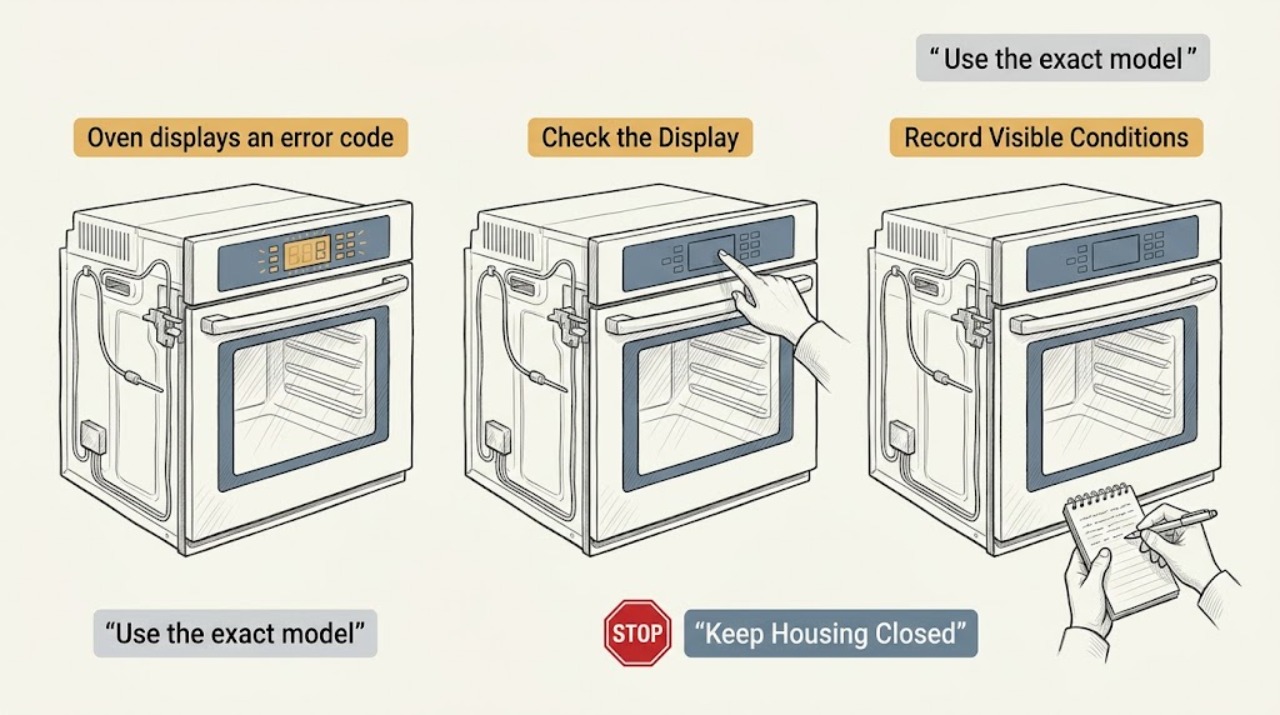
Stop the cooking cycle if it is safe to do so, keep hands and combustibles away from hot surfaces, and photograph or write down every displayed character, including whether the sequence is F# E# or E# F#.
Expected result: The display is a complete code or message, or it is incomplete, changing, or accompanied by smoke, burning odor, sparking, gas odor, visible damage, an uncontrolled flame, or a breaker that trips again.
Next step: For an active hazard, stop using the oven, keep people away, leave the area when appropriate, and seek emergency or qualified help. Otherwise record the model number and continue with the symptom-led checks without guessing the code.
Stop if: Do not touch hot or damaged surfaces, force a door, bypass a lock, or continue testing when smoke, gas odor, sparking, fire, or a repeated breaker trip is present.
Why this matters
Why: A complete code can be matched to the exact Amana model guidance; a partial or changing display is not enough to identify a failed component. An active hazard is a stop-use condition rather than an ordinary troubleshooting step.
-
Use the exact model and message together
Read the oven model identification from its normal accessible location or existing paperwork, then use the Amana Product Help error-code index and the owner's literature for that model to locate the complete displayed message.
Expected result: The code maps to a model-specific page, only a broad code family is available, or the display is actually a lock, Sabbath, Celsius, calibration, or power-failure message rather than an F/E fault.
Next step: Follow only the instructions that match the exact model and complete message. If no matching page is available or the model cannot be identified, preserve the photo and arrange model-specific appliance service rather than applying another model's code meaning.
Stop if: Do not enter service mode, alter settings, or remove panels just to reveal a code.
Why this matters
Why: Amana's error-code index separates control messages and multiple F-code families; a broad family label does not establish which component is bad. A normal control message may need a manual operation step instead of a repair diagnosis.
-
Record when the code appears
From a safe position, note whether the code appears at power-up, during preheat or baking, after a recent outage or installation, when the door or lock is used, or when a self-clean function is selected; check only that the door appears closed and the controls are not visibly locked.
Expected result: The pattern is immediate at startup, tied to heating or temperature, tied to a door-lock action, follows an outage or installation, or occurs with smoke, unusual heat, or a control that will not respond.
Next step: Use the matching branch below and stop normal operation when the code returns, the door does not close or release normally, or any hazard symptom appears. Do not run self-clean as a test.
Stop if: Do not force the door, defeat a latch, reach into a hot oven, or repeatedly start a heating or self-clean cycle with a returning code.
Why this matters
Why: The timing narrows the decision path: temperature-sensor guidance is relevant to an exact F3 E0, door-latch guidance to an applicable latch code, and electrical-supply guidance to persistent F9/F9 E0 after an outage or installation. Timing alone cannot confirm a part failure.
-
Apply Amana's documented power reset once
Only when the oven is dry, no immediate hazard is present, and the household panel can be operated safely, turn the oven circuit breaker(s) off for one minute, turn them back on, wait and monitor for one minute, then verify basic oven operation without starting an extended or self-clean cycle.
Expected result: The code clears and the controls operate normally, the code returns during the one-minute monitoring period, or the code returns when a normal operation is attempted.
Next step: If the code returns, leave the oven out of service and arrange qualified appliance service; for a persistent F9/F9 E0, disconnect power when safe and have a qualified electrician verify the electrical supply, especially after installation or an outage.
Stop if: Do not repeatedly cycle the breaker, work inside the panel, inspect energized wiring, or continue if the breaker trips, the oven overheats, or there is smoke, gas odor, sparking, or visible damage.
Why this matters
Why: A clear display after reset supports a transient control recovery; a returning code indicates an unresolved fault or supply condition and is not fixed by repeated resets. Amana specifically links persistent F9/F9 E0 to a possible miswired outlet or electrical connection.
-
Classify the returning code without disassembly
If the code returns, compare the exact message with the model-specific Amana page and record whether it is an F0 E0 control/wiring direction, an F3 E0 temperature-sensor direction, an F9/F9 E0 power-supply direction, or another code family; do not remove the control panel or sensor.
Expected result: The code and timing consistently point to one documented path, the code changes, or no exact model-specific explanation is available.
Next step: Give the technician the code photo, model, timing, reset result, outage or installation history, and any door or heating behavior; leave the oven unused until the returning fault is evaluated.
Stop if: Do not substitute a sensor, control, latch, or wiring part from the code label alone and do not perform electrical tests or bypass safety devices.
Why this matters
Why: A consistent documented path helps a technician prepare, but it still does not prove which component failed. A changing or unmatched code makes self-diagnosis less reliable and increases the need for service evaluation.
Use your observations
Decision map
Find the observation that best matches what you see, then follow the next safe action.
-
PATH 01Next step
What you see
The code is accompanied by smoke, burning odor, sparking, gas odor, visible damage, an uncontrolled flame, unusual control heat, or a breaker that trips again.
Do this next
Stop using the oven and keep people away. Leave the area for a gas or fire hazard when appropriate and seek emergency or qualified appliance/electrical help from a safe location. Do not reset or test again.
-
PATH 02Next step
What you see
The exact code is recorded, no hazard is present, the one-minute reset clears it, and the display remains clear while basic operation is verified.
Do this next
Treat the reset as a recovery check, monitor for recurrence, and follow the exact model manual. If the code returns, stop using the oven and arrange service rather than repeating the reset.
-
PATH 03Next step
What you see
An exact F0 E0 or another control-related code returns immediately or during normal operation after the reset.
Do this next
Leave the oven out of service and arrange qualified appliance service. The code can involve the electronic control or associated wiring, but the display alone does not identify a replaceable part.
-
PATH 04Next step
What you see
The exact model page identifies F3 E0 and the code returns in connection with heating or temperature behavior.
Do this next
Stop further heating tests and provide the technician with the model, code photo, timing, and reset result. Amana identifies the temperature sensor, control, or associated wiring as possible areas; do not open the oven control or replace a sensor by guesswork.
-
PATH 05Next step
What you see
The exact model code appears with a door-lock or latch action, or the door will not close or release normally.
Do this next
Keep the oven out of service and arrange qualified appliance service. Do not force the door, defeat the latch, or run self-clean to reproduce the issue.
-
PATH 06Next step
What you see
F9 or F9 E0 persists after an outage or recent installation, or the oven is otherwise suspected of an electrical-supply problem.
Do this next
Disconnect power when safe and have a qualified electrician verify the household electrical supply, then have appliance service evaluate the oven if the supply is correct. Do not open the connection box or test live wiring.
-
PATH 07Next step
What you see
The display is incomplete or changing, the model cannot be identified, or the code does not match the exact Amana literature.
Do this next
Preserve photos and the event timeline, avoid further resets or heating cycles, and arrange model-specific appliance service.
Helpful context
Understand the symptom
Treat the displayed characters as the starting evidence
Amana's cooking-appliance guidance notes that the display can use an F-number/E-number order or the reverse, so a photograph and the exact sequence matter. A letter, a lock message, a power-failure message, and an actual fault code can lead to different instructions. Do not translate a partial display into a familiar code or assume that two Amana models use the same meaning. The model number and the owner information are needed for a model-specific lookup.
A reset is a recovery check, not a component diagnosis
Amana's code pages use a one-minute circuit-breaker reset, followed by one minute of monitoring and an operation check, for several examples. If the display returns, the reset has established that the symptom is repeatable; it has not proved that the control, sensor, latch, or wiring is defective. Do not cycle the breaker repeatedly to keep an oven with a returning fault in service.
Separate code families before choosing the next safe step
A persistent F9 or F9 E0 after an outage or a recent installation can involve the electrical supply and may require a qualified electrician to verify it. F3 E0 makes the temperature-sensing path relevant, while F5 E0 on the applicable model pages can make the door-latch or switch path relevant. These are diagnostic directions, not permission to open the control area, bypass a latch, or order a part without confirming the exact model and test result.
Stop for an active safety symptom
An error-code investigation stops when there is smoke, a burning odor, sparking, an uncontrolled flame, gas odor, a cracked or damaged oven surface, a hot control area, or a breaker that trips again. Keep people away, leave the area for a gas or fire hazard when appropriate, and seek emergency or qualified appliance/electrical help from a safe location. Do not open panels or continue heating tests.
Only after diagnosis
Potential parts
- oven temperature sensor
Only consider this part if the exact model documentation and a qualified diagnosis implicate the temperature-sensing path, such as a returning F3 E0; the code alone does not prove the sensor failed.
Confirm the complete oven model and the manufacturer's fit information before ordering or replacing any part. - electronic oven control
Only consider this part after a qualified diagnosis identifies the control as the cause of a returning control-related code such as F0 E0; the associated wiring must also be evaluated.
Confirm the exact model, revision, and manufacturer's compatibility information; do not substitute a control from another model. - oven door latch or switch
Only consider this part when the exact model guidance and service diagnosis identify a latch or switch problem associated with the door behavior or code.
Confirm the exact model and latch configuration with the manufacturer or qualified technician before ordering. - oven wiring harness or connection
Only consider wiring repair or replacement after qualified service finds damaged, loose, or misrouted wiring; a code can point to an associated wiring path without identifying a harness.
Use the exact model documentation and qualified service assessment for fit and routing; do not work on energized wiring.
When checks do not resolve it
Need a professional?
A returning or unmatched error code, abnormal heating, a door-lock problem, or any diagnosis involving internal controls, sensors, latches, or wiring requires qualified appliance service. Persistent F9/F9 E0 after an outage or recent installation also requires qualified electrical-supply evaluation.
Safety scope: Do not open panels, test energized wiring, bypass a door latch, force the door, or keep operating an oven with an active hazard or returning fault.
Common questions
FAQ
Should I keep using an Amana oven after an error code clears?
Only if there was no safety symptom, the exact code was recorded, the documented one-minute reset cleared it, and basic operation is normal. Monitor for recurrence and stop using the oven if the code returns, heating is abnormal, the door or lock acts incorrectly, or any smoke, odor, sparking, or repeated breaker trip occurs.
Does an Amana oven error code identify the part to replace?
No. Amana's code pages describe possible paths such as the electronic control and wiring for F0 E0 or the temperature sensor, control, and wiring for F3 E0. Confirm the exact model and have the returning fault diagnosed before considering a part.
What should I do if F9 or F9 E0 returns after a power outage?
Record the code, perform the documented one-minute reset only when safe, and monitor for one minute. If F9 or F9 E0 persists, leave the oven unused and have a qualified electrician verify the electrical supply; arrange appliance service as needed. Do not open the connection area or test live wiring.
Why does the exact model matter for an Amana oven error code?
Amana provides separate code families, control messages, and model literature. The exact display order and model number keep a general code label from being mistaken for a different message or an unsupported part diagnosis.
Read the exact guide
Official sources
- F3 E0 - Error Code - RangeAmana Product Help · Exact F3 E0 display on applicable Amana range or oven models
- Error CodesAmana Product Help · Finding the relevant Amana control-message or F-code family and model literature
- Oven Not Working - ElectricAmana Product Help · Electric Amana ovens with F9 or F9 E0 after an outage, installation, or electrical event
- Error Codes for Cooking AppliancesAmana Product Help · General Amana oven error-code display formats, examples, and power-reset procedure
- F0 E0 - Error Code - RangeAmana Product Help · Exact F0 E0 display on applicable Amana range or oven models
Community feedback
Share a repair observation
Share a plain-text repair observation. Accepted observations are published automatically; this page may take a moment to update.