
On this page
Start here
Quick answer
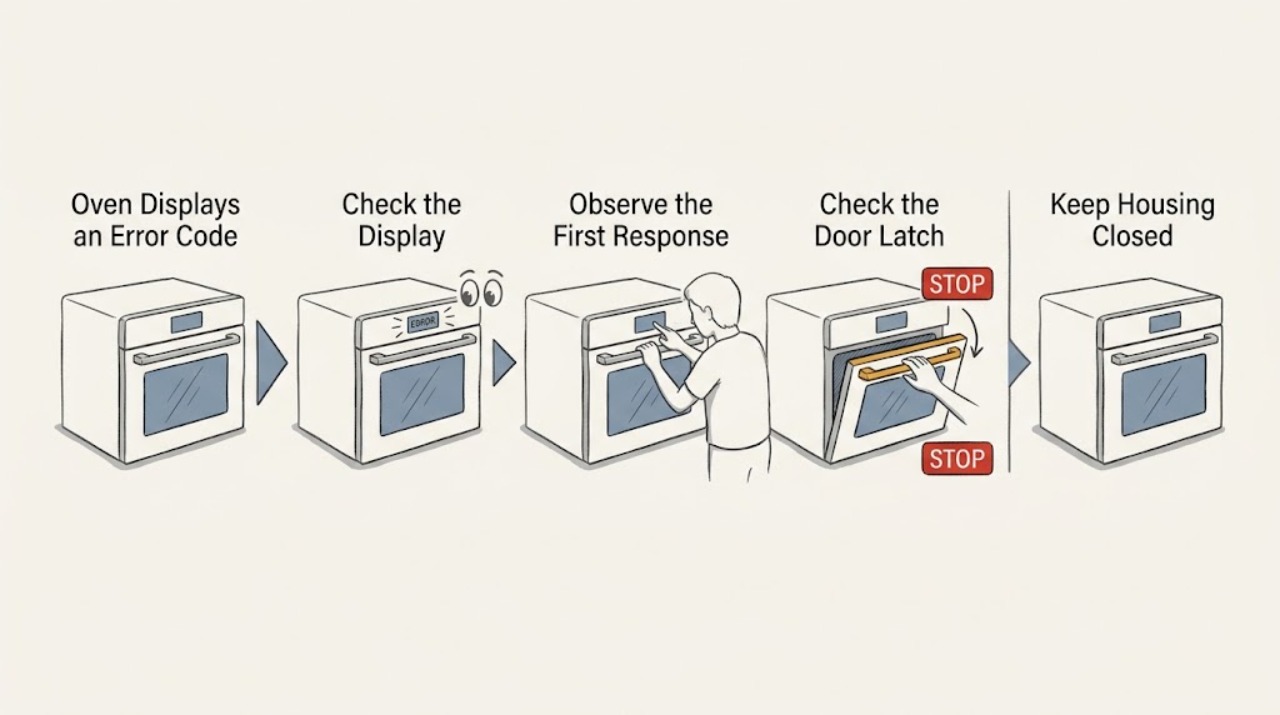
Write down the GE oven's complete display exactly as shown, including letters, numbers, dashes, or a door/lock message, and note what the oven was doing when it appeared. GE says its published fault-code list is only a summary, so the exact model manual controls the interpretation. Clear the cooking command and, only when there is no smoke, burning odor, damaged wiring, overheating, or other safety concern, perform the model-approved single power reset. If the code returns, the display identifies an internal or control fault, the door remains locked, or the oven shows a line-wiring or over-temperature condition, stop using the oven and arrange qualified appliance service rather than replacing a part based on the code alone.
Before you begin
Safety first
- Do not open panels, test energized circuits, force a hot or locked door, bypass a safety control, or restart after smoke, odor, sparking, abnormal heating, damaged wiring, or repeated breaker trips.
Work through in order
Diagnostic checks
Use only checks that match the exact appliance or system and its official guide.
-
Check 1
Stop the current cooking command without opening panels and transcribe the entire GE display exactly as shown. Include every letter, digit, dash, symbol, whether it flashes or beeps, the selected function, and whether the oven was baking, broiling, self-cleaning, preheating, or idle when the message appeared.
Expected result: The display is an F-code, a code such as F350, F9, or F20, a word or status such as LOC, ERR, OFF, Unlock Door, or Bad Line, or an incomplete/unclear character string.
Next step: Use the exact model manual and the matching branch below. If the display is unreadable, photograph it and arrange service rather than guessing the missing character.
Why this matters
Why: GE assigns different likely areas to common F-codes and treats several word displays as status or installation conditions. An incomplete code cannot be safely mapped to a part.
-
Check 2
Identify the complete GE model number from the appliance label or the model's support page, then compare the code with that model's Owner's Manual and GE support information. Do not use a code meaning copied from a different GE range, wall oven, generation, or third-party chart.
Expected result: The exact model manual lists the code, the code appears only in GE's common summary, or the model manual does not list it.
Next step: Save the manual page or support result with the exact code and model. For an unlisted, contradictory, or recurring code, leave the oven off and request qualified service.
Why this matters
Why: GE states that its common-code page is not exhaustive. A code found only in a general list provides a direction for service, not permission to replace a keypanel, sensor, control, or lock without diagnosis.
-
Check 3
Classify the message before resetting: check whether it is a lockout or mode message such as LOC, ERR, OFF, Sabbath mode, or Unlock Door, or a fault code beginning with F or another model-specific code. Note whether self-clean was selected and whether the oven is still hot; do not force a latch or start another self-clean cycle to test it.
Expected result: The message matches a child lock, invalid entry, excessive residual heat, Sabbath mode, self-clean door state, or an F-code/internal fault.
Next step: Follow only the exact model's documented status-message or cool-down instruction. If the message is a fault, returns after clearing, or does not match the manual, stop and arrange service.
Why this matters
Why: GE documents these word displays as model-dependent control or temperature states, while F-codes can indicate keypanel, sensor, cooling-fan, door-lock, or electronic-control concerns. A lock or hot-oven state should not be treated as a failed control board.
-
Check 4
If the oven is cool, no safety symptom is present, and the model instructions permit it, press Clear/Off and perform at most one electronic-control reset by switching the oven's supplying breaker off for the model-specified interval before restoring it. Do not repeatedly cycle power or reset while smoke, burning odor, overheating, a damaged cord, or a stuck hot door is present.
Expected result: The code clears and does not return, the same code returns immediately, a different code appears, or the display remains blank/unresponsive after the reset.
Next step: Do not repeat the reset. Leave the oven off as appropriate, record the result, and arrange qualified appliance service for a returning code or an unresponsive display.
Why this matters
Why: GE notes that a brief power interruption can clear some electronic control errors, but a returning or uncleared code indicates that a reset did not correct the cause. A blank display after a reset is a power or control branch, not proof of a specific part.
-
Check 5
Inspect only safe external conditions after the oven is cool: the door is not forced or trapped, the control panel has no visible damage, the power cord and outlet show no scorch or heat damage, and there is no smoke, burning smell, gas odor, sparking, or repeated breaker trip. Leave internal electrical checks and control-board access to a qualified technician.
Expected result: A lock will not release after cool-down, an F9/FC or similar door-lock message returns, F2/F20 or an over-temperature message appears, F350 or a fan-related message appears, or a safety/electrical symptom is present.
Next step: Stop using the oven and isolate power only from a safe, dry location when necessary. Keep clear of a hot or locked door and arrange qualified service; do not force the latch or continue cooking tests.
Why this matters
Why: GE's code guide associates these patterns with door-lock, over-temperature, cooling-fan, or internal component areas. The safety and internal-component branches require a technician rather than an external adjustment.
-
Check 6
Prepare a service record with the exact model, full code or message, when it appeared, selected function, oven temperature or self-clean status, whether Clear/Off was pressed, the result of one reset, any door-lock behavior, and any heat, odor, smoke, power, or breaker symptom.
Expected result: The code returns during the same function, returns after every reset, appears during self-clean, appears with a blank display or door-lock problem, or cannot be reproduced after one reset.
Next step: Give the record and model manual reference to qualified GE appliance service. Do not select a replacement part solely from a generic F-code list.
Why this matters
Why: The timing and related symptoms help a technician distinguish a mode or transient control state from a persistent keypanel, sensor, cooling-fan, lock, wiring, or electronic-control fault.
Use your observations
Decision map
Find the observation that best matches what you see, then follow the next safe action.
-
PATH 01Next step
What you see
The display is LOC, ERR, OFF, a Sabbath-mode symbol, or another documented status message, and the exact manual explains the condition.
Do this next
Use only the model-specific control or cool-down instruction. If the message returns or the controls remain unavailable, arrange service rather than replacing a control part.
Why this path and its safety boundary
Why it matters: The oven may be in a control-lock, invalid-entry, residual-heat, or special-mode state rather than reporting a failed component.
-
PATH 02Next step
What you see
The complete code is F0, F1, F6, or F7, or another code that GE's summary associates with the keypanel.
Do this next
Perform only the single model-approved reset if safe. If the code returns, stop using the oven and have qualified service diagnose the keypanel, control, and connections.
Why this path and its safety boundary
Why it matters: A keypanel or related control-input concern is possible, but the summary does not prove that the keypanel itself is the failed part.
-
PATH 03Next step
What you see
The display is F2/F20, an over-temperature message, or a code appears with a very hot oven or a self-clean cycle.
Do this next
Cancel the function if the manual permits it, keep the door closed if it is hot or locked, let the oven cool, and arrange service for a returning code. Do not force the latch or restart self-clean to test it.
Why this path and its safety boundary
Why it matters: GE associates F2/F20 with an oven temperature exceeding a preset threshold; heat and door-lock conditions can also be normal safety states during or after self-clean on some models.
-
PATH 04Next step
What you see
The display is F3/F4, F350, F5/F8/FF, F9/FC, F96/F97/F7X, or an unlisted model-specific fault code.
Do this next
Do not order a sensor, fan, lock, or control from the code alone. Leave the oven off if the code persists and arrange qualified appliance service with the exact display and model.
Why this path and its safety boundary
Why it matters: GE's summary points toward a sensor, upper cooling-fan circuit or obstruction, electronic control, door-lock circuit, or internal-component area, but the unlisted or recurring code needs model-specific diagnosis.
-
PATH 05Next step
What you see
The display says Bad Line, the oven recently moved or was installed, or the code appears with a power or breaker symptom.
Do this next
Stop using the oven and arrange a qualified installer or electrician/appliance technician to verify the connection. Do not remove covers or test the supply yourself.
Why this path and its safety boundary
Why it matters: GE describes Bad Line as power being applied to an incorrectly wired unit; a repeated electrical symptom may be an installation or supply issue rather than an oven control fault.
-
PATH 06Next step
What you see
The code clears once after the documented power reset and does not return, with no heat, odor, door, or electrical symptom.
Do this next
Resume use only as the model manual permits and monitor. Record the original code and request service if it returns or the oven behaves abnormally.
Why this path and its safety boundary
Why it matters: A transient electronic-control state is possible, but the one-time clearing does not prove that an underlying intermittent issue cannot recur.
-
PATH 07Next step
What you see
Smoke, burning or gas odor, sparking, a hot or damaged cord, exposed wiring, a repeated breaker trip, a door that will not safely release, or an oven that continues heating abnormally occurs.
Do this next
Stop using the oven, keep clear, isolate power or gas only from a safe location when appropriate, and obtain qualified or emergency help. Do not restart to test.
Why this path and its safety boundary
Why it matters: This is an immediate appliance safety stop, not a routine code reset.
Helpful context
Understand the symptom
A code is a clue, not a part number
GE uses fault, error, and function codes to help technicians diagnose electronic range and wall-oven controls. A code can point toward a keypanel, sensor, cooling fan, door-lock circuit, electronic control, or an over-temperature state, but the same-looking display may behave differently across models. Preserve the exact code and model information instead of ordering a replacement from a generic code list.
Separate a fault from a normal status message
Not every unusual display is a failed part. GE documents LOC as a child-lockout state, ERR as an invalid control entry, OFF as an oven that is still too hot for a requested function in certain situations, and a Sabbath-mode symbol as a mode indication. A door-lock message after self-cleaning follows a different path from an F-code. Read the exact model instructions before treating the display as a hardware failure.
Safety boundary
Stop conditions
- Do not remove oven panels, access the electronic control, test voltage, bypass a door lock, force a hot latch, or replace a part solely from a generic GE code list.
- Stop immediately for smoke, burning or gas odor, sparking, a hot or damaged cord, exposed wiring, repeated breaker trips, abnormal continued heating, or a door that will not safely release. Keep clear and arrange qualified help.
- If the same code returns after one model-approved reset, or the exact model manual does not explain the display, leave the oven off and arrange qualified appliance service.
Only after diagnosis
Potential parts
- GE oven keypanel or touch-control assembly
Consider only when qualified diagnosis confirms a keypanel or control-input fault after the exact code, model instructions, and one safe reset have been checked.
Keypanels and touch controls vary by GE model, revision, and console design. Confirm the exact model and diagnosis before selecting a part. - GE oven temperature sensor
Consider only when the exact model code and qualified testing confirm a sensor fault rather than an over-temperature event, wiring issue, or electronic-control problem.
Sensor shape does not establish fitment. Confirm the exact model and professional diagnosis before ordering or installing. - GE oven cooling fan, door-lock, or electronic-control component
Consider only when qualified service confirms the component area identified by the exact code, such as a cooling-fan circuit, door-lock circuit, or electronic control.
These components are model-specific and may require access to hot or energized equipment. Confirm exact fitment and professional installation requirements first.
When checks do not resolve it
Need a professional?
Arrange qualified GE appliance service when an error or fault code returns after one safe, model-approved reset; the code is unlisted or contradictory; the oven has an F-code associated with a sensor, cooling fan, keypanel, electronic control, door-lock, or internal component; the display is blank or unresponsive; or Bad Line, over-temperature, or self-clean lock behavior persists. Treat smoke, burning or gas odor, sparking, exposed wiring, damaged power connections, repeated breaker trips, and abnormal continued heating as immediate safety stops.
Safety scope: Do not open panels, test energized circuits, force a hot or locked door, bypass a safety control, or restart after smoke, odor, sparking, abnormal heating, damaged wiring, or repeated breaker trips.
Common questions
FAQ
What should I do first when my GE oven displays an error code?
Photograph and write down the complete display, including all letters and numbers, then record the model and what the oven was doing. Compare it with the exact model manual and GE's common-code guide; do not guess a replacement part from a partial code.
Can I reset a GE oven error code?
On applicable models, GE says a brief power interruption may clear an electronic-control code. Only do the model-approved single reset when there is no smoke, odor, overheating, damaged wiring, or other safety concern. If the code returns, leave the oven off and arrange service.
What do common GE oven F-codes mean?
GE's summary associates some F-codes with keypanel, sensor, cooling-fan, electronic-control, door-lock, or internal-component areas, and F2/F20 with an over-temperature condition. The list is not exhaustive, so use the exact model manual and technician diagnosis.
Is LOC or ERR the same as a GE oven fault code?
Not necessarily. GE describes LOC as a child-lockout state and ERR as an invalid control entry on applicable models; other displays can indicate residual heat, Sabbath mode, or a door-lock state. Follow the model-specific instructions before treating the message as a failed part.
When should I stop using a GE oven with an error code?
Stop for smoke, burning or gas odor, sparking, abnormal continued heating, exposed wiring, a hot or damaged cord, repeated breaker trips, a returning over-temperature or door-lock code, or a display that remains faulty after the model-approved reset. Keep clear and arrange qualified appliance service.
Read the exact guide
Official sources
- Range & Wall Oven - Display Dimming or Not Displaying ProperlyGE Appliances · GE display reset and service guidance when characters dim, fade, or disappear.
- Range & Wall Oven - Oven Will Not Come OnGE Appliances · GE oven power, control reset, door-latch, and service guidance for ranges and wall ovens.
- Range & Wall Oven - Oven Error, Fault or Function CodesGE Appliances · GE Appliances common code summary for electronic range and wall ovens; not exhaustive across all models.
- FAQs | Ranges & OvensGE Appliances · GE Appliances FAQ confirming model-specific error-code support, lock, power, fan, and normal operating-state guidance.
- Support for GE Cooking ProductsGE Appliances · GE support entry point for finding model-specific manuals, troubleshooting, parts, and service for ovens and ranges.
Community feedback
Share a repair observation
Share a plain-text repair observation. Accepted observations are published automatically; this page may take a moment to update.