
On this page
Start here
Quick answer
Do not diagnose a KitchenAid oven from an error-code number alone. Photograph or write every character exactly as shown, record the full model and the function running when it appeared, and use that model's manual or KitchenAid's matching error-code entry. If the oven is cool, dry, and free of smoke, gas odor, arcing, or unusual heat, use Cancel once if the manual allows it; a model-approved power reset may be appropriate for some codes, followed by a brief observation for recurrence. A code that returns, an unresponsive display, a door-lock problem, abnormal heating, or a repeated breaker trip needs qualified appliance service. Stop immediately for gas odor, smoke, fire, burning electrical odor, arcing, or suspected carbon monoxide, and contact emergency or gas professionals from a safe location.
Before you begin
Safety first
- This article supports code recording, model lookup, cool external observations, ordinary control use, and one exact manual-approved Cancel or power step only. A qualified professional should handle panels, live electrical testing, wiring, control boards, sensors, heaters, door interlocks, gas components, and any hot, wet, damaged, or hazardous appliance.
Work through in order
Diagnostic checks
Use only checks that match the exact appliance or system and its official guide.
-
Check 1
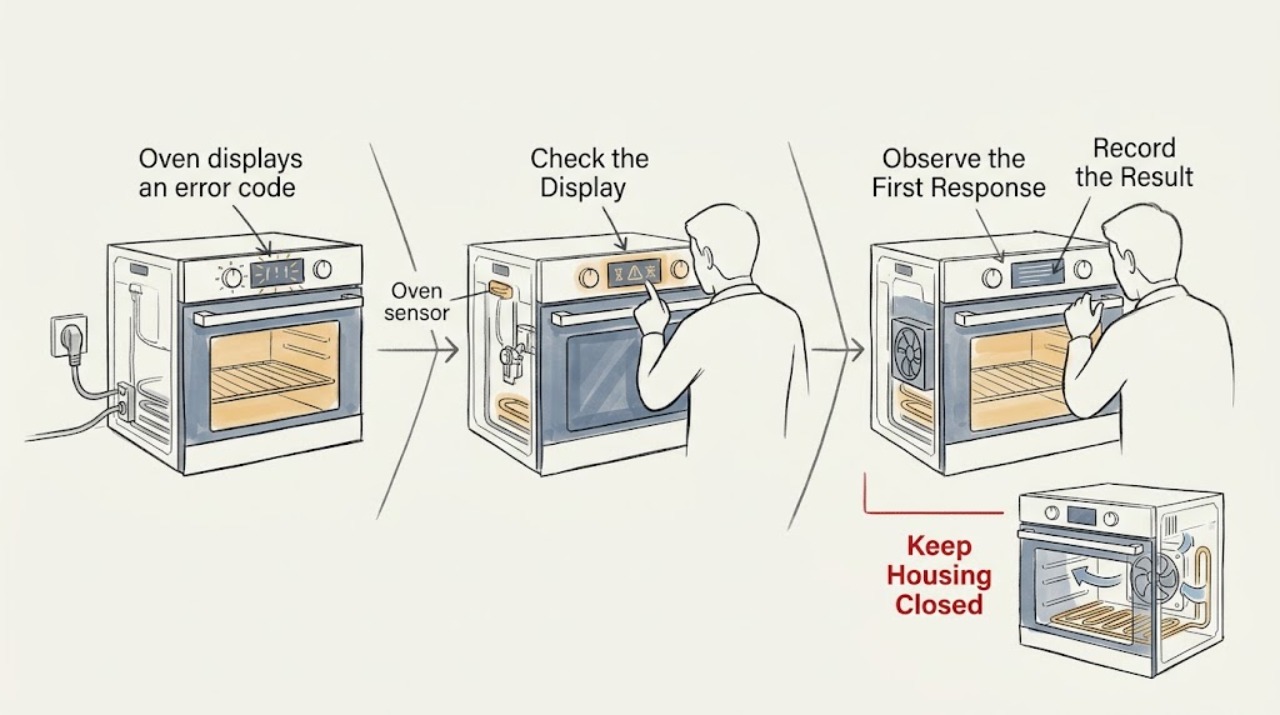
Stop the oven function if it can be stopped normally, stay clear of a hot cavity, and record or photograph the complete display before it changes. Include the model number, oven cavity, selected mode, set temperature, and the point at which the code appeared.
Expected result: Note whether the display is steady, flashing, blank, or responsive; whether the code appears at startup, preheat, bake, broil, self-clean, after a door action, or after a power interruption; and whether there is smoke, gas odor, unusual flame, burning odor, arcing, water, uncontrolled heat, or a breaker trip.
Next step: If there is gas odor or suspected carbon monoxide, leave the area and contact emergency or gas professionals from a safe location. For smoke, fire, arcing, or burning electrical odor, stop use and obtain emergency or qualified electrical help as appropriate. Otherwise keep the code record for the model lookup.
Stop if: Do not keep pressing controls, relight or restart a gas oven, touch damaged wiring, or use the appliance to reproduce smoke, arcing, a gas odor, or uncontrolled heat.
Why this matters
Why: The exact characters and operating stage determine which KitchenAid entry or manual applies. A safety symptom overrides code lookup and makes further testing inappropriate.
-
Check 2
Use the KitchenAid error-code index and the owner's manual for the exact model and appliance type. Search the code exactly as displayed, preserving the order of letters and numbers and noting whether the oven is a wall oven, range, or combination appliance.
Expected result: Confirm that the model, oven cavity, code, and operating stage match the published entry. The result may give a user control action, a power-reset step, a cooling or lock condition, or a service direction; it may also have no matching entry.
Next step: Follow only the matching model's documented user step. If the code is unclear, unlisted, or mismatched to the appliance type, keep the oven off if it cannot operate normally and arrange qualified appliance service.
Stop if: Do not infer a part from the first search result, use a range instruction on a wall oven without checking the manual, or order a component from the code alone.
Why this matters
Why: KitchenAid's published pages group codes by appliance type and code family. A code from a similar-looking model is not enough to identify a sensor, board, heater, door lock, or wiring fault.
-
Check 3
With the oven cool and no smoke, gas, or electrical hazard, look at the controls and door from outside. Confirm that the intended mode and temperature are selected, the door is fully closed, and no ordinary lock, delay, Sabbath, probe, or power-loss message is present.
Expected result: Record whether the display accepts normal input, shows a lock or delay indication, shows a flashing clock after a power loss, or returns the same error before a cycle starts. Check only visible door alignment and the accessible control surface; do not remove trim or panels.
Next step: Use the exact manual for one documented cancel, unlock, delay-cancel, clock-setting, or setting-confirmation action. If the display remains unresponsive, the door will not close or latch, or the error returns, arrange service.
Stop if: Do not force the door, defeat a lock, run self-clean with a door fault, or repeatedly press keys to bypass an error.
Why this matters
Why: A control state or door-recognition message may prevent a cycle without proving an internal component has failed. A normal-looking control state with a returning code makes a model-specific fault more likely.
-
Check 4
Only if the exact KitchenAid entry or manual allows it and the oven is cool, dry, inactive, and free of hazard signs, press Cancel once. If the entry specifically calls for a power reset, turn the dedicated circuit breaker off for the documented one-minute interval, then restore it once; do not open the electrical enclosure.
Expected result: After the reset, observe whether the display returns normally, whether the code comes back immediately, whether the controls respond, and whether the breaker trips or the display becomes blank. Do not start repeated heating cycles just to test the result.
Next step: If the exact manual permits one normal verification cycle and there are no abnormal symptoms, remain nearby and stop at the first recurrence. Otherwise leave the oven off and give the recorded code and reset result to qualified appliance service.
Stop if: Do not repeatedly reset the breaker, use an extension cord, perform live electrical measurements, or continue after a hot connection, arcing, smoke, burning odor, or uncontrolled heat.
Why this matters
Why: KitchenAid describes Cancel and, for some faults, a one-minute power reset followed by a brief observation. Clearing the code can be transient; recurrence, a trip, or loss of display points away from a simple recoverable interruption.
-
Check 5
If the code has cleared and the manual permits a single normal observation, note the mode in which it returns rather than deliberately creating a fault. Keep the oven off for self-clean, door-lock, or heating anomalies and record whether the issue is tied to one mode or appears at power-up.
Expected result: Record no heat, delayed heat, overheat, a fan or cooling message, a door-lock indication, a code during self-clean, a code during preheat or bake, or a code that returns before any function begins.
Next step: Attach the stage and symptom record to the exact KitchenAid manual entry or service request. Keep the oven off for abnormal temperature, smoke, flame, gas odor, damaged glass, a stuck lock, or any electrical symptom.
Stop if: Do not bypass a door interlock, operate with damaged glass or seals, reach into a hot cavity, or continue a self-clean or heating cycle after an error.
Why this matters
Why: The timing narrows the service path: a door or lock symptom differs from a temperature, cooling, heating, control, or power symptom. A code that returns across modes or at startup is not a reason to repeat the test.
-
Check 6
If the code returns, is not listed for the model, or is accompanied by a start, heat, door, display, or power fault, stop troubleshooting and prepare a complete service handoff.
Expected result: Gather the model and serial information, the exact code photo or transcription, selected mode and cavity, time in the cycle, recent power event or installation, Cancel or reset performed, and every observed symptom.
Next step: Arrange qualified KitchenAid appliance service. Use a qualified electrician as well when there is a hot or damaged connection, arcing, repeated breaker trip, or suspected supply wiring problem; do not return the oven to use until it is declared safe.
Stop if: Do not remove panels, bypass safety devices, test energized circuits, adjust gas components, or install a part before model fit and diagnosis are confirmed.
Why this matters
Why: A returning or ambiguous code requires model-specific diagnosis; the display alone cannot establish which board, sensor, lock, harness, or heating part is at fault.
Use your observations
Decision map
Find the observation that best matches what you see, then follow the next safe action.
-
PATH 01Safety boundary
What you see
Smoke, active fire, a burning or melting odor, arcing, a hot or damaged electrical connection, water near electrical parts, uncontrolled heat, gas odor, abnormal flame, delayed ignition, or suspected carbon monoxide is present.
Do this next
Stop operating the oven. Leave the area for active smoke, fire, gas, or suspected carbon monoxide, and contact local emergency, gas, or electrical professionals from a safe location. Do not re-enter until it is safe.
Why this path and its safety boundary
Why it matters: This is a fire, electrical, gas, or combustion-safety problem, not a code-lookup problem.
Safety stop: Do not press switches or controls in a gas-odor area, test for a leak, relight the oven, reset a tripped breaker, or try to reproduce the event.
-
PATH 02Safety boundary
What you see
The exact code, model, appliance type, oven cavity, and operating stage match a KitchenAid error-code or manual entry, and no hazard symptom is present.
Do this next
Follow that entry once, remain within ordinary external controls, and observe for recurrence. Stop and arrange service if the entry directs service or the code returns.
Why this path and its safety boundary
Why it matters: That model-specific entry, rather than a generic code list, defines the defensible user action. It may permit Cancel, a specified reset, or direct service.
Safety stop: Do not substitute an entry for another model, assume the code names a replaceable part, or continue operation after abnormal heating, locking, display, or power behavior.
-
PATH 03Safety boundary
What you see
The display clears after the one model-approved Cancel or power step, controls respond normally, the breaker remains stable, and no abnormal heat, odor, door, or ignition symptom returns.
Do this next
Follow the manual's limited verification instruction once, stay nearby, and keep the code record. Arrange service if the code or any abnormal behavior returns.
Why this path and its safety boundary
Why it matters: A transient interruption or control state is possible, but clearing the code does not prove a repair.
Safety stop: Do not keep resetting the oven or use it unattended as a way to test whether the problem is gone.
-
PATH 04Safety boundary
What you see
The same code returns immediately after Cancel or the permitted reset, appears at power-up, occurs across more than one function, or is paired with an unresponsive display or repeat breaker trip.
Do this next
Keep the oven off and arrange qualified appliance service; use qualified electrical service for suspected supply wiring, hot connections, arcing, or repeated trips. Provide the exact code, model, timing, and reset result.
Why this path and its safety boundary
Why it matters: A persistent control, power, wiring, sensor, door-recognition, or other model-specific fault is more likely than a one-time interruption.
Safety stop: Do not open the control area, measure live voltage, replace a board or sensor from the code alone, or repeatedly cycle the breaker.
-
PATH 05Safety boundary
What you see
The code appears only during self-clean, door locking, preheat, bake, broil, or another defined stage, and the oven otherwise has a normal display with no immediate hazard.
Do this next
Do not repeat the affected cycle. Record the stage and visible symptoms and use the exact model manual or qualified service path; leave the oven off for a stuck lock, overheat, no heat, smoke, or damaged door.
Why this path and its safety boundary
Why it matters: The operating stage makes a door-recognition, cooling, temperature-sensing, heating, or control path relevant, but it still does not identify a part by itself.
Safety stop: Do not force the door, bypass an interlock, reach into a hot cavity, run self-clean again, or probe a sensor or heater.
-
PATH 06Safety boundary
What you see
The characters are unclear, the model is unknown, the code is not listed, or the published entry does not match the appliance type or stage.
Do this next
Keep the photo, model information, timing, and symptoms and request qualified KitchenAid appliance service. Do not continue heating tests just to obtain another code.
Why this path and its safety boundary
Why it matters: There is not enough reliable evidence to interpret the code safely or select a part.
Safety stop: Stop immediately if the unclear code is accompanied by gas odor, smoke, abnormal flame, suspected carbon monoxide, arcing, uncontrolled heat, or electrical damage.
Helpful context
Understand the symptom
The displayed characters are the starting evidence
KitchenAid publishes different paths for different displays, including F/E error formats, power-failure messages, lock or control messages, and model-specific wall-oven codes. A character that looks like a zero, letter, or segment can change the lookup. Save a photo, transcribe the code, and include the model, cavity, selected function, and point in the cycle. Do not substitute a code meaning from another KitchenAid model, a different oven type, or an online list that does not match your appliance.
A reset is a limited diagnostic step
For a cool, inactive oven with no hazard signs, KitchenAid's general guidance may allow Cancel or a one-minute circuit-breaker power reset, followed by a short observation. The exact owner's manual controls which action applies. A cleared display is not proof that a component is repaired; a returning code, repeated trip, or abnormal operation changes the decision to service. Do not keep resetting the oven to make a heating or door fault disappear.
Keep internal and hazardous diagnosis out of homeowner checks
The code can point to a control, sensor, door-recognition, cooling, power, or heating path, but the display alone does not identify a replaceable part. Keep observations external and use ordinary controls only. Do not remove panels, probe live wiring, bypass a door lock or sensor, adjust gas components, or restart after smoke, arcing, uncontrolled heat, or a gas odor. A qualified appliance or electrical professional can test the appliance safely and confirm the correct model-specific repair.
Safety boundary
Stop conditions
- Stop using the oven and seek emergency help for active smoke or fire, gas odor, suspected carbon monoxide, or a flame outside the intended burner area.
- Stop and arrange qualified appliance or electrical service for arcing, a burning electrical odor, a hot or damaged connection, water near electrical parts, a repeated breaker trip, or a blank/unresponsive display.
- Do not force or bypass a door lock, operate with damaged glass or seals, continue self-clean after an error, or reach into a hot cavity.
- Do not remove panels, test live wiring, adjust gas components, bypass a sensor, or replace a part from the code alone.
Only after diagnosis
Potential parts
- oven temperature sensor
Consider this category only if the exact model documentation and professional diagnosis connect a recurring temperature or sensor-related code with a failed sensor circuit.
Confirm the full model and the manufacturer's fit information before ordering; an error code alone does not establish compatibility or failure. - electronic oven control or display control
Consider this category only after a persistent control, communication, or unrecognized-fault code remains after the permitted reset and a qualified technician confirms the control path.
Controls are model-specific. Confirm the full model, revision, and manufacturer's fit information before any replacement. - oven door latch or door switch
Consider this category only when the exact model entry and diagnosis link a recurring lock or door-recognition code to the latch or switch circuit.
Do not bypass the lock or order from a code alone; verify model fit and service instructions first. - oven cooling fan or related harness
Consider this category only if a model-specific cooling or fan code returns and qualified diagnosis confirms an airflow, fan, or harness fault.
Confirm the full model and manufacturer's fit information; do not disassemble or operate with an overheating condition.
When checks do not resolve it
Need a professional?
Arrange qualified KitchenAid appliance service when the exact code is unlisted or unclear, the code returns after the single model-approved action, the oven will not start or heat, the display is unresponsive, a door or lock indication remains, or the fault is associated with a repeat breaker trip or abnormal temperature. Use qualified electrical service for suspected supply wiring, arcing, hot connections, or repeated trips. For gas odor, suspected carbon monoxide, smoke, or active fire, leave the area as appropriate and contact emergency or gas professionals from a safe location.
Safety scope: This article supports code recording, model lookup, cool external observations, ordinary control use, and one exact manual-approved Cancel or power step only. A qualified professional should handle panels, live electrical testing, wiring, control boards, sensors, heaters, door interlocks, gas components, and any hot, wet, damaged, or hazardous appliance.
Common questions
FAQ
Should I keep using my KitchenAid oven after an error code clears?
Only follow the exact manual's limited verification step when the oven is cool and free of hazard signs. Stay nearby and stop if the code or abnormal heat, door, display, odor, or power behavior returns; clearing the display does not prove the fault is repaired.
Can I identify the failed part from a KitchenAid oven error code?
Not safely from the code alone. Match the exact code and model first; several fault paths can produce related messages, and a qualified technician may need to confirm the sensor, control, lock, cooling, heating, power, or wiring cause.
How long should I turn off the breaker for a KitchenAid oven error reset?
KitchenAid's general range guidance describes a one-minute power-down and a one-minute observation after power is restored, but your exact model manual controls whether that procedure applies. Use it at most as the documented single attempt, and stop if the code returns or any hazard appears.
What information should I give the appliance technician?
Provide the exact model, a photo or transcription of every character, oven cavity and function, when the code appeared, whether it returns at startup or after a reset, and any no-heat, overheat, door, fan, odor, smoke, flame, gas, water, arcing, or breaker symptoms.
Read the exact guide
Official sources
- Error Code or Message - Wall OvenKitchenAid Product Help · KitchenAid wall-oven error-code and control-message index
- Error CodesKitchenAid Product Help · KitchenAid range error-code and control-message index
- F0 E0 - Error Code - RangeKitchenAid Product Help · KitchenAid range F0 E0 fault and reset/service guidance
- Error Codes for Cooking AppliancesKitchenAid Product Help · KitchenAid cooking appliances, including oven error-code formats, listed code meanings, and general reset guidance
- Press Cancel to Reset - RangeKitchenAid Product Help · KitchenAid range control-message reset and service boundary
- TROUBLESHOOTINGKitchenAid · KitchenAid oven owner's manual troubleshooting and assistance guidance
Community feedback
Share a repair observation
Share a plain-text repair observation. Accepted observations are published automatically; this page may take a moment to update.