
On this page
Start here
Quick answer
An LG oven error display is a diagnostic clue, not a universal fault code: the same-looking display can indicate a sensor, heating, convection fan, door-lock, communication, power, or other model-specific issue, while PF, Sb, or a lock indication may describe a power interruption or operating mode rather than a failed part. Photograph the exact characters, identify the full model and whether the oven is electric, gas, single, or double, then use LG's range error-code list and the exact owner's manual. If LG's listed first step is to press CLEAR/OFF or POWER and retry the original function, do that once only after the oven is in a safe state; if the code returns, LG directs a 30-second circuit-breaker reset for many codes and service when the problem continues. Do not open panels, test live wiring, defeat a door lock, or keep operating when there is smoke, gas odor, sparking, uncontrolled heat, or a repeated breaker trip.
Before you begin
Safety first
- This article supports identifying the display, following LG's documented first response, and one model-appropriate power reset only. A qualified technician must handle internal electrical, heating, sensor, fan, lock, control, and wiring diagnosis.
Work through in order
Diagnostic checks
Use only checks that match the exact appliance or system and its official guide.
-
Check 1
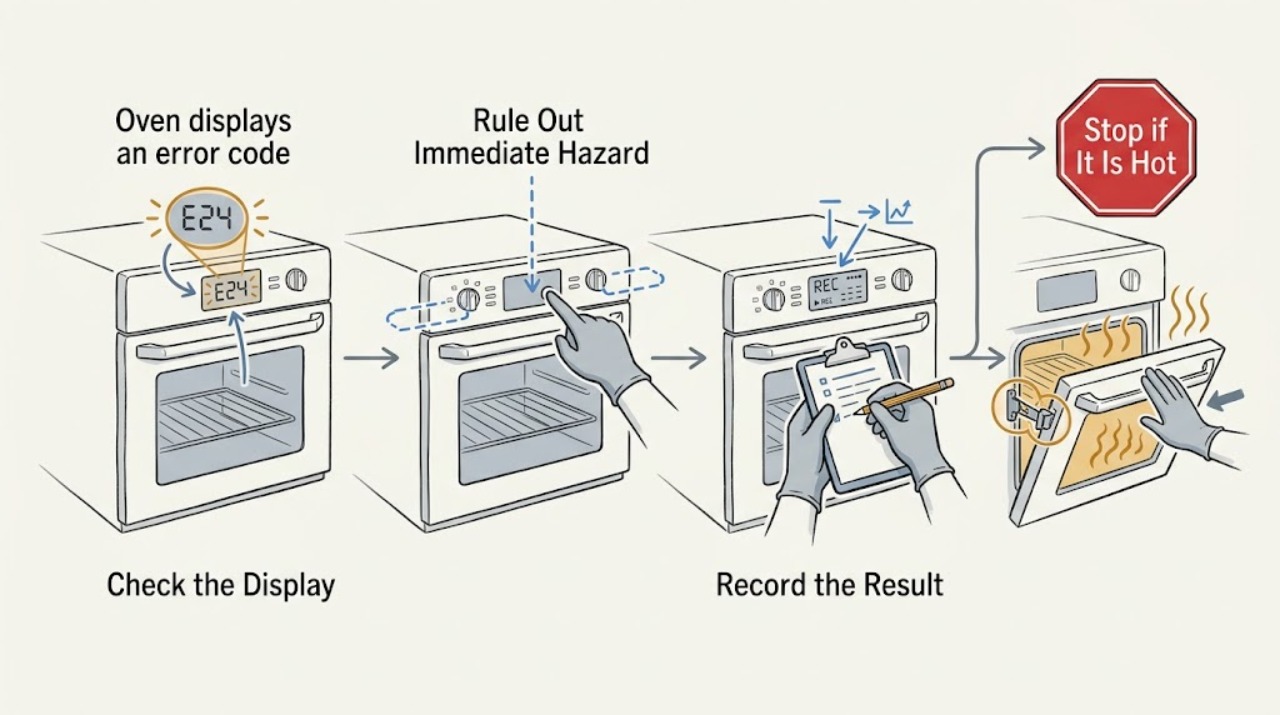
From outside the appliance, photograph the complete display and write down every character, punctuation mark, flashing pattern, affected upper or lower oven, current cycle, and the full model number; note whether the unit is electric or gas and whether it is a range or wall oven.
Expected result: The display is a specific F code, PF, Sb, a lock or mode message, an incomplete display, or an unrecognized symbol; the model and affected cavity are either known or still unknown.
Next step: Use the exact code and model in LG's error-code list and owner's manual. If the code cannot be read, keep the photo and arrange model-specific support rather than guessing a replacement part.
Stop if: Do not clear the display before recording it, and do not open the control panel to read a board or wiring label.
Why this matters
Why: LG assigns different meanings and next steps to individual codes, including thermistor, heating, door-lock, communication, convection-fan, voltage, and power-interruption conditions. An unrecognized character cannot safely be mapped by appearance alone.
-
Check 2
Stop the cooking cycle and look only from a safe position for smoke, flames, gas odor, sparking, a burning electrical smell, uncontrolled heating, a damaged door or glass, or a breaker that trips again; keep hands away from hot surfaces and do not force the door.
Expected result: No immediate hazard is present and the oven is cooling, or one of the hazard symptoms is present.
Next step: If any hazard is present, turn controls off, leave the area for a gas or fire danger, disconnect power only from a safe location, and seek qualified appliance or emergency help as appropriate. If no hazard is present, continue with code-specific guidance only after cooling as needed.
Stop if: Do not relight a gas appliance after a gas odor, reset a tripped breaker repeatedly, or open the door against a lock or hot cavity.
Why this matters
Why: A code with a safety symptom is not a routine reset problem. Continued heating or repeated electrical operation could worsen fire, gas, burn, or shock risk.
-
Check 3
For the exact code, follow only LG's listed first response: where instructed, press CLEAR/OFF or POWER and retry the original function once; for PF, clear the interrupted-power message and retry; for a lock or mode message, use the model's documented unlock or mode procedure instead of treating it as a failed part.
Expected result: The display clears and the oven performs the original function, the display returns immediately, or the message is not covered by the chosen LG guidance.
Next step: If the code returns or is not covered, stop the cycle and proceed to the documented power isolation step once; record the result for service. Do not substitute a procedure from another LG model.
Stop if: Do not keep clearing the code to continue cooking, bypass a door lock, or use a guessed button sequence from an unrelated model.
Why this matters
Why: A cleared code may have been a transient state, but a returning code means the underlying condition remains possible. LG lists distinct service paths for unlisted codes and for codes that persist after the first response.
-
Check 4
Only when the oven is safe, not actively heating, and the exact LG guidance calls for it, turn the appliance circuit breaker off for 30 seconds and back on; keep the oven controls off while power is restored and do not remove any cover.
Expected result: The display returns normally and the code does not reappear, or the code immediately returns, the display stays abnormal, or the breaker trips again.
Next step: Use the reset at most once for this event. If the code returns, the display remains abnormal, or the breaker trips, leave the oven out of service and arrange qualified diagnosis with the recorded code and model.
Stop if: Do not cycle the breaker repeatedly, remove panels, measure live voltage, or work on the appliance if power isolation is uncertain.
Why this matters
Why: LG uses a 30-second breaker cycle as a recovery step for many listed codes, but a returning code or tripped breaker indicates that the condition was not resolved by a reset.
-
Check 5
Prepare a service record containing the model and serial information, exact code and photo, upper or lower cavity, gas or electric type, cycle in progress, whether CLEAR/OFF or POWER was tried, the breaker-reset result, and any heat, odor, smoke, lock, or power symptoms.
Expected result: The code is listed but recurs, the code is unlisted, the oven will not run, the door remains locked, or the display and power behavior are abnormal.
Next step: Arrange qualified appliance service or LG model-specific support. Keep the oven out of service when a code recurs or its cause is unknown, and provide the complete record so the technician can start with the correct diagnostic path.
Stop if: Do not order or install a sensor, control board, fan, heater, or lock from the code alone, and do not operate an oven with a recurring code or safety symptom.
Why this matters
Why: The remaining possibilities span sensors, heating components, fans, locks, controls, wiring, power supply, and model-specific software or settings; an outside observation cannot identify the failed component safely.
Use your observations
Decision map
Find the observation that best matches what you see, then follow the next safe action.
-
PATH 01Safety boundary
What you see
The exact code is listed by LG, no hazard is present, the specified CLEAR/OFF or POWER step clears it, and the original function completes without the code returning.
Do this next
Record the event and use the model manual; stop and request service if the code returns or the oven behaves abnormally.
Why this path and its safety boundary
Why it matters: The event may have been transient, but clearing the display does not establish that every underlying component is healthy.
Safety stop: Do not continue cooking if the code returns, heating is uncontrolled, or any smoke, odor, spark, or breaker trip appears.
-
PATH 02Safety boundary
What you see
The same listed code returns after CLEAR/OFF or POWER and one LG-directed 30-second breaker reset.
Do this next
Leave the oven out of service and arrange qualified appliance diagnosis with the code, model, cavity, and reset result.
Why this path and its safety boundary
Why it matters: LG treats persistence as a condition requiring service; the code may point toward the named system but does not identify a user-replaceable part.
Safety stop: Do not repeat resets, bypass a lock, or replace a component based only on the code label.
-
PATH 03Safety boundary
What you see
The display cannot be read, the characters do not match LG's list, or the appliance model or cavity cannot be identified.
Do this next
Preserve a photo, locate the complete model information, and request model-specific LG or qualified appliance assistance without opening the appliance.
Why this path and its safety boundary
Why it matters: The diagnostic mapping is unresolved; a similar-looking code from another LG model can lead to the wrong repair or unsafe test.
Safety stop: Do not infer a code from a partial display, substitute another model's procedure, or keep operating to obtain a clearer code.
-
PATH 04Safety boundary
What you see
The display shows PF, Sb, OVEN LOCKOUT, CHILD LOCK, DELAY START, or a locked-door state rather than a recurring listed fault code.
Do this next
Follow the exact model's mode or lock instructions only when the oven is safe and cool; request service if the lock remains after cooling and documented steps or if the message returns unexpectedly.
Why this path and its safety boundary
Why it matters: The message may describe interrupted power, a selected mode, a delayed cycle, or a safety lock. LG provides separate setting or lock guidance and warns that an error code should be handled through the error-code article.
Safety stop: Do not force the door, defeat the lock, or use a reset as a substitute for a failed locking mechanism.
-
PATH 05Safety boundary
What you see
The oven powers on but will not run and a code remains, or the display also shows lockout, child lock, or delay information.
Do this next
Verify the intended cycle and lock or delay state without forcing controls, then use the listed code procedure once. Arrange repair when the code or no-run condition remains.
Why this path and its safety boundary
Why it matters: The code path takes priority over generic start-setting checks; if the code persists, a control, sensor, power, lock, or heating condition may be preventing operation.
Safety stop: Do not defeat lockout, repeatedly press controls, or alter the circuit protection to make the oven run.
-
PATH 06Safety boundary
What you see
The code is accompanied by smoke, gas odor, flames, sparking, burning electrical odor, uncontrolled heating, damaged glass or wiring, or repeated breaker trips.
Do this next
Turn controls off, leave the area for a gas or fire danger, disconnect power only from a safe location, and seek qualified appliance or emergency help as appropriate.
Why this path and its safety boundary
Why it matters: This is an immediate stop-use condition, not a routine error-code reset; continued operation can increase fire, gas, burn, or shock risk.
Safety stop: Do not relight, reset, cook, open energized panels, or keep testing after a safety symptom.
Helpful context
Understand the symptom
The exact characters and model matter
Do not diagnose an LG oven from the phrase error code alone. LG's list includes separate meanings for sensor, heating, door-lock, communication, convection-fan, voltage, and other faults, and some displays such as PF or Sb describe a power interruption or mode. A code shown on a double oven may also identify an upper or lower cavity. Capture the display before clearing it and use the model-specific guide.
Reset only within the documented boundary
A reset can clear a transient control state; it cannot prove that a sensor, heater, fan, lock, or wiring fault is repaired. Keep the oven away from active hazards, press CLEAR/OFF or POWER only as LG specifies for that code, and use the listed breaker reset once. A returning code is evidence for service, not an invitation to repeat resets or replace a guessed part.
Separate an error from a lock or operating setting
An oven may appear not to run because the control lock, child lock, delay start, or a locked door is active. LG says an actual error code should be handled through the error-code guidance, while a lock or delay message follows its own control instructions. Never force the door or bypass the lock, especially after self-clean or while the cavity is hot.
Safety boundary
Stop conditions
- Do not open panels, touch live wiring, measure energized circuits, or remove a control board, sensor, heater, fan, or lock as a user test.
- Do not force or bypass a locked oven door, defeat child lock, alter circuit protection, or repeatedly cycle the breaker.
- Stop use for smoke, flames, gas odor, sparking, burning electrical odor, uncontrolled heating, damaged glass or wiring, or a repeated breaker trip.
- Do not substitute an error-code procedure or part from another LG model; preserve the exact code and model identity first.
- A recurring, unlisted, unreadable, or unresolved code requires qualified appliance diagnosis rather than continued cooking.
Only after diagnosis
Potential parts
- oven temperature sensor or thermistor
Consider only when the exact LG code and qualified diagnosis identify a sensor or thermistor circuit fault.
Confirm the full model, upper or lower cavity, connector, mounting, and service instructions; do not infer fit from an F code alone. - convection or cooling fan assembly
Consider only when the exact code or service diagnosis identifies a fan fault, stalled fan, or fan circuit problem.
Verify the model-specific fan, guard, motor, wiring, and clearances with qualified service before ordering. - oven control or display assembly
Consider only after service confirms a persistent display, communication, or control fault and rules out power and connected components.
Confirm exact model and revision, connector arrangement, programming requirements, and safe installation procedure.
When checks do not resolve it
Need a professional?
Arrange qualified appliance service when an LG oven code returns after the documented first step and one 30-second breaker reset, the code is unlisted or cannot be identified, the oven will not run, the door remains locked after cooling and model-specific instructions, or the display and power behavior are abnormal. Stop use and seek urgent qualified or emergency help as appropriate for smoke, flames, gas odor, sparks, burning electrical odor, uncontrolled heating, damaged glass or wiring, or repeated breaker trips.
Safety scope: This article supports identifying the display, following LG's documented first response, and one model-appropriate power reset only. A qualified technician must handle internal electrical, heating, sensor, fan, lock, control, and wiring diagnosis.
Common questions
FAQ
Is every LG oven display message an error code?
No. LG's guidance distinguishes listed fault codes from messages such as PF for interrupted power, Sb for Sabbath mode, and lock or delay indicators. Record the exact characters and use the matching model guidance instead of assuming every message names a failed part.
Can I clear an LG oven error code and keep cooking?
Only follow LG's documented CLEAR/OFF or POWER step once when the oven is safe. If the code returns, the oven will not run, or any smoke, odor, spark, uncontrolled heating, or breaker trip appears, stop using it and arrange qualified service.
What should I give a technician for an LG oven error code?
Provide the complete model and serial information, a photo and transcription of the code, affected cavity, gas or electric type, cycle in progress, any lock or safety symptoms, and the result of the documented first step and one breaker reset.
Read the exact guide
Official sources
- LG Range - Error Codes ListLG USA Support · Primary LG USA support article for range and oven error-code lookup; exact model manual controls when a code or procedure differs.
- LG Range – Troubleshooting the Control PanelLG USA Support · LG USA control-panel guidance used for lock, display, and panel boundaries; exact button sequence can vary by model.
- LG Range, Oven, Electric Cooktop: Powers On, Won't RunLG USA Support · LG USA guidance for range and oven units that power on but do not run; use the exact model instructions for controls and settings.
Community feedback
Share a repair observation
Share a plain-text repair observation. Accepted observations are published automatically; this page may take a moment to update.