
On this page
Start here
Quick answer
Record the exact code, the Frigidaire oven or range model, what mode was running, and whether the oven is hot, locked, beeping, or still operating. Frigidaire's oven guide supports a manufacturer-directed power reset for some codes, but the code must be matched to the exact use-and-care manual. A temperature-related F10 code calls for turning the oven off and allowing it to cool; F30 concerns an open probe; F90 through F94 concern a door-lock issue; and a dash can indicate a lock state rather than a failed part on applicable models. Do not force a locked door, open the control panel, test wiring, or order a control board from the code alone. If the code returns, the oven overheats, the door will not unlock, heating is abnormal, a breaker trips, or there is smoke or a burning odor, leave the appliance off and arrange qualified Frigidaire appliance service.
Before you begin
Safety first
- This article supports recording the display, using model-directed controls, and making ordinary-access observations only. A qualified technician must handle control boards, wiring, temperature probes, door locks, heating circuits, live testing, and any overheating or combustion-related fault.
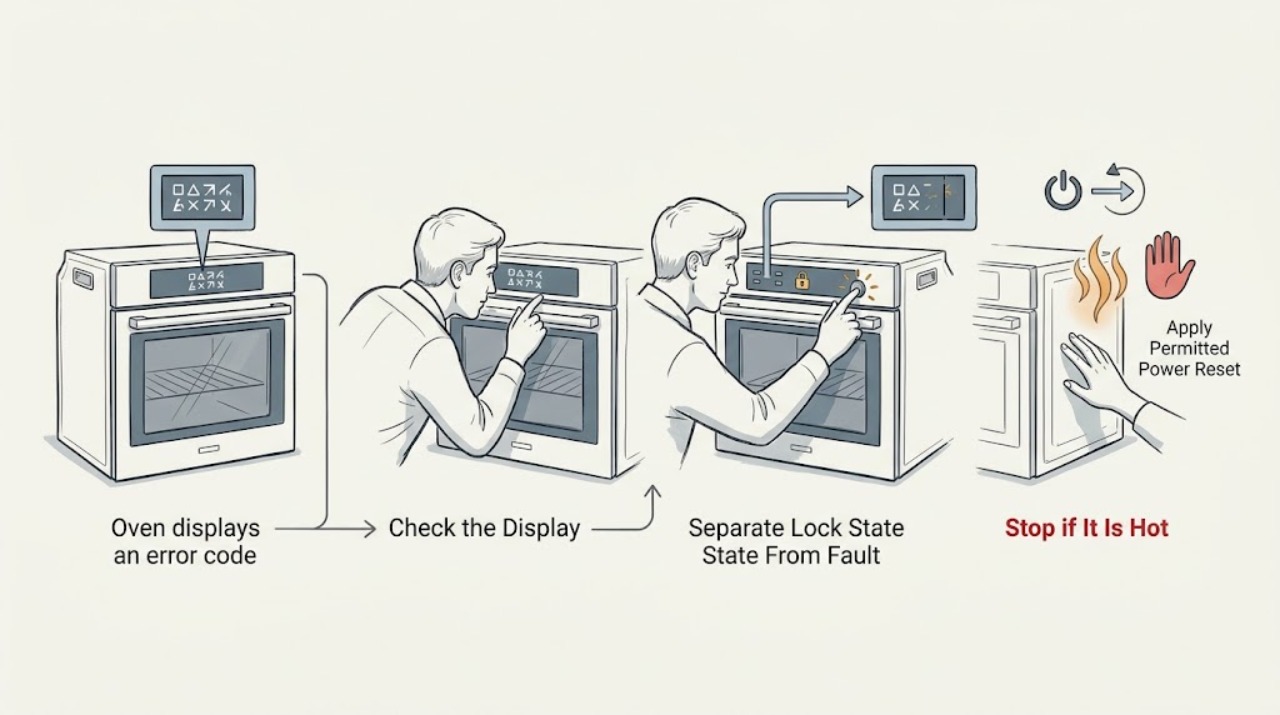
Work through in order
Diagnostic checks
Use only checks that match the exact appliance or system and its official guide.
-
Check 1
Without opening the oven or touching hot surfaces, photograph or write down the full display exactly as it appears and note the Frigidaire model number from the rating label or paperwork, the selected mode, door state, and whether the control is beeping.
Expected result: Record whether the display shows a letter-number code, a dash or lock indication, a repeated code, a blank or flashing display, and whether the oven was hot, preheating, self-cleaning, or idle when it appeared.
Next step: Use the exact model's owner manual and the Frigidaire error-code guide to match the display before changing settings or disconnecting power. Keep the photo for service if the code disappears.
Stop if: Stop using the oven for smoke, sparks, burning odor, a tripped breaker, visible damage, uncontrolled heating, or a door that is dangerously hot or cannot be handled safely.
Why this matters
Why: The code and context determine which Frigidaire guide applies. A dash or lock state may be a control setting, while a recurring letter-number code may be a fault; a generic description such as error is not enough to choose a part or reset procedure.
-
Check 2
If the display is a dash or the controls and door are locked, use only the unlock or lock-cancel control sequence shown for the exact Frigidaire model; do not pull on the door or insert tools around the latch.
Expected result: Note whether the lock indication clears and normal controls return, whether the door releases normally, or whether the dash/lock state remains or is accompanied by F90, F91, F92, F93, or F94.
Next step: If the door does not release with the model-approved sequence, leave it closed and arrange service with the exact display and model. Do not attempt to defeat the lock.
Stop if: Do not force, pry, remove, or bypass the door lock, and do not run self-clean when the door does not lock or unlock as the manual requires.
Why this matters
Why: A cleared lock state supports a control setting rather than a failed replacement part. A persistent lock state or a door-lock code points toward the lock/control path and may keep cooking functions unavailable until service.
-
Check 3
Only when the exact Frigidaire error guidance permits a reset and there is no overheating, smoke, odor, or other hazard, turn the oven off and disconnect power by the manufacturer-described method; restore power once and observe the display without opening the appliance.
Expected result: Record whether the display returns to normal, the same code returns immediately, a different code appears, the code returns only when a mode starts, or the oven remains locked or inoperative.
Next step: Follow the exact manual if it provides a next observation; otherwise keep the oven off and arrange service with the before-and-after codes and reset method. Do not repeat resets as a substitute for diagnosis.
Stop if: Do not reset a hot or overheating oven, repeatedly cycle the breaker, remove a panel, or touch wiring, sensors, heating elements, or the door-lock assembly.
Why this matters
Why: A cleared one-time code may have been a temporary control event, but a returned code is evidence that the underlying condition remains. A different code or a persistent lock changes the diagnostic path and should not be treated as a successful repair.
-
Check 4
Match the exact display to the official Frigidaire code family without assuming that an unlisted or similar-looking code has the same meaning; use the model manual for any code not covered by the general guide.
Expected result: Classify the display, when applicable, as F10 thermal runaway, F30 open probe, F90-F94 door-lock issue, F1 keypad, F12 or F13 control issue, a communication code, or an unrecognized code.
Next step: Use the exact model manual for the matched category and provide the code to a technician if it persists. Treat an unrecognized code as a service case rather than trying another category's reset.
Stop if: Do not bypass a lock, substitute a sensor, replace a control board, or test live circuits from a code label alone.
Why this matters
Why: F10 changes the immediate action to cool-down and service if persistent; F30 points to an open-probe category; F90-F94 point to door-lock behavior; keypad, identification, EEPROM, or communication codes point to control diagnosis. The family narrows the next safe step but does not prove which part failed.
-
Check 5
From a safe position with the oven off or operating only as the exact manual permits, observe whether the door closes normally, the display responds, the oven heats as selected, the temperature is uncontrolled, or the code returns when a specific mode starts; do not open control or rear panels.
Expected result: Record normal or abnormal door locking, no heat, overheating, uneven heating, a fan or element that does not behave as expected, a breaker trip, or a code that is tied to self-clean, probe use, or another mode.
Next step: Keep the appliance off for overheating, repeated breaker trips, or unsafe door behavior. For other persistent codes, arrange qualified service and supply the mode and symptom pattern.
Stop if: Do not continue cooking through an overheating or recurring fault, operate with a damaged door or seal, or probe heating elements, sensors, or wiring.
Why this matters
Why: A code plus abnormal heating, lock behavior, or power interruption may involve more than the keypad display. Frigidaire identifies high temperature as a safety alert and notes that models vary, so a mode-specific symptom should be diagnosed from the exact manual or by service.
-
Check 6
Prepare the model number, complete code, display photo, selected mode, temperature or lock behavior, reset result, and safety symptoms for Frigidaire or qualified appliance service; do not order a part until the code is confirmed against the model.
Expected result: Confirm whether the code is recurring, whether the oven is usable without the affected mode, whether the door is locked, and whether the appliance has smoke, odor, sparks, abnormal heat, or a breaker event.
Next step: Leave the oven off for a safety symptom or a recurring unresolved code and arrange qualified service. Keep the exact code visible or recorded and do not clear it before documenting it.
Stop if: Do not dismantle the control panel, door, lock, sensor, or heating circuit, and do not continue to use an appliance that is overheating, smoking, sparking, or repeatedly tripping power.
Why this matters
Why: A complete record helps separate a one-time display event from a repeatable control, sensor, door-lock, or thermal fault. The same generic code family can require different model-specific parts or procedures, so a part name is not a diagnosis.
Use your observations
Decision map
Find the observation that best matches what you see, then follow the next safe action.
-
PATH 01Safety boundary
What you see
The display is a dash or lock indication, the model-approved lock-cancel or unlock sequence clears it, the door releases normally, and no letter-number code returns.
Do this next
Use the oven normally according to the exact manual and record the event. If the lock state returns without being selected or the door later fails to release, arrange service.
Why this path and its safety boundary
Why it matters: A control lock state is more likely than a failed oven part. Frigidaire identifies the dash as a lock state on applicable ovens, wall ovens, and ranges.
Safety stop: Do not pry the door, bypass the latch, or run self-clean if the lock does not operate normally.
-
PATH 02Safety boundary
What you see
The exact display is F10 on a standard range or wall oven, the cavity or appliance is unusually hot, and the code clears only after the oven is turned off and allowed to cool or returns after a permitted reset.
Do this next
Keep the oven off until it is cool. If F10 returns or heating was uncontrolled, arrange service and provide the code and conditions that preceded it.
Why this path and its safety boundary
Why it matters: Frigidaire defines F10 as a thermal-runaway or higher-than-normal-temperature safety alert. It is not a reason to replace a sensor or control board without diagnosis.
Safety stop: Do not restart an overheated oven, repeatedly reset it, open the control area, or continue cooking to see whether the code disappears.
-
PATH 03Safety boundary
What you see
The exact display is F30 or another probe-related code, and the model manual identifies that code as an open or shorted probe condition.
Do this next
Stop at the model-approved reset or observation and arrange qualified service if the code returns. Do not pull the probe, open panels, or substitute a sensor without model-specific diagnosis.
Why this path and its safety boundary
Why it matters: The temperature-probe circuit is a possible diagnostic path, but the code does not establish whether the sensor, wiring, connector, or control is at fault.
Safety stop: Do not test live circuits, bridge a probe connection, or continue using the oven when temperature control is abnormal.
-
PATH 04Safety boundary
What you see
The display is F90, F91, F92, F93, or F94, or the door remains locked after the model-approved unlock sequence.
Do this next
Leave the door and latch undisturbed, record the code, and arrange qualified service if the lock does not recover through the exact manual procedure.
Why this path and its safety boundary
Why it matters: Frigidaire classifies these codes as a door-lock issue; cooking functions may remain unavailable while the controls or door are locked.
Safety stop: Do not pull the door open, insert tools, remove lock hardware, or run self-clean with an unresolved lock condition.
-
PATH 05Safety boundary
What you see
The display identifies a keypad, micro-identification, EEPROM, or communication category, or an unrecognized code remains after the permitted model reset.
Do this next
Keep the exact code and model information and arrange qualified service. Avoid ordering a control board until the technician confirms the diagnosis and compatibility.
Why this path and its safety boundary
Why it matters: The control or communication path may be involved, but code labels cannot distinguish a board, keypad, connector, wiring, or software condition without model-specific service information.
Safety stop: Do not remove the console, unplug internal connectors, test live circuits, or repeatedly cycle power to suppress the code.
-
PATH 06Safety boundary
What you see
Any code persists or returns with smoke, burning odor, sparks, a breaker trip, uncontrolled or excessive heating, damaged wiring, or a door that is unsafe to open.
Do this next
Turn the oven off, keep people away from the hot or damaged appliance, and arrange qualified emergency or appliance service as appropriate. Do not reuse it until cleared.
Why this path and its safety boundary
Why it matters: The display is accompanied by an immediate appliance-safety symptom, so resetting or identifying a replacement part is not an adequate next step.
Safety stop: Do not search inside the appliance, touch wiring, open the door against resistance, or continue cooking through a safety warning.
Helpful context
Understand the symptom
The exact display matters more than the word error
Frigidaire uses different code families for ovens, wall ovens, and ranges, and the same-looking display may have a different meaning by model. Write the code exactly as shown, including a dash, letters, numbers, or a code that flashes with a tone. Also record whether the oven was preheating, cooking, self-cleaning, or idle and whether the door is locked. Frigidaire explicitly directs owners to the use-and-care guide because controls and procedures vary by model.
Reset only when the code's guidance allows it
Frigidaire's general oven guide describes a brief power reset for many displayed codes, but that is not a universal repair and should not be used to keep an overheated or unsafe oven running. For a thermal-runaway indication, turn the oven off and let it cool before any further use. If a code returns after the permitted reset, treat that recurrence as evidence for service rather than repeating power cycles or replacing a part by guesswork.
A code can point to a lock, sensor, or control path without proving the part
A door-lock code may prevent cooking functions, an open-probe code may relate to the temperature-probe circuit, and a keypad or communication code can involve the controls. These are diagnostic categories, not permission to remove a panel. Before ordering a control board, temperature sensor, or door lock, confirm the model and have the code interpreted by the manual or a qualified technician. Stop for smoke, sparks, a burning smell, abnormal heat, or a breaker that trips.
Safety boundary
Stop conditions
- Record the complete code and model before resetting or clearing the display; do not assume a similar-looking code has the same meaning.
- Do not open the control panel, remove the door-lock assembly, pull a temperature probe, test live wiring, or replace a board or sensor from the code alone.
- Do not force or bypass a locked oven door, and do not run self-clean when the door does not lock or unlock as the exact manual requires.
- For a temperature-related F10 or any uncontrolled heating, turn the oven off and let it cool; do not restart it if the code returns.
- Stop for smoke, sparks, burning odor, a tripped breaker, damaged wiring, an unsafe door, or abnormal heat, and leave the appliance off for qualified service.
- If a permitted reset does not clear the code or the code returns, arrange Frigidaire or qualified appliance service rather than repeating resets.
Only after diagnosis
Potential parts
- oven control board
Consider this category only when the exact code and model-specific professional diagnosis identify a failed control or communication assembly after other causes are checked.
Confirm the exact Frigidaire model, control revision, connectors, and technician-diagnosed fit before ordering or installing. - oven temperature sensor
Consider this category only when a qualified diagnosis confirms a probe or temperature-sensing fault; an error display alone does not distinguish the sensor from wiring or control circuitry.
Confirm the exact Frigidaire model, sensor design, connector, and safe installation procedure before ordering or installing. - oven door lock
Consider this category only when the exact model shows a persistent door-lock condition and a qualified diagnosis confirms the lock assembly rather than the control, latch alignment, or wiring.
Confirm the exact Frigidaire model, door-lock configuration, and technician-diagnosed fit before ordering; never defeat the lock for testing.
When checks do not resolve it
Need a professional?
Arrange Frigidaire or qualified appliance service when an error code returns after the exact model-approved reset, the code is not covered by the available manual, the door remains locked, heating is uncontrolled or uneven, a probe or control fault is indicated, the oven is inoperative, or any diagnosis would require panel, latch, sensor, wiring, or heating-circuit access. Treat smoke, sparks, burning odor, a tripped breaker, and uncontrolled heat as immediate stop conditions.
Safety scope: This article supports recording the display, using model-directed controls, and making ordinary-access observations only. A qualified technician must handle control boards, wiring, temperature probes, door locks, heating circuits, live testing, and any overheating or combustion-related fault.
Common questions
FAQ
What should I do first when my Frigidaire oven displays an error code?
Record the complete code, model, selected mode, door state, and whether the oven is hot or beeping. Match it to the exact Frigidaire Owner's Manual and official code guide before resetting or ordering a part.
Can I reset a Frigidaire oven error code?
Frigidaire describes a brief power reset for some oven codes, but it is model- and code-dependent. Do not reset an overheated or unsafe oven; if the code returns, keep the appliance off and arrange service rather than repeating resets.
What does F10 mean on a Frigidaire oven?
For standard range and wall ovens, Frigidaire identifies F10 as a thermal-runaway or higher-than-normal-temperature safety alert. Turn the oven off and let it cool; if the code returns or heating was uncontrolled, request service instead of replacing a part from the code alone.
What does F30 mean on a Frigidaire oven?
Frigidaire's oven guide labels F30 as an open-probe category. The display does not distinguish the probe from its wiring or control circuit, so follow the exact manual and arrange service if the code returns; do not pull the probe or open panels.
What do Frigidaire F90, F91, F92, F93, and F94 mean?
Frigidaire classifies F90 through F94 as door-lock issues. Use only the exact model's unlock sequence, never force the door, and arrange service if the lock or code remains unresolved.
What does a dash on a Frigidaire oven display mean?
On applicable Frigidaire ovens, wall ovens, and ranges, a dash can indicate a lock state rather than a failed part. Use the model-approved lock-cancel sequence; if the door remains locked or a letter-number code appears, stop and request service.
When should I call for Frigidaire oven error-code service?
Call when the code returns after the permitted model reset, the code is unrecognized, the door will not unlock, heating is uncontrolled or uneven, the oven is inoperative, or there is smoke, burning odor, sparks, or a tripped breaker. Have the model and code photo ready.
Read the exact guide
Official sources
- Ranges - Error Code GuideFrigidaire · Frigidaire support guide for electric ranges; code coverage and controls vary by appliance model, so use the exact manual for a particular oven or range.
- Oven - Is Not Hot EnoughFrigidaire · Frigidaire support guidance for electric range and wall ovens that are not hot enough; it supports adjacent heating observations when an error code affects operation.
- How do I use my display or controls?Frigidaire · Frigidaire support guidance covering ranges, cooktops, and ovens; the owner manual for the exact model controls the displayed-code procedure.
- Oven - Is too HotFrigidaire · Frigidaire support guidance for range ovens and wall ovens with overheating or temperature symptoms; exact model instructions control calibration and use.
- Oven Error Codes and Alarms GuideFrigidaire · Frigidaire owner-support guidance for ovens and related range or wall-oven code families; exact model manuals control code meaning and reset steps.
- What does it mean if my display shows a – (dash)?Frigidaire · Frigidaire support guidance for ovens, wall ovens, and ranges where a dash indicates the cooktop or oven lock state; exact controls vary by model.
Community feedback
Share a repair observation
Share a plain-text repair observation. Accepted observations are published automatically; this page may take a moment to update.