
On this page
Start here
Quick answer
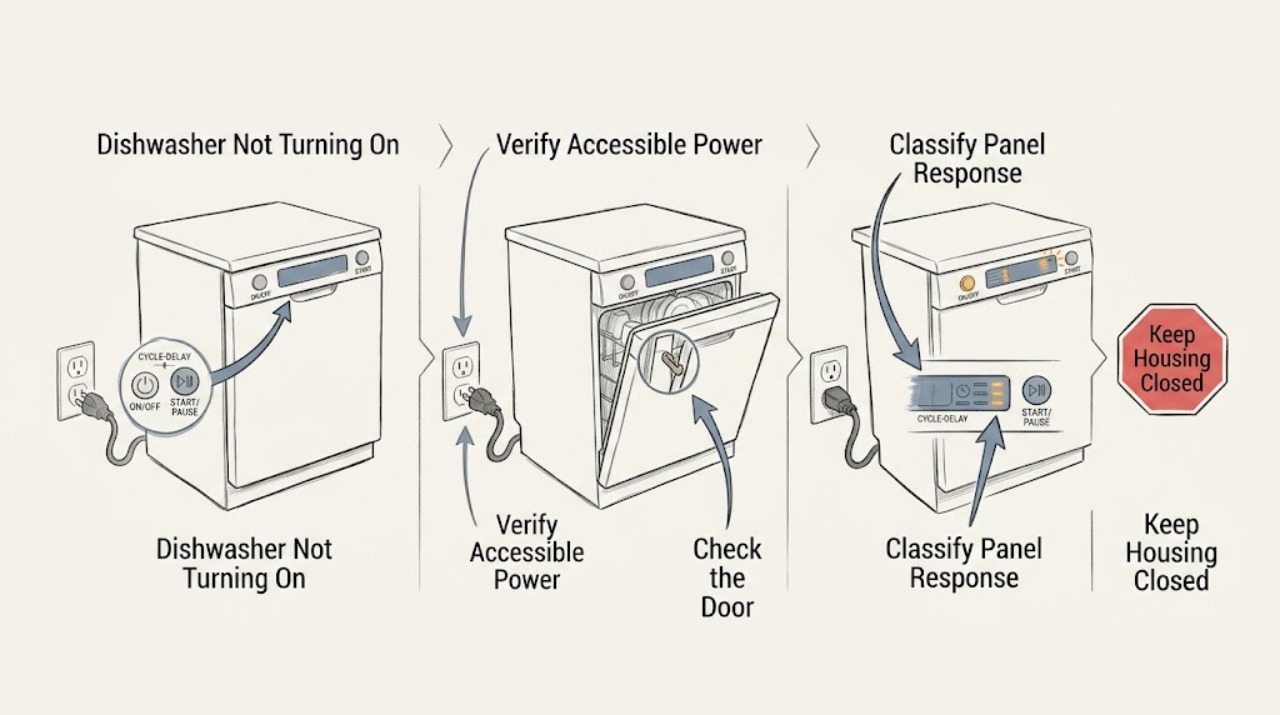
For an Ariston dishwasher that will not turn on, first separate a completely dark control panel from a panel that wakes but will not start a cycle. From a dry, accessible position, confirm the plug is fully inserted and that the household circuit has not lost power; do not open an electrical panel. If the controls respond, make sure the door and racks are fully closed, cancel any Start Delay, select a programme, and press START/PAUSE using the exact model instructions. Some Ariston manuals require the door to be closed within four seconds of START/PAUSE, while other models use a different panel sequence. If the appliance remains unresponsive after the model-appropriate one-minute power reset, shows a recurring fault, trips the breaker, smells hot, or has damaged wiring or a leak, leave it off and arrange qualified service rather than testing a latch, board, or live circuit.
Work through in order
Diagnostic checks
Use only checks that match the exact appliance or system and its official guide.
-
Check 1
From a dry, accessible position, press the dishwasher's ON/OFF control once and note whether any indicator, display, or button light appears. Record whether the symptom is a completely dark panel, a panel that wakes and then goes dark, or a panel that stays lit but ignores START/PAUSE.
Expected result: No light or display appears; the panel wakes normally; or the panel lights but does not accept a programme or start command.
Next step: For a dark panel, continue with the accessible plug and household-power check. For a lit panel, skip repeated power cycling and continue with the door and start-sequence checks.
Stop if: Do not remove an electrical cover, probe the outlet or wiring, or continue if there is smoke, a burning smell, water near electrical parts, damaged insulation, or a breaker that trips again.
Why this matters
Why: A completely dark panel makes an upstream power connection, household circuit, internal power supply, or control issue more likely. A lit panel shifts attention to door recognition, delay, programme selection, or a control state; the observation does not identify an internal part.
-
Check 2
If the panel is completely dark, check that the plug is fully seated in its accessible socket and that the household circuit has not lost power. Do not pull the dishwasher out, open a breaker panel, or work on fixed wiring; use only the normal user-accessible indication of a tripped circuit and follow local electrical-safety practice.
Expected result: The plug was loose, the household circuit is off, power is restored but the dishwasher remains dark, or the accessible connection and circuit appear normal.
Next step: If a loose plug or lost household power explains the dark panel, restore only the normal accessible connection or household supply and try the ON/OFF control once. If the breaker trips again, leave the dishwasher off and arrange electrical or appliance service.
Stop if: If the panel remains dark with a normal accessible connection, stop at this boundary and arrange qualified service; do not infer a compatible board, fuse, or cord from the symptom.
Why this matters
Why: Ariston manuals list an incorrectly plugged appliance and a household power outage or circuit-fuse condition among no-start causes. If accessible power is restored and the panel returns, the original symptom was upstream of the controls; if power appears normal but the panel stays dark, an internal supply or control fault is more likely.
-
Check 3
With the controls off, inspect the visible door edge, latch path, and rack positions. Make sure no dish, utensil, packing material, or rack prevents the door from reaching its normal closed position; then close the door normally without forcing it.
Expected result: The door is held open by a load or rack, it closes with the normal click, the door resists closure or sits misaligned, or the door closes but the panel still reports a door/start condition.
Next step: Remove only the visible loading obstruction and retry the model's normal start sequence once. If the door will not align or close normally, stop and arrange service rather than adjusting hinges or bypassing the interlock.
Stop if: Do not force a misaligned door, tape or defeat the latch, remove the door, or access hidden switch wiring.
Why this matters
Why: Ariston manuals list an unclosed door and, on one model, racks not fitted to the end or an ActiveDry pin not pulled in as reasons the cycle will not start. A door that closes normally but is not recognized can involve the latch or interlock, which cannot be confirmed by appearance alone.
-
Check 4
Using the exact model manual, confirm that a wash programme is selected, Start Delay is not active, and START/PAUSE—not a different information, option, or delay control—has been pressed. On models whose manual specifies it, press START/PAUSE and close the door within four seconds.
Expected result: Start Delay is displayed or lit; the machine has no selected programme; START/PAUSE was not pressed; the door was not closed within the model's stated interval; or the correct start sequence was completed with no response.
Next step: Clear or avoid the documented delay, select a simple programme, and perform the exact start sequence once. If the correct sequence still produces no start or a door message returns, continue to the model-specific reset and escalation step.
Stop if: Do not guess undocumented button combinations or repeatedly start a cycle when there is a leak, electrical warning, or abnormal noise.
Why this matters
Why: Ariston's LFP 5P31 manual says Start Delay postpones starting and that the door must be closed within four seconds after the start command. The LIC 3C26 C manual similarly describes a start sequence interrupted by door opening. These are control-state or door-sequence explanations, not proof of a failed motor or control board.
-
Check 5
If the plug, accessible household power, door, programme, and start sequence are normal, use only the exact Ariston manual's documented off/on reset. One opened Ariston guide specifies switching off, waiting about one minute, and switching back on; another model's response after a power outage differs, so do not transfer timing or button steps between models. Record any display, flashing LED pattern, or fault code before contacting service.
Expected result: The dishwasher returns to normal operation; it remains unresponsive; a numbered or lettered code/rapid LED pattern returns; the breaker trips; or a leak, hot smell, or damaged wiring is present.
Next step: If the symptom persists or a fault returns, leave the dishwasher off and contact authorized Ariston after-sales service with the full model/identification-plate code, exact display or LED pattern, power and door observations, and steps already completed.
Stop if: Do not open panels, test live voltage, bypass a door switch, replace a fuse or board, or keep resetting a breaker or appliance to force operation.
Why this matters
Why: A successful model-approved reset supports a temporary control state or interrupted cycle, but it does not prove the underlying fault is repaired. A persistent no-response or recurring code makes a door interlock, power-supply, wiring, or control fault more likely; safety symptoms require an immediate stop.
Use your observations
Decision map
Find the observation that best matches what you see, then follow the next safe action.
-
PATH 01Next step
What you see
The panel stays completely dark after ON/OFF, while the accessible plug and household power appear normal.
Do this next
Leave the dishwasher off and arrange qualified appliance/electrical service. Provide the model from the identification plate and do not open the cabinet.
-
PATH 02Next step
What you see
The panel lights, but the cycle does not begin; a rack/load prevents normal closure, a door message appears, or the model requires START/PAUSE followed by closing within four seconds.
Do this next
Remove only visible loading obstructions and perform the exact model start sequence once. Stop and request service for misalignment, resistance, persistent door messages, or hidden switch concerns.
-
PATH 03Next step
What you see
The panel is active and shows Start Delay, a selected programme was not started, or the machine stopped after a door opening or power interruption without an internal fault indication.
Do this next
Use the exact manual to clear or wait through the delay, select a programme, and press START/PAUSE. If the correct sequence fails, use only the documented reset and then escalate.
-
PATH 04Next step
What you see
The no-start symptom persists after accessible power, door, programme, and model-approved reset checks, or a fault code/rapid LED pattern, repeated breaker trip, leak, hot smell, or damaged wiring is present.
Do this next
Stop using the dishwasher and arrange authorized Ariston or qualified appliance service. Record the exact code/LED pattern and identification-plate information; do not perform electrical or interlock tests.
Helpful context
Understand the symptom
A dark panel is a different problem from a cycle that will not begin
If no indicator or display appears after the ON/OFF control is pressed, start with the accessible plug and household-power checks. If the panel wakes but the cycle does not begin, the dishwasher has a different decision path: door closure, Start Delay, programme selection, and START/PAUSE timing become more useful observations. Ariston's opened manuals describe both patterns, but button labels and automatic behavior vary across models.
Door sensing is part of the start sequence
An Ariston dishwasher can appear not to turn on when it is powered but does not accept the start command because the door is not recognized as closed. Check only the visible door, rack, and latch path. One opened Ariston manual calls for pressing START/PAUSE and closing the door within four seconds; another lists an unclosed door or active Start Delay separately. Use the manual for the exact model rather than forcing the door or bypassing its interlock.
Keep power-reset and component work within their boundaries
A model-specific off/on reset can clear a temporary control state, but it cannot prove that the outlet, door interlock, wiring, or control board is healthy. Ariston directs owners to authorized after-sales service for a persistent technical defect and asks them to provide the fault shown and the codes on the identification plate. Do not remove panels, defeat a door switch, make live measurements, or replace a part from a no-start symptom alone.
Only after diagnosis
Potential parts
- door latch or door-closure interlock
Consider this category only if the door closes normally yet the exact model repeatedly reports an open door or refuses the documented start sequence after visible obstructions are removed.
Confirm the complete dishwasher model and the manufacturer's fit information before ordering; appearance alone does not establish compatibility or prove the latch is faulty. - dishwasher power-supply or control component
Consider internal power or control parts only after an authorized technician confirms normal household power but a persistent dark panel, recurring no-response condition, or model-specific fault.
Do not select a board, fuse, cord, or control part from the symptom alone; use the complete model and verified service diagnosis.
When checks do not resolve it
Need a professional?
Stop and arrange service for a dark panel with normal accessible power, a door that will not close or remains unrecognized, a recurring fault code or rapid LED pattern, no response after the exact model reset, smoke, burning or hot odor, water near electrical parts, damaged wiring, a leak, or any breaker that trips again.
Common questions
FAQ
Why is my Ariston dishwasher completely dead with no lights?
First check only the accessible plug and whether the household circuit has power. Ariston manuals list an incorrectly plugged appliance and a power outage or circuit-fuse condition among no-start causes. If the connection and household power are normal but the panel stays dark, leave the dishwasher off and arrange service instead of opening the cabinet.
Why does my Ariston dishwasher light up but not start?
Check that the racks and door reach their normal closed position, that Start Delay is not active, a programme is selected, and START/PAUSE is pressed using the exact model sequence. Some Ariston manuals require the door to be closed within four seconds after the start command. A persistent door message or no-start condition needs service, not an interlock bypass.
Can a power outage make an Ariston dishwasher appear not to turn on?
Yes. The opened Ariston manuals differ by model: one says the dishwasher will not restart automatically when power returns and describes pressing START/PAUSE and closing the door within four seconds, while another directs an off/on reset after an interruption. Follow the exact manual for your model rather than transferring button timings between panels.
Should I replace the Ariston dishwasher control board if it will not turn on?
Not from this symptom alone. A dark panel can involve the household supply, plug, internal power path, wiring, or control; a lit panel can involve the door interlock or start state. Have the model-specific fault confirmed by qualified service before considering any part, and verify fitment against the complete identification-plate model.
Read the exact guide
Official sources
- DAILY REFERENCE GUIDE — LIC 3C26 C 60HZAriston · Official model manual used for plug/power, door closure, START/PAUSE timing, one-minute reset, fault indicators, and authorized after-sales guidance; other Ariston models may use different controls.
- INSTRUCTION FOR USE — LFP 5P31 WLT X 60HZAriston · Official model manual used for ON/OFF, Start Delay, door closure, programme start, power-fuse, and service-boundary examples; exact model instructions take precedence.
- DAILY REFERENCE GUIDE — LSFE 1B19 SAriston · Official model manual used to show a different control layout and power-interruption/start behavior; it is not a universal sequence for every Ariston dishwasher.
Community feedback
Share a repair observation
Share a plain-text repair observation. Accepted observations are published automatically; this page may take a moment to update.