
On this page
Start here
Quick answer
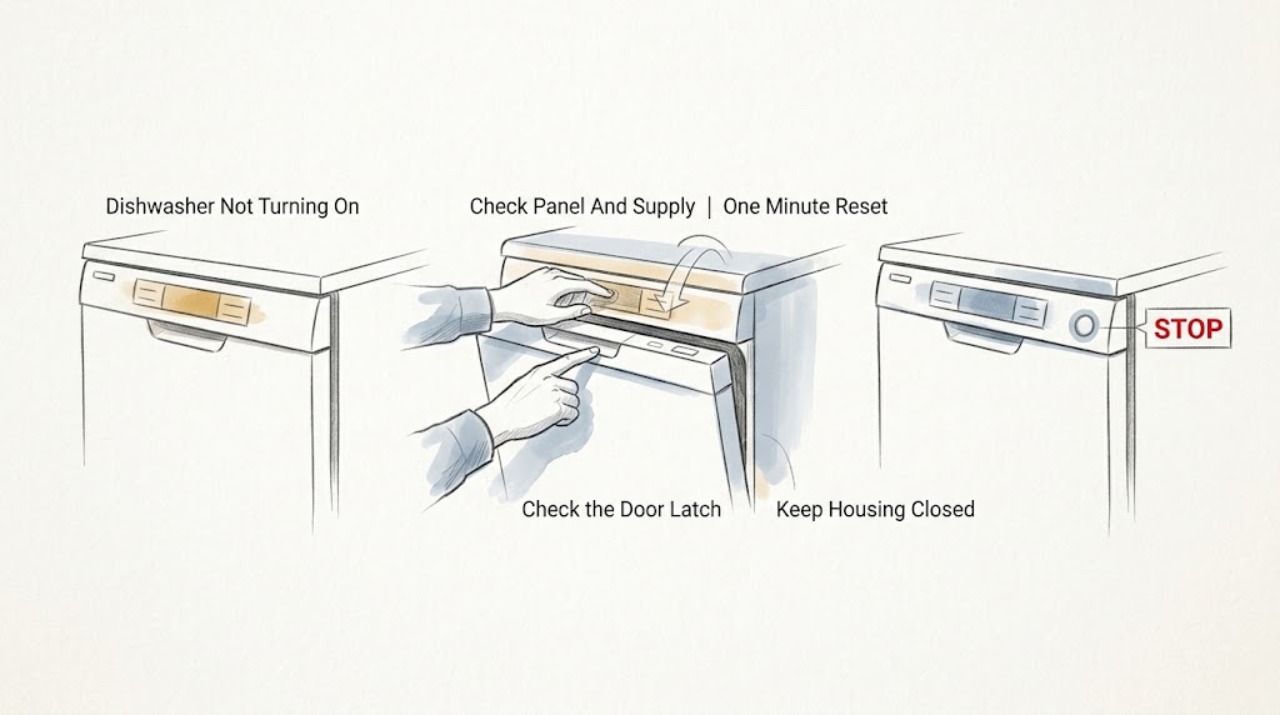
First separate a dishwasher with no lights from one whose display works but will not begin a cycle. AEG says a completely dark control panel usually calls for an external supply check: confirm the plug and socket, check the breaker or RCD, and make one safe one-minute wall-switch or breaker reset. If the panel has power, select a program, close the door fully until the latch engages, and check for a delayed start or a previous cycle that needs the model's reset command. A demonstration mode can also show controls without starting a wash. If the dishwasher remains dead, the door will not latch, a breaker trips again, or the same condition returns, switch it off, disconnect it when safe, and arrange qualified AEG service. Do not remove panels or perform live electrical tests.
Before you begin
Safety first
- This article covers external supply observation, one safe reset, program and door-state checks, model-directed state cancellation, and service handoff. It does not authorize panel removal, live electrical work, hardwired-supply work, latch bypass, cabinet bending, or internal component testing.
Work through in order
Diagnostic checks
Use only checks that match the exact appliance or system and its official guide.
-
Check 1
With the dishwasher dry and not running, note whether any display or control-panel light appears. Confirm from outside that the plug is seated and test the socket with a small known-working appliance only if the outlet is dry, cool, and safe. Check whether the breaker or RCD has operated; do not open a fuse box or receptacle.
Expected result: The panel is completely dark, the socket has no power, a breaker or RCD has operated, or the dishwasher has normal power but still does not respond.
Next step: Restore only a safe plug or ordinary switched-off breaker condition permitted by the installation. If protection operates again, leave the dishwasher disconnected and call a qualified electrician or AEG service; if the panel works, continue to the cycle-start checks.
Stop if: Stop for a hot, wet, damaged, or arcing outlet; a damaged cord or plug; smoke; a burning smell; or a breaker or RCD that trips again.
Why this matters
Why: AEG treats absent panel lights as a likely supply question and identifies the plug, socket, breaker or fuse, and appliance switch as first external checks. A normal supply with a dead dishwasher leaves an appliance-side fault possible but does not identify a component.
-
Check 2
If there is no sign of damage, water, smoke, or a recurring trip, switch the dishwasher off at its normal wall switch or the accessible circuit control for one minute, then restore power once. Do not repeatedly cycle a hardwired appliance or remove a panel to reach the supply.
Expected result: The display returns and responds normally, the dishwasher remains completely dark, or the breaker or RCD operates during or after the reset.
Next step: If the dishwasher recovers, try only the normal program-selection and door-closure sequence once. If it remains dead or protection operates again, leave it off and arrange service.
Stop if: Stop immediately if resetting causes smoke, smell, sparking, moisture at electrical parts, or another breaker or RCD operation.
Why this matters
Why: AEG documents a one-minute off/on reset for a no-light condition. A recovery suggests a transient control or supply state, while a persistent dark panel or recurring trip is not resolved by the reset.
-
Check 3
When the controls have power, select a normal program before closing the door. Close the door fully and listen or feel for the ordinary latch engagement; do not slam it, force it, bend the cabinet, or bypass the latch.
Expected result: A cycle begins after the door clicks, the door closes but no cycle begins, or the door cannot close or latch normally.
Next step: If the door latches and the cycle starts, monitor the first operation. If it latches but will not start, check the delay or previous-program state. If it cannot latch, stop and arrange service or installation inspection.
Stop if: Stop if the door, hinge, latch, cabinet, or seal is damaged, the machine moves in its opening, or starting would require forcing or bypassing a safety interlock.
Why this matters
Why: AEG says a program must be selected and the door must be fully closed before starting. A latch that does not engage or a door that is visibly misaligned makes door detection or installation alignment more likely than a generic no-power diagnosis.
-
Check 4
If the dishwasher has power but does not begin, look for a delayed-start indicator, a prior program, or a demonstration-mode behavior. Use the exact AEG manual's RESET or CANCEL command for the control layout; do not guess a button combination or repeatedly press Start.
Expected result: Canceling the delay or previous program allows a cycle to start, the display runs a short demonstration sequence and then stops, or the no-start condition remains after the model-specific reset.
Next step: If a documented reset clears the state, select the intended program and close the door once. If the dishwasher still will not start, record the display and arrange AEG service rather than changing hidden settings.
Stop if: Stop if the manual is unavailable for the control layout, an error remains, the machine fills or leaks unexpectedly, or any internal access would be needed.
Why this matters
Why: AEG documents delayed start, uncleared program state, and demonstration mode as reasons that controls may appear responsive without a wash beginning. A persistent no-start after those documented state checks is not proof of a particular failed part.
-
Check 5
For an unresolved fault, record the exact model, product number or serial label if safely visible, whether the panel is dark, the socket and protection result, any display code or indicator pattern, door-latch behavior, reset result, and whether the dishwasher is integrated or freestanding. Do not run repeated cycles to reproduce the issue.
Expected result: The dishwasher works normally after a documented low-risk correction, the same symptom returns, or the cause remains unknown.
Next step: Use the dishwasher only if it completes a normal operation without electrical or water hazards. Otherwise switch it off, disconnect it when safe, and provide the recorded details to an AEG Authorized Service provider.
Stop if: Stop for smoke, burning, water at electrical parts, repeated protection trips, a damaged cord, a leaking or unstable appliance, or any need to remove covers or test wiring.
Why this matters
Why: The external checks narrow the symptom but do not establish a failed inlet valve, pump, heater, latch, control, or wiring fault. A recurring or unresolved no-start condition needs model-specific diagnosis.
Use your observations
Decision map
Find the observation that best matches what you see, then follow the next safe action.
-
PATH 01Safety boundary
What you see
The control panel is completely dark, the socket has no confirmed power, or the breaker or RCD has operated.
Do this next
Check only the external plug, socket, and accessible protection state. Make one safe reset if there is no hazard; if power is absent or protection operates again, leave the dishwasher disconnected and obtain qualified help.
Why this path and its safety boundary
Why it matters: The supply path is more likely than a program-selection fault, but the public symptom does not identify whether the issue is the installation, switch, cord, or appliance internals.
Safety stop: Do not open a fuse box or dishwasher, perform live testing, or continue after smell, smoke, heat, moisture, or arcing.
-
PATH 02Safety boundary
What you see
The display works, but the door cannot close and latch normally or there is no ordinary latch engagement.
Do this next
Observe the door, seal, latch, and cabinet from outside without forcing them. If the door still cannot latch, stop and arrange service or installation inspection.
Why this path and its safety boundary
Why it matters: Door detection or alignment is more likely than a no-power fault. AEG notes that closure and lock alignment affect cycle start, while the exact adjustment depends on installation and model.
Safety stop: Do not bend the cabinet, bypass the interlock, remove the latch, or operate with a damaged seal or unstable appliance.
-
PATH 03Safety boundary
What you see
The controls respond, the door latches, but a delayed-start indicator, prior program, or demonstration-mode sequence prevents a wash from beginning.
Do this next
Follow the exact AEG manual to cancel the delay or previous program, exit demonstration mode if applicable, select a program, and close the door once. If no cycle begins, arrange service.
Why this path and its safety boundary
Why it matters: The appliance may be in a documented control state rather than suffering an established hardware failure. The exact reset command is model-specific.
Safety stop: Do not guess hidden service settings or repeat start attempts if an error, leak, or abnormal electrical behavior appears.
-
PATH 04Safety boundary
What you see
Supply, one safe reset, door closure, and model-documented state checks do not restore operation; the breaker trips again; or the cause would require internal access.
Do this next
Switch the dishwasher off, disconnect it when safe, preserve the exact model and observations, and contact an AEG Authorized Service provider or qualified electrician as appropriate.
Why this path and its safety boundary
Why it matters: An internal latch, control, wiring, or other component fault remains possible, but no safe generic part diagnosis follows from this complaint.
Safety stop: For smoke, burning smell, exposed wiring, water at electrical parts, or a damaged cord, leave the appliance disconnected and obtain urgent qualified help.
Helpful context
Understand the symptom
No lights and no start are different dishwasher symptoms
If every control-panel light is off, begin with the external electrical supply. If the display or indicators work but a wash does not begin, the decision changes to program selection, door-latch detection, a delayed start, an uncleared prior program, or a model state such as demonstration mode. AEG publishes separate guidance for these two patterns, so do not infer a failed pump or control board from the words 'will not start' alone.
Keep checks outside the energized dishwasher
Only inspect the plug, socket, breaker or RCD, controls, and door closure from the outside. Do not remove an integrated dishwasher, open its panels, probe wiring, bypass a latch, or work on a hardwired supply. If there is smoke, a burning smell, a damaged cord, water at electrical parts, or a breaker that operates again, leave the appliance disconnected and obtain qualified help.
Model controls change the reset step
AEG's public support instructions use different reset combinations for integrated and freestanding controls, and the exact user manual takes precedence. A one-time reset can clear a transient state; it does not prove that an appliance which repeatedly stays off, refuses to latch, or trips protection is repaired. Record the model and the observed pattern for service.
Safety boundary
Stop conditions
- Do not remove panels, open the control area, probe wiring, or perform live electrical tests.
- Do not bypass the door latch or any safety interlock, force the door, bend the cabinet, or operate an unstable or leaking dishwasher.
- Do not repeatedly reset the circuit, use an improvised adapter, or continue after a breaker or RCD operates again.
- Do not keep running cycles to reproduce smoke, burning odor, water at electrical parts, unusual noise, or a recurring no-start.
- Do not order an inlet valve, pump, heater, latch, control, sensor, or other part until the exact model and failed component are confirmed.
When checks do not resolve it
Need a professional?
Contact qualified electrical or AEG service help if the dishwasher remains dark after safe supply checks, a breaker or RCD operates again, the door cannot latch, a model-specific reset does not clear a powered no-start, an error or demonstration state persists, or any diagnosis would require removing panels, moving a hardwired appliance, testing wiring, or bypassing a safety interlock. Leave it disconnected for smoke, burning odor, water at electrical parts, a damaged cord, arcing, or other immediate hazards.
Safety scope: This article covers external supply observation, one safe reset, program and door-state checks, model-directed state cancellation, and service handoff. It does not authorize panel removal, live electrical work, hardwired-supply work, latch bypass, cabinet bending, or internal component testing.
Common questions
FAQ
Why is my AEG dishwasher completely dark?
Check the plug and socket from outside, the breaker or RCD, and the dishwasher's normal power switch. AEG recommends a one-minute off/on reset for a no-light condition. If power is normal but the panel stays dark, or protection operates again, leave the dishwasher disconnected and arrange qualified service.
My AEG dishwasher has power but will not start. What should I check?
Select a program before closing the door and confirm that the door closes fully and latches. Then check for delayed start or an uncleared previous program and use the exact model's RESET or CANCEL command. If the door latches and the dishwasher still will not start, contact AEG service rather than guessing at a part.
Can demonstration mode make an AEG dishwasher look like it will not start?
Yes. AEG's power-on no-start guidance describes demonstration mode as a state in which functions may be shown without a normal wash. Follow the exact model manual to identify or exit that state; if the appliance still will not begin a cycle, arrange service.
When should I stop troubleshooting an AEG dishwasher?
Stop for smoke, a burning smell, arcing, a damaged cord, water at electrical parts, a recurring breaker or RCD trip, a door that will not latch, or any need to remove panels or bypass an interlock. Switch the dishwasher off, disconnect it when safe, and contact qualified help for a persistent no-start.
Read the exact guide
Official sources
- Dishwasher does not switch on, no light on the control panel | AEGAEG · Official AEG support article; exact installation, switch arrangements, and controls vary by model and market.
- User ManualAEG · Official AEG user manual for the opened model family; exact controls, ratings, messages, and procedures vary by model.
- Dishwasher does not switch on, does not start a cycle, does not automatically open the door at the end of a cycle | AEGAEG · Official AEG support article; installation and door-adjustment details depend on the exact dishwasher.
- Dishwasher does not / will not start but the power is on | AEGAEG · Official AEG support article covering integrated and freestanding dishwashers; exact reset combinations vary by control layout.
- Dishwasher's On / Off button does not work | AEGAEG · Official AEG support article; local electrical installations and control layouts vary.
Community feedback
Share a repair observation
Share a plain-text repair observation. Accepted observations are published automatically; this page may take a moment to update.