
On this page
Start here
Quick answer
When a Blomberg dishwasher will not turn on or start, first separate a completely dark control panel from a panel that lights but will not begin a program. With the appliance dry and stopped, check that the power cable is seated, the plug or household fuse has not failed, the On/Off control is selected, and the door closes fully without an obstruction. If the panel lights but the cycle will not begin, verify that a program is selected, the machine is not paused, and the exact model's start control and child-lock procedure are being followed. A closed door and normal power do not prove the latch, control, inlet, or internal wiring is healthy. Do not open the appliance, handle wet electrical parts, replace internal fuses, or bypass the door interlock; if the safe visible checks do not restore operation, arrange Blomberg or qualified appliance service.
Before you begin
Safety first
- This article covers ordinary-access observation only. Do not open the dishwasher or outlet, handle wet electrical parts, perform live voltage testing, replace an internal fuse, bypass the door interlock, loosen a pressurized hose, pull or tip a built-in unit, or keep resetting a protective device.
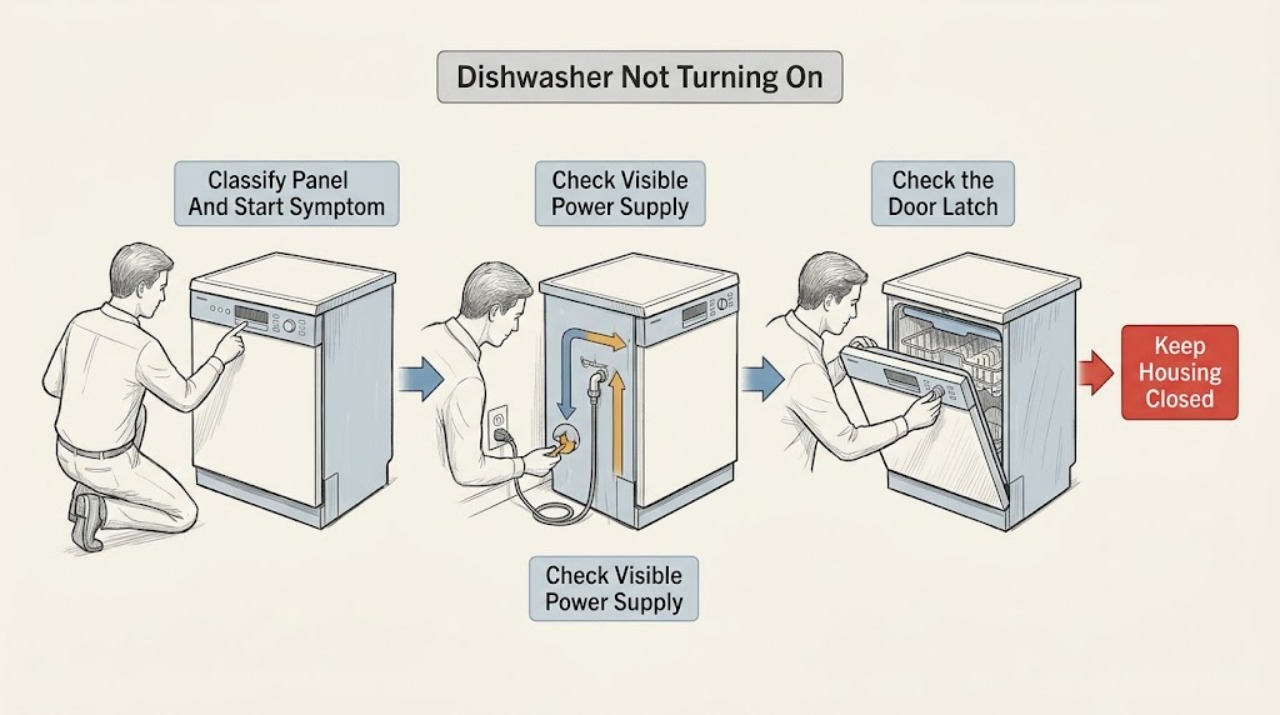
Work through in order
Diagnostic checks
Use only checks that match the exact appliance or system and its official guide.
-
Check 1
With the dishwasher stopped and the floor dry, observe the control panel without pulling the appliance out. Record whether it is completely dark, shows any lights or display, accepts the On/Off control, shows a lock, delay, pause, or fault indication, and whether the problem began after a power interruption or an interrupted cycle.
Expected result: Classify the symptom as no panel response, panel on but no programme start, programme selected but no fill or wash, or an explicit indicator or error state.
Next step: Follow the matching power, door, or programme branch. Stop immediately for smoke, sparking, a burning odor, a hot or damaged cord, water near electrical parts, or repeated protective-device trips.
Why this matters
Why: No panel response keeps the plug, fuse, receptacle, cord, and internal power path in view. A lit panel with no start makes door closure, programme or pause state, child lock, water availability, and the start control more likely than a total supply loss.
-
Check 2
For a dark panel, leave the dishwasher switched off and visually check that the power cable is fully seated in its ordinary-access outlet and that the plug, cord, and accessible outlet area are dry and undamaged. Check the household fuse or breaker indication without opening electrical equipment or performing live testing; do not move a built-in dishwasher.
Expected result: Record whether the plug is loose, the cord or plug is damaged or wet, the outlet appears unpowered, a fuse or breaker is open, or the supply appears normal but the panel remains dark.
Next step: Secure only a plainly loose plug if it can be done dry and safely. Keep the dishwasher unplugged for damage, water exposure, or a repeated trip, and arrange qualified electrical or appliance service; do not keep resetting the protective device.
Stop if: Do not touch wet electrical parts, open the outlet or dishwasher, replace an internal fuse, use an extension cord as a workaround, or perform live voltage testing.
Why this matters
Why: A loose connection or failed household supply can explain a dark panel. A damaged cord, wet connection, or repeated breaker trip is an electrical safety fault. Normal visible supply with no panel response leaves the dishwasher's internal power path or control in question.
-
Check 3
With the dishwasher off and power isolated as the exact model permits, open and close the door gently while checking the visible inner edge, racks, detergent area, gasket, latch strike, and frame for a dish or utensil preventing closure, debris, a bent strike, a loose hinge, or an uneven gap. Do not remove the latch or force the door.
Expected result: Classify the door as closing evenly with a definite latch, obstructed by loading or debris, visibly misaligned or damaged, or impossible to assess without disassembly.
Next step: Remove only a plainly visible loading obstruction, close the door normally, and make one model-authorized start attempt. If the door will not latch evenly, the gap changes, or the cycle still will not start, keep the appliance out of service and arrange Blomberg or qualified appliance service.
Stop if: Do not bend the door, pry the latch, defeat the interlock, or operate the dishwasher with a damaged or unevenly closing door.
Why this matters
Why: An obvious obstruction or incomplete closure can prevent the start permission. A damaged latch, hinge, strike, or frame can leave the door apparently closed while the interlock remains open and requires service rather than adjustment by trial and error.
-
Check 4
If the panel lights and the door closes normally, use the exact model manual to select a valid programme, confirm the machine is not in pause or delay state, and check that the accessible dishwasher water tap is open and the inlet hose is not visibly kinked or crushed. Do not loosen a hose or reach behind a built-in unit.
Expected result: Record whether a programme is selected, the start control is accepted, a lock or delay indicator remains active, the tap is closed, the inlet hose is restricted, or the controls show a fault.
Next step: Correct only an obvious programme or tap state permitted by the manual, then make one normal start attempt. If a fault indicator remains, the hose is damaged, or the machine still does not start, arrange service and provide the exact model and indication.
Stop if: Do not open the water connection under pressure, pull the appliance out, bypass a lock, or repeatedly start a machine with a fault indication.
Why this matters
Why: A missing programme, pause or lock state, closed tap, or restricted inlet can prevent a lit dishwasher from progressing. A normal programme and water path with no start response keeps the door interlock, control board, valve, or internal wiring in view.
-
Check 5
After the visible supply, door, and programme checks, follow the exact model manual for one ordinary start attempt. If the model provides a documented cancel or reset sequence, use it only as written and only with the door closed and the area dry; do not dismantle the dishwasher or repeat resets to force operation.
Expected result: Record whether the dishwasher starts, starts then stops, remains dark, shows a recurring lock or fault indication, or trips the household protective device.
Next step: Remove the dishwasher from service for a persistent or recurring symptom. Give the technician the model and serial information, panel behavior, door findings, programme state, water-tap status, and any fault or protective-device event.
Stop if: Stop immediately for smoke, sparks, burning odor, water near electrical parts, a hot or damaged cord, flooding, or a repeated protective-device trip.
Why this matters
Why: A normal start after correcting a visible state supports a supply, door, tap, or programme explanation but does not justify ignoring a recurrence. Persistent no-start, immediate stop, or repeated tripping points to an internal interlock, control, inlet, motor, or electrical fault requiring diagnosis.
Use your observations
Decision map
Find the observation that best matches what you see, then follow the next safe action.
-
PATH 01Next step
What you see
The control panel is completely dark, and the plug, outlet, fuse or breaker indication, or cord has an observable problem.
Do this next
Keep the dishwasher off for damage, moisture, or a repeated trip and arrange qualified electrical or appliance service. If the only issue is a plainly loose dry plug, reconnect it once and reassess without moving the appliance.
Why this path and its safety boundary
Why it matters: The household supply or accessible power connection is more likely than a door or programme setting, but a damaged or tripping electrical path is unsafe to test further.
-
PATH 02Next step
What you see
The panel is dark, the accessible plug and cord look intact, the outlet appears to supply power, and no protective device is open.
Do this next
Leave the dishwasher disconnected and arrange Blomberg or qualified appliance service. Do not open the control area or replace an internal fuse based on the symptom alone.
Why this path and its safety boundary
Why it matters: An internal power switch, control, fuse, wiring, or electronic supply fault is more likely than a loading or programme issue.
-
PATH 03Next step
What you see
The panel lights, but the door has an obstruction, does not close evenly, will not latch, or has visible latch, hinge, strike, or frame damage.
Do this next
Remove only an obvious loading obstruction. Keep the appliance out of service for damage or misalignment and arrange qualified appliance service; do not defeat the interlock or force the door.
Why this path and its safety boundary
Why it matters: The door-start interlock path is more likely than a total power fault; a visible closure problem can prevent the programme from being authorized.
-
PATH 04Next step
What you see
The panel and door appear normal, but no programme is selected, pause or lock remains active, the water tap is closed, or the inlet hose is visibly kinked.
Do this next
Follow the exact model manual for the programme, pause or lock state and correct only an obvious tap or hose-route issue. Arrange service if the indication remains or the hose is damaged.
Why this path and its safety boundary
Why it matters: A control or water-entry state can prevent a cycle from starting even though the dishwasher has power.
-
PATH 05Next step
What you see
Power, door closure, programme state, and accessible water checks are normal, but the dishwasher remains unresponsive, stops immediately, shows a recurring fault, or trips protection.
Do this next
Keep the dishwasher out of service and arrange Blomberg or qualified appliance service. Provide the exact model, serial information, symptom timing, panel indication, and any trip or water event.
Why this path and its safety boundary
Why it matters: An internal door interlock, control, inlet, motor, wiring, or electrical fault is more likely than a user-correctable setting.
Helpful context
Understand the symptom
Start by distinguishing no power from no programme start
A completely dark panel points first toward the supply path, while a lit panel that will not run a cycle points toward door closure, programme selection, pause or lock state, or an internal control condition. Note what the display and indicators do before changing settings. Do not repeatedly start the machine or reset a protective device to reproduce a fault.
The door is part of the start permission, not just a seal
Blomberg's dishwasher guidance tells the user to close the door properly before starting. A rack, utensil, detergent dispenser lid, misaligned door, or damaged latch can leave the door apparently shut without proving that the interlock has engaged. Check only for an obvious loading obstruction and do not force, bend, or dismantle the latch.
Water and programme state can block a start after the panel lights
The opened Blomberg manual lists a closed water inlet tap as a no-start possibility and separately requires the On/Off control and door state for starting. Check the accessible tap and hose route only from a dry position. If the panel shows a fault, a delayed start, a lock symbol, or a pause state, use the exact model manual rather than guessing at a button combination.
Only after diagnosis
Potential parts
- dishwasher door latch or interlock assembly
Consider this category only if qualified diagnosis confirms that the door closes correctly but the interlock does not authorize a start, or if the latch assembly is visibly damaged.
Confirm the complete Blomberg model and manufacturer fit information; do not bypass the interlock or order from the no-start symptom alone. - dishwasher power or control module
Consider this category only after a technician verifies the external supply and door path and identifies an internal power or control failure.
Match the exact model, revision, connector layout, and manufacturer part information. Internal electrical replacement is a service task. - dishwasher inlet valve or inlet assembly
Consider this category only when the programme starts or attempts to start but qualified diagnosis confirms that the inlet assembly prevents operation after the tap and hose are verified.
Confirm the exact model, connection type, and manufacturer fit information; do not loosen or replace a pressurized connection as a first response to a no-start symptom.
When checks do not resolve it
Need a professional?
Arrange Blomberg or qualified appliance service when the dishwasher remains dark after a safe visible supply check, the door will not latch or is damaged, the panel lights but a valid programme will not start, a fault indication recurs, or the appliance starts and immediately stops. Keep it disconnected for smoke, sparking, burning odor, water near electrical parts, a damaged cord, flooding, or repeated protective-device trips; use qualified electrical help for the household supply or wiring.
Safety scope: This article covers ordinary-access observation only. Do not open the dishwasher or outlet, handle wet electrical parts, perform live voltage testing, replace an internal fuse, bypass the door interlock, loosen a pressurized hose, pull or tip a built-in unit, or keep resetting a protective device.
Common questions
FAQ
Why is my Blomberg dishwasher completely dark?
Check from a dry, ordinary-access position that the power cable is seated and that the plug, cord, outlet, and household fuse or breaker indication appear normal. If the panel remains dark, or the cord is damaged or a protective device trips, leave the dishwasher disconnected and arrange qualified electrical or appliance service.
Can an open Blomberg dishwasher door prevent it from starting?
Yes. Blomberg lists a properly closed door as a start check. Look for a rack, dish, utensil, debris, or visible latch or hinge misalignment, but do not force the door or bypass the interlock. A door that will not latch evenly needs service.
What if my Blomberg dishwasher lights up but will not start a cycle?
Confirm that a valid programme is selected, the machine is not paused or delayed, the exact model's start control is being used, and the door is latched. Also check that the accessible water tap is open and the inlet hose is not kinked. Arrange service if the controls or a fault indication remain abnormal.
Should I replace the fuse inside a Blomberg dishwasher?
No. Blomberg's initial guidance concerns the plug fuse or household supply; an internal fuse, wiring, or control fault requires qualified diagnosis. Do not open the dishwasher, perform live testing, or repeatedly reset a tripping protective device.
What information should I have before contacting Blomberg?
Have the full model and serial information, panel behavior, door and power observations, water-tap status, programme or lock indication, and any fault or protective-device event. Blomberg says model and serial details are needed for manuals, repairs, accessories, and spare-part support.
Read the exact guide
Official sources
- Dishwasher User manual GSN9123Blomberg · Opened official manual for the specific GSN9123 dishwasher family; do not generalize its controls or component layout to an unlisted model. Use the user's exact Blomberg manual.
- FAQ | Blomberg AppliancesBlomberg Appliances · Official Blomberg appliance FAQ with a dishwasher no-switch-on entry; exact model controls the appliance's electrical connection and start procedure.
- Why is my Blomberg dishwasher not filling with water, and how can I fix it?Blomberg · Official Blomberg dishwasher support article for a related no-fill symptom; it informs the water-tap, hose, unplugged-check, and escalation boundary but does not replace the exact model manual for a no-start fault.
- Contact Us | BlombergBlomberg · Official Blomberg support contact page; service availability and contact channels vary by region.
Community feedback
Share a repair observation
Share a plain-text repair observation. Accepted observations are published automatically; this page may take a moment to update.