
On this page
Start here
Quick answer
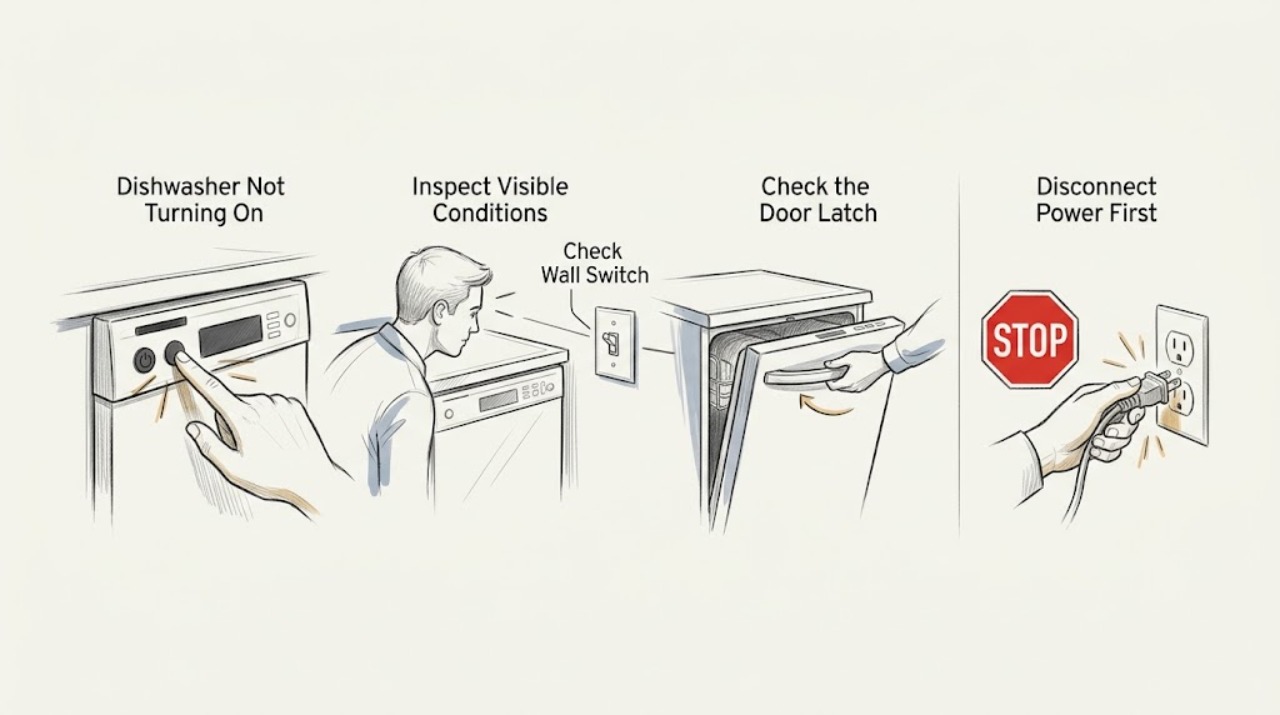
First separate a Bosch dishwasher with no display or lights from one that has power but will not begin a cycle. For a dark machine, check the power cord, outlet, and household breaker or fuse from a dry, safe position. For a powered machine, close the door until the latch clicks, remove any rack or dish blocking the door, check Child Lock or Delay Start, select a cycle, and press Start; some Bosch manuals require the door to be closed within four seconds after Start. If a previous cycle is stuck, use the model manual's reset procedure, such as holding Start for at least three seconds on applicable models. Do not bypass the door latch, open panels, or reach into a wet or energized dishwasher. Turn off the water tap and disconnect power for a leak, repeated breaker trip, burning smell, damaged cord, or persistent no-start fault, then contact Bosch service.
Before you begin
Safety first
- Do not bypass or probe the door latch, open electrical panels, reach into a wet dishwasher, pull an integrated unit out alone, or test energized wiring. For leaks or a repeated breaker trip, turn off the water supply and disconnect power from a dry, safe position.
Work through in order
Diagnostic checks
Use only checks that match the exact appliance or system and its official guide.
-
Check 1
Look for the display, control response, status light, or any sound without opening panels. If the dishwasher is wet, leaking, or has a burning smell, stop before pressing buttons or touching the plug.
Expected result: The controls are completely dark, or the display responds but the dishwasher will not begin a cycle.
Next step: Use the supply branch for a dark unit and the latch/control branch when the display responds. If there is water, heat, smoke, or a burning smell, keep it off and arrange service.
Why this matters
Why: A dark control panel points first to the supply path, fuse, breaker, or appliance power entry. A powered no-start points more toward the door, control lock, Start sequence, or an unfinished cycle.
-
Check 2
From a dry, safe position, verify that the dishwasher's plug or local isolation switch is on, the cord is intact, and the outlet has power. Check the household breaker or fuse once; do not reset a device that trips again or replace a fuse with a different rating.
Expected result: The outlet is dead or protection is open, or the supply is live while the dishwasher remains dark.
Next step: Use qualified electrical help for a dead outlet or recurring trip. If the supply is live and the dishwasher is still dark, leave it disconnected if there is damage or heat and contact Bosch service.
Why this matters
Why: A dead outlet or open circuit protection can explain a no-display dishwasher. A live outlet with no display shifts the fault into the dishwasher's power-entry or control path and is not a panel-level repair.
-
Check 3
Open the door and remove only visible loading interference: a rack not fully seated, a utensil, or a dish touching the door. Close the door firmly until the latch clicks, without pushing on or bypassing the latch mechanism.
Expected result: The door now latches positively, or it still will not click or feels loose, misaligned, or damaged.
Next step: If the door latches, select a cycle and follow the model's Start timing. If it does not latch or requires force, do not use a screwdriver or bypass test; keep the appliance off and arrange service.
Why this matters
Why: A physical obstruction can prevent the safety interlock from confirming a closed door. A latch that will not engage can prevent both starting and, on some models, normal control response.
-
Check 4
With the door fully closed, press On/Off, select a cycle, and press Start. On models using the documented protection against unintentional operation, close the door within four seconds after Start; if a previous cycle is stuck, use the manual's reset sequence rather than random button combinations.
Expected result: The cycle starts, the Start indicator flashes or pauses, or the controls remain locked or show the previous cycle.
Next step: Repeat the documented Start timing once and cancel Child Lock or Delay Start only as the exact manual describes. If the panel remains locked or the dishwasher will not start, contact Bosch service.
Why this matters
Why: A delayed or incomplete Start sequence, an unfinished cycle, Child Lock, or Delay Start can make a powered dishwasher appear not to turn on. A persistent lock or unresponsive panel after the documented reset suggests a control or latch fault.
-
Check 5
Check the accessible water shutoff valve and inlet hose only from outside the cabinet; confirm the valve is open and the hose is not visibly kinked or crushed. Do not pull out an integrated dishwasher or remove the toe-kick to reach hidden plumbing.
Expected result: The water supply is off or visibly restricted, or the supply appears normal but the dishwasher still will not begin.
Next step: Restore an obviously closed valve only if the area is dry and there is no leak. If the hose is damaged, water is present, or the dishwasher is integrated, leave it off and arrange service rather than moving the unit.
Why this matters
Why: Bosch manuals list an unavailable water supply as a possible no-start or no-resume condition on applicable models. A normal visible supply with a no-start moves suspicion back to the door, control, or internal valve and pump systems.
-
Check 6
If the dishwasher starts and immediately stops, or if an error or flashing status appears, record the exact display and stop the cycle if there is water or an electrical warning. Do not open panels or probe the door switch, control board, pump, or wiring.
Expected result: The same code or flashing status returns, the unit stops with water present, or it runs normally after a documented reset.
Next step: Turn off the water tap and disconnect power for a leak, repeated protection trip, or persistent fault. Give Bosch the model number, code, display behavior, and checks completed; do not continue test cycles.
Why this matters
Why: A repeat code or stop condition indicates an unresolved safety, door-sensor, water, pump, or control fault. A one-time reset can clear a transient interrupted cycle but does not prove the underlying fault is fixed.
Use your observations
Decision map
Find the observation that best matches what you see, then follow the next safe action.
-
PATH 01Next step
What you see
The display and status lights are dark, and the outlet is dead or a breaker/fuse is open.
Do this next
Use qualified electrical help for a dead outlet or repeated trip. Do not keep resetting protection or open the dishwasher's electrical area.
Why this path and its safety boundary
Why it matters: The household supply or circuit protection is more likely than a dishwasher cycle-control issue.
-
PATH 02Next step
What you see
The outlet is live and the dishwasher remains dark, with no safe external cord or plug explanation.
Do this next
Leave the dishwasher disconnected if there is heat, damage, moisture, or odor and arrange Bosch service. Do not remove panels or test live wiring.
Why this path and its safety boundary
Why it matters: An appliance power-entry, control, or wiring fault is more likely and is outside safe user troubleshooting.
-
PATH 03Next step
What you see
The panel responds, but the door does not latch securely or a rack, dish, or utensil blocks closure.
Do this next
Remove only the visible obstruction and close the door until it clicks. If the latch remains damaged or misaligned, stop and call Bosch service; never bypass it.
Why this path and its safety boundary
Why it matters: The door interlock is more likely preventing the start command than a failed motor or pump.
-
PATH 04Next step
What you see
The door latches, but Child Lock, Delay Start, an unfinished cycle, or the documented Start timing prevents a cycle from beginning.
Do this next
Cancel the documented lock or delay and perform the model's reset/Start sequence once. If it remains blocked or the same fault returns, arrange service.
Why this path and its safety boundary
Why it matters: The dishwasher is powered and receiving controls, but an operating-state condition is blocking the start sequence.
-
PATH 05Next step
What you see
The dishwasher remains off after supply, door, and documented control checks, or it trips protection, leaks, or shows a persistent error.
Do this next
Turn off the water supply for a leak, disconnect power safely, and contact Bosch technical service. Do not pull out an integrated unit, bypass a switch, or open panels.
Why this path and its safety boundary
Why it matters: The fault has crossed the safe accessible-check boundary and may involve the latch switch, control, pump, inlet system, or internal wiring.
Helpful context
Understand the symptom
No power and no start are different faults
If the display, buttons, and status light are all dark, begin with the electrical supply. If the display responds but a program will not begin, the door latch, Child Lock, Delay Start, an unfinished cycle, or the Start sequence is more relevant. Bosch notes that controls and features vary by model, so a model-specific manual takes priority over a generic button combination.
The door can look closed without being latched
Bosch's troubleshooting guidance treats a fully closed and latched door as a start requirement. A rack, utensil, or dish protruding near the front can keep the door from engaging the latch even when it appears shut. A latch that feels damaged or never clicks is a service issue; do not force it or defeat its safety switch.
Protect against water and mains hazards
Do not work inside the dishwasher with power connected. If the unit is leaking, has water in the base, smells burnt, shows a damaged cord, or trips a breaker again, turn off the water supply if safely accessible, disconnect power from a dry position, and arrange service. A door-latch bypass or live electrical test can expose mains voltage and is not a user-level check.
When checks do not resolve it
Need a professional?
Contact Bosch service when the outlet is live but the dishwasher is dark, the door will not latch, Child Lock or the documented reset does not clear a no-start condition, an error or flashing status returns, the unit leaks, or a breaker trips again.
Safety scope: Do not bypass or probe the door latch, open electrical panels, reach into a wet dishwasher, pull an integrated unit out alone, or test energized wiring. For leaks or a repeated breaker trip, turn off the water supply and disconnect power from a dry, safe position.
Have this ready
- Provide the exact model and serial information, whether the display and status lights work, outlet and breaker results, door-latch behavior, Child Lock or Delay Start status, reset result, water-supply condition, any code or flashing light, and whether the problem followed a power interruption.
Common questions
FAQ
Why is my Bosch dishwasher completely dark?
Check the cord, outlet, and household breaker or fuse from a dry, safe position. If the outlet is live but the display remains off, do not open panels; leave the appliance disconnected if there is heat, damage, or odor and contact Bosch service.
Why does my Bosch dishwasher have power but not start?
Make sure the door latches, no rack or dish blocks closure, Child Lock and Delay Start are not active, a cycle is selected, and Start is pressed using the model's required timing. If it still will not start, arrange service rather than bypassing the latch.
How do I reset a Bosch dishwasher that will not start?
Use the exact model manual. One Bosch manual describes holding Start for at least three seconds to reset an unfinished cycle; Bosch's support guide also describes a brief power cycle. If a reset does not restore operation or the fault returns, contact Bosch service.
Should I bypass the Bosch dishwasher door latch to test it?
No. The latch is a safety interlock and Bosch troubleshooting treats secure closure as a start requirement. Do not defeat or probe it; if the door will not click closed or the latch seems damaged, keep the dishwasher off and arrange professional service.
Read the exact guide
Official sources
- Bosch Dishwasher Use and Care / Operating ManualBSH Home Appliances Corporation · Official model-family manual for On/Off, Start timing, door latch, power/fuse, reset, Delay Start, Child Lock, water supply, and no-start troubleshooting; features and button labels may differ on other models
- Contact Us | Bosch Home AppliancesBSH Home Appliances Corporation · Bosch dishwasher customer-care and service escalation, including model information and large-appliance support
- Bosch SHX3AR55UC/07 Not StartingReddit r/bosch · Anecdotal powered-but-no-start Bosch dishwasher report after a power event; useful only for symptom framing and conditional latch consideration, not for confirmed diagnosis or repair instructions
- Bosch Dishwasher Troubleshooting & Repair GuideBosch Home Appliances · Official Bosch guide for dishwasher power/no-start separation, door closure, Child Lock, door latch, power cycling, outlet, cord, and breaker checks; exact controls vary by model
Community feedback
Share a repair observation
Share a plain-text repair observation. Accepted observations are published automatically; this page may take a moment to update.