
On this page
Start here
Quick answer
If an Asko washing machine will not turn on, first distinguish a blank display from a machine that has lights but will not begin a programme. Check the wall outlet, plug, cord, and household breaker without opening the cabinet or testing live wiring. If the controls light up, close the door firmly, select a programme, press Start, and check for a delayed start, child lock, pause state, or a displayed fault code. A controlled power reset may clear a temporary control state, but do not erase stored fault information if service is already planned. If the outlet is good but the washer stays completely dead, a breaker trips again, water remains with a locked door, or there is smoke, a burning smell, heat damage, or a damaged cord, unplug it and arrange qualified appliance service.
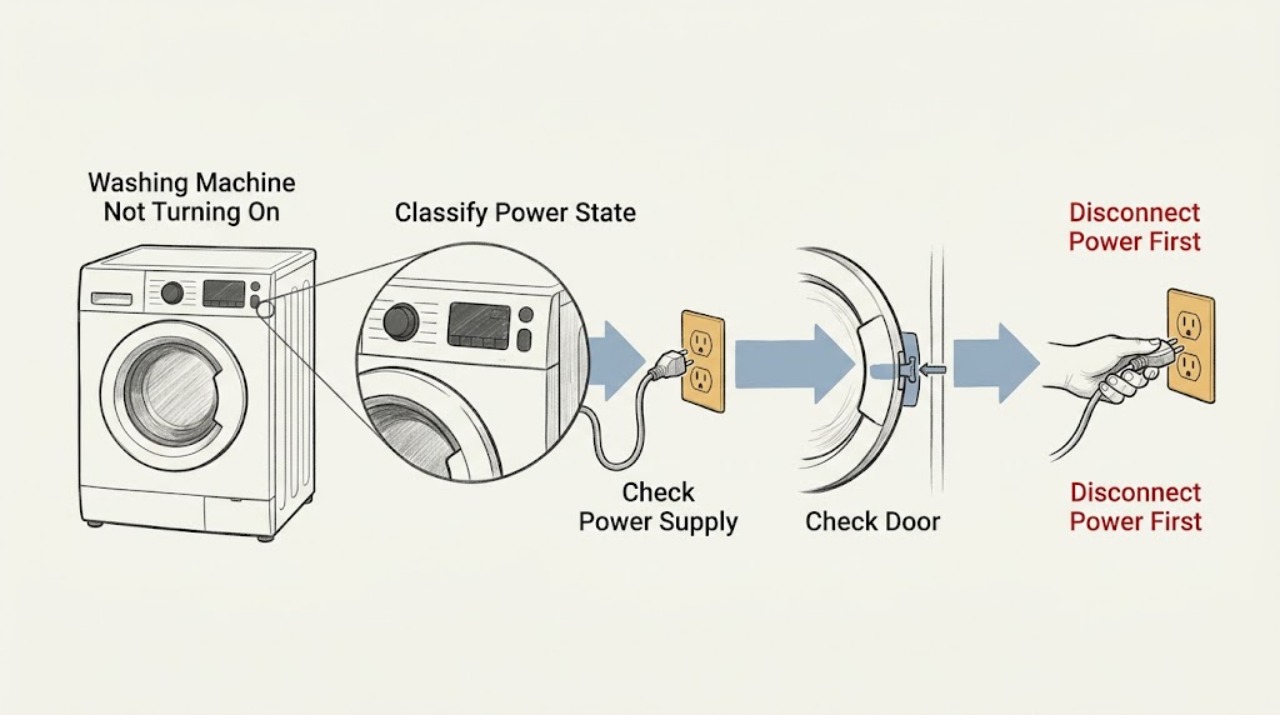
Work through in order
Diagnostic checks
Use only checks that match the exact appliance or system and its official guide.
-
Check 1
Press the normal power control once and observe the display, indicator, and any response without repeatedly forcing the button.
Expected result: Note whether the panel is completely blank, briefly flashes, shows a code, or lights normally but does not accept a programme.
Next step: If blank, continue to the outlet and breaker check. If lit, skip to the door and programme-start check.
Stop if: Stop if the panel, cord, or control area smells burnt, is unusually hot, shows melting, or emits smoke; unplug the washer and arrange qualified service.
Why this matters
Why: A completely blank panel keeps the electrical-supply path first; a lit panel means the washer has control power and the start, door, lock, delay, or fault path should be checked instead.
-
Check 2
With the washer unplugged, inspect the plug and cord for cuts, crushed sections, looseness, or discoloration, then check whether the wall outlet and the household breaker or residual-current device are supplying the room.
Expected result: A known-good small appliance works at the outlet and the breaker stays on, or the outlet is dead, the plug/cord is damaged, or the breaker trips again.
Next step: If the outlet is dead, stop using that outlet and have the household supply checked. If the outlet is good and the washer remains blank, leave it unplugged and arrange appliance service; do not open the cabinet.
Stop if: Stop immediately for a damaged cord, hot/discolored outlet, burning odor, sparks, water near the connection, or a breaker that trips again.
Why this matters
Why: A dead outlet or tripped protective device is an installation or household-supply issue; a good outlet with a still-dead washer points beyond the external supply. A repeated trip indicates a fault, not a reason to keep resetting it.
-
Check 3
If the panel is lit, remove any fabric caught at the door opening, close the door firmly until the latch engages, select a normal programme, and press Start once.
Expected result: The washer begins its normal start sequence, or the door will not latch and the washer remains idle despite a lit display.
Next step: If it starts, monitor the first minute for normal filling and operation. If it will not latch, clean only visible debris from the opening and consult the model manual or service for a damaged lock or hinge.
Stop if: Stop if the lock, door, or hinge is cracked, loose, scorched, or requires force, or if the washer starts and immediately trips the supply.
Why this matters
Why: Starting after the door is correctly latched indicates a door-position or programme-state issue. Failure to latch keeps the door strike, lock, or an obstruction in the service path; do not bypass the lock.
-
Check 4
Read the panel for a pause indication, delayed start, child-lock symbol, or fault code; use only the button sequence listed for the exact Asko model rather than guessing a universal combination.
Expected result: The washer starts after the setting is cancelled or Start is pressed as the model guide specifies, or the lock/code remains and the controls stay unresponsive.
Next step: Photograph or write down the exact code and model number, then use the Asko manual/fault-code instructions. If the code returns after the permitted reset, arrange service.
Stop if: Do not perform a factory reset when a technician visit is already planned unless Asko specifically directs it, because it may remove useful fault history.
Why this matters
Why: A delayed or locked control state can prevent a programme from beginning without meaning that the washer has lost all power. A persistent code or unresponsive panel needs model-specific diagnosis.
-
Check 5
If there is no hazard and no service visit is pending, switch the washer off, disconnect it from the wall outlet, wait about two minutes, reconnect it, and try one normal start cycle.
Expected result: The display and programme controls return normally, or the washer remains dead, returns the same code, or immediately trips the supply.
Next step: If it recovers, run only a supervised short programme and record any recurrence. If it does not, keep it unplugged and arrange qualified service with the model number and recorded symptoms.
Stop if: Do not repeat resets after a trip, burning smell, smoke, heat damage, or visible cord/outlet damage.
Why this matters
Why: Recovery after a power reset is consistent with a temporary control state, but it does not rule out an intermittent or underlying fault. No recovery or a repeated trip requires professional diagnosis.
-
Check 6
If the panel works but the washer stops at the beginning, look for an active water-inlet or drain message and check only accessible taps, hoses, and the pump-filter area described in the model guide; make the washer powerless before any filter cleaning and be prepared for residual water.
Expected result: A closed tap, kinked hose, blocked filter, standing water, or a water-related code is present, or the water path looks normal and the washer still will not begin.
Next step: Correct only an obvious closed tap or kink and follow the exact model instructions for a filter; if water remains, the filter will not open safely, or the code returns, arrange service. Do not remove panels or reach into moving parts.
Stop if: Stop if water leaks toward electrical connections, the filter cannot be opened without force, the water is hot, or the pump/washer makes an abnormal electrical noise.
Why this matters
Why: Asko support treats water supply, hose condition, pump-filter condition, and the door as separate causes of a washer that cannot proceed. A normal visible water path with a persistent start failure shifts suspicion toward controls, lock feedback, or another internal fault.
-
Check 7
Before requesting repair, record the model/serial information, whether the display was blank or lit, the outlet and breaker result, the door-latch result, any code, and what happened after the safe reset.
Expected result: The washer is still completely dead, will not latch or start with a good supply, repeats a fault, trips power, or has a hazard symptom.
Next step: Leave the washer unplugged when a hazard or repeated trip is present and contact qualified Asko appliance service using the official support path for the model and region.
Stop if: Do not continue troubleshooting once a hazard, repeated electrical trip, damaged cord, water near electrics, or persistent no-power condition is established.
Why this matters
Why: These results exceed a safe external-user diagnosis and can involve the internal supply, control electronics, door lock, or wiring. The record helps the technician choose the correct model documentation and preserves the decision history.
Use your observations
Decision map
Find the observation that best matches what you see, then follow the next safe action.
-
PATH 01Safety boundary
What you see
The panel remains completely blank.
Do this next
Check the plug, outlet, and household protective device externally. If the outlet is good but the washer remains blank, unplug it and arrange service.
Why this path and its safety boundary
Safety stop: Use the powered-but-not-starting path: door, programme, lock/delay state, code, and safe reset.
-
PATH 02Safety boundary
What you see
The outlet is dead or the breaker/residual-current device trips again.
Do this next
Stop using the outlet or washer and have the electrical supply or appliance assessed; do not keep resetting the device.
Why this path and its safety boundary
Safety stop: Continue with the washer door and start-control checks.
-
PATH 03Safety boundary
What you see
The display is lit but the door does not latch or the selected programme does not begin.
Do this next
Remove only visible obstruction, close the door without force, and use the model manual; a damaged lock or hinge is a service boundary.
Why this path and its safety boundary
Safety stop: Check delayed start, child lock, pause state, and any displayed code.
-
PATH 04Safety boundary
What you see
A lock, delay, pause, or fault indication is shown.
Do this next
Follow the exact model-specific cancellation or fault-code instructions and record the code before any factory reset.
Why this path and its safety boundary
Safety stop: Try one controlled power reset only when there is no hazard and no pending service visit.
-
PATH 05Safety boundary
What you see
The washer has power but stops at the beginning with a water or drain indication.
Do this next
Check an obvious closed tap, kinked hose, or accessible filter issue only as described for the model, with power disconnected before filter work.
Why this path and its safety boundary
Safety stop: Do not assume a water issue; persistent failure with normal visible water conditions needs service diagnosis.
-
PATH 06Safety boundary
What you see
There is smoke, a burning smell, heat damage, a damaged cord, water near electrics, or a repeated trip.
Do this next
Unplug if it is safe to do so, keep the washer out of use, and arrange qualified appliance service; do not open or live-test it.
Why this path and its safety boundary
Safety stop: Continue only the external checks and stop if the washer remains dead or the fault returns.
Helpful context
Understand the symptom
Start with the symptom you can actually see
“Won’t turn on” can mean no display or indicator at all, or it can mean the display is active but the selected wash does not start. Those paths are different: the first points toward the supply, plug, breaker, or internal power path; the second keeps the door interlock, programme state, delayed start, child lock, or a recorded fault in play. Make only the external checks below. Asko models and controls vary, so use the model-specific instructions when a button combination is not obvious.
Why a reset is only a diagnostic step
Asko support recommends making a washer briefly powerless when it is not behaving correctly, and its support guidance warns that a factory reset can remove fault history that a technician may need. A normal power reset is therefore a reversible test; it is not proof that a failed control, lock, or supply component is repaired. Record any code or unusual symptom before resetting.
Do not turn a dead washer into an electrical experiment
Do not remove panels, bypass the door lock, probe live terminals, or replace a fuse with a larger rating. If the cord is damaged, the outlet is hot or discolored, the breaker trips when the washer is connected, or there is smoke or a burning odor, leave the washer unplugged and use qualified service.
Safety boundary
Stop conditions
- Unplug and stop for smoke, a burning smell, sparks, heat damage, or a damaged cord or outlet.
- Stop after a breaker or residual-current device trips again; do not keep resetting it.
- Stop and arrange service if a good outlet is confirmed but the washer remains completely dead.
- Do not bypass the door lock or open the cabinet to test internal electrical parts.
- Do not factory-reset a washer when service is already planned unless Asko directs it.
When checks do not resolve it
Need a professional?
Arrange qualified appliance service when a good outlet has been verified but the Asko washer remains completely dead; when the door will not latch; when a fault code returns after the model-approved steps; when the breaker or residual-current device trips again; or when there is a damaged cord, heat damage, smoke, burning odor, water near electrical connections, or an unsafe filter/door condition. Do not open the cabinet, bypass the lock, or test live wiring.
Common questions
FAQ
Why is my Asko washer completely blank?
Start with the plug, wall outlet, and household breaker or residual-current device. If the outlet is working and the washer remains blank, leave it unplugged and arrange qualified service rather than opening the cabinet.
Why does my Asko washer have lights but not start?
A lit panel makes the door latch, selected programme, Start control, delayed start, child lock, pause state, and displayed code more relevant than the wall outlet. Close the door firmly without forcing it and use the exact model manual for control settings.
Can I reset an Asko washing machine?
Asko support recommends making the appliance powerless for about two minutes as a normal reset step. Treat that as a diagnostic test, and do not use a factory reset when a service visit is already planned unless Asko directs it because fault history may be lost.
Should I clean the pump filter if the washer will not start?
Only when the symptom includes a drain or water-related indication and the model instructions cover the filter. Disconnect power first, expect residual water, and stop if the filter cannot be opened safely or water approaches electrical connections.
When should I stop troubleshooting and call for service?
Call when a good outlet is confirmed but the washer stays dead, the door will not latch, a fault returns, the breaker trips again, or there is smoke, burning odor, heat damage, a damaged cord, or water near electrical parts. Do not bypass the lock or test live wiring.
Read the exact guide
Official sources
- User manualsASKO · ASKO product manuals by product code or model name
- Hoe maak ik het filter van de wasmachine schoon?ASKO Support · ASKO washing-machine pump-filter maintenance
- Wasmachine trekt geen water aanASKO Support · ASKO washing machines
- Hoe kan ik mijn ASKO wasmachine resetten?ASKO Support · ASKO washing machines
- Wat betekent de foutcode van mijn ASKO wasmachine?ASKO Support · ASKO washing-machine error-code guidance
- Classic Washer Install InstructionsASKO · ASKO Classic washing-machine installation and electrical connection
Community feedback
Share a repair observation
Share a plain-text repair observation. Accepted observations are published automatically; this page may take a moment to update.