
On this page
Start here
Quick answer
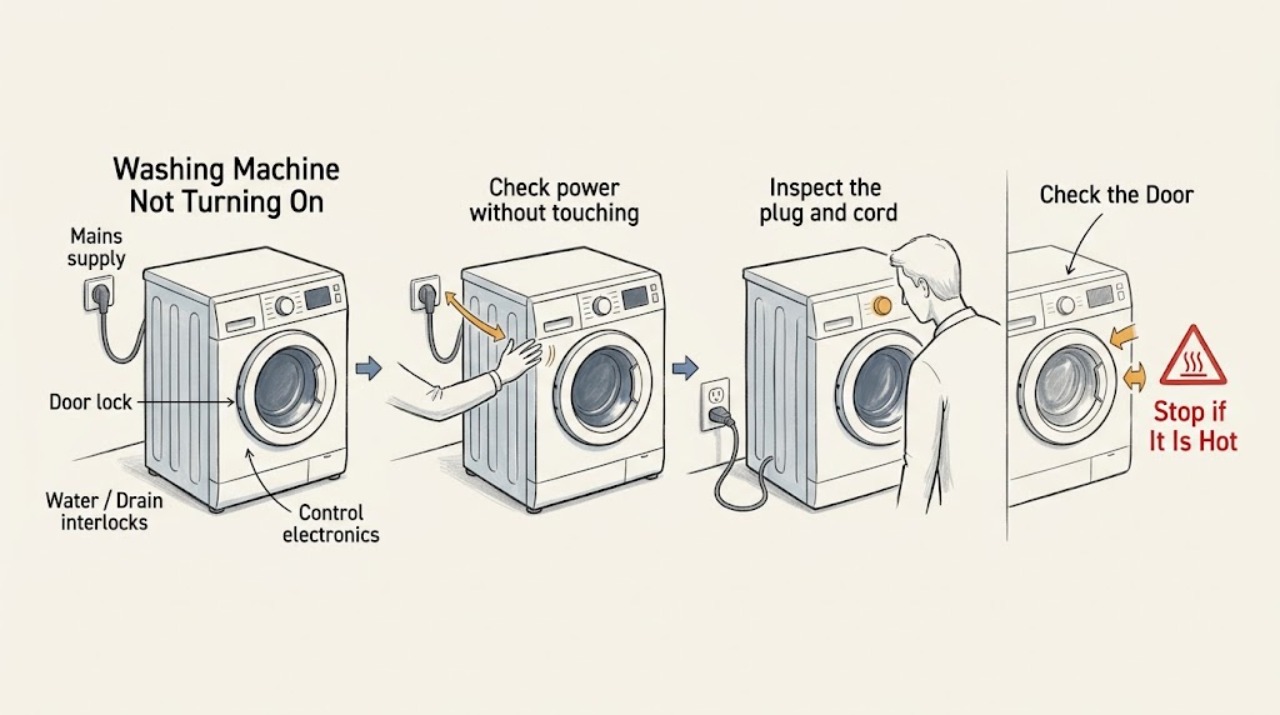
Check the outlet, plug, cord, and household breaker without touching damaged or wet electrical parts. Then confirm the door is fully latched, a programme is selected, Pause or child lock is not active, and the exact model manual does not show a supply or water condition. If the breaker trips again, the cord or outlet is damaged, the appliance is wet, or the machine remains dead after a safe reset, leave it disconnected and arrange qualified service. Do not open the cabinet or replace an internal electrical part as a user test.
Work through in order
Diagnostic checks
Use only checks that match the exact appliance or system and its official guide.
-
Check power without touching an unsafe connection
Look at the control panel and confirm whether any display or indicator is lit. If the plug, cord, outlet, or floor is wet, scorched, loose, or damaged, do not touch it. From a dry, safe location, check whether the household breaker or fuse has operated and whether other devices in the home have power. Do not repeatedly reset a breaker that trips again.
Expected result: The outlet has no power, the breaker trips again, the cord or outlet shows damage, or the washer has a normal power indication but will not start.
Next step: Leave the washer disconnected and have the supply or appliance assessed by a qualified electrician or appliance technician when any damage or repeated trip is present. If supply is stable, continue with the control and door checks.
Why this matters
Why: A supply-side fault can make the washer appear dead. Repeated tripping or visible damage points to an electrical hazard, while a lit display shifts the diagnosis to controls and interlocks.
-
Inspect the plug and cord only when disconnected
With the washer disconnected from mains electricity, make a visual inspection of the plug and cord for cuts, crushed insulation, looseness, discoloration, or signs of heat. Do not open the plug, repair the cord, use an extension lead, or restore power to a visibly damaged connection.
Expected result: The cord or plug is damaged, the connection was loose, or the cord and plug look intact.
Next step: For any damage, keep the appliance disconnected and arrange qualified replacement or service. If the cord is intact and the outlet is verified, reconnect only once from a dry, safe position and continue with the user-level checks.
Why this matters
Why: Damage or a poor connection can interrupt operation and create shock or fire risk. An intact external cord does not rule out an internal supply or control fault.
-
Confirm the door and programme state
Close the loading door firmly without forcing it and check that no garment is caught in the seal or latch area. Select a valid programme, ensure the machine is not in Pause or delayed mode, and check the exact manual for the child-lock indicator and release method. Do not bypass or wedge the door lock.
Expected result: The door closes and latches, an obstruction is visible, a lock or pause indicator is active, or the controls remain unresponsive despite a closed door and valid programme.
Next step: Remove only a plainly accessible garment obstruction and follow the exact manual for a child-lock or pause state. If the latch is damaged or the machine still will not start, keep it out of service and arrange repair.
Why this matters
Why: The door interlock and programme state can intentionally prevent the motor and water valves from operating. Persistent unresponsiveness after these checks suggests a control, lock, or supply fault rather than a loading error.
-
Check water and drain indicators before assuming no power
If the display works but the programme does not begin, read the lights or code and compare it with the exact Blomberg manual. From outside the machine, verify that the water taps are open, inlet hoses are not visibly kinked, and the drain hose is connected and not visibly blocked. Do not open a pump filter while water may spill onto the floor or an electrical connection.
Expected result: A water, rinse, drain, or door indicator is displayed; the inlet or drain hose is visibly displaced or blocked; or no such indication is present.
Next step: Correct only a clearly displaced external hose according to the model manual. If an indicator remains, water is trapped, or the source is internal, stop and arrange service rather than guessing at a component.
Why this matters
Why: A washer can refuse to start because a water or drain prerequisite is not met even though the control panel has power. A clear external path and no indicator make an internal sensor, lock, or control fault more likely.
-
Perform one model-appropriate reset
If the cord, outlet, floor, and washer are dry and there is no damage or repeated breaker trip, turn the machine Off and disconnect it for the interval specified by the exact manual. Reconnect it once, select a simple programme, and press the documented Start/Pause control. Do not use a factory reset from another model or cycle power repeatedly.
Expected result: The washer returns to normal, shows the same code, remains dark, or trips the breaker when power is restored.
Next step: If the symptom recurs, disconnect the machine and provide the code, indicator state, and reset result to Blomberg service. If the breaker trips or the cord/outlet becomes warm, do not restore power.
Why this matters
Why: A single safe reset can clear a temporary control state, but recurrence or a supply trip is evidence of an unresolved fault, not a successful repair.
-
Document the dead or non-starting state
Record the model, whether the display is dark or lit, outlet and breaker result, cord condition, door-latch behavior, selected programme, child-lock or error indicators, water and drain observations, and what happened after the one safe reset. Do not remove panels or perform energized measurements.
Expected result: The machine remains dead, the display works but Start is refused, the same error returns, or the source cannot be identified externally.
Next step: Keep the washer disconnected when a fault or hazard is present and use Blomberg customer care or a qualified service provider with the recorded evidence.
Why this matters
Why: An unresolved no-start condition may involve the door-lock assembly, control board, internal wiring, power supply, or a safety interlock. Those possibilities cannot be distinguished safely by bypassing parts.
Use your observations
Decision map
Find the observation that best matches what you see, then follow the next safe action.
-
PATH 01Next step
What you see
The display is dark and the outlet has no power, the breaker trips again, or the cord/outlet is damaged.
Do this next
Arrange qualified service and follow the exact model guidance.
Why this path and its safety boundary
Why it matters: The supply or appliance is assessed without repeated energizing of a potentially unsafe circuit.
-
PATH 02Next step
What you see
The display is lit but Start does nothing, the door does not latch, or a child-lock/pause state is shown.
Do this next
Arrange qualified service and follow the exact model guidance.
Why this path and its safety boundary
Why it matters: A user setting or latch obstruction may be cleared; a damaged latch or repeated refusal requires service.
-
PATH 03Next step
What you see
A water or drain indicator is shown, water is unavailable, a hose is kinked, or water remains in the machine.
Do this next
Arrange qualified service and follow the exact model guidance.
Why this path and its safety boundary
Why it matters: A visible hose/setup issue may be corrected; persistent indicators or retained water require qualified diagnosis.
-
PATH 04Next step
What you see
Power and external controls are normal but the washer remains dead, repeatedly stops, returns the same code, or has an unexplained smell, heat, noise, or moisture.
Do this next
Arrange qualified service and follow the exact model guidance.
Why this path and its safety boundary
Why it matters: The machine stays out of service while its supply, lock, control, and internal wiring are inspected safely.
Helpful context
Understand the symptom
No display is different from no programme start
First separate a dead control panel from a washer that has power but refuses to begin. If every lamp and display is dark, start with the supply path. If the display responds but Start does nothing, focus on the door latch, selected programme, Pause or child lock, water/drain conditions, and any model-specific message. The same symptom can be caused by an interrupted household supply or by a normal safety interlock.
Use the exact Blomberg manual
Blomberg manuals and support pages are model-specific. A code or reset sequence from another washer is not a diagnosis for yours. Record any code or indicator exactly, identify the model from its rating information, and stop before opening a panel or handling internal wiring.
When checks do not resolve it
Need a professional?
Contact Blomberg support or a qualified appliance technician for any persistent no-power or no-start condition, repeated breaker operation, damaged cord or latch, unexplained heat or smell, or a code that remains after the manual's user checks.
Common questions
FAQ
What should I check first when a Blomberg washing machine has no display?
Check the outlet and household supply from a safe dry location, then inspect the plug and cord only after disconnecting the appliance. Do not touch a wet or damaged connection or keep resetting a breaker that trips again.
Why does my Blomberg washer have power but not start?
Confirm the door is fully latched, a valid programme is selected, Pause or delay is not active, and child lock is not preventing input. A water or drain indicator can also block a start; use the exact manual for the model's indicator meanings.
Can I reset a Blomberg washer that will not turn on?
If the appliance and electrical area are dry and undamaged, follow only the reset procedure in the exact model manual and try it once. If the display remains dark, a code returns, or the breaker trips, disconnect the appliance and arrange service.
Should I open the cabinet to find why the washer is dead?
No. Blomberg's manual directs users to authorized service when the troubleshooting steps do not resolve a nonfunctional product. Do not open the cabinet, bypass the door lock, or replace internal electrical parts as a user test.
Read the exact guide
Official sources
- My Blomberg washer dryer is not powering on, what should I do?Blomberg · Blomberg UK washer-dryer power FAQ; used for the supply, cord, breaker, door, controls, child-lock, reset, and service boundary.
- My Blomberg washing machine has stopped working, what should I do?Blomberg · Blomberg UK washing-machine support FAQ; apply the power, door, settings, water, drain, and error-code guidance to the reader's model.
- Blomberg WNF8441AE20 Washing Machine User's ManualBlomberg · Blomberg washing-machine manual; use the troubleshooting and safety statements only where the reader's model is comparable, and defer to the exact manual.
- FAQBlomberg Appliances · Blomberg appliance FAQ; used for generic washer no-start conditions such as plug, door, programme, Pause, child lock, water, and drain checks.
Community feedback
Share a repair observation
Share a plain-text repair observation. Accepted observations are published automatically; this page may take a moment to update.