
On this page
Start here
Quick answer
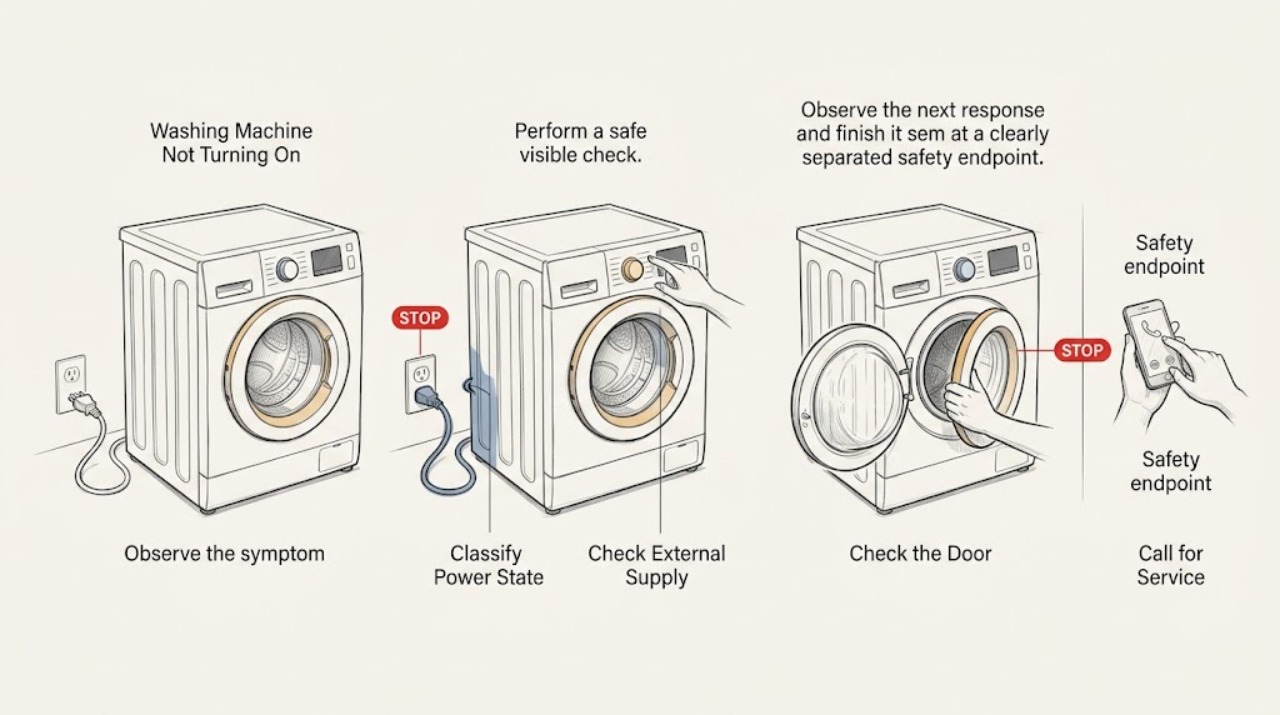
If a Baumatic washing machine will not turn on, first separate a completely blank machine from one with lights or a display that will not start a programme. Check the plug, wall socket, household power, and accessible fuse or breaker externally, using a known-good appliance at the socket only when the area is dry and safe. Then close the door fully, select a programme, press Start or Start/Pause, and clear pause or time-delay mode according to the exact model manual. If the display shows a door, power, or other fault indication, record it and use the model-specific instructions rather than guessing at a code. If the washer remains dead, repeatedly blows a fuse or trips the breaker, the door will not latch, or there is smoke, burning odor, sparking, or damaged wiring, disconnect power if safe and arrange qualified Baumatic service.
Work through in order
Diagnostic checks
Use only checks that match the exact appliance or system and its official guide.
-
Check 1
Press the appliance power control once and observe the display, indicator lights, interior light if fitted, and any sound. Do not repeatedly press Start while the state is unclear.
Expected result: There is no light or display at all, or the display/indicators work but the programme does not begin.
Next step: For a blank machine, check the socket and household supply externally. For a lit machine, continue with the door and programme-start checks.
Stop if: Stop for smoke, burning odor, sparks, hot or damaged wiring, water near electrical parts, or any sign that the appliance is unsafe to touch.
Why this matters
Why: No visible response keeps the check on the external supply path. A lit control panel means power is reaching at least part of the machine, so door, programme, Start/Pause, time-delay, or a displayed fault becomes the next path.
-
Check 2
With the floor and socket area dry, confirm the plug is fully inserted and check the wall socket with a known-good appliance. Inspect only the accessible plug and cord for damage, and check whether the household breaker or fuse has operated without opening the washer.
Expected result: The known-good appliance also fails, the household breaker/fuse has operated, the Baumatic plug or cord is damaged, or the socket works normally.
Next step: Have a dead socket or household protection checked by an appropriate qualified professional. If the socket works but the washer remains blank, leave it disconnected and continue only with safe model checks or service.
Stop if: Stop if the plug, cord, socket, or breaker is hot, discolored, wet, cracked, sparking, or trips again.
Why this matters
Why: A dead socket or operated household protection points to the supply installation. A working socket with a blank washer points beyond the external supply; repeated fuse or breaker operation indicates a fault rather than a reason to keep resetting it.
-
Check 3
If the controls light, open and close the door without slamming, check that no clothing is caught in the seal, select a normal programme, and press Start or Start/Pause as the manual shows.
Expected result: The door latches and the cycle begins, or the door will not latch and the washer remains idle.
Next step: Remove only accessible fabric from the seal and retry once. If the door still will not latch or the panel reports a door problem, arrange service rather than bypassing the interlock.
Stop if: Stop if the door, latch, hinge, glass, seal, or cabinet is cracked, loose, sharp, or visibly damaged.
Why this matters
Why: A correctly closed door and selected programme satisfy basic start conditions. A door that will not latch, or a door blocked by clothing, keeps the interlock or an obstruction in the fault path.
-
Check 4
Check the selected programme and indicators for Pause or a time-delay setting. Cancel or clear those states only using the button sequence in the exact Baumatic manual; do not infer a universal key combination from another model.
Expected result: The washer starts after the pause or delay is cleared, or the controls remain lit but it still does not start.
Next step: If it starts, observe one complete fill and tumble sequence. If it does not, record the indicators or code and use the model-specific reset/service path.
Stop if: Stop if the manual is unavailable for the control sequence, buttons stick, the panel behaves erratically, or a reset causes the breaker to operate.
Why this matters
Why: A cleared pause or delay explains a no-start without proving a component fault. A persistent no-start with a valid programme and closed door points toward a stored fault, control, interlock, or supply issue.
-
Check 5
Record any displayed code or repeating light pattern before attempting the model-documented reset. If the manual instructs you to turn the washer off, unplug it, wait, and restart, do that once with the appliance dry and disconnected; do not repeatedly reset a recurring fault.
Expected result: The washer starts after the documented reset, the same code returns, or the panel remains blank.
Next step: Keep the code, light pattern, model/product code, and reset result for the technician. Do not substitute a code from a different Baumatic model.
Stop if: Stop if the reset produces smoke, odor, sparks, unusual heat, a breaker trip, or any other hazard.
Why this matters
Why: A successful reset may clear a transient control state, but it does not identify or repair a recurring fault. The same code or a blank panel after a confirmed supply is evidence for service diagnosis.
-
Check 6
If the socket works and the washer still will not turn on or start after the door, programme, pause/delay, and model-documented reset checks, disconnect it and arrange qualified appliance service. Provide the model/product code, power-state result, door-latch behavior, displayed code, and whether the breaker or fuse operated.
Expected result: The machine remains dead, starts only intermittently, repeatedly trips household protection, or will not latch the door.
Next step: Leave the washer disconnected until it is assessed. A qualified technician can isolate the internal fault using the exact model information.
Stop if: Do not open the cabinet, bypass the door lock, work on energized wiring, or repeatedly restart a machine with an electrical or water hazard.
Why this matters
Why: The remaining possibilities can include the power entry, control, door interlock, wiring, or another internal fault. Safe external checks cannot determine a compatible part or justify cabinet access.
Use your observations
Decision map
Find the observation that best matches what you see, then follow the next safe action.
-
PATH 01Next step
What you see
The washer has no display or indicator response.
Do this next
Check the accessible plug, working socket, and household fuse/breaker externally. If the socket works and the washer remains blank, disconnect it and arrange service.
-
PATH 02Next step
What you see
The panel lights but the door will not latch or the programme does not begin.
Do this next
Remove accessible fabric from the seal, close the door, select the programme, and press Start/Pause once. Persistent latch failure needs service; never bypass the interlock.
-
PATH 03Next step
What you see
A pause or time-delay state is active.
Do this next
Clear it using the exact model manual and observe whether the cycle begins. A persistent no-start after clearing it moves to fault recording and service.
-
PATH 04Next step
What you see
A fault code or repeating indicator pattern is shown.
Do this next
Record it, follow only the model-specific reset instruction once, and escalate if it returns or the washer remains unresponsive.
-
PATH 05Next step
What you see
The breaker/fuse trips again or there is smoke, burning odor, sparking, damaged wiring, or water near electrical parts.
Do this next
Stop using the washer, disconnect power only if safe, keep clear of the appliance, and arrange qualified service. Do not reset and retest repeatedly.
Helpful context
Understand the symptom
Identify the start state before changing anything
A blank panel and a lit panel that refuses to begin are different diagnostic paths. Baumatic's washing-machine guidance checks the working socket and power, door closure, programme selection, Start/Pause, and pause or time-delay mode. Note the exact display or indicator pattern before resetting, because a repeatable fault after a reset is useful information for service.
Keep the boundary outside the cabinet
The accessible checks are limited to the plug, socket, household protection, controls, door, and model-documented reset. A fuse or breaker that trips again, a damaged cord, or a washer that stays dead after a confirmed supply needs qualified diagnosis. Do not remove panels, bypass the door interlock, or make live measurements to find the failed component.
Safety boundary
Stop conditions
- Do not remove appliance panels, bypass the door interlock, or make live electrical measurements.
- Do not repeatedly reset a breaker, fuse, or washer that trips or shows a hazard.
- Do not force the door or continue operation with a damaged cord, leaking appliance, smoke, burning odor, or water near electrical parts.
When checks do not resolve it
Need a professional?
Arrange qualified Baumatic appliance service when a working socket is confirmed but the washer remains blank, a door will not latch, a code returns after the model-documented reset, or the washer starts only intermittently., Use an appropriate qualified electrical professional for a dead socket, household protection problem, damaged plug or cord, or repeated breaker operation., Stop immediately for smoke, burning odor, sparking, damaged wiring, water near electrical parts, or any suspected shock or fire hazard.
Common questions
FAQ
What should I check first if my Baumatic washing machine will not turn on?
Separate a blank panel from a lit panel, then check the accessible plug and working socket externally. If the panel lights, close the door, select a programme, press Start/Pause, and check for pause or time-delay mode in the model manual.
Why does my Baumatic washer have power but not start?
The door may not be fully latched, no programme may be selected, Start/Pause may not have been pressed, or pause/time-delay mode may be active. Check those model-documented start conditions before treating it as an internal fault.
What if the Baumatic washing machine is completely blank?
Check the plug, wall socket, and household power externally with the area dry and safe. If another appliance also fails at the socket, the supply needs attention; if the socket works but the washer stays blank, disconnect it and arrange service.
Should I bypass the door lock on a Baumatic washer that will not start?
No. Confirm that clothing is not caught in the seal and close the door normally. A door that will not latch is a service condition; bypassing the interlock creates an injury and water-leak risk.
When should I stop resetting a Baumatic washing machine?
Stop after the model-documented reset fails once, the same code returns, or the breaker/fuse operates again. Leave the appliance disconnected and arrange qualified service, especially for smoke, burning odor, sparks, damaged wiring, or water near electrical parts.
Read the exact guide
Official sources
- 9. TROUBLESHOOTING AND WARRANTYBaumatic · Baumatic BWDI1485D-80 washer-dryer start conditions, safety, and troubleshooting
- No electrical power - Baumatic Advice CentreBaumatic Advice Centre · Baumatic appliance external power, socket, fuse, breaker, and service guidance
Community feedback
Share a repair observation
Share a plain-text repair observation. Accepted observations are published automatically; this page may take a moment to update.