
On this page
Start here
Quick answer
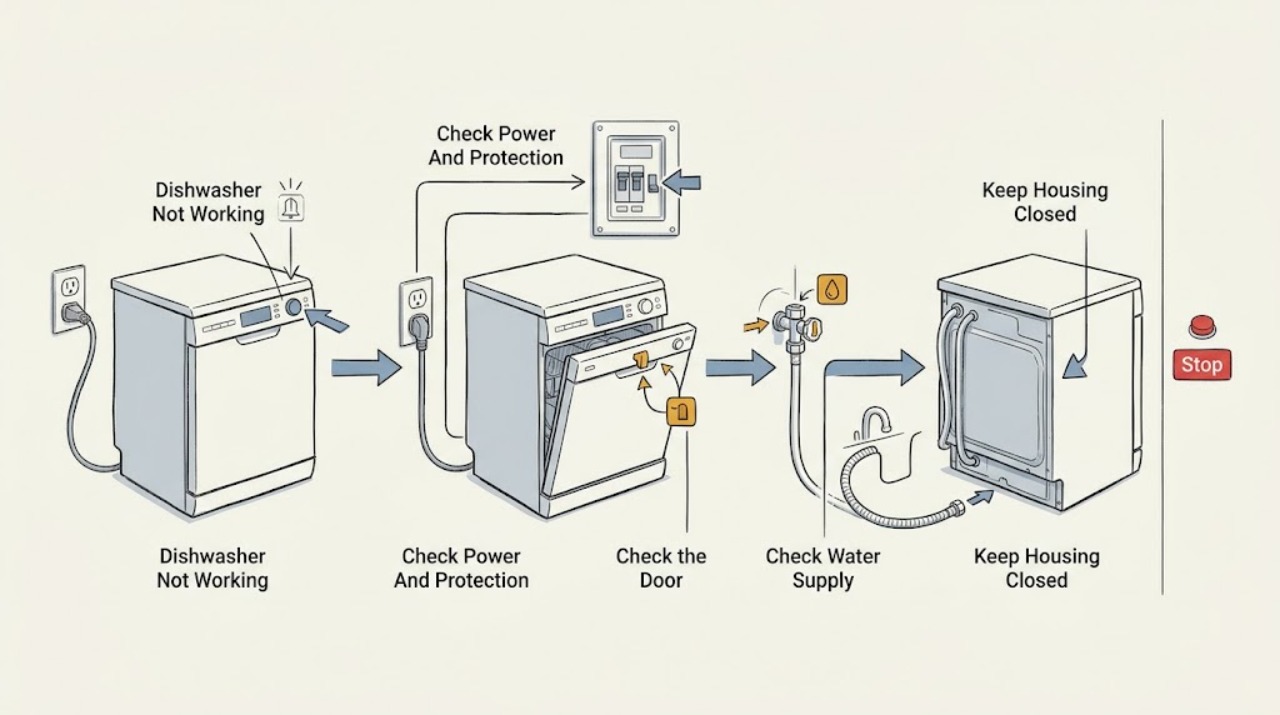
When a Blomberg dishwasher is not working, first identify whether the panel is completely dead, the panel lights but a programme will not start, the machine starts and stops, or it runs without filling or draining. Blomberg's official guidance starts with the power connection, a closed door, and the plug fuse; its dishwasher manual also lists the water inlet tap and On/Off control for a no-start condition. Disconnect power before cleaning or inspecting accessible parts, and do not open the appliance or work on mains wiring. If the outlet and external checks are good but the dishwasher remains dead, repeatedly trips protection, leaks, smells burnt, or needs a latch, valve, pump, or control diagnosis, leave it off and arrange qualified or authorized service.
Before you begin
Safety first
- The user may check safe external power, door closure, water tap and visible hose routing, and manual-permitted accessible filters or spray arms with power disconnected. The user must not open panels, bypass interlocks, probe live wiring, dismantle pumps or valves, or repair internal electrical, heating, or control components.
Work through in order
Diagnostic checks
Use only checks that match the exact appliance or system and its official guide.
-
Check 1
Turn the dishwasher off. Check that the plug is fully seated in the intended outlet and that the visible cord has no cuts, crushing, scorching, or wet connection. From a dry, safe position, check whether the household breaker or plug fuse has operated; do not open the appliance or dismantle a plug to reach wiring.
Expected result: The outlet has no power, the breaker or fuse has operated, the cord or plug is damaged or wet, or the dishwasher has normal power at the outlet but its panel remains dark.
Next step: If the outlet is safe and the external protection was a one-time event, restore power only as allowed by local practice and the exact manual. If protection trips again, the cord is damaged, or the panel remains dark with known-good power, leave the appliance off and arrange qualified service.
Stop if: Do not touch a wet plug, repair the cord, repeatedly reset a tripping breaker, or remove an electrical panel.
Why this matters
Why: A supply interruption can make the dishwasher appear dead. A damaged or wet connection, or protection that trips again, is an electrical safety issue rather than a reason to keep resetting it. Power at the outlet with a dark panel makes an internal supply, switch, or control fault more likely.
-
Check 2
With the machine powered off, make sure no rack, tall dish, utensil, or detergent dispenser is preventing the door from closing. Close the door evenly, turn the machine on, select a valid programme, and press the model-specific Start or On/Off control exactly as the manual describes.
Expected result: The door closes and latches with a normal feel and the programme starts, or the door springs back, remains ajar, shows a latch or door indicator, or the controls light but no programme begins.
Next step: Remove only the visible loading obstruction and retry the correct programme-start control once. If the latch, hinges, seal, or door alignment is damaged or the machine still will not start, stop and request service.
Stop if: Do not force the door, bypass a latch or interlock, or run the machine with a damaged door or seal.
Why this matters
Why: The official Blomberg manual lists an open door and an unpressed On/Off button as no-start causes. An obstruction or a door that cannot latch makes a closure or latch problem more likely; a properly latched door with no response points toward controls or an internal interlock.
-
Check 3
If the controls work but the cycle does not fill, turn the dishwasher off and close the water tap before inspecting the visible supply hose. Check that the tap is open and the hose is not kinked, crushed, or pulled tight; do not disconnect a pressurized connection unless the exact manual instructs it and the area can be kept dry.
Expected result: The tap is closed or only partly open, the hose route is kinked or blocked, the inlet connection is wet, or the tap and visible hose route are normal but no water enters.
Next step: Correct only a closed tap or visible hose routing issue, dry the area, and follow the exact model's start procedure. If the connection leaks, the hose is damaged, or the dishwasher still will not fill, close the tap, leave the machine off, and arrange service.
Stop if: Do not remove an inlet valve, open internal plumbing, or continue operating with a water leak or wet electrical area.
Why this matters
Why: Blomberg's dishwasher troubleshooting identifies a cut water supply as a no-start cause, and its support guidance says to check an open tap and a clear, unbuckled supply hose. A normal external supply with no fill makes an inlet valve, filter, sensor, door interlock, or control issue more likely.
-
Check 4
If a cycle starts but leaves water, stops during drain, or gives no useful wash action, switch off and disconnect power before opening the door for ordinary user maintenance. When the exact manual permits, inspect the accessible filter system and visible spray arms for food residue, and check that the drain hose has a clear, correctly routed visible path.
Expected result: The filter or spray-arm openings contain debris, the filter is not seated, the drain hose is kinked or blocked, or the accessible paths are clean and correctly fitted.
Next step: Clean and refit only the accessible parts using the exact manual, then monitor one correct programme. If water remains, the pump makes an abnormal noise, a leak appears, or the problem returns, stop and arrange service.
Stop if: Do not reach into a running machine, dismantle the pump, remove internal hoses, or work around water and electricity together.
Why this matters
Why: Blomberg manuals and support guidance link clogged filters, blocked spray arms, and an obstructed or incorrectly placed drain hose with poor operation or water remaining. A clean, correctly fitted user-accessible path with continued stopping or standing water points toward a pump, sensor, hose, or control fault.
-
Check 5
Read the model and serial label, note every indicator or displayed code, and consult that model's manual for programme cancellation, child-lock, pause, or reset instructions. Record whether the symptom is dead panel, no start, no fill, mid-cycle stop, or no drain; do not apply an undocumented reset sequence.
Expected result: The manual identifies a user setting or state that explains the symptom and the machine recovers, or no documented user state explains it, the symptom recurs, or an electrical, leak, burning, or door-safety sign is present.
Next step: Use only the manual's documented user procedure once. If the dishwasher remains nonfunctional, record the model, code, water and power observations, and previous steps for qualified or authorized service.
Stop if: Do not bypass a child lock or safety switch, repeatedly cycle power to conceal a fault, or remove panels to inspect controls or wiring.
Why this matters
Why: A model-specific control state can prevent a programme from starting without a failed part. If the documented setting is not the cause, or the dishwasher repeatedly fails after safe external checks, an internal component or connection needs diagnosis.
Use your observations
Decision map
Find the observation that best matches what you see, then follow the next safe action.
-
PATH 01Safety boundary
What you see
The outlet is confirmed safe and powered, the external cord and plug look sound, but the Blomberg dishwasher's panel remains completely dark.
Do this next
Leave the dishwasher disconnected and arrange qualified or authorized service with the model and serial information. Do not open the cabinet.
Why this path and its safety boundary
Why it matters: An internal supply, switch, control, or connection fault is more likely than a door or water-supply issue.
Safety stop: Stop immediately for a damaged or wet cord or plug, a repeated breaker trip, scorching, or a burning smell.
-
PATH 02Safety boundary
What you see
The panel illuminates, but the programme does not begin after a valid programme is selected and the door is closed.
Do this next
Check visible loading obstructions and use only the model manual's start, pause, cancellation, or lock instructions. If the door will not latch or the machine still does not start, call service.
Why this path and its safety boundary
Why it matters: A door obstruction, latch or interlock condition, pause or control state, or an internal control fault is more likely than a completely lost power supply.
Safety stop: Do not force or bypass the door latch or safety interlock.
-
PATH 03Safety boundary
What you see
The dishwasher responds to controls but either does not take in water, stops with water inside, or leaves a drain problem after a cycle.
Do this next
With power off, correct only a closed tap, visible hose kink, accessible filter residue, or user-permitted drain-hose routing issue. Close the tap and call service for leaks, abnormal pump noise, or persistent no-fill/no-drain.
Why this path and its safety boundary
Why it matters: An external tap, hose, filter, or drain-route issue should be separated first from an inlet valve, pump, sensor, or internal hose fault.
Safety stop: Do not disconnect wet plumbing near live electrical parts or dismantle pumps, valves, hoses, or panels.
-
PATH 04Safety boundary
What you see
The dishwasher repeatedly stops or remains nonfunctional after the documented external checks, or there is a leak, burning smell, smoke, unusual electrical noise, repeated protection trip, damaged cord, or damaged door.
Do this next
Keep power and, when applicable, the water tap off and arrange qualified or Blomberg-authorized service. Supply the model, serial, indicators, timing, and observations already recorded.
Why this path and its safety boundary
Why it matters: An internal electrical, mechanical, water, or safety fault is possible and cannot be isolated safely by more user testing.
Safety stop: Do not continue cycling the appliance, remove panels, probe live circuits, or replace a component without model-specific qualified diagnosis.
Helpful context
Understand the symptom
“Not working” can describe several different failures
A dark control panel points first to power, while a lit panel with no cycle points toward door closure, programme selection, a pause or cancel state, or a model-specific control lock. A cycle that starts but never fills or drains has a different next check. Note exactly what the dishwasher does before trying anything so you do not treat a water or drain problem as a dead appliance.
Use the exact model manual
Blomberg publishes manuals by model and says the model and serial number are needed for support, repairs, accessories, and spare parts. Dishwasher controls, reset sequences, indicators, and installation details vary, so use the manual for the rating-label model rather than borrowing a button sequence from another dishwasher.
Keep the repair boundary outside the cabinet
Safe user checks are limited to the outlet or household protection, the visible power lead, controls, door closure, water tap and hose routing, and user-accessible filters or spray arms when the manual permits. A failed inlet valve, pump, heater, latch switch, control board, internal hose, or mains connection requires qualified service; do not remove panels or probe live parts.
Safety boundary
Stop conditions
- Disconnect power before cleaning or inspecting accessible dishwasher parts, and keep plugs, outlets, and electrical connections dry.
- Do not operate with a damaged cord, plug, door, latch, seal, leaking hose, or water near electrical parts.
- Do not bypass a door interlock, repeatedly reset a tripping breaker, or use an undocumented control reset.
- Do not remove panels or attempt electrical, pump, inlet-valve, heater, control-board, or internal-hose repairs yourself.
- Leave the water tap and power off and arrange qualified or authorized service for a recurring no-start, no-fill, mid-cycle stop, no-drain condition, burning smell, smoke, leak, or unexplained protection trip.
Only after diagnosis
Potential parts
- dishwasher door latch or interlock assembly
Consider this category only if qualified service confirms that the door closes correctly but the latch or interlock does not permit a programme to start; do not bypass it as a test.
Confirm the complete Blomberg model and the manufacturer's fit information with authorized service before ordering or installing the part. - dishwasher water inlet valve
Consider this category only after the tap is open, the visible supply hose is clear, and qualified diagnosis confirms that the dishwasher still does not fill.
Match the exact model and approved service documentation; do not infer compatibility from connector appearance or a generic valve listing.
When checks do not resolve it
Need a professional?
Arrange qualified or Blomberg-authorized service when the outlet, door, tap, hose, accessible filter, and model-documented controls do not explain the failure, or immediately for a repeated breaker trip, damaged cord or plug, burning smell, smoke, leak, water near electrical parts, damaged door or latch, or any need to open the cabinet. Provide the exact model and serial number and the observed symptom sequence.
Safety scope: The user may check safe external power, door closure, water tap and visible hose routing, and manual-permitted accessible filters or spray arms with power disconnected. The user must not open panels, bypass interlocks, probe live wiring, dismantle pumps or valves, or repair internal electrical, heating, or control components.
Common questions
FAQ
Why will my Blomberg dishwasher not switch on?
Start with the safe external checks Blomberg lists: make sure the cable is correctly plugged in, the door is properly closed, and the plug fuse is working. The model manual also lists the On/Off control and water supply among no-start checks. If the outlet is good but the panel stays dark, or a breaker trips again, leave the dishwasher off and arrange service.
What if the Blomberg dishwasher lights up but does not start?
Check for a rack or dish obstructing the door, close and latch it evenly, select a valid programme, and use the exact model manual's Start or On/Off procedure. Do not bypass the latch or interlock. A properly closed door with no start response needs qualified diagnosis.
Could a closed tap make a Blomberg dishwasher seem not to work?
Yes. Blomberg's dishwasher troubleshooting lists a cut water supply as a no-start cause and advises checking that the water tap is open. Also check the visible supply hose for a kink. If the tap and hose are normal but the machine does not fill, close the tap and arrange service rather than opening the inlet assembly.
What should I do if water remains in my Blomberg dishwasher?
Disconnect power before checks. Inspect the visible drain-hose route and clean the accessible filters exactly as the model manual allows. If the hose and filters are clear but water remains, the pump, internal hose, sensor, or control may need service; do not dismantle the pump.
When should I stop troubleshooting a nonworking Blomberg dishwasher?
Stop for a damaged cord, plug, door, latch, or hose; a leak or water near electrical parts; a burning smell, smoke, repeated breaker trip, or any need to remove a panel. For a recurring no-start, no-fill, mid-cycle stop, or no-drain condition after safe model-specific checks, leave power and the water tap off and call qualified or authorized service.
Read the exact guide
Official sources
- FAQBlomberg Appliances · Official Blomberg Appliances FAQ; individual controls and parts remain model-specific.
- What should I do if water is not draining from my Blomberg dishwasher?Blomberg · Official Blomberg dishwasher FAQ; follow the exact model manual for access and drain details.
- Dishwasher User Manual GSN9123Blomberg · Official GSN9123 model manual; controls and installation details vary by model, so the exact user's model manual controls any reset or component procedure.
- Contact UsBlomberg · Official Blomberg UK support page; service route and contact details depend on the user's market.
- Product ManualsBlomberg · Official Blomberg manual index; the model number determines the applicable manual.
Community feedback
Share a repair observation
Share a plain-text repair observation. Accepted observations are published automatically; this page may take a moment to update.